 9
Lenovo Legion 5i (15IRX10) Review - Feature-Rich and Wallet Friendly
Measured Temperatures & Clocks »Battery Life Test Methodology
How we test battery life:- The screen is set to 180 nits of brightness
- If the device has an iGPU-only mode, this is activated
- If not, the test will be executed with the standard NVIDIA Optimus / Advanced Optimus / Auto mode settings
- All battery-saving features that don't decrease visual quality are applied.
- This includes:
- Best Power Efficiency mode and Energy Saver mode in the Windows Power & Battery Menu
- Variable Refresh Rate (if present, that's a display/laptop dependent extra)
- Panel Self Refresh (if present, that's a display/laptop dependent extra)
- The most energy-efficient mode is selected by the manufacturer's own software that controls the notebook's power
Settings Used

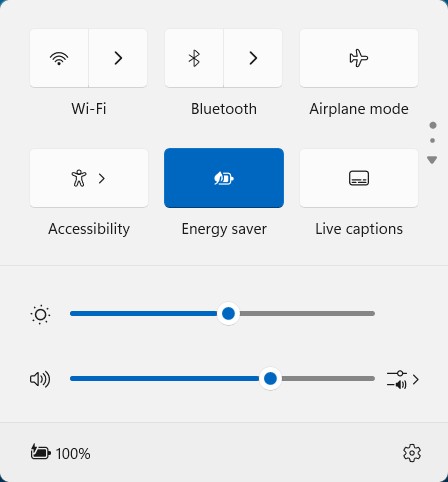
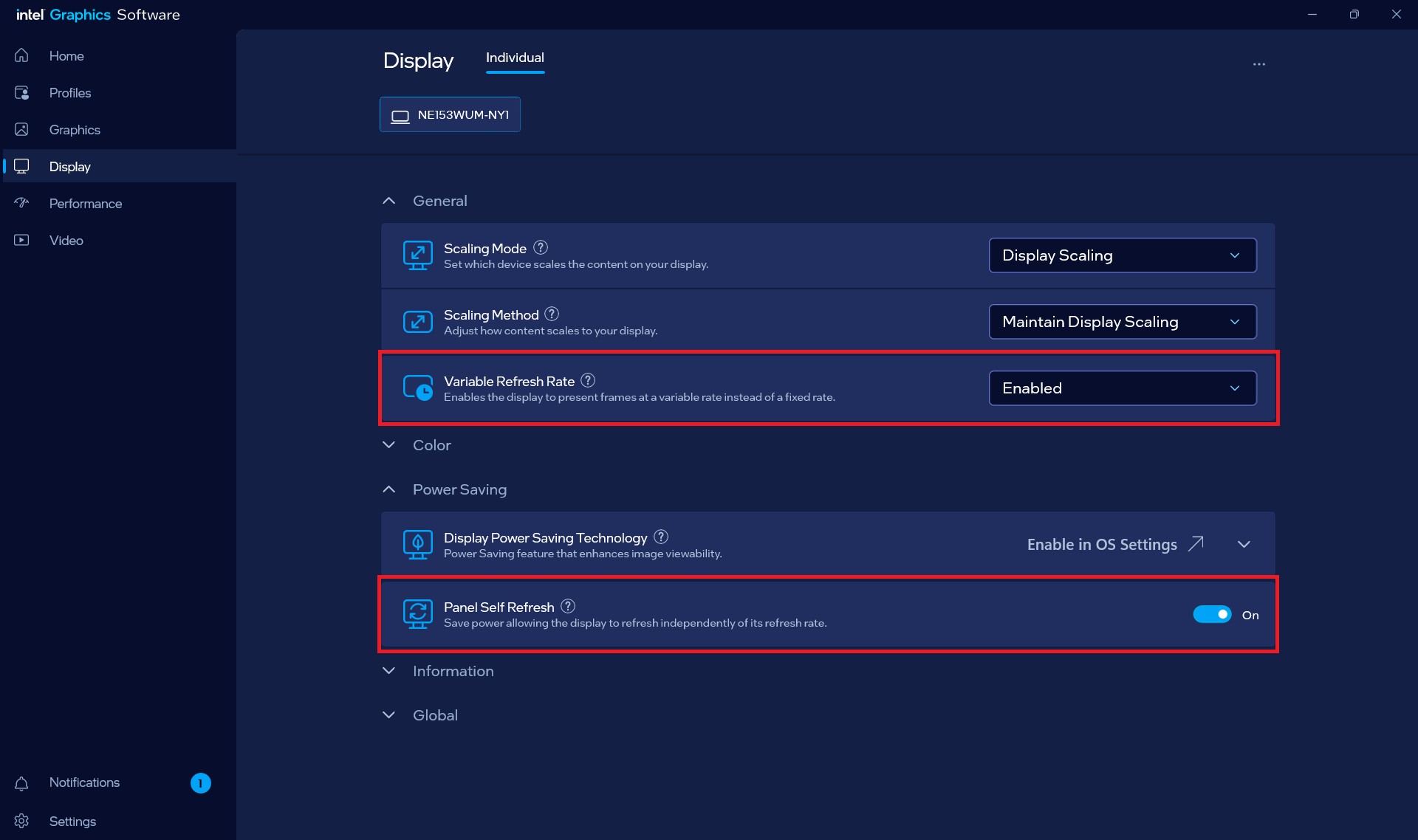
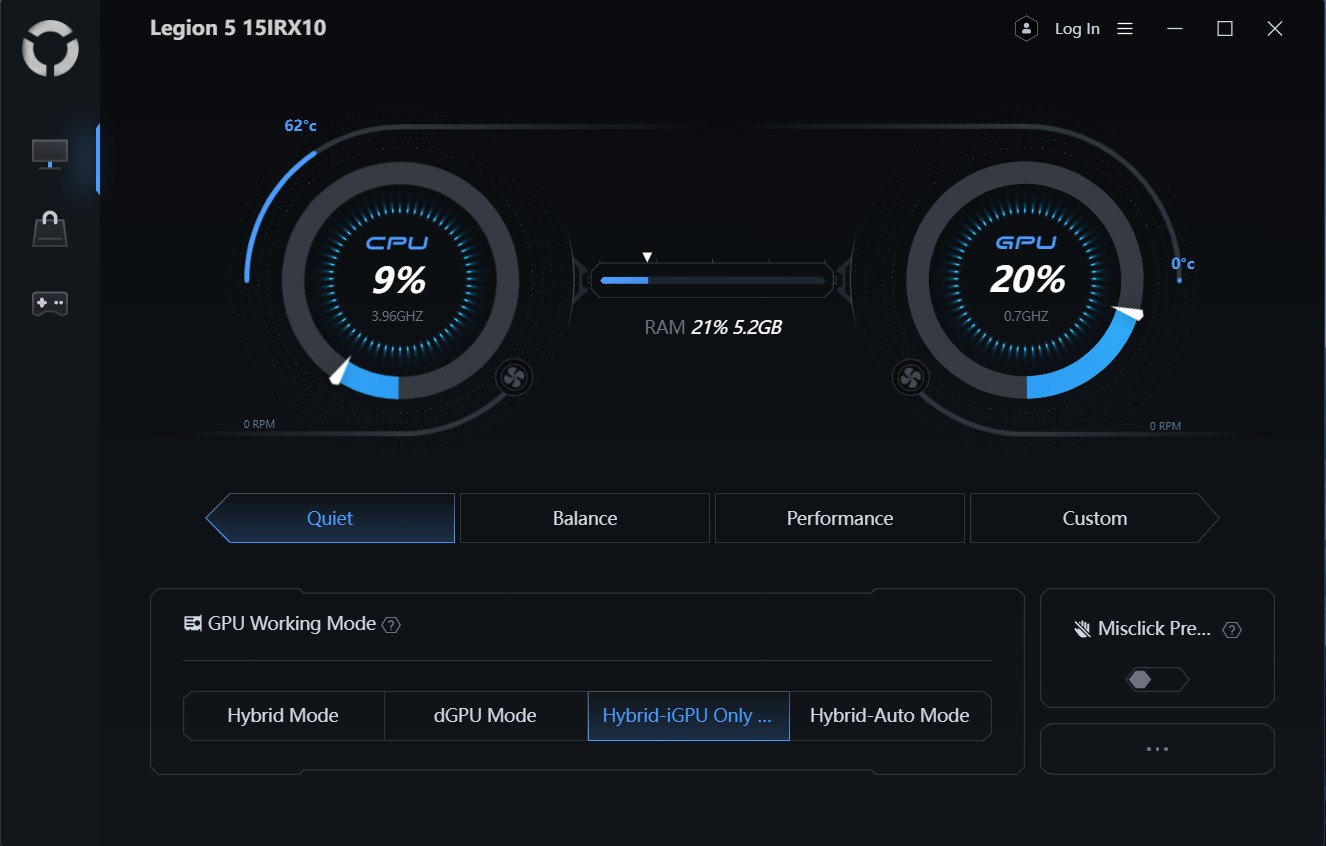
To maximize the battery life of this gaming beast, you could use the following settings:
- Open the Legion Space app and select "Quiet" power mode and "Hybrid-iGPU Only."
- Variable Refresh Rate and Panel Self Refresh should be turned on in the Intel Graphics Software.
- Apply Best power efficiency + Energy Saver Mode in the Windows Battery menu
- Screen is set to 180 nits and it automatically switches to 60 Hz when the adapter is unplugged.
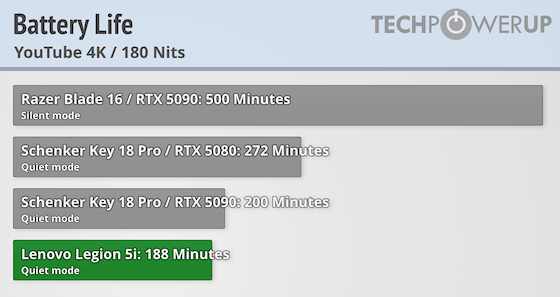
The base 60 Wh battery could take you through ~3 hours of 4K videos, which is a mediocre result at best. Choosing a 1600p display will further reduce battery life, so investing in the optional 80 Wh model seems like a smart move if you value mobility.
Nov 25th, 2026 08:16 CST
change timezone
Latest GPU Drivers
New Forum Posts
- Claude credits purchased on or after Dec. 7 now have an expiry date (0)
- Ryzen Owners Zen Garden (8566)
- WarpCoreBench scores! (104)
- Increasing Power Limit? (34)
- Sexy Hardware Close-Up Pic Clubhouse. (10344)
- {NA} 2026 Black November prices / deal (6)
- Smokin Hot Lappy (1)
- What is the latest game you finished or 100% (205)
- The time has come to upgrade...my desktop (20)
- Can you guess Which game it is? (358)
Popular Reviews
- ASRock X870E Challenger Wi-Fi White Review
- Microsoft Surface Laptop Ultra Review - The Next-gen Arm Laptop
- VZMORE AX9 Max Review
- Upcoming Hardware Launches 2027 (Updated Nov 2026)
- AMD Ryzen 7 9800X3D Review - The Best Gaming Processor
- AMD Zen 6 Technical Deep Dive
- Corsair RM1200e (Second Generation) Review
- Phantom Blade Zero Performance Benchmark Review - 35 GPUs Tested
- Pulsar Office Tour & First Look at P1 Dual-Sensor Mouse
- Ocypus lota P1000 Review
TPU on YouTube
Controversial News Posts
- Jensen Huang Reinstated as CEO of NVIDIA (555)
- NVIDIA Co-Founder and CEO Jensen Huang Officially Resigns (492)
- Report: Jensen Huang Eyes NVIDIA Comeback (281)
- Open Letter Asking NVIDIA to Reinstate Jensen Huang Passes 115,000 Signatures (184)
- OpenAI CEO Argues Home PCs Waste the World's Limited DRAM Supply (152)
- NVIDIA Launches Investigation Into Jensen Huang's Relationship With Suspected Chinese Spy (136)
- Intel "Raptor Lake Next" 16-Core and 20-Core CPUs Surface (130)
- Intel Razor Lake Gets a 12 P-Core bLLC Chip With No E-Cores, Per Leak (94)