 22
Logitech G Pro X2 Superstrike Review
Testing 8000 Hz Wireless »Sensor and Performance
The Logitech G Pro X2 Superstrike is equipped with the HERO 2. According to specifications, the HERO 2 is capable of up to 44,000 CPI, as well as a maximum tracking speed of 888 IPS, which equals 22.6 m/s. Out of the box, five pre-defined CPI steps are available: 800, 1200, 1600, 2400, and 3200.All testing was done on the latest firmware (42.0.11/7.2.11). As such, results obtained on earlier firmware versions may differ from those presented hereafter.
CPI Accuracy
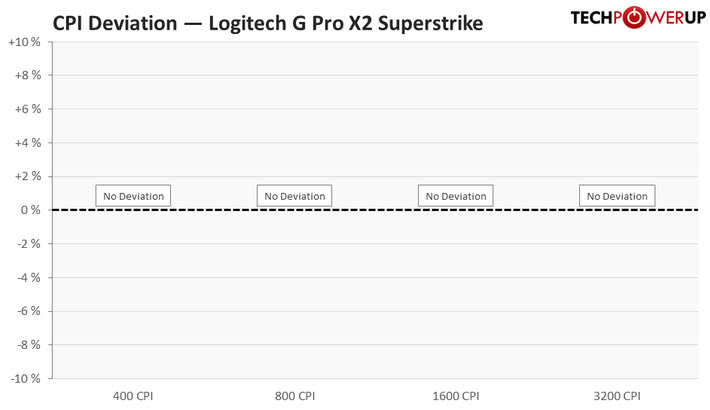
I've restricted my testing to the four most common CPI steps, which are 400, 800, 1600, and 3200. As you can see, there is no deviation at all, which is a perfect result.
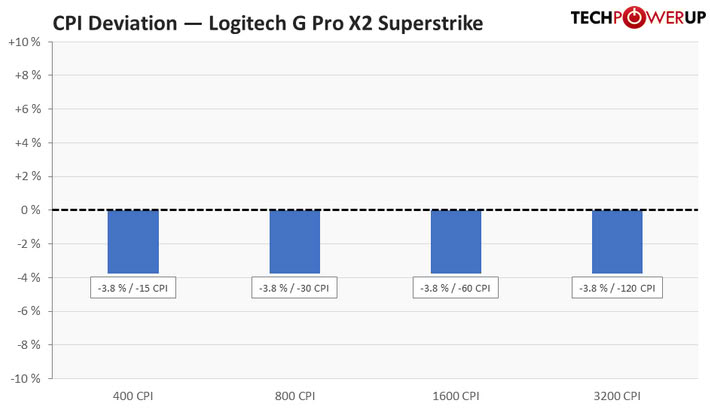
Of note is that occasionally, and for reasons unknown, the Pro X2 Superstrike will be set to a different set of effective CPI values. This appears to be related to surface detection, though when comparing Gaming Surface Mode on and off, the results are the same. I have been able to reproduce this type of CPI inconsistency on two different mousepads, though how widely it applies remains unclear.
Motion Delay
Wired testing
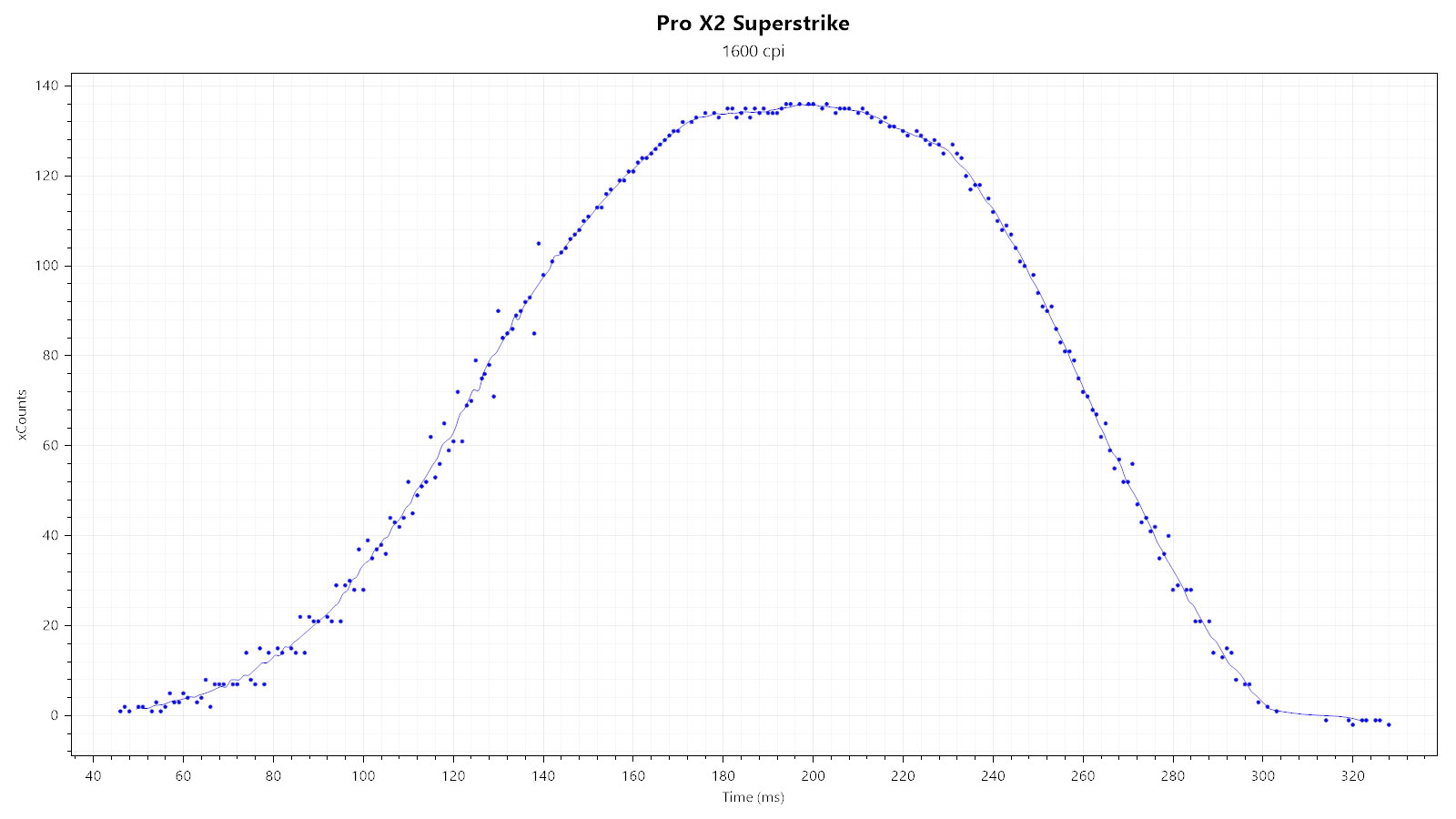
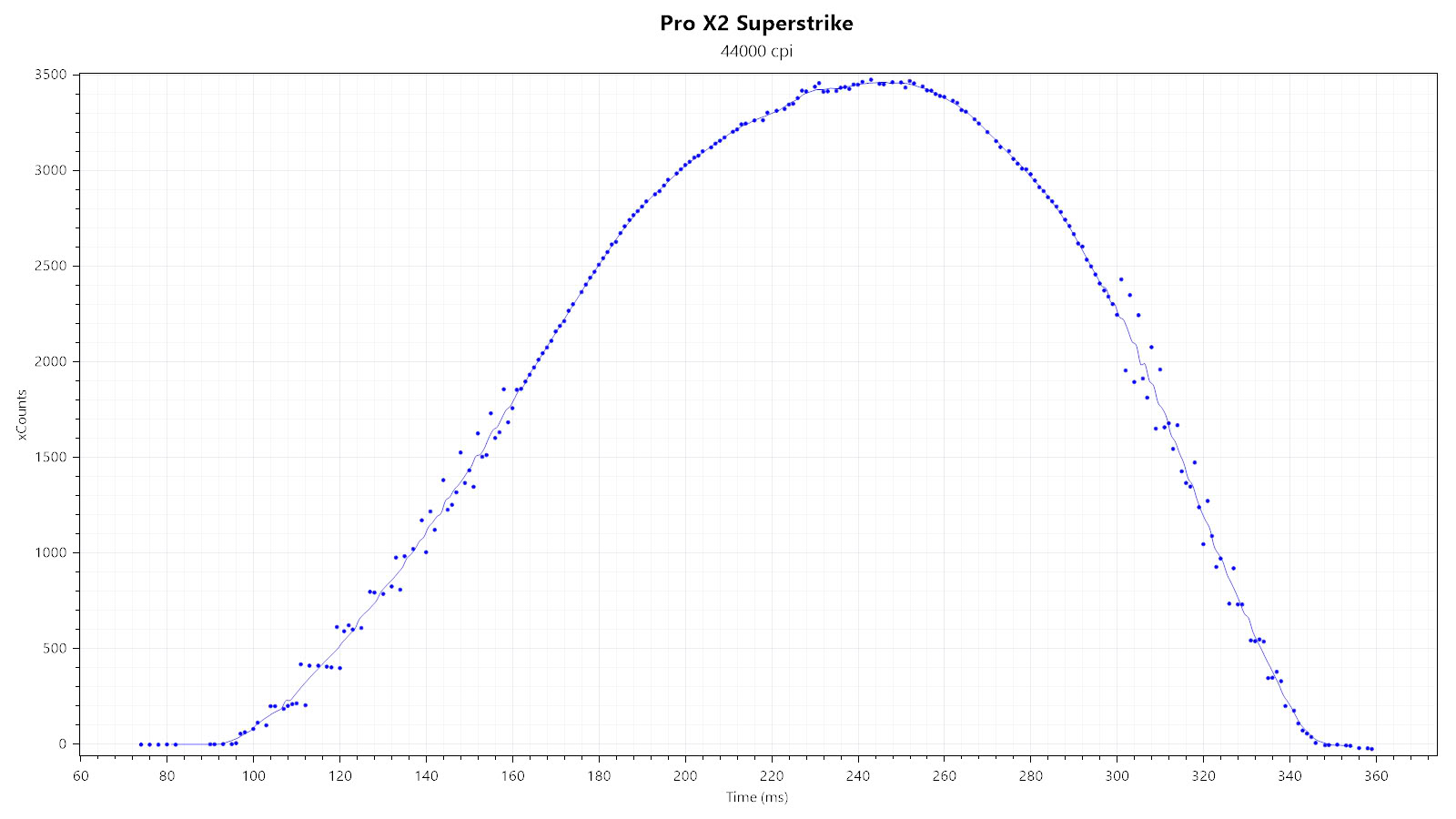
First, I'm looking at two xCounts plots—generated at 1600 and 44,000 CPI—to quickly gauge whether there is any smoothing, which would be indicated by any visible "kinks." Neither plot shows any kinks, strongly suggesting there not being any smoothing.
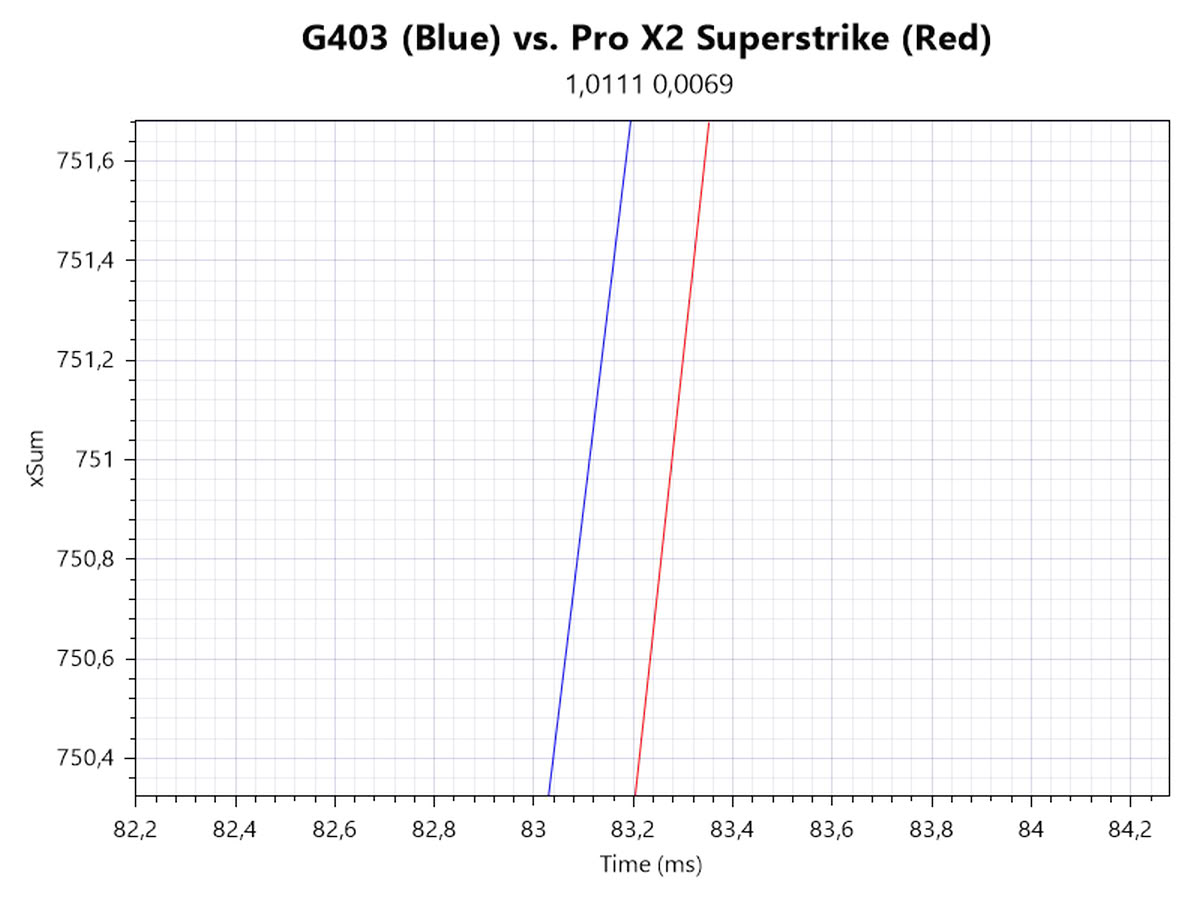
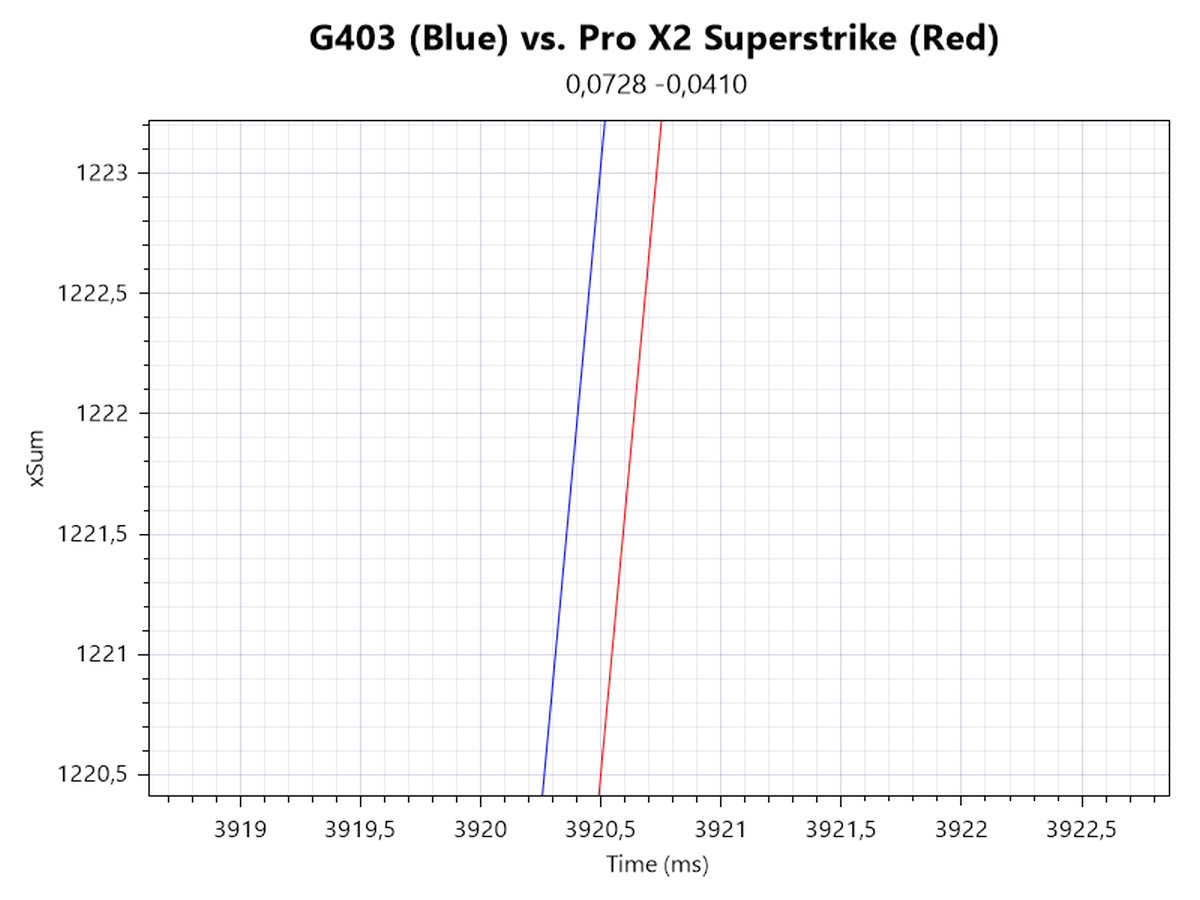
In order to determine motion delay, I'm looking at xSum plots generated at 1600 and 44,000 CPI. There is no motion delay differential at both 1600 and 44,000 CPI, further confirming there not being any smoothing across the entire CPI range.
Wireless testing
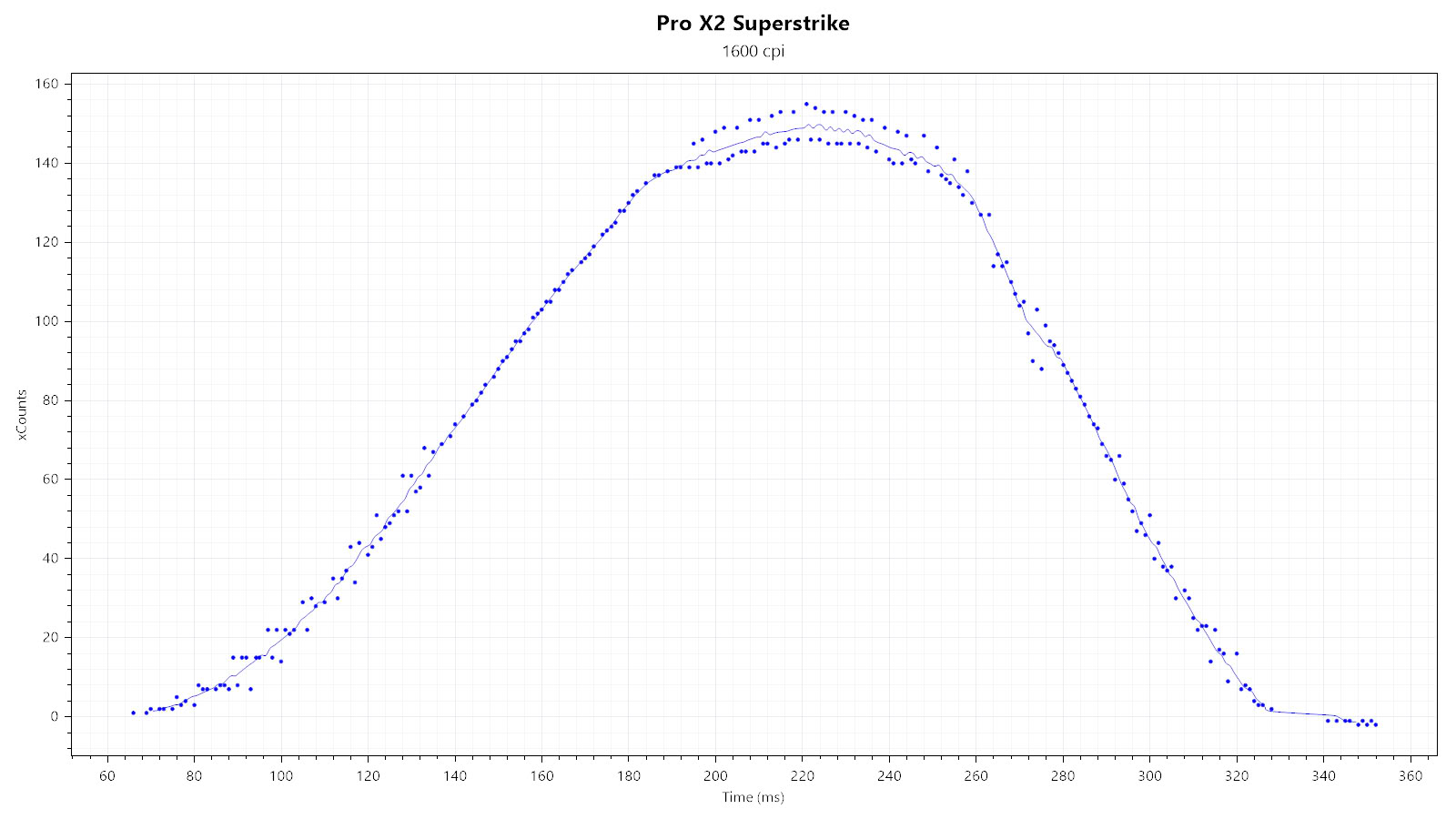
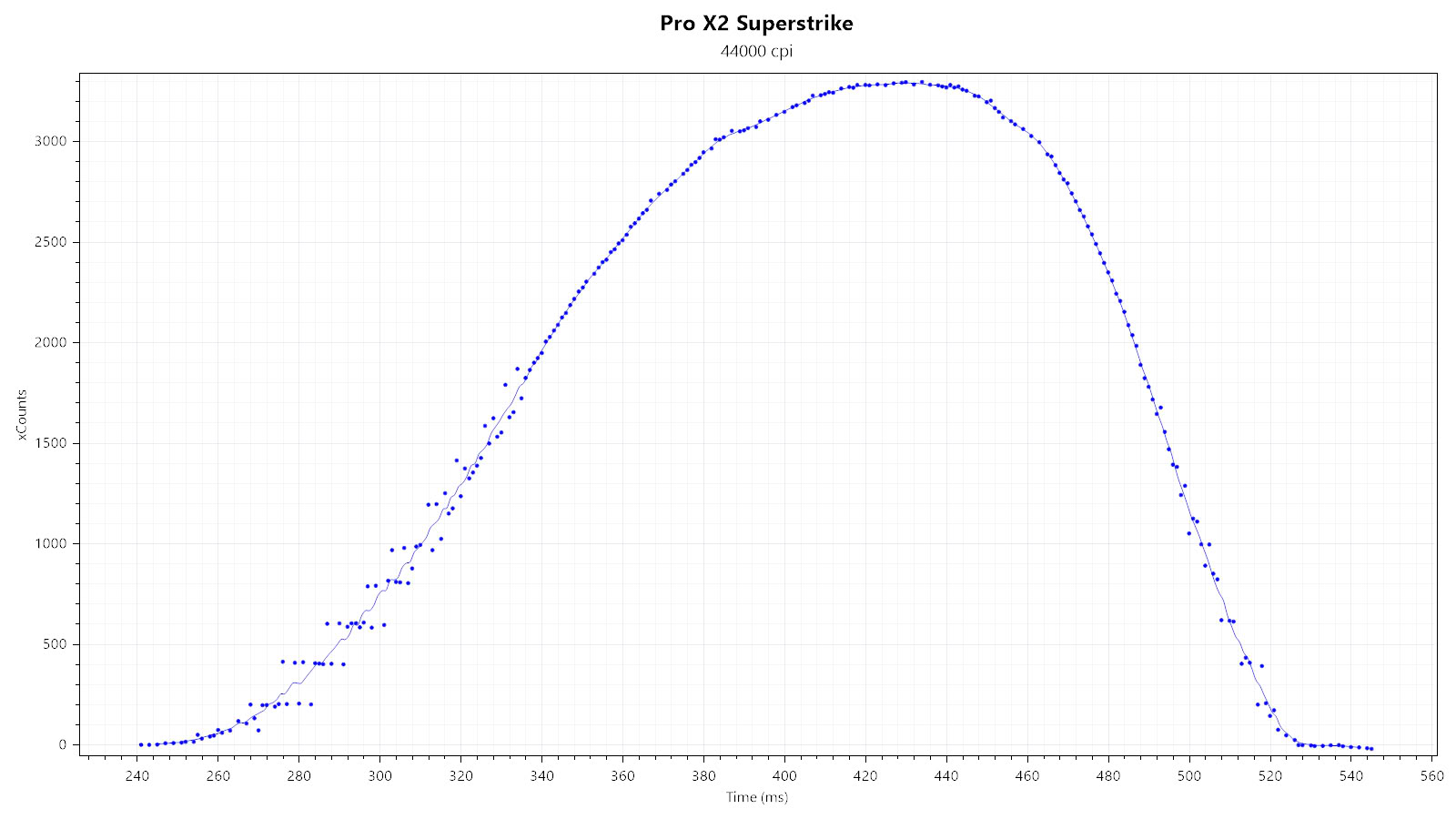
Not much changes when running the Pro X2 Superstrike in wireless mode as SPI timing jitter and general tracking are virtually on the same level as when wired.
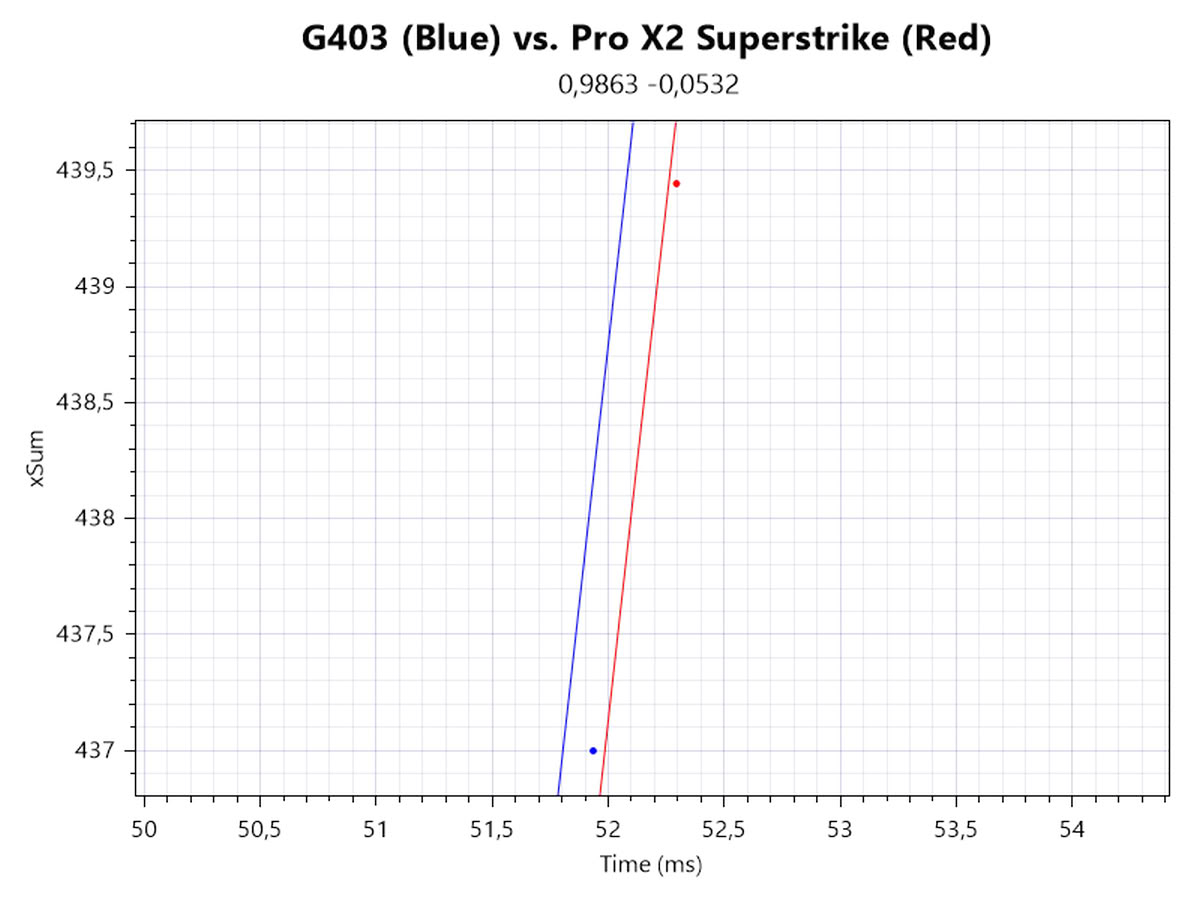
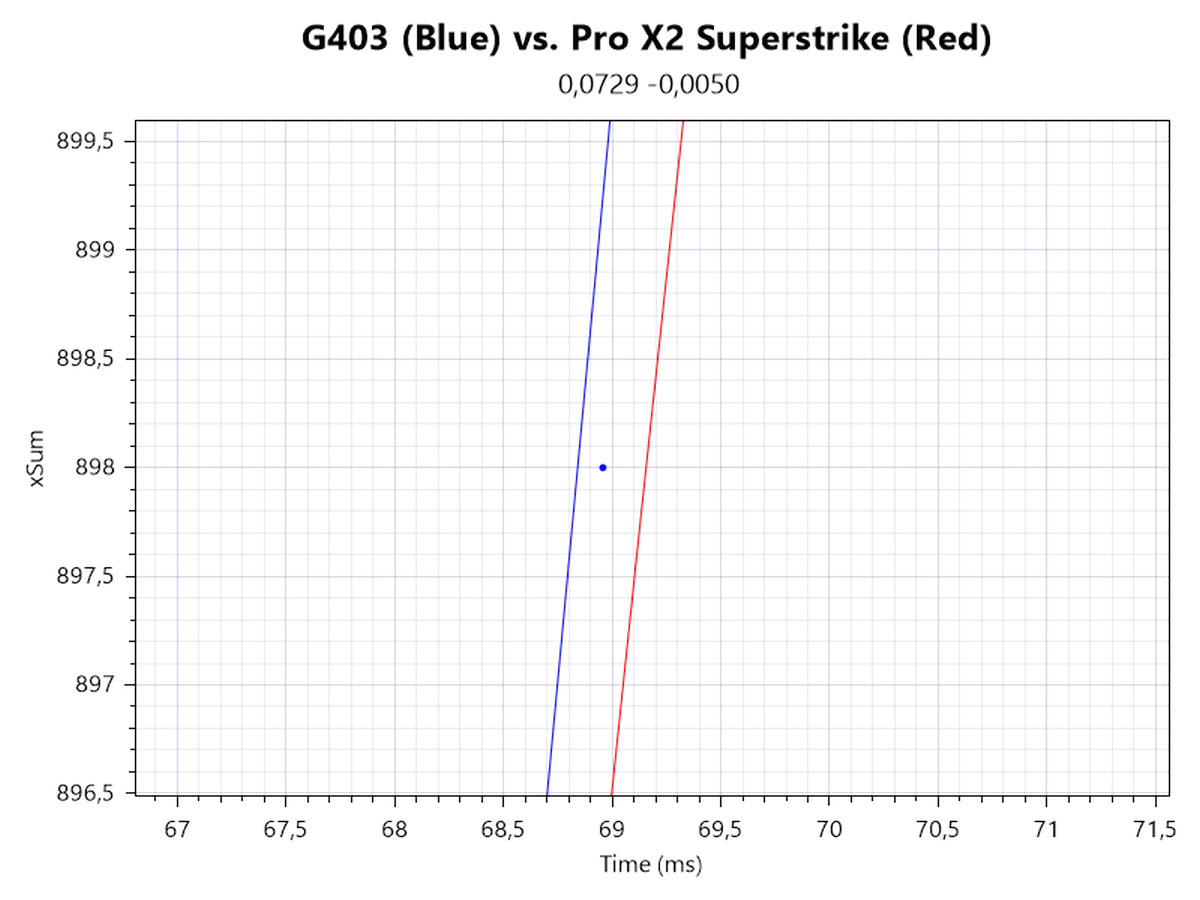
Once again, 1600 and 44,000 CPI are tested. At both 1600 and 44,000 CPI, no motion delay differential can be measured.
Speed-related Accuracy Variance (SRAV)
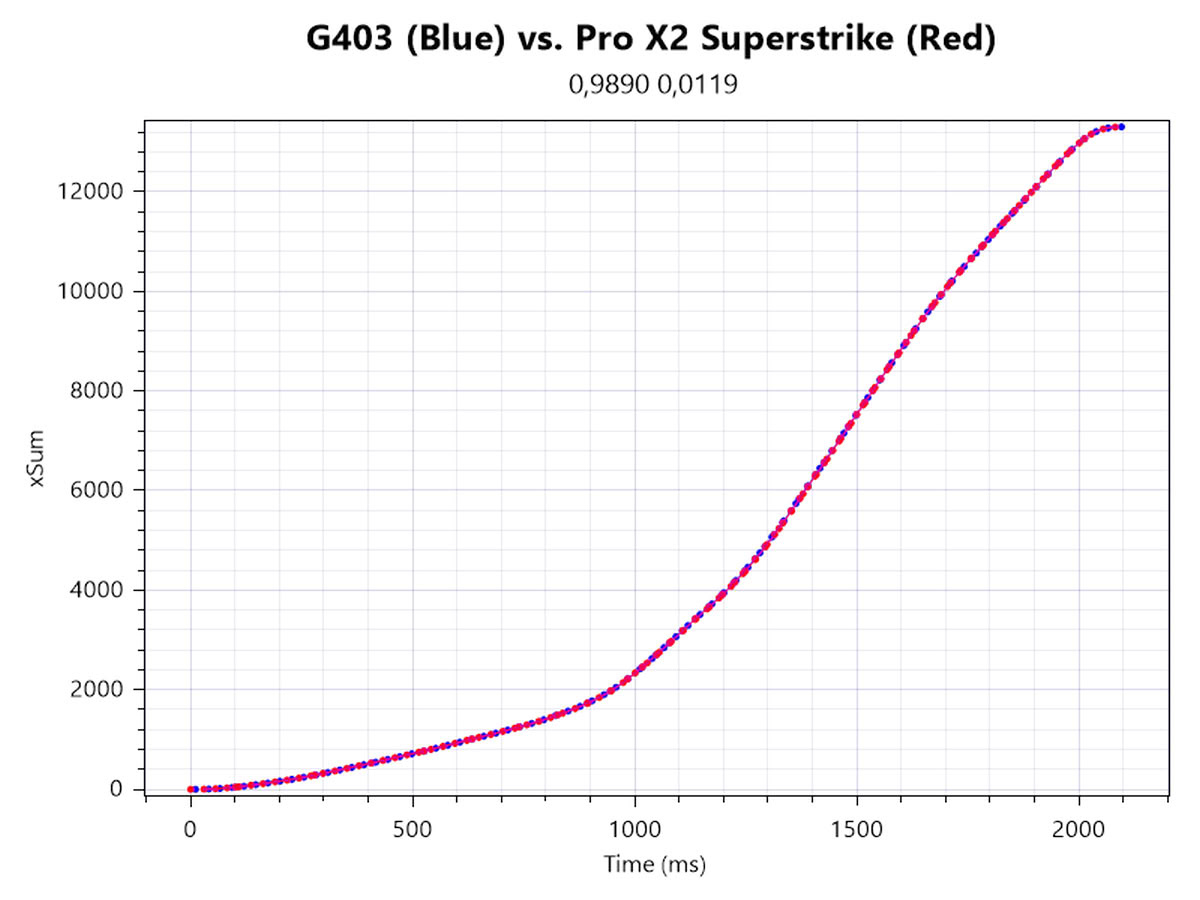
As you can see from the plot, no displacement between the two cursor paths can be observed, which confirms that SRAV is very low.
Perfect Control Speed
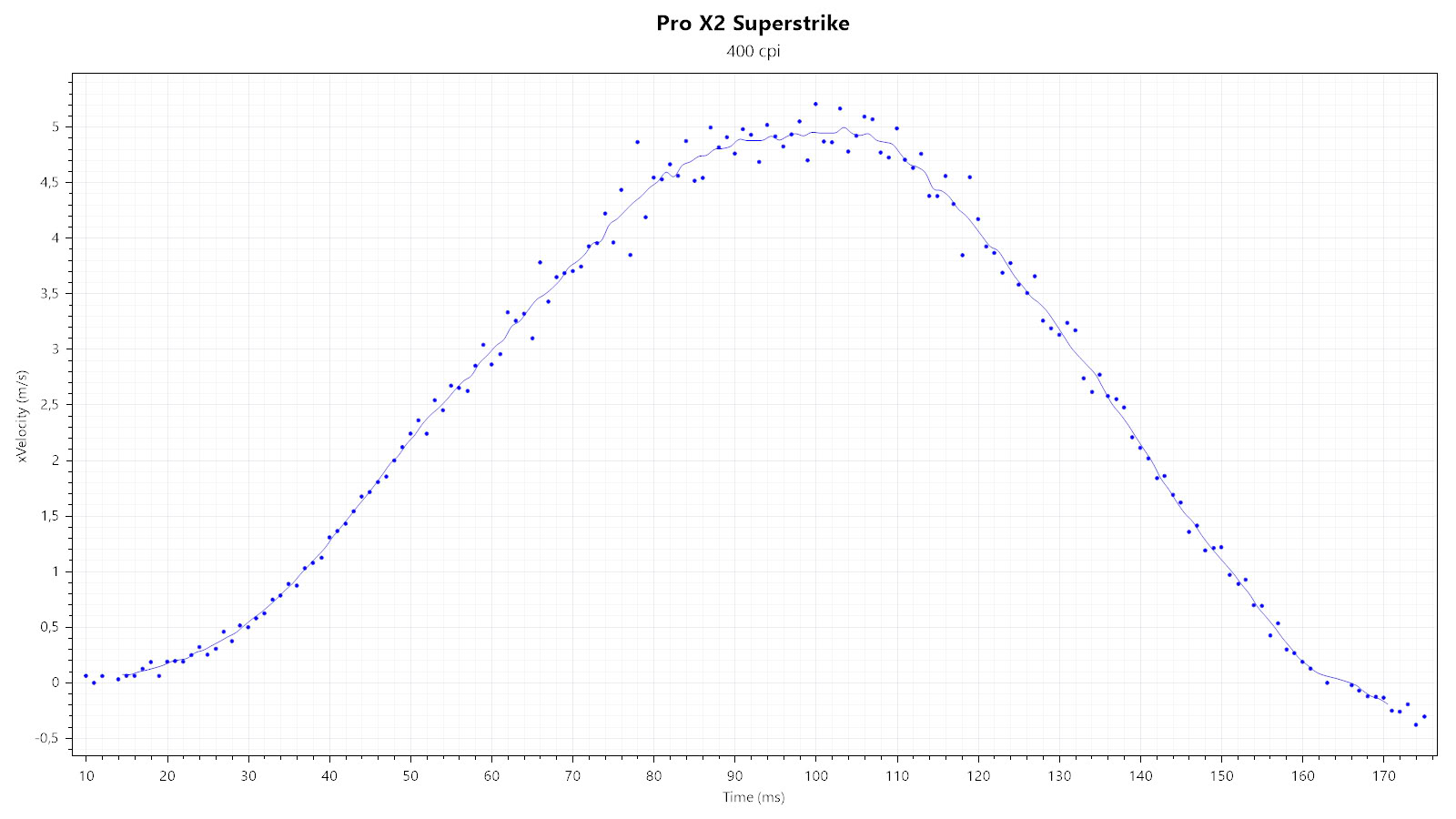
I've only managed to hit a measly 5 m/s, which is within the proclaimed PCS range and causes no observable sensor malfunction.
Polling Rate Stability
Wired testing
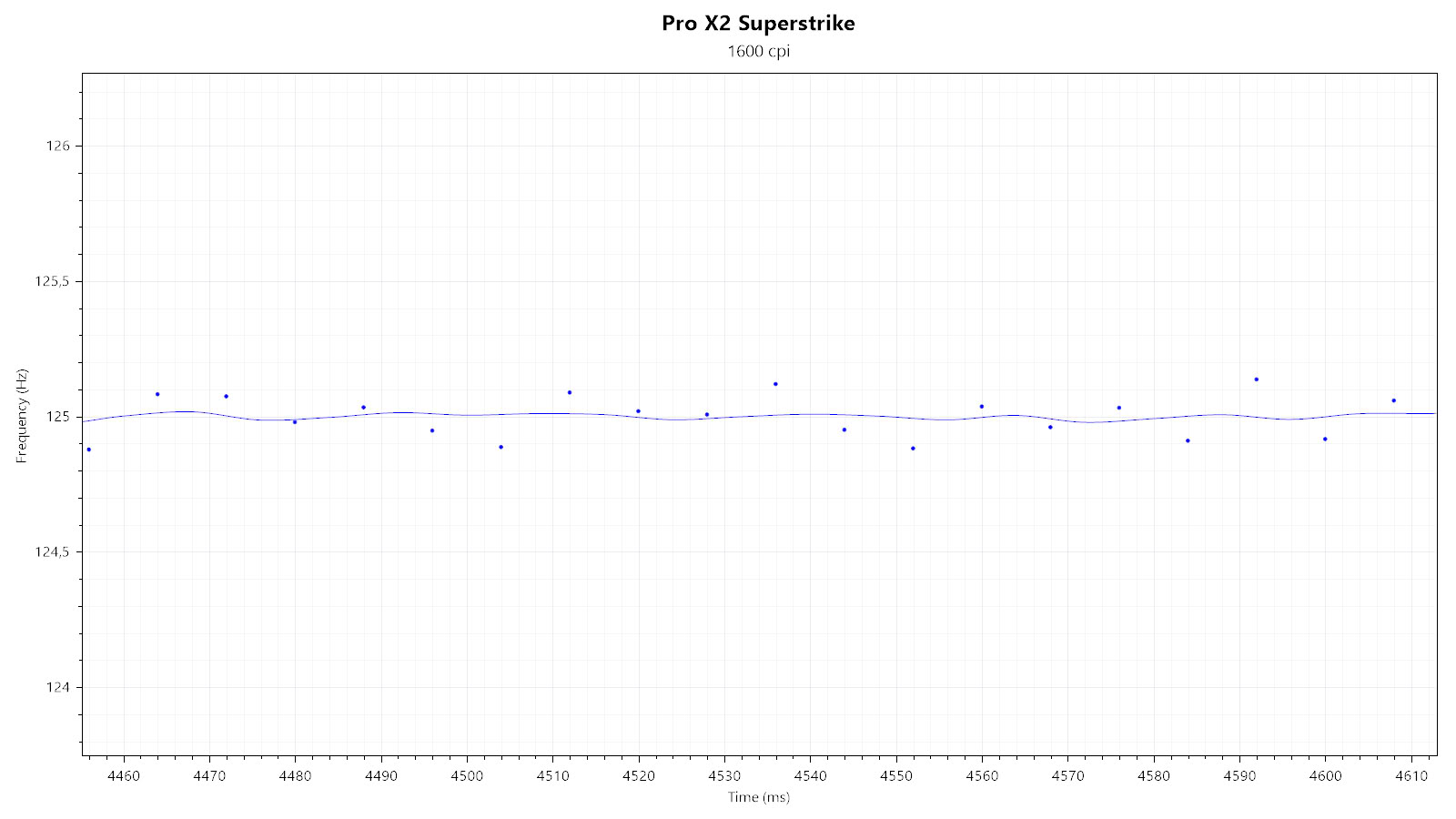
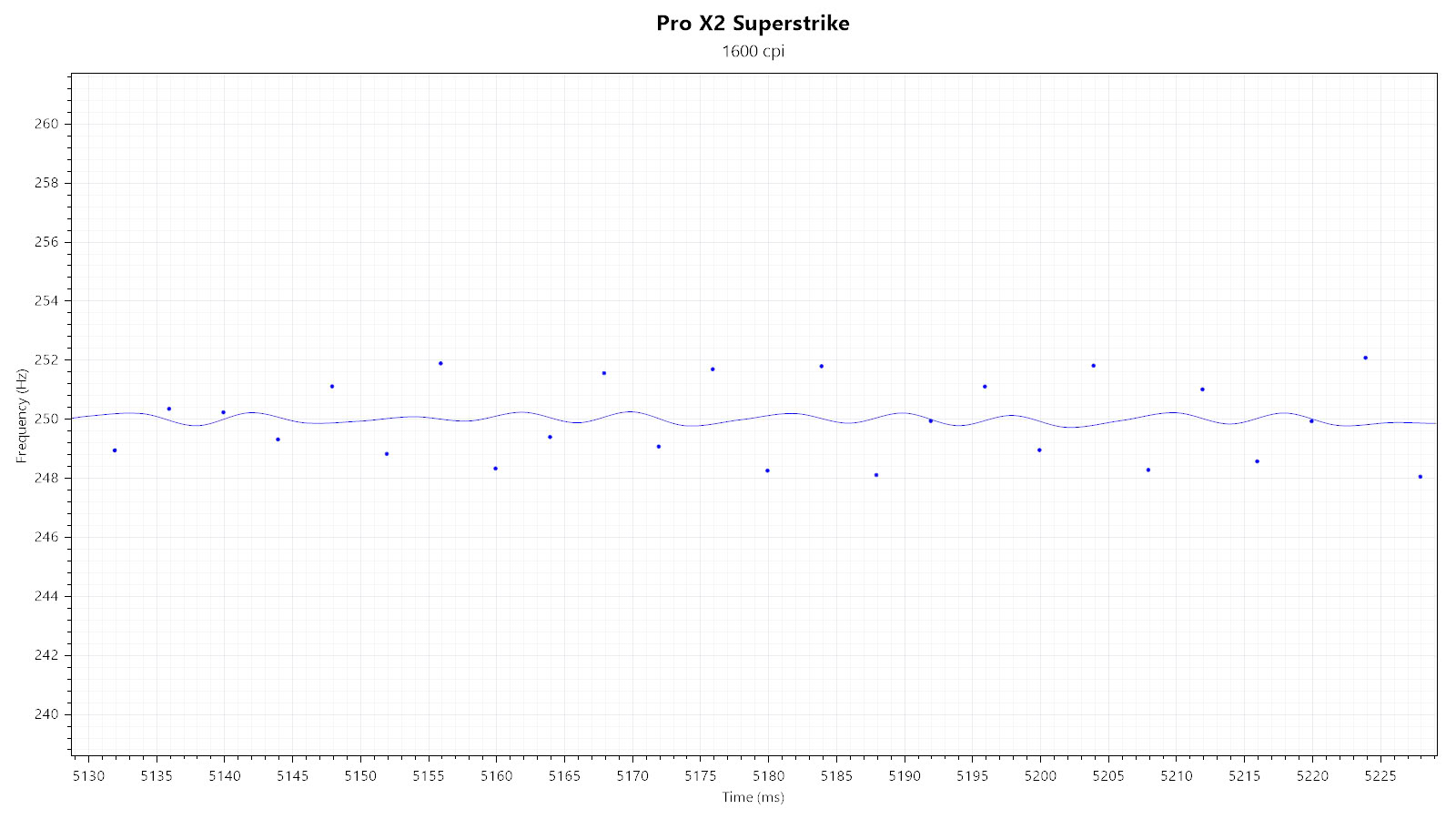
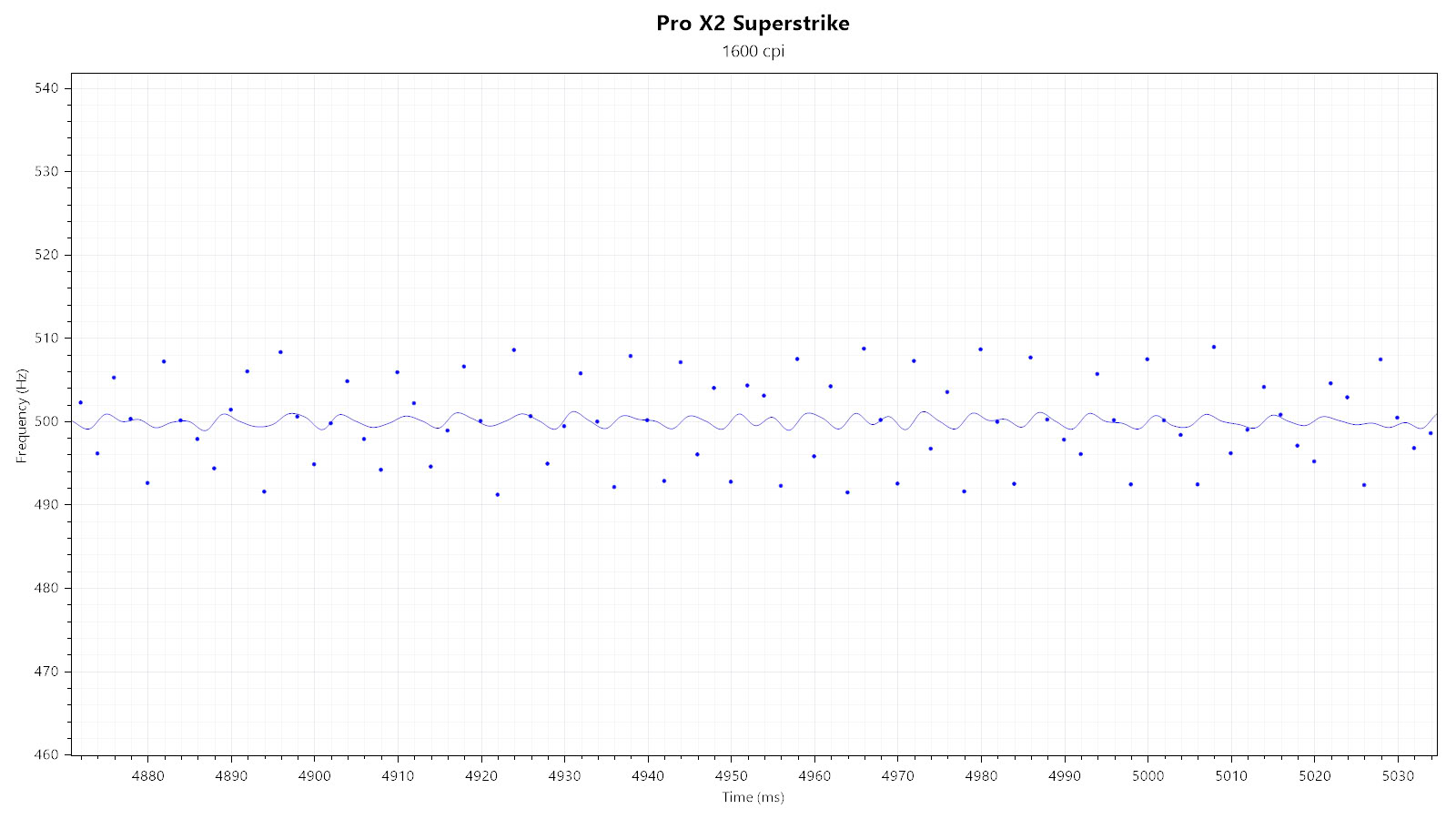
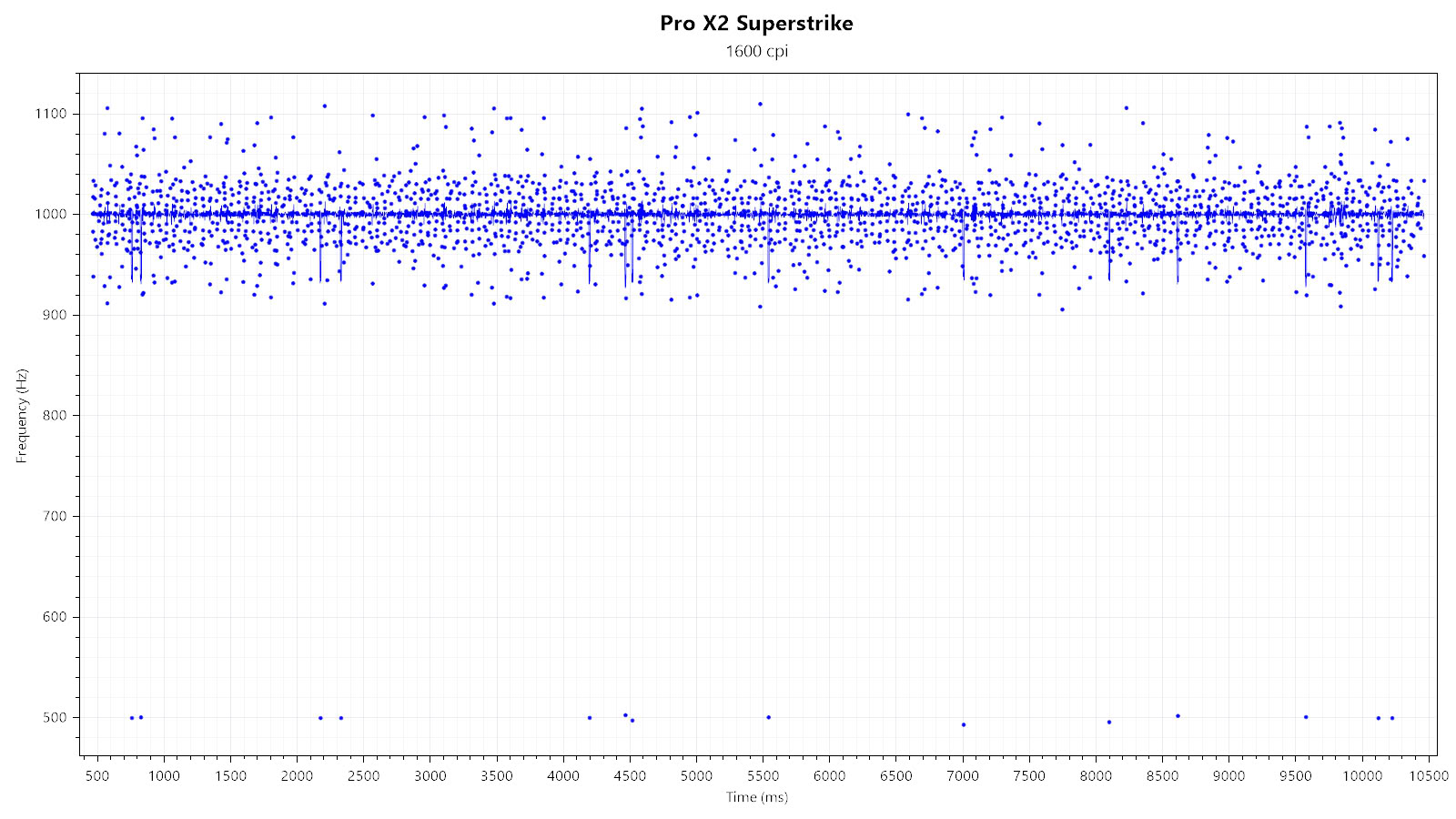
Of the available polling rates (125, 250, 500, and 1000 Hz), 125, 250, and 500 Hz are fully stable, whereas 1000 Hz displays periodic off-period polls.
Wireless testing
For wired mice, polling rate stability merely concerns the wired connection between the mouse (SPI communication) and USB. For wireless mice, another device that needs to be kept in sync between the first two is added to the mix: the wireless dongle/wireless receiver. I'm unable to measure all stages of the entire end-to-end signal chain individually, so testing polling-rate stability at the endpoint (the USB) has to suffice here.
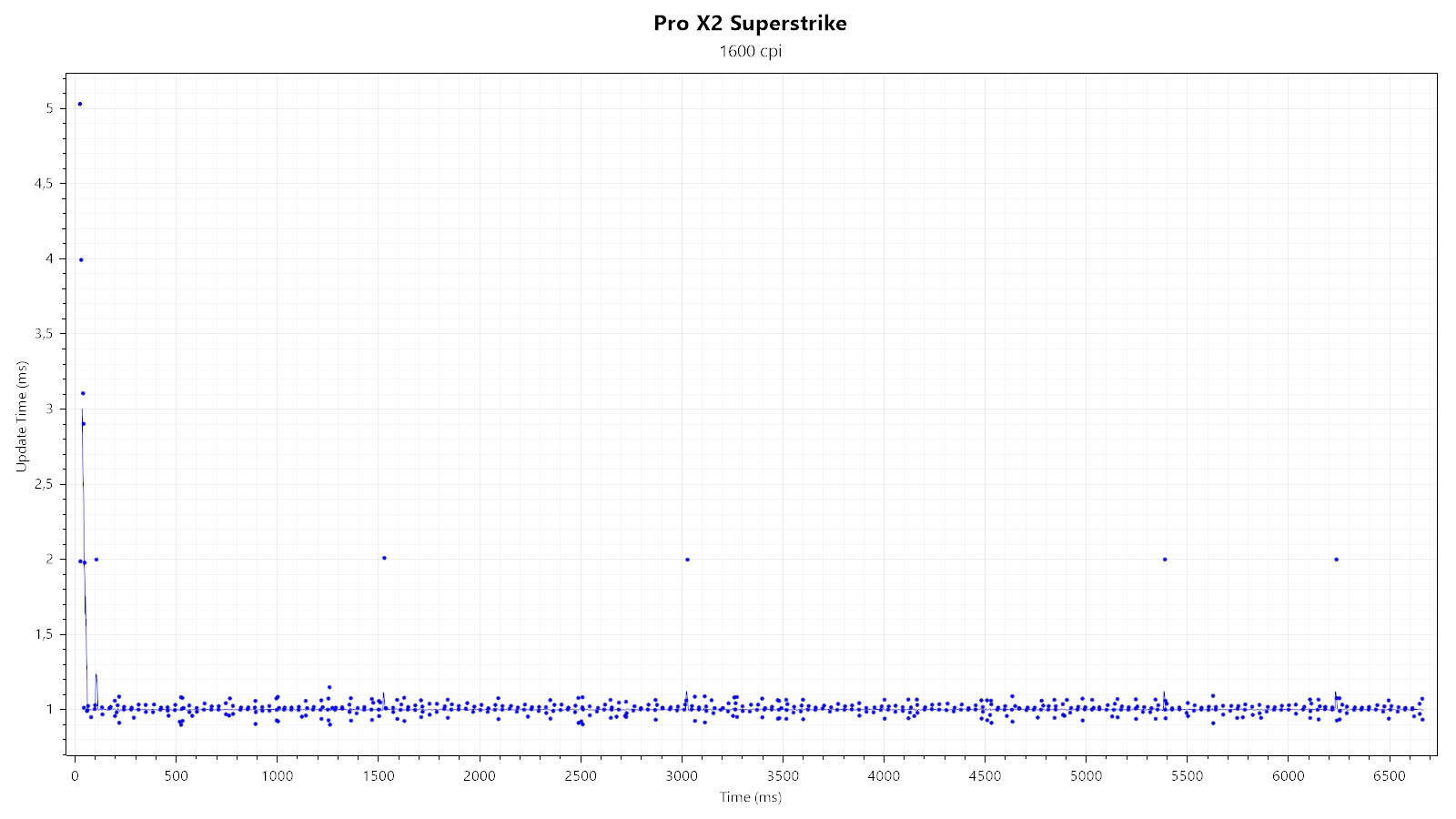
First, I'm testing whether SPI, wireless, and USB communication are synchronized. Any of these being out of sync would be indicated by at least one 2 ms report, which would be the result of any desynchronization drift accumulated over time. There are periodic off-period polls, which may be indicative of a desynchronization drift.
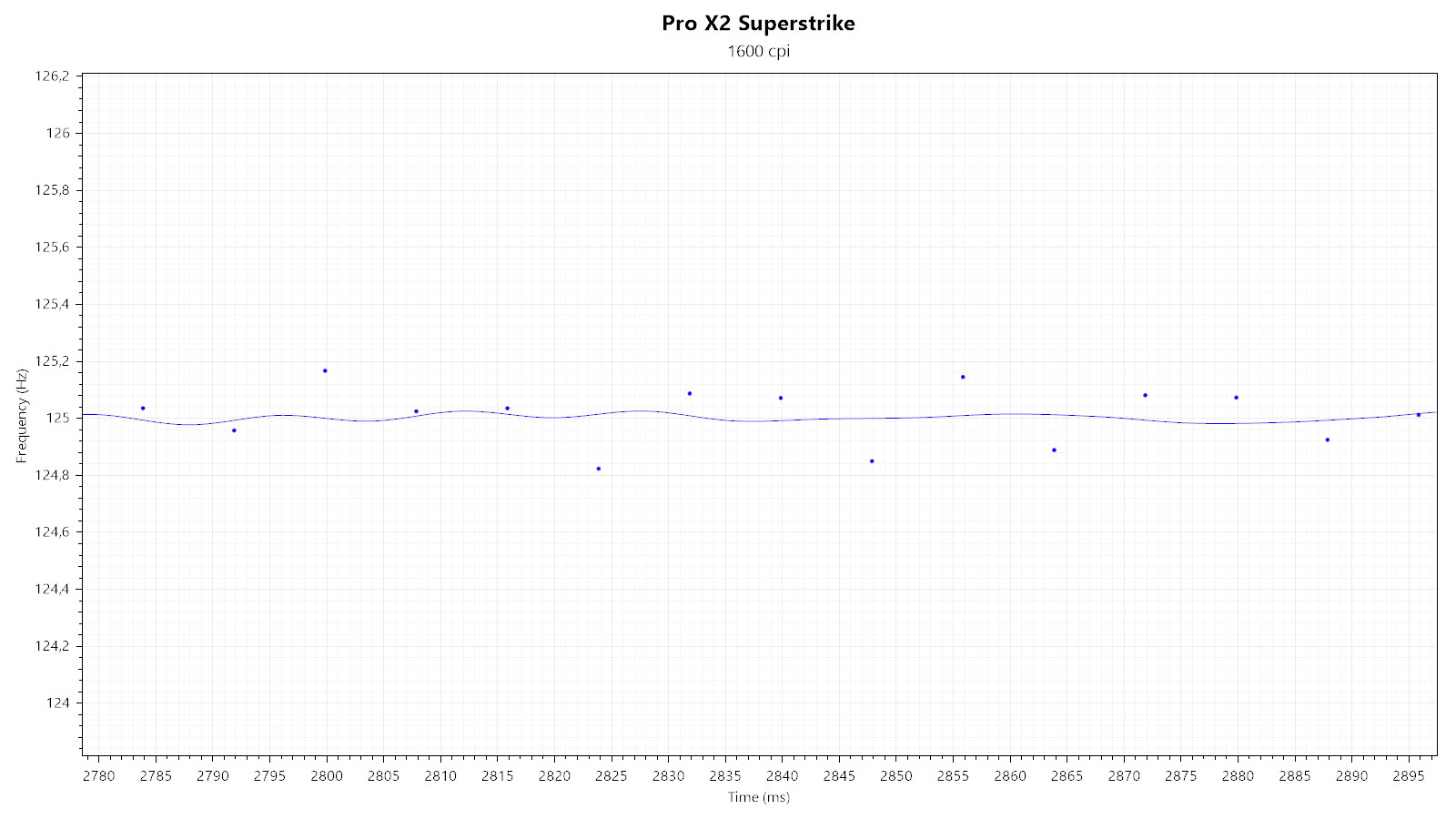
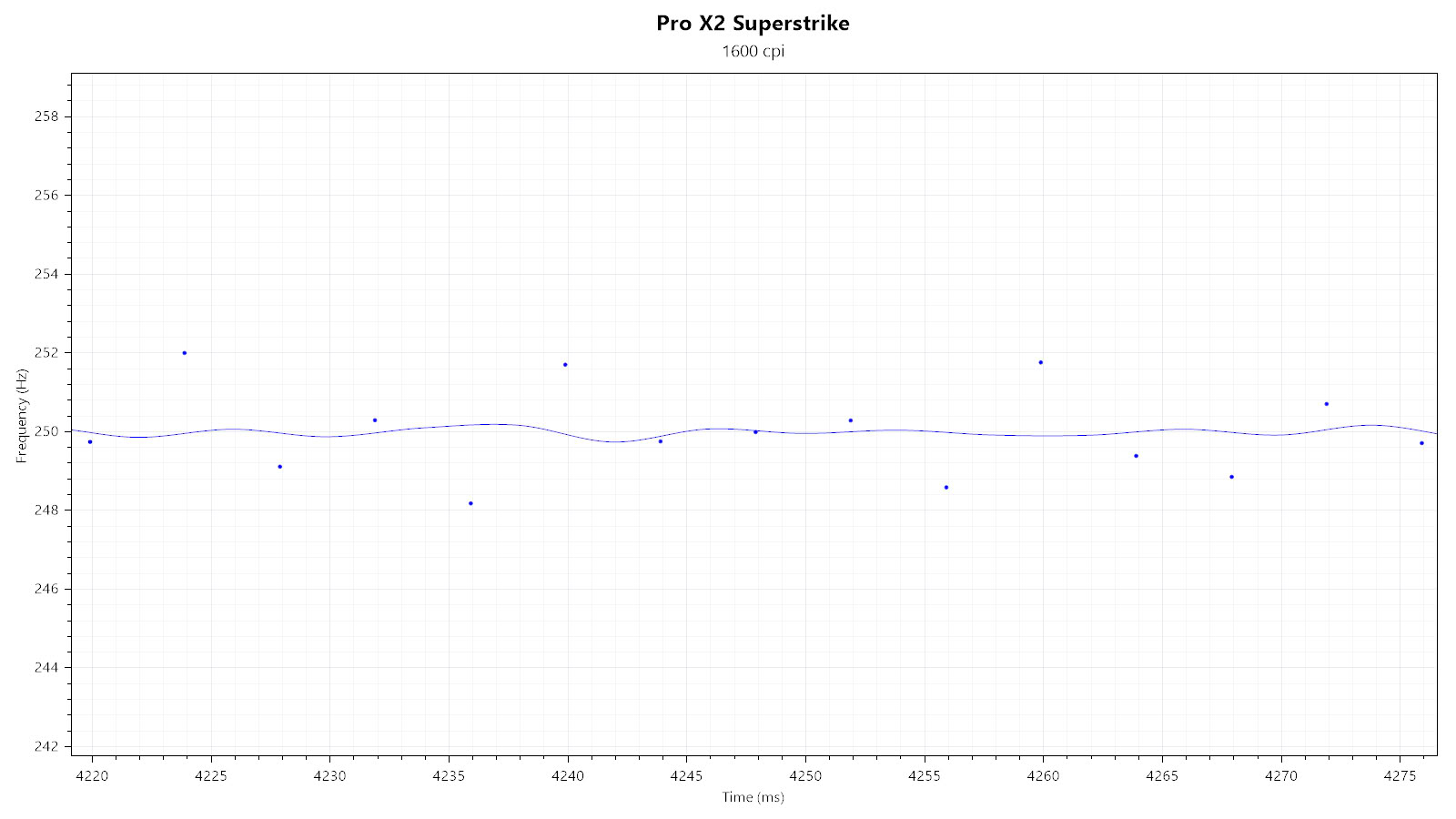
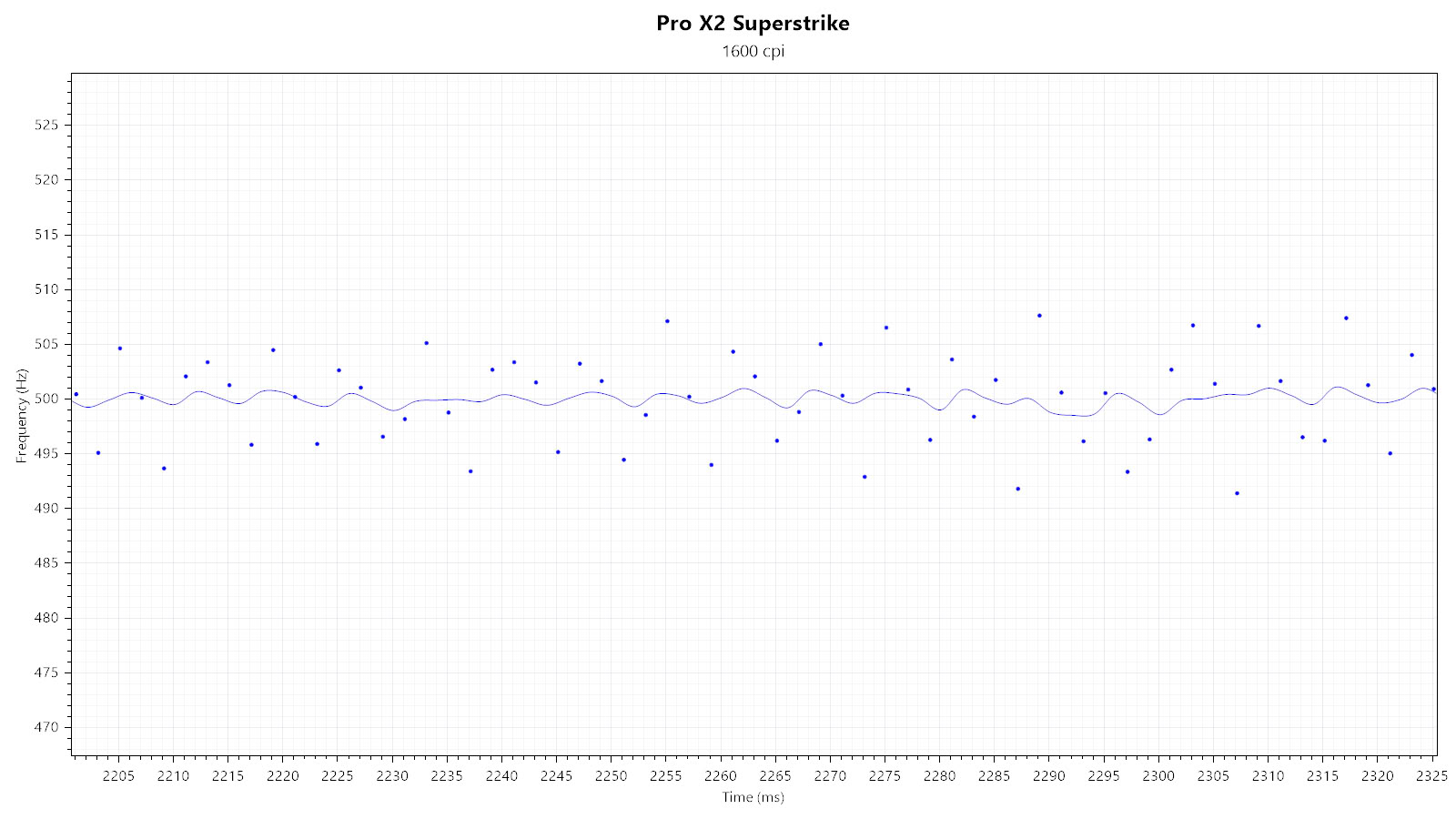
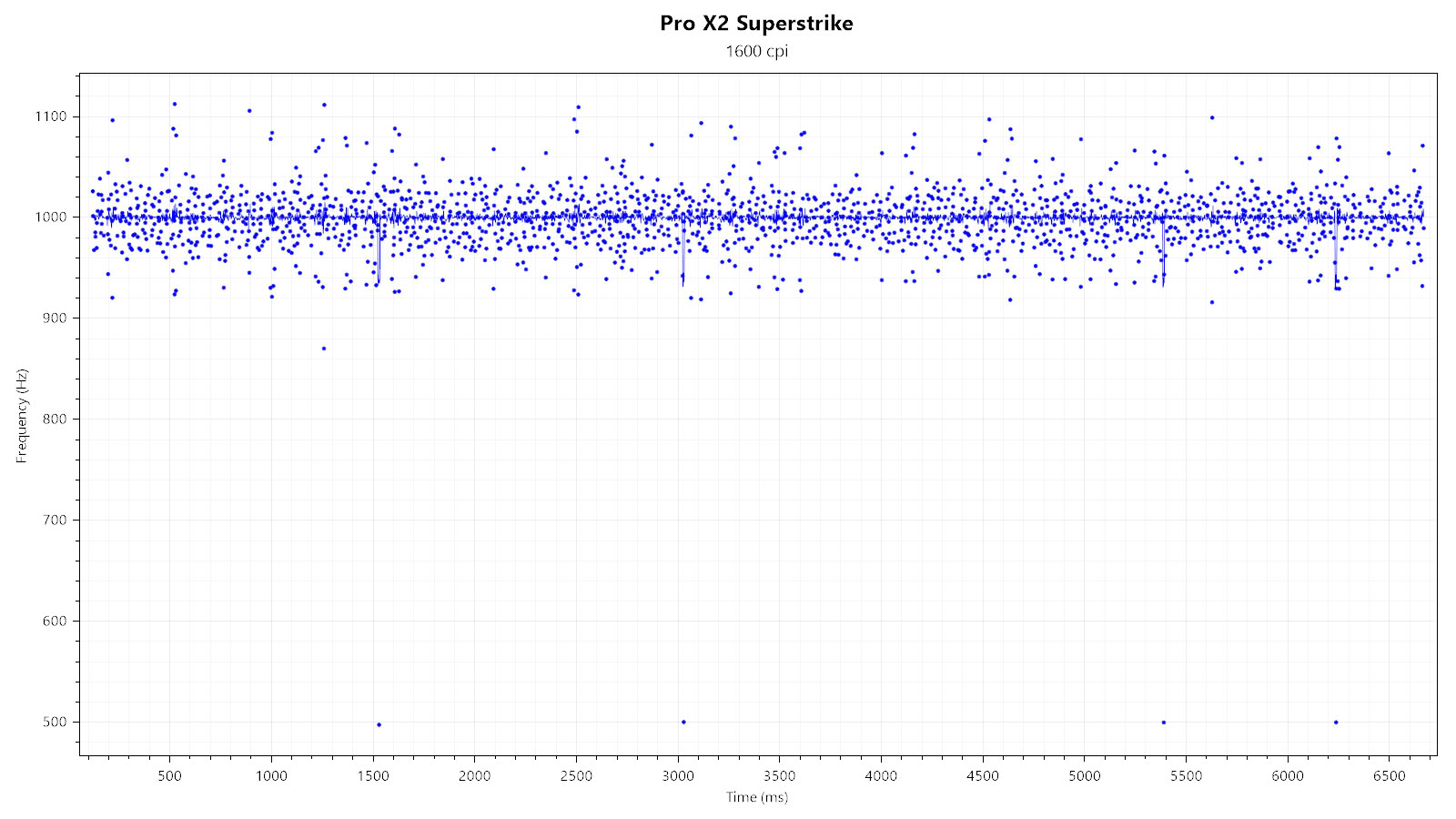
Second, I'm testing the general polling-rate stability of the individual polling rates in wireless mode. Running the Pro X2 Superstrike at a lower polling rate can have the benefit of extending battery life. Much like in wired mode, 125, 250, and 500 Hz are fully stable, whereas 1000 Hz displays periodic off-period polls.
Paint Test
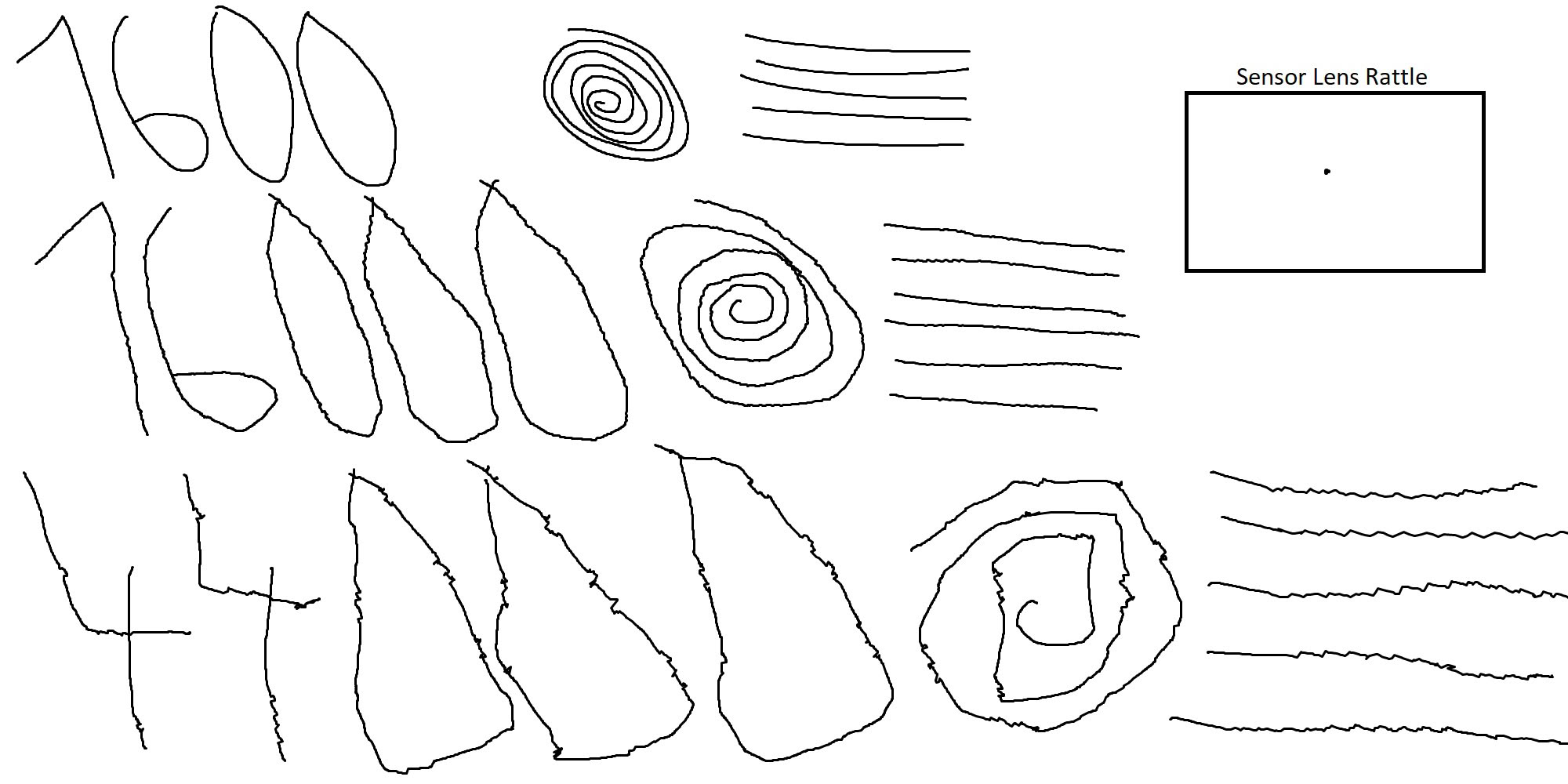
As you can see, no issues with angle snapping can be observed. No jitter is visible at 1600 CPI. 16,000 CPI already displays major jitter, which is amplified to ludicrous levels at 44,000 CPI. While elevated jitter is expected on a sensor lacking any smoothing, the degree displayed here far exceeds this expectation, and borders on unusable even at lower CPI levels. Enabling or disabling Gaming Surface Mode has no effect. The level of jitter is high to where the sensor rattle tests show movement, even though there very likely is no sensor lens movement.
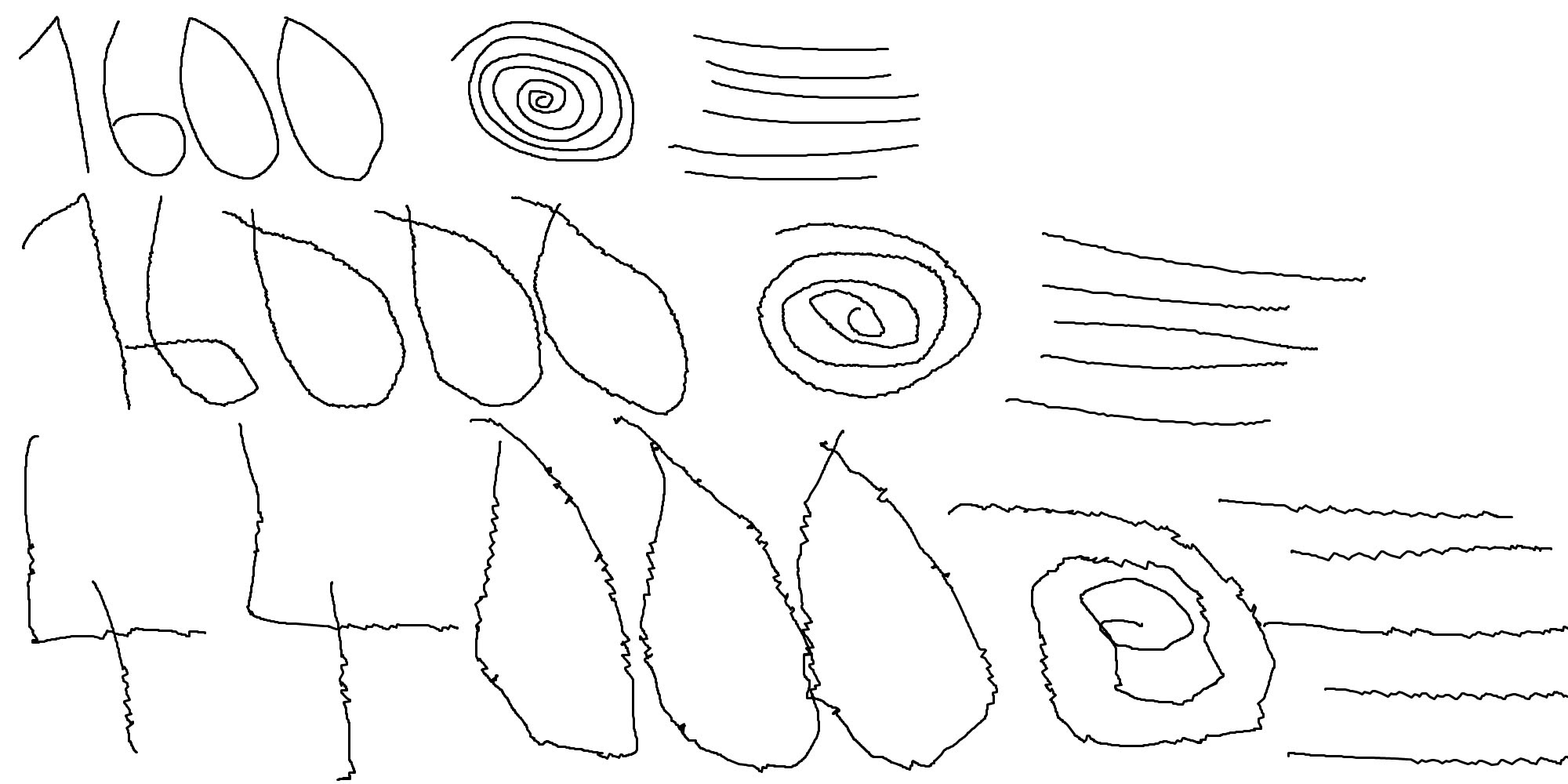
Of note is that the same degree of jitter could be reproduced on a different mousepad, which wasn't the case when testing the Pro X Superlight 2.
Lift-off Distance
The Pro X2 Superstrike offers three pre-defined LOD levels. At the "Low" or "Medium" settings, the sensor does not track at a height of 1 DVD. If set to "High," the sensor tracks at a height of 1 DVD (1.2 mm<x<2.4 mm, with x being LOD height), but not at a height of 2 DVDs. Keep in mind that LOD may vary slightly depending on the mousing surface (pad) it is being used on.
Click Latency
On the Pro X2 Superstrike, button actuation and release are recognized through a change in inductance. The electromagnetic coils produce an analog waveform, which needs to be converted to a digital edge at some point. Devices such as LDAT or XLAT use edge detection (typically falling edge) to measure click latency, yet on the Pro X2 Superstrike PCBA, finding such a clean digital edge is difficult if not impossible. In addition, the unique attribute of HITS is its ability to determine the actuation point more-or-less freely, in contrast to a non-HITS mouse where the actuation point is a function of the physical properties of the button design and switch being used. As such, HITS allows realizing a very short actuation point (<0.2 mm), which in turn reduces the time the finger has to travel to actuate the button, which may be conceived of as a reduction in physical click latency.
In order to account for the above, the testing setup used for this review differs from the usual one. XLAT is used for the measurement, which starts upon a foil on the left main button and a foil wrapped around a pen making contact at the geometric center of the button. The force and speed with which this contact is made is deliberately chosen to emulate typical human finger movement. The force and speed of human finger movement isn't robotically stable, and neither is this one, though by averaging roughly 500 samples per run and then comparing and averaging multiple runs, sufficiently consistent results can be gathered. That said, one needs to keep in mind that the result of any measurement will be a function of the force and speed with which the contact is made. By adjusting those, the measured values can be significantly lower or higher than the ones provided below.
First, below is an overview of how the ten actuation points scale. Both Haptics and Rapid Trigger were disabled for this testing, leaving the Actuation Point as the only variable affecting the outcome. Please note that only the non-italic values have been measured, whereas the italic ones are conjecture under the assumption that the spacing between each step is perfectly equal (⁸⁄₉ ms), which likely is not the case. Accordingly, the italic values should be taken as a rough approximation.
| AP1 | AP2 | AP3 | AP4 | AP5 | AP6 | AP7 | AP8 | AP9 | AP10 |
|---|---|---|---|---|---|---|---|---|---|
| 1.8 ms | 2.7 ms | 3.6 ms | 4.5 ms | 5.4 ms | 6.2 ms | 7.1 ms | 8.0 ms | 8.9 ms | 9.8 ms |
For the comparison below, all values listed under Electrical are taken from previous testing (using LDAT and direct interfacing). Each mouse was set to whatever settings result in the lowest possible click latency.
| Click Latency Comparison | |||||||
|---|---|---|---|---|---|---|---|
| Physical | Electrical | Total | |||||
| Logitech G Pro X2 Superstrike | 0.9 ms | 0.9 ms¹ | 1.8 ms | ||||
| Logitech G Pro X Superlight 2 | 7.0 ms | 0.9 ms | 7.9 ms | ||||
| Endgame Gear OP1 8K V2 | 4.7 ms | 0.1 ms | 4.8 ms | ||||
Looking at these values, the notion of "click latency" deserves further elucidation. Defining electrical click latency is straightforward, as it is invariant relative to user input. Whenever a button state is reached (press or release), the delay incurred will be the same on average regardless of which switch is used, with how much force the button is pressed, and so on. Physical click latency describes the chain of events before a button state is reached. In general terms, we can distinguish between switch travel and button travel. Switch travel includes the moving of physical parts of the switch after the plunger is pressed down, such as the spring leaf on a mechanical switch or the beam barrier on an optical switch. This part of physical click latency is also wholly or largely invariant relative to user input, as the switch mechanism will function essentially the same regardless of how much force the switch is pressed with, which part of the button is pressed on, and so on. Switch travel is chiefly addressed by e.g. "GX Speed" mode on the SPDT switches of the Endgame Gear OP1 8K V2, as a click is already registered upon the top contact being opened instead of having to wait until the bottom one closes.
Button travel, however, is decidedly different from both electrical click latency and physical switch click latency in that its magnitude is dependent on user input. To give a simplified example, if we posit 0.5 mm worth of button pre-travel, then a hydraulic machine actuator moving at 1 m/s will result in a travel time of 0.5 ms, whereas a human finger moving at a leisurely pace of 0.05 m/s will result in a travel time of 10 ms. This of course assumes that the idle position of each actuator is removed from the button, and it also ignores that the acceleration may vary across the motion and differs between these two actuators, as a human finger takes longer to "get going," and that the button may offer some resistance as well that a hydraulic machine will overcome more easily. In reality, one's fingers will already rest on the button, and depending on how much one's fingers weigh, what the button tensioning is like, how flexed one's fingers are, and so on, some portion of the supposed 0.5 mm worth of button pre-travel may already be traveled before one consciously initiates the button press. As such, we can say that the measured physical button click latency in this testing may not be representative compared to the physical button click latency experienced in practice. In fact, given that physical button click latency is subject to so many external factors, one could argue that attaching a fixed latency value to button pre-travel is conceptually flawed in general, and that it may be more methodologically sound not to conceive of button pre-travel as latency at all.
With that in mind, there is another important distinction to make. On the Pro X2 Superstrike, there is no switch, which is why the physical switch click latency is effectively zero. Any remaining physical click latency is entirely due to button pre-travel, which, as explained, is variant. Whereas the Endgame Game OP1 8K V2's GX Speed mode merely reduces switch travel, HITS eliminates it entirely, which explains why the Pro X2 Superstrike beats the OP1 8K V2 so succinctly in the comparison table above, despite having higher electrical click latency. Hence, even if we were to argue that we cannot attach a latency value to button pre-travel, the elimination of physical switch click latency represents an objective advantage over any non-HITS mouse, all other things being equal. This advantage persists regardless of how we assert the effect of reducing button pre-travel, which is particularly relevant in that the shorter actuation points such as AP1 or AP2 may also introduce the challenge of avoiding accidental actuation, potentially requiring an active mental and physical commitment on the part of the user, which may or may not negatively affect one's reaction time in turn. In a hypothetical scenario in which the Pro X2 Superstrike were set to an actuation point that would result in equivalent button pre-travel to the Endgame Gear OP1 8K V2 to avoid such accidental actuation (e.g. AP4), the Pro X2 Superstrike would still be neck-to-neck with the OP1 8K V2 despite being wireless and having higher electrical click latency, simply by virtue of not having any switch-induced latency.
Nov 22nd, 2026 23:50 CST
change timezone
Latest GPU Drivers
New Forum Posts
- Last game you purchased? (1416)
- Honestly, do you care about GTA VI? (267)
- Anker SOLIX C2000 Gen 2 + PS400 Solarpanel (1)
- What are you playing? (26241)
- Increasing Power Limit? (9)
- DTS DCH Driver for Realtek HDA [DTS:X APO4 + DTS Interactive] (2818)
- UPS what one to get? (48)
- Your PC ATM (36458)
- Gacha Games - Discussions, Pulls, Updates, etc. (1157)
- Making a game in Godot engine (19)
Popular Reviews
- Microsoft Surface Laptop Ultra Review - The Next-gen Arm Laptop
- Corsair RM1200e (Second Generation) Review
- Upcoming Hardware Launches 2027 (Updated Nov 2026)
- Pulsar Office Tour & First Look at P1 Dual-Sensor Mouse
- Ugreen NASync DXP4800 GT Review
- AMD Ryzen 7 9800X3D Review - The Best Gaming Processor
- AMD Zen 6 Technical Deep Dive
- AMD Ryzen 7 5800X3D 10th Anniversary Review
- Phantom Blade Zero Performance Benchmark Review - 35 GPUs Tested
- Biwin Black Opal NV7400 2 TB Review
TPU on YouTube
Controversial News Posts
- NVIDIA Co-Founder and CEO Jensen Huang Officially Resigns (492)
- Report: Jensen Huang Eyes NVIDIA Comeback (266)
- Open Letter Asking NVIDIA to Reinstate Jensen Huang Passes 115,000 Signatures (184)
- OpenAI CEO Argues Home PCs Waste the World's Limited DRAM Supply (152)
- NVIDIA Launches Investigation Into Jensen Huang's Relationship With Suspected Chinese Spy (136)
- Intel "Raptor Lake Next" 16-Core and 20-Core CPUs Surface (130)
- NVIDIA GeForce RTX 50-Series Scheduled for up to $500 Price Hike This Week (89)
- Intel Razor Lake Gets a 12 P-Core bLLC Chip With No E-Cores, Per Leak (86)