 9
MCHOSE A7 V2 Ultra Review
Value & Conclusion »Software
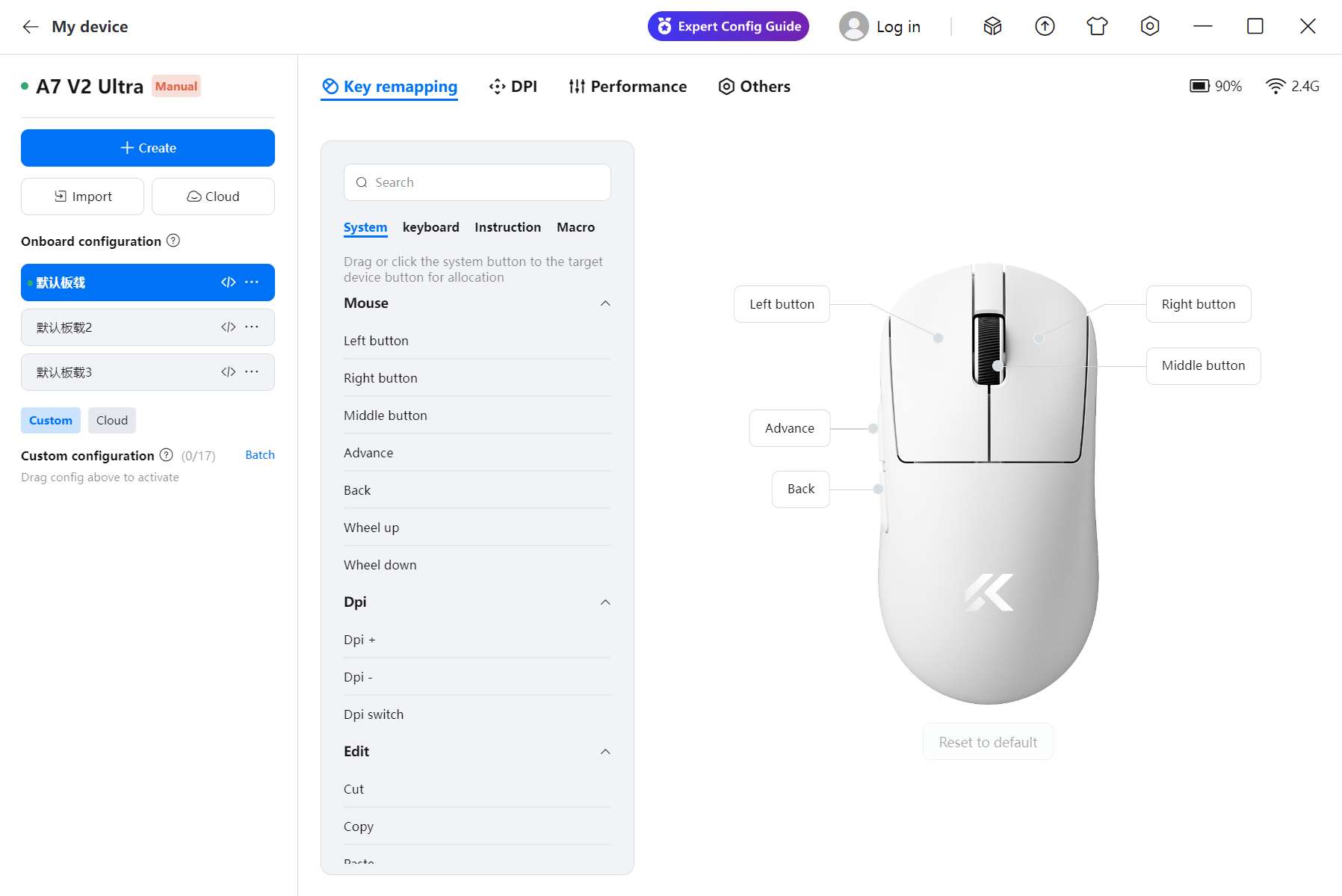
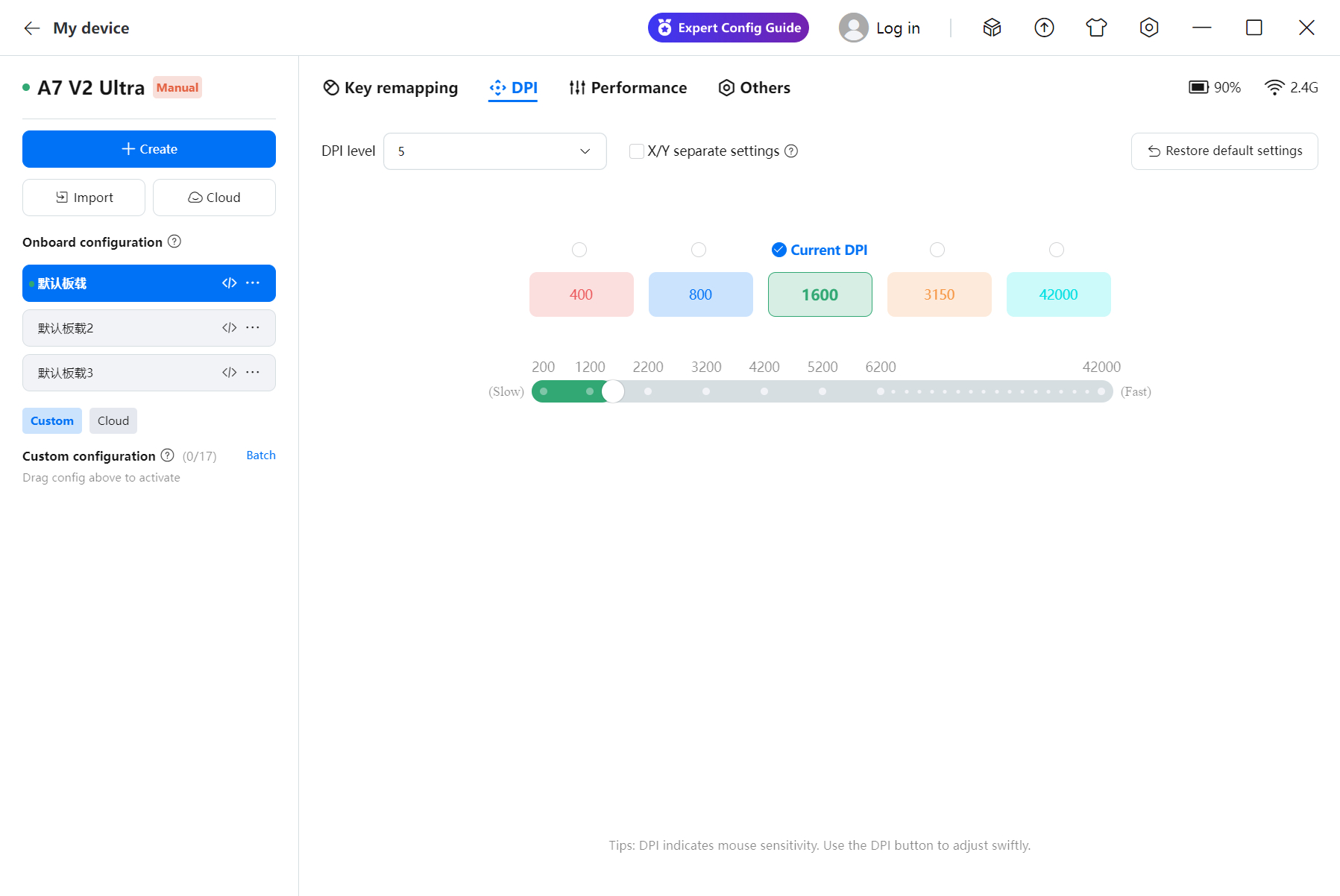
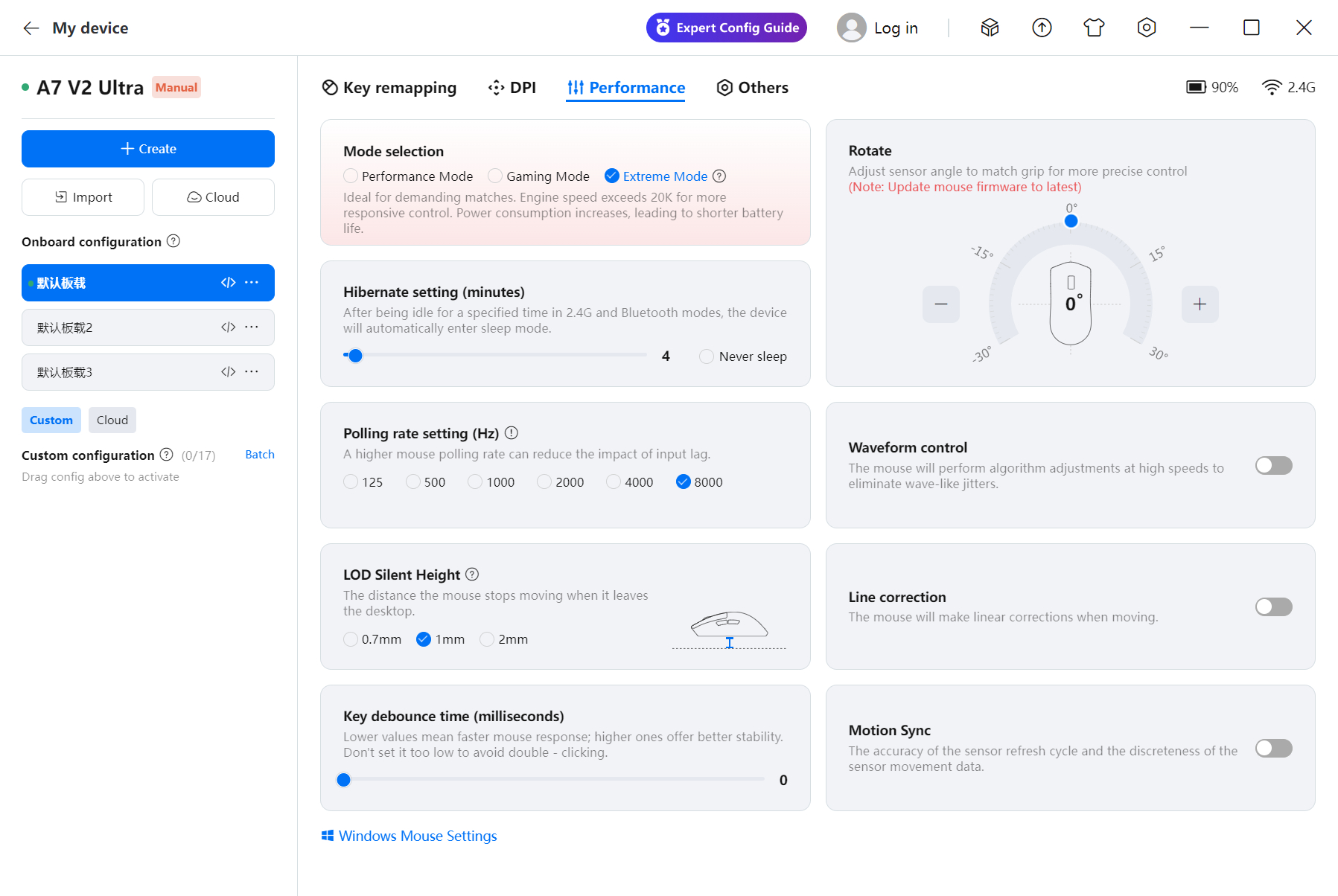
On the A7 V2 Ultra, configuration is possible through the MCHOSE Hub. Aside from a few instances where settings weren't read from memory properly and therefore were not working, which could be fixed by restarting the application, I found no issues during testing. A handy feature is the ability to turn on "performance mode," which lowers UI graphical fidelity in favor of responsiveness.
All options are distributed across three pages. The first page includes button remapping to mouse, keyboard, media, and macro functions. The second page features CPI adjustment for up to six color-coded levels, at a range of 200 to 42,000 in increments of 50, and x- and y-axis values may be set independently. Values may be entered manually, and any non-native values are truncated to native ones. The third page has miscellaneous settings. Polling rate can be set to 125, 500, 1000, 2000, 4000, or 8000 Hz. Sensor run mode may be set to "Performance," "Gaming," or "Extreme," which are different names for the PAW3950's "LP," "HP," and corded modes, though "Extreme Mode" also sets sensor framerate to the applicable maximum. Further settings include lift-off distance (0.7/1/2 mm), angle snapping (on/off), and ripple control (on/off), the latter of which lowers jitter at higher CPI steps at the cost of higher motion delay. MotionSync synchronizes SPI reads with USB polls, albeit at the cost of up to an entire interval of added motion delay. "Hibernate" defines after how much idle time the mouse enters sleep mode, and can be adjusted between 0 and 100 minutes. The sensor angle may be adjusted from -30° to 30° in increments of 1°. Debounce time may be adjusted between 0 and 20 ms, with higher values lowering the likelihood of inadvertent double-clicking, but increasing click latency. Lastly, profile management is also available.
All setting changes are saved live to the on-board memory, so the software does not need to be running (or be installed) all the time. On my system, the software had a RAM footprint of anywhere between 210 and 290 MB when running in the foreground, which doesn't change when minimized, whether to the taskbar or system tray. Upon exiting the application, two processes with a RAM footprint of 1 MB keep running.

As an alternative to the regular software, MCHOSE also offers a web driver. Much like other web driver solutions, this one connects through WebHID and therefore will, at least as of now, only work on Chromium-based browsers such as Chrome or Edge. Both functionally and aesthetically, the web driver is wholly equivalent to the regular software.
Battery Life
MCHOSE does not cite any battery life numbers. The software includes a battery charge indicator utilizing increments of 10%. After two and a half hours of continuous usage at 8000 Hz with Extreme Mode enabled and another two and a half hours at 1000 Hz with Extreme Mode enabled, the indicator went down by 10%. As such, we can surmise that expected battery life when using Extreme Mode should be around the 50-hour mark.Sleep mode is entered after three minutes of inactivity by default, but can be adjusted within the software.
Using the included USB Type-A to Type-C charging cable, I measured the charging speed during the constant current stage, which sits at 0.273 A. The battery has a capacity of 500 mAh (3.7 V) and utilizes a 3-pin JST connector.
Nov 21st, 2026 03:15 PST
change timezone
Latest GPU Drivers
New Forum Posts
- TPU's Nostalgic Hardware Club (22178)
- RX 9000 series GPU Owners Club (2252)
- Windows 11 General Discussion (7743)
- Without Jensen, PC gaming will be (52)
- What's your latest tech Freebie? (84)
- Zen 3 IF/IMC degradation (242)
- AI generated images... (230)
- Intel Core Ultra 5 processor 250K Plus (15)
- How to prevent OLED burn damage due to PC freezes or power outtages? (50)
- Anthrophics IPO (27)
Popular Reviews
- Microsoft Surface Laptop Ultra Review - The Next-gen Arm Laptop
- Ugreen NASync DXP4800 GT Review
- Corsair RM1200e (Second Generation) Review
- Pulsar Office Tour & First Look at P1 Dual-Sensor Mouse
- Upcoming Hardware Launches 2027 (Updated Nov 2026)
- Acemagic Retro X3 Review
- Biwin Black Opal NV7400 2 TB Review
- AMD Ryzen 7 9800X3D Review - The Best Gaming Processor
- AMD Zen 6 Technical Deep Dive
- Chieftec Iceberg PRO 360 DARK Review
TPU on YouTube
Controversial News Posts
- NVIDIA Co-Founder and CEO Jensen Huang Officially Resigns (491)
- Report: Jensen Huang Eyes NVIDIA Comeback (257)
- Open Letter Asking NVIDIA to Reinstate Jensen Huang Passes 115,000 Signatures (184)
- OpenAI CEO Argues Home PCs Waste the World's Limited DRAM Supply (152)
- NVIDIA Launches Investigation Into Jensen Huang's Relationship With Suspected Chinese Spy (136)
- Intel "Raptor Lake Next" 16-Core and 20-Core CPUs Surface (130)
- Legendary Game Studio BioWare Shuts Down Following EA Layoffs (104)
- NVIDIA GeForce RTX 50-Series Scheduled for up to $500 Price Hike This Week (89)