 0
Microsoft Surface Laptop Ultra Review - The Next-gen Arm Laptop
Test System Configuration »Display Testing
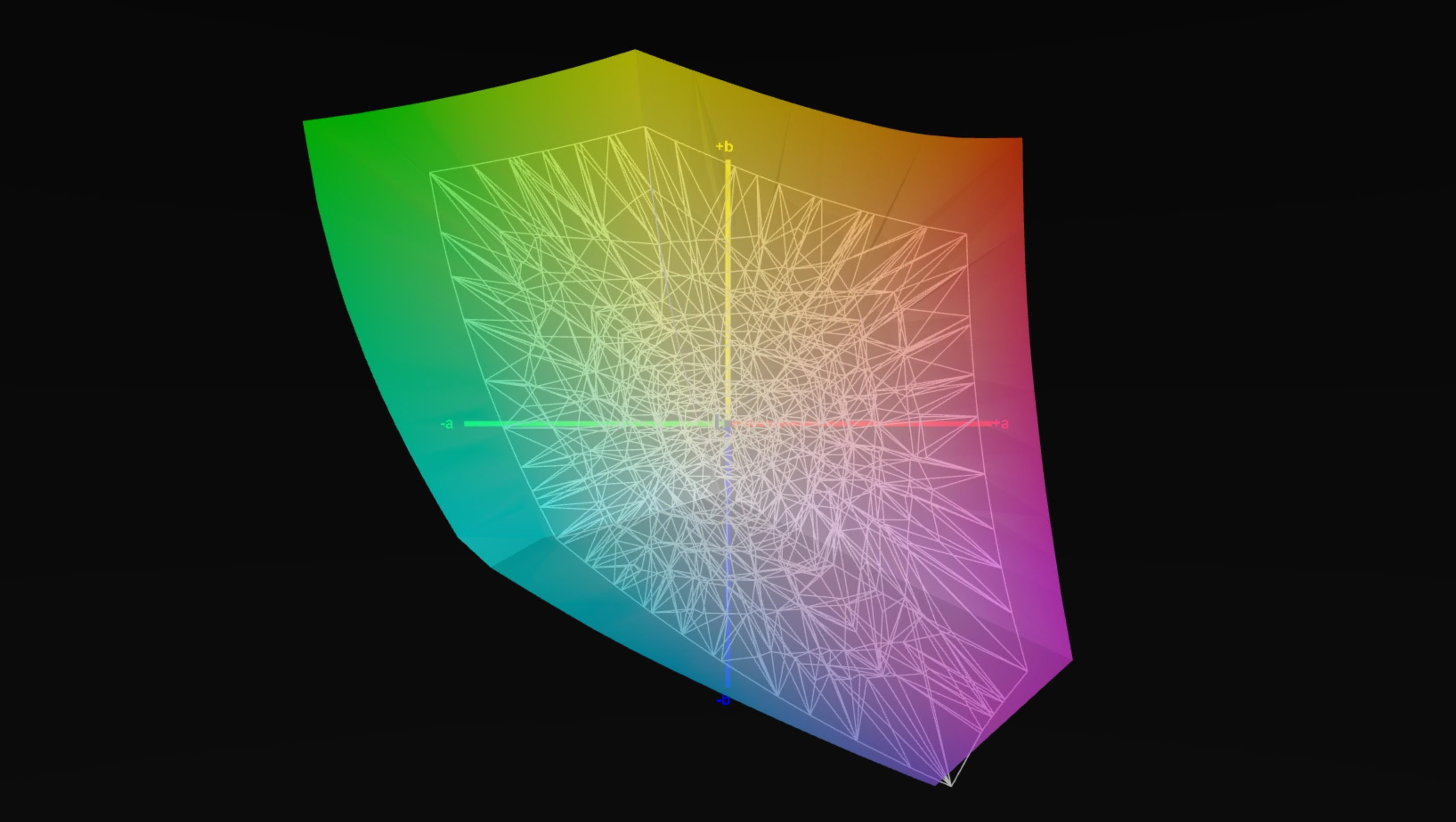
Our unit uses a 15-inch mini-LED panel (LP150UD171878) with a 3270×2180 resolution, a 3:2 aspect ratio, and a 120 Hz refresh rate with VRR support from 24 to 120 Hz. Windows reports a 10-bit signal and Dolby Vision HDR certification. It's a glossy touchscreen, and Microsoft calls it PixelSense Ultra.
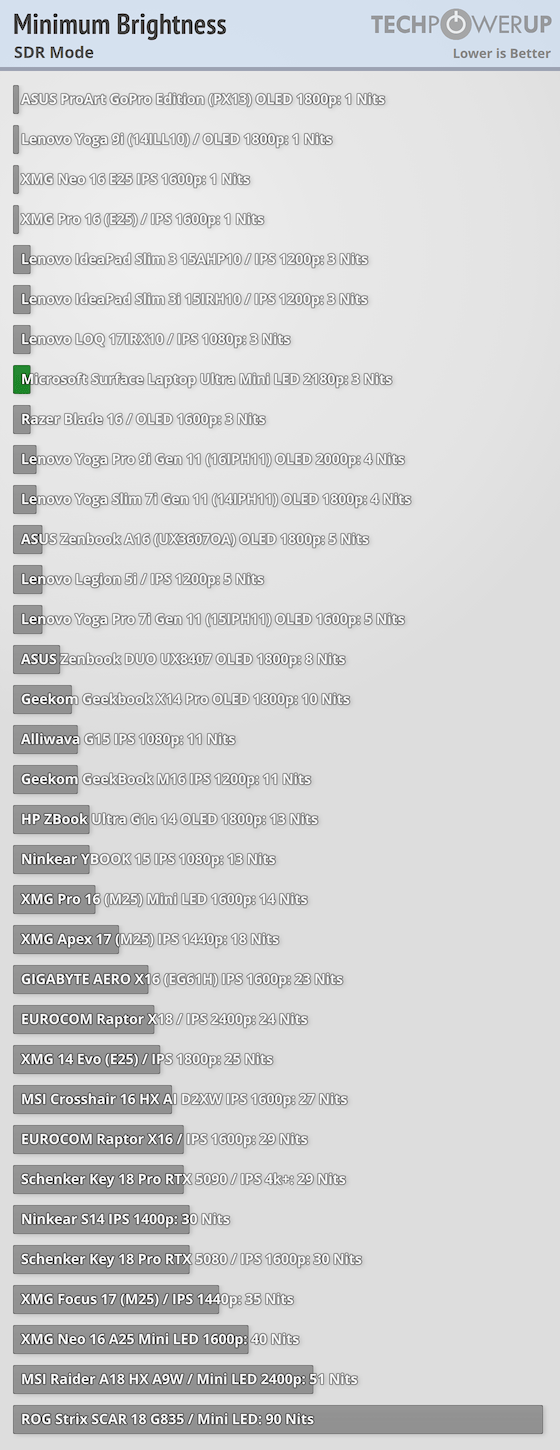
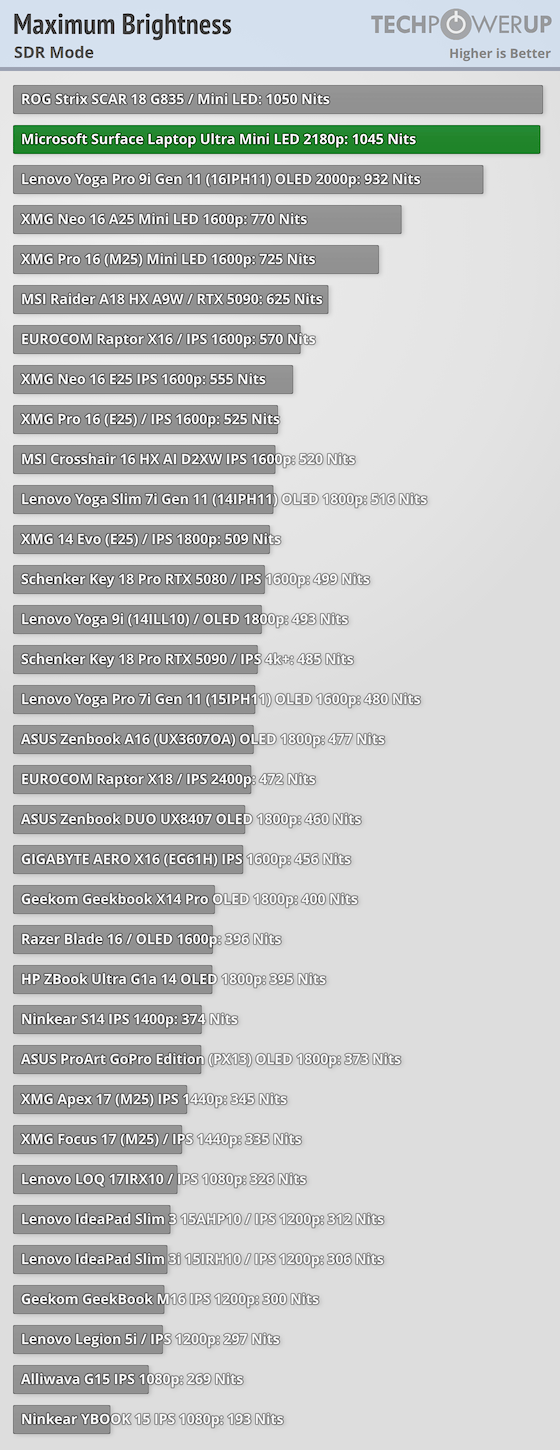
This is one bright screen. With no color profile applied, the panel reached 1,045 nits, and the Vivid profile wasn't far behind at 993 nits. That's the brightest SDR result we've ever recorded. At the other end, it goes down to just 3 nits, while contrast came in at 1720:1, which is good for a mini-LED panel measured with full-screen patterns, but don't expect OLED-like blacks in dark scenes.
Color accuracy is very good, though, with an average ΔE of 1.07 and a maximum of 4.0. After calibration, ΔE drops to 0.77 (average) and 3.16 (maximum). Microsoft offers several color profiles, and the Enhanced one shows what the panel can do: 99.3% sRGB, 94.7% Adobe RGB, and 93% DCI-P3 coverage. That's a hair below Microsoft's 100% DCI-P3 claim, but it's still a great result for photo and video work.
Uniformity is okay, but not perfect. At around 180 nits, the darkest zone was 8% dimmer than the center, and at maximum brightness, the biggest deviation grew to 9.5%. A few zones also went past the recommended color tolerance at full brightness. You won't see it in everyday use, but it's there.
Subjectively speaking, the screen looks fantastic. Text is razor-sharp at 262 PPI, the 3:2 format is great for work, and the brightness means you can comfortably use it outdoors. The glossy coating does reflect a lot, though, so you'll want to crank the brightness up when there's a window behind you.
| Microsoft Surface Laptop Ultra | |
|---|---|
| Model: | (LP150UD171878) |
| Max SDR Brightness: | 1045 nits |
| Max HDR Brightness: | 2016 nits |
| Min Brightness: | 3 nits |
| Contrast: | 1720:1 |
| Typical Color Accuracy: (Average ΔE) | 2.16 (sRGB profile) 0.74 (Vivid profile) 1.07 (Enhanced profile) 0.77 after calibration |
| Lowest Color Accuracy (Maximum ΔE) | 4.88 (sRGB profile) 3.72 (Vivid profile) 4.0 (Enhanced profile) 3.16 after calibration |
| Correlated Color Temperature (CCT) (at 180 nits) | 6737K |
| Correlated Color Temperature (CCT) (at max brightness) | 6306K |
| Gamut coverage | 99.3% sRGB 94.7% Adobe RGB 93.0% DCI-P3 |
| Gamut volume | 151.5% sRGB 104.4% Adobe RGB 107.3% DCI-P3 |
For most users, the Vivid color profile is the way to go, since it offers excellent color accuracy right out of the box. Pros, on the other hand, should pick the Enhanced profile and calibrate it manually. That combo brings the average ΔE down to 0.77 and covers 93% of the DCI-P3 gamut, while the Vivid profile lands at just 70% of the same color space.
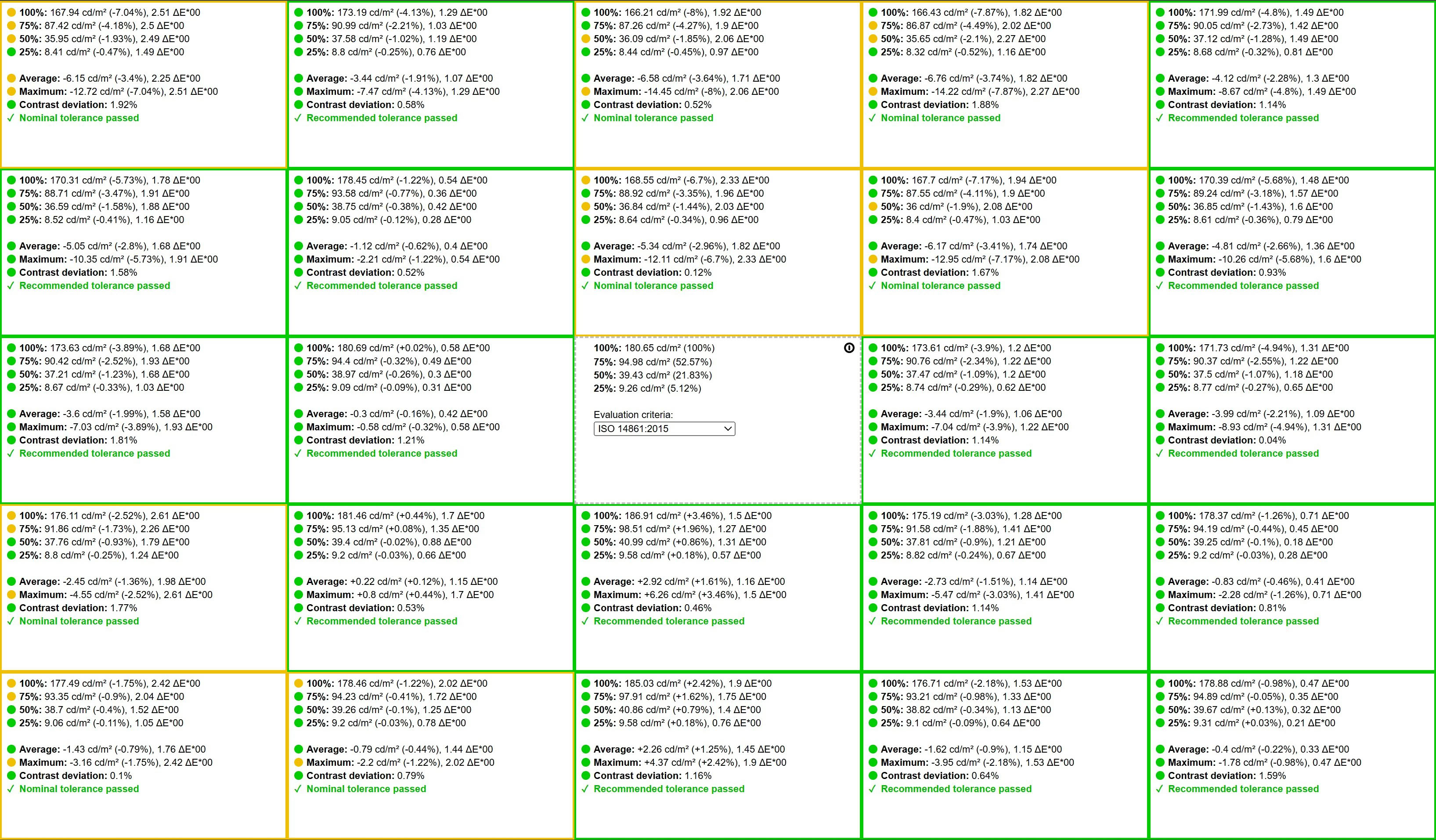
Here's the uniformity of the screen at 180 nits.
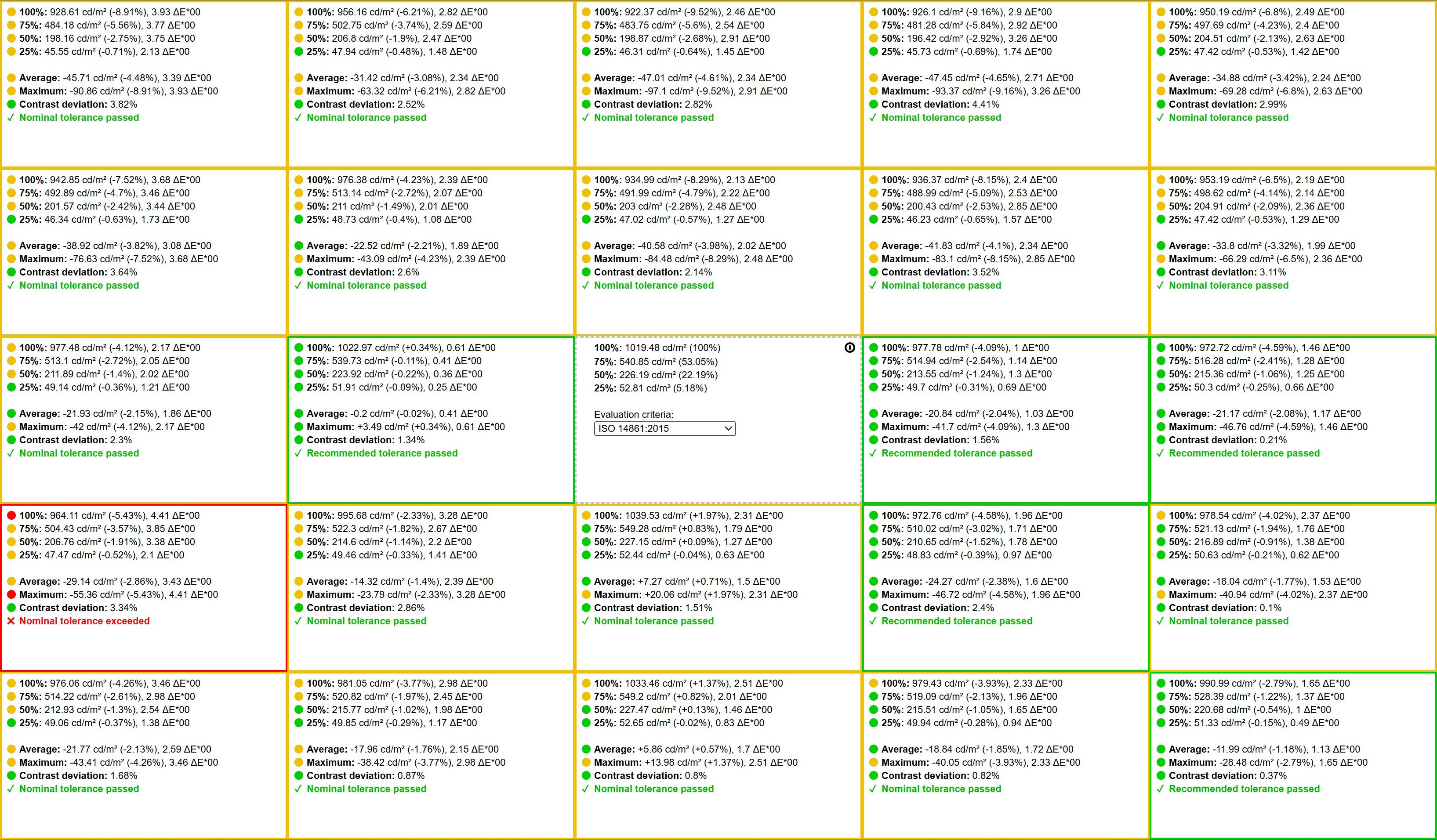
You can also check the uniformity at max brightness.

Nov 20th, 2026 10:12 PST
change timezone
Latest GPU Drivers
New Forum Posts
- Anthrophics IPO (13)
- How to prevent OLED burn damage due to PC freezes or power outtages? (42)
- RX 7600 + Ryzen 5 5600GT getting the same FPS as my old RX 6500 XT – What am I missing? (19)
- RX 9000 series GPU Owners Club (2244)
- [Poll] 12V-2x6 Connector Protection: What Are You Using? (WireView / Ampinel / Equalizer / Other / Nothing) (49)
- Very unusual two gaming-pc scenarios. (28)
- GTA VI (18)
- Free Games Thread (5384)
- Making a game in Godot engine (13)
- Intel Core Ultra 5 processor 250K Plus (10)
Popular Reviews
- AMD Zen 6 Technical Deep Dive
- Ugreen NASync DXP4800 GT Review
- Corsair RM1200e (Second Generation) Review
- Acemagic Retro X3 Review
- Upcoming Hardware Launches 2027 (Updated Nov 2026)
- Pulsar Office Tour & First Look at P1 Dual-Sensor Mouse
- Microsoft Surface Laptop Ultra Review - The Next-gen Arm Laptop
- Biwin Black Opal NV7400 2 TB Review
- AMD Ryzen 7 9800X3D Memory Performance Scaling
- AMD Ryzen 7 9800X3D Review - The Best Gaming Processor
TPU on YouTube
Controversial News Posts
- NVIDIA Co-Founder and CEO Jensen Huang Officially Resigns (490)
- Report: Jensen Huang Eyes NVIDIA Comeback (243)
- Open Letter Asking NVIDIA to Reinstate Jensen Huang Passes 115,000 Signatures (184)
- OpenAI CEO Argues Home PCs Waste the World's Limited DRAM Supply (152)
- NVIDIA Launches Investigation Into Jensen Huang's Relationship With Suspected Chinese Spy (136)
- Intel "Raptor Lake Next" 16-Core and 20-Core CPUs Surface (130)
- Legendary Game Studio BioWare Shuts Down Following EA Layoffs (104)
- Dell CEO Says the Memory Shortage Will Get Worse in 2027 (95)