 3
Montech HS02 PRO Review
Review System Setup »A Closer Look - Inside


Once you dive into the interior layout of the H02 Pro, it quickly becomes apparent that Montech is continuing to push custom tooling for its cases, which is the most costly aspect of manufacturing any chassis. As such it makes sense that initial products to build up market share lean heavily on existing tooling, but as the brand grows and sales go up, it allows for the exploration of getting custom tooling done for high-volume cases. Inside the H02 Pro, the motherboard is recessed and thanks to the cutouts, you can use back-connect boards as well. In the rear, there are two covers one for the PSU, which also allows for storage thanks to one 2.5" and a 2.5/3.5" mounting position, and one under the ceiling that hides the cable mess around the built-in PCB. That latter cover is made of plastic unfortunately, which seems like an odd choice. Lastly, Montech has opted to add venting cutouts in the area around the PCB in the motherboard tray, which means you can see through it and see any wires there.


On the floor of the chassis, being the Pro variant, there are three inverted fans to push air up against the GPU. These are embedded into the floor nicely, so you still get access to all the usual expansion slots of a full size motherboard and its connectors at the bottom edge. On the side, towards the front of the case the top portion of the PSU cover is vented as well, which means you will see your power supply. The bottom portion is solid and slimmer, so that long GPUs can pass through. The simple GPU support bracket is meant to be screwed down to this portion of the cover as well. In the ceiling, it is all about venting and cooling. Montech has also placed several cutouts strategically, so that you should have no issues to route wires from any active cooling elements in the ceiling to the backside of the motherboard tray.

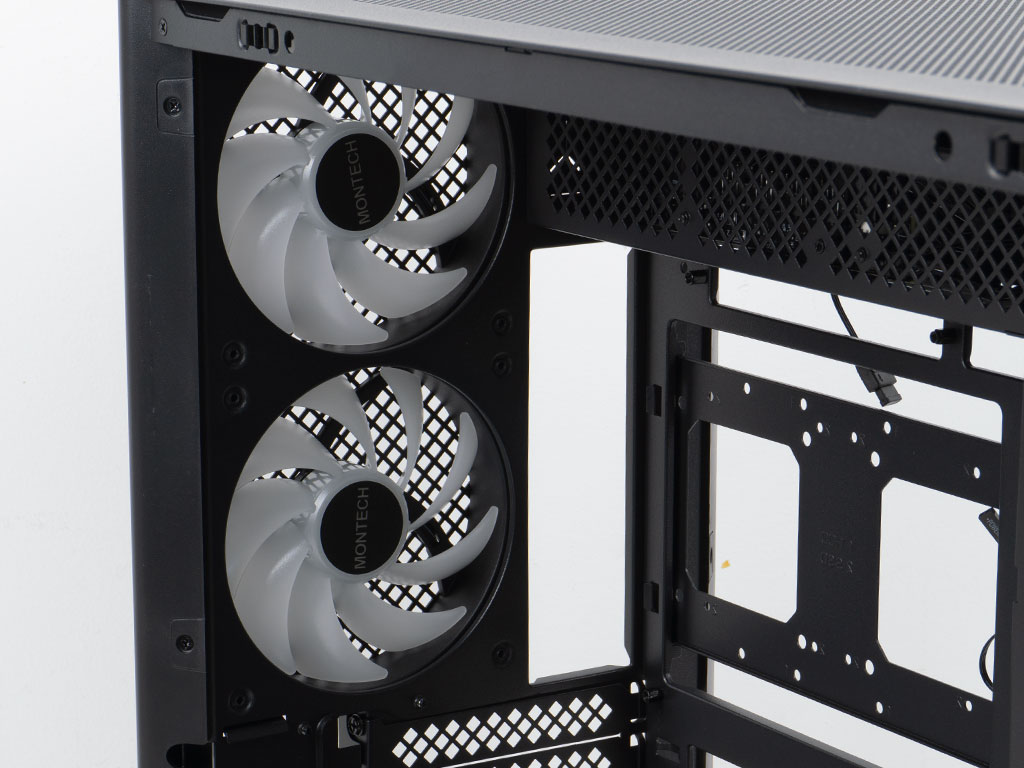
The expansion slots use traditional screws which you can reach through openings in the corner pieces of the chassis. This will work just fine for classic drivers, but the openings are likely too small if you have a tool where you can exchange bits for example. Montech could have easily made these bigger to accommodate. Worst case, this could mean that you don't end up having the right tool to complete the assembly process. Above that, the two exhaust fans are clearly visible, in line with the back of the chassis as they are sitting on the exterior of the frame. This gives you a little bit more room around the CPU area, which is always welcome.


Behind the motherboard tray, you have another storage plate that can accommodate either two 2.5" drives of one 3.5" drive. This means the Montech HS02 Pro can, at the very least, hold two 3.5" and one 2.5" drive or a total of four 2.5" units, which is plenty for the vast majority of users. The built-in PCB can connect up to five PWM fans and ARGB components. Interestingly enough, its connectors face upward, with the PWM ones on the backside facing the interior of the chassis. This makes it quite inconvenient to plug things in.


If you want to rotate the expansion slots 90 degrees, it is easily done by detaching the two pieces in that part of the chassis. One is a cover and the other a frame holding the seven expansion slots. Once rotated, simply use the screws to secure everything in place, and you can use at least 5 of the expansion slots to pick from when it comes to inserting your vertical GPU.


The USB cables inside the Montech HS02 Pro are flat, which makes routing them a bit easier, especially for those still using classic boards with front facing plugs. As the reset wire has been repurposed for the ARGB controller, you will only find a power connector and the usual pair of connectors for the power LED to connect to the front panel pins of your motherboard.
Nov 22nd, 2026 20:23 CST
change timezone
Latest GPU Drivers
New Forum Posts
- Increasing Power Limit? (8)
- DTS DCH Driver for Realtek HDA [DTS:X APO4 + DTS Interactive] (2818)
- Honestly, do you care about GTA VI? (266)
- What are you playing? (26240)
- UPS what one to get? (48)
- Your PC ATM (36458)
- Gacha Games - Discussions, Pulls, Updates, etc. (1157)
- Last game you purchased? (1414)
- Making a game in Godot engine (19)
- Intel D270 (5)
Popular Reviews
- Microsoft Surface Laptop Ultra Review - The Next-gen Arm Laptop
- Corsair RM1200e (Second Generation) Review
- Upcoming Hardware Launches 2027 (Updated Nov 2026)
- Pulsar Office Tour & First Look at P1 Dual-Sensor Mouse
- Ugreen NASync DXP4800 GT Review
- AMD Ryzen 7 9800X3D Review - The Best Gaming Processor
- AMD Zen 6 Technical Deep Dive
- AMD Ryzen 7 5800X3D 10th Anniversary Review
- Phantom Blade Zero Performance Benchmark Review - 35 GPUs Tested
- Biwin Black Opal NV7400 2 TB Review
TPU on YouTube
Controversial News Posts
- NVIDIA Co-Founder and CEO Jensen Huang Officially Resigns (492)
- Report: Jensen Huang Eyes NVIDIA Comeback (266)
- Open Letter Asking NVIDIA to Reinstate Jensen Huang Passes 115,000 Signatures (184)
- OpenAI CEO Argues Home PCs Waste the World's Limited DRAM Supply (152)
- NVIDIA Launches Investigation Into Jensen Huang's Relationship With Suspected Chinese Spy (136)
- Intel "Raptor Lake Next" 16-Core and 20-Core CPUs Surface (130)
- NVIDIA GeForce RTX 50-Series Scheduled for up to $500 Price Hike This Week (89)
- Intel Razor Lake Gets a 12 P-Core bLLC Chip With No E-Cores, Per Leak (86)