 31
MSI MPG X870E Carbon Wi-Fi Review
(31 Comments) »Introduction

The MPG Carbon Wi-Fi line has been a solid mid-range motherboard offering for a couple of generations now, and usually offers certain features associated with more expensive options such as the Ace or Godlike, but at a much lower price tag. High-end VRM cooling, the latest USB and Wi-Fi standards, Thunderbolt, overclocking and tweaking tools plus cutting edge ease-of-use features are all in the MPG Carbon Wi-Fi's repertoire. It's even come in a pre water-cooled guise before now thanks to a makeover from EKWB.
This is 2024, though, and $500 probably isn't what many would consider to be a mid-range price tag. It's far from the most expensive X870E option out there, but there are other excellent motherboards such as the ASRock X870E Taichi at $50 less. Then there's the RGB-free sibling, the Taichi Lite, which would leave $100 in your wallet compared to the board we're looking at today. We have a pretty straightforward task then when it comes to seeing whether MSI's MPG X870E Carbon Wi-Fi is worth considering, especially if it means increasing your motherboard budget to do so.

Firstly, the board looks fantastic. Like most of the $400+ X870E motherboards out there, you would not want to drop this thing on your foot thanks to enormous heatsinks covering the power circuitry, chipsets and all M.2 ports. However, there is no backplate here, as we found on both the ASRock X870E Taichi and ASUS Crosshair ROG X870 Hero, which help to protect the rear of the PCB and to cool certain hotspots such as the VRMs. What we do have, though, is a more lavishly-equipped rear I/O panel along with updated tool-free features, some very elaborate RGB lighting components and a slightly larger set of features than the ASRock X870E Taichi. The board is also ATX rather than E-ATX with the ASRock board, which is immediately more appealing in terms of case compatibility, although it doesn't have the side M.2 port as a result.
In our review a while ago, we found that the ASRock board didn't have the best EFI or software, so it will be interesting to see what MSI brings to the table here as its EFI is usually excellent, with Windows software less so. We have the cheaper Tomahawk and Ace boards from MSI waiting in the wings too, while we're waiting for updates from Intel and motherboard manufacturers regarding Z890 options before our reviews drop, given the launch issues we've encountered. Thankfully MSI has just released a BIOS to remedy an issue that caused graphics card driver problems with Windows 11, so fixes are definitely coming. Stay tuned for our Z890 content.
Specifications
| Specifications | |
|---|---|
| CPU Support: | AMD Socket AM5 Ryzen 7000, 9000 |
| Power Design: | CPU Power: 18-phase SOC Power: 2-phase VDD MISC Power: 1-phase |
| Chipset: | AMD X870E |
| Integrated Graphics: | Supported 1x HDMI 2x DisplayPort via USB-C |
| Memory: | 4x DIMM, Support up to 192 GB 2x Single Rank DDR5-8400 (OC) |
| BIOS: | 256 Mbit AMI UEFI |
| Expansion Slots: | 2x PCIe Gen 5 x16 slots (x16/x0) or (x8/x4) 1x PCIe Gen 4 x16 slot |
| Storage: | 4x SATA 6 Gb/s 2x M.2 (PCIe Gen 5 x4) 3x M.2 (PCIe Gen 4 x4) |
| Networking: | 1x Realtek RT8126 5 Gbps Ethernet 1x Realtek RT8125b 2.5 Gbps Ethernet 1x Wi-Fi 7 |
| Rear Ports: | BIOS Flashback button Clear CMOS button Smart Button 1x 2.5 Gbps Ethernet 1x 5 Gbps Ethernet 1x HDMI port 2x USB4 40 Gbps (Type-C) 2x USB 3.2 Gen 2 10 Gbps (Type-C) 9x USB 3.2 Gen 2 10 Gbps (Type-A) 2x USB 2.0 (Type-A) 2x Wi-Fi antenna connectors 2x Audio jacks 1x Optical S/PDIF Out port |
| Audio: | 1x Realtek ALC4080 Codec |
| Fan / Thermistor headers: | 7x 4-pin / 1x 2-pin |
| Form Factor: | ATX Form Factor 12.0 x 9.6 in. / 30.5 x 24.3 cm |
| Exclusive Features: |
|
Packaging and Contents


As with other X870E motherboards we've reviewed so far, anyone that enjoys a lavish accessory set is likely to be disappointed, as even boards costing over $700 have just the bare essentials such as SATA cables, Wi-Fi antennas and RGB cables. That's not unusual with a second generation of chipsets on the same socket, especially now, where there are now extra high-speed M.2 ports and other features located on the motherboard, with less of a need for accessories such as PCIe Gen 5 expansion cards.
With the MSI MPG X870E Carbon Wi-Fi you get a Wi-Fi antenna equipped with new quick-fit EZ Wi-Fi Antenna connectors, a USB driver flash drive, various RGB cables, SATA cables and a single 2-pin thermistor cable for the single 2-pin header. There is also a 3-way EZ Conn-Cable. This combines 4-pin fan, 3-pin ARGB and 4-pin USB pins in a single connector allowing you to hook up MSI MPG Coreliquid P-Series Liquid AIO Coolers with a single cable to the JAF_V2 header on the PCB.
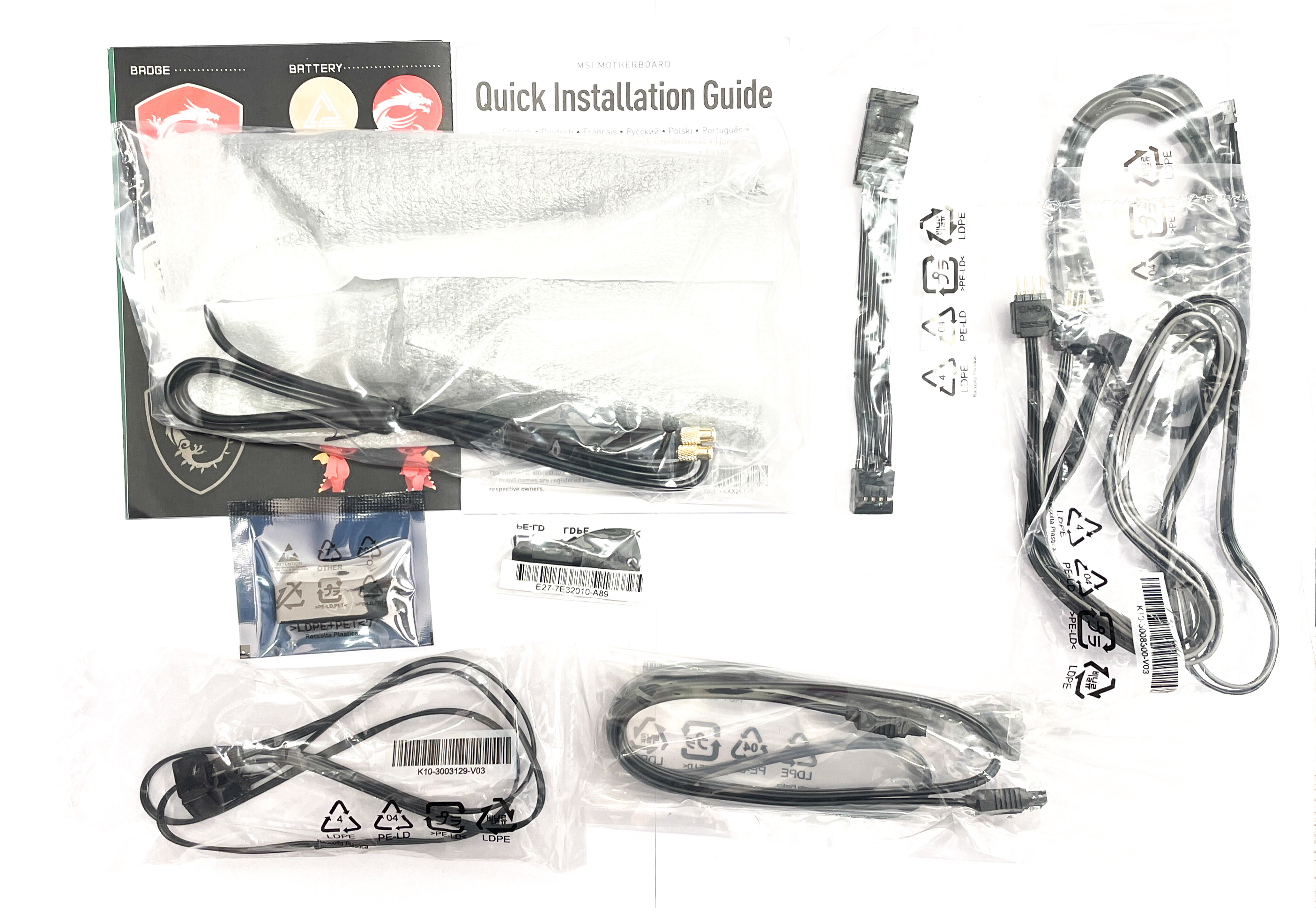
The full list of accessories includes:
- 1x Quick start guide
- 1x Wi-Fi Antenna
- 2x SATA cables
- 1x thermistor cable
- 1x 3-pin RGB extension cable
- 1x 4-pin RGB slitter cable
- 1x 3-way EZ Conn-Cable
- USB driver flash drive
- Cable stickers
- EZ M.2 Clip II Remover
- EZ M.2 Clip II
Our Patreon Silver Supporters can read articles in single-page format.
Nov 15th, 2026 19:36 CST
change timezone
Latest GPU Drivers
New Forum Posts
- Your PC ATM (36432)
- It’s been fascinating times in Retro agian r36s isn’t even worth 50-65 dollars no more and newly listed Rm36 64gb 4in IPS models for only 34 dollars. (6)
- Power supply noise stops when I move the mouse (10)
- Can you guess Which game it is? (320)
- What is the latest game you finished or 100% (203)
- HP Office Jet 7740 Pro - Supply system problem with replacement cartridge (4)
- What are you playing? (26224)
- WarpCoreBench scores! (55)
- Local LLM General Discussion (691)
- Folding Pie and Milestones!! (10205)
Popular Reviews
- ASUS ROG Strix B850-I Gaming Wi-Fi7 W Review
- Corsair HX1000i Shift Crystal Review
- AMD Zen 6 Technical Deep Dive
- Upcoming Hardware Launches 2027 (Updated Nov 2026)
- Montech King 95 3D PRO Review
- NZXT C1200 Platinum Review
- Phantom Blade Zero Performance Benchmark Review - 35 GPUs Tested
- AMD Ryzen 7 9800X3D Review - The Best Gaming Processor
- NZXT H7 RGB+ Review
- NZXT H5 Review
TPU on YouTube
Controversial News Posts
- NVIDIA Co-Founder and CEO Jensen Huang Officially Resigns (430)
- Open Letter Asking NVIDIA to Reinstate Jensen Huang Passes 115,000 Signatures (184)
- OpenAI CEO Argues Home PCs Waste the World's Limited DRAM Supply (152)
- NVIDIA Launches Investigation Into Jensen Huang's Relationship With Suspected Chinese Spy (136)
- Intel "Raptor Lake Next" 16-Core and 20-Core CPUs Surface (130)
- Legendary Game Studio BioWare Shuts Down Following EA Layoffs (104)
- Dell CEO Says the Memory Shortage Will Get Worse in 2027 (95)
- NVIDIA GeForce RTX 50-Series Scheduled for up to $500 Price Hike This Week (89)