 7
MSI MPG 271QR QD-OLED X50 Review - 500 Hz for the Elite Few
Controls, OSD & AI Features »Connectivity

The MPG 271QR QD-OLED X50 is equipped with two HDMI 2.1 ports capable of delivering 2560×1440 at 500 Hz. For PC users the best option is the DisplayPort input. MSI uses DisplayPort 2.1a with UHBR20 bandwidth, providing up to 80 Gbps of raw throughput. This is enough to carry an uncompressed 1440p 500 Hz signal with 10-bit color, without needing Display Stream Compression. There's also a USB-C port with DisplayPort Alt Mode. It carries a full video signal and simultaneously delivers up to 98 W of power, so you can connect a laptop with a single cable for display output, charging, and USB hub functionality.
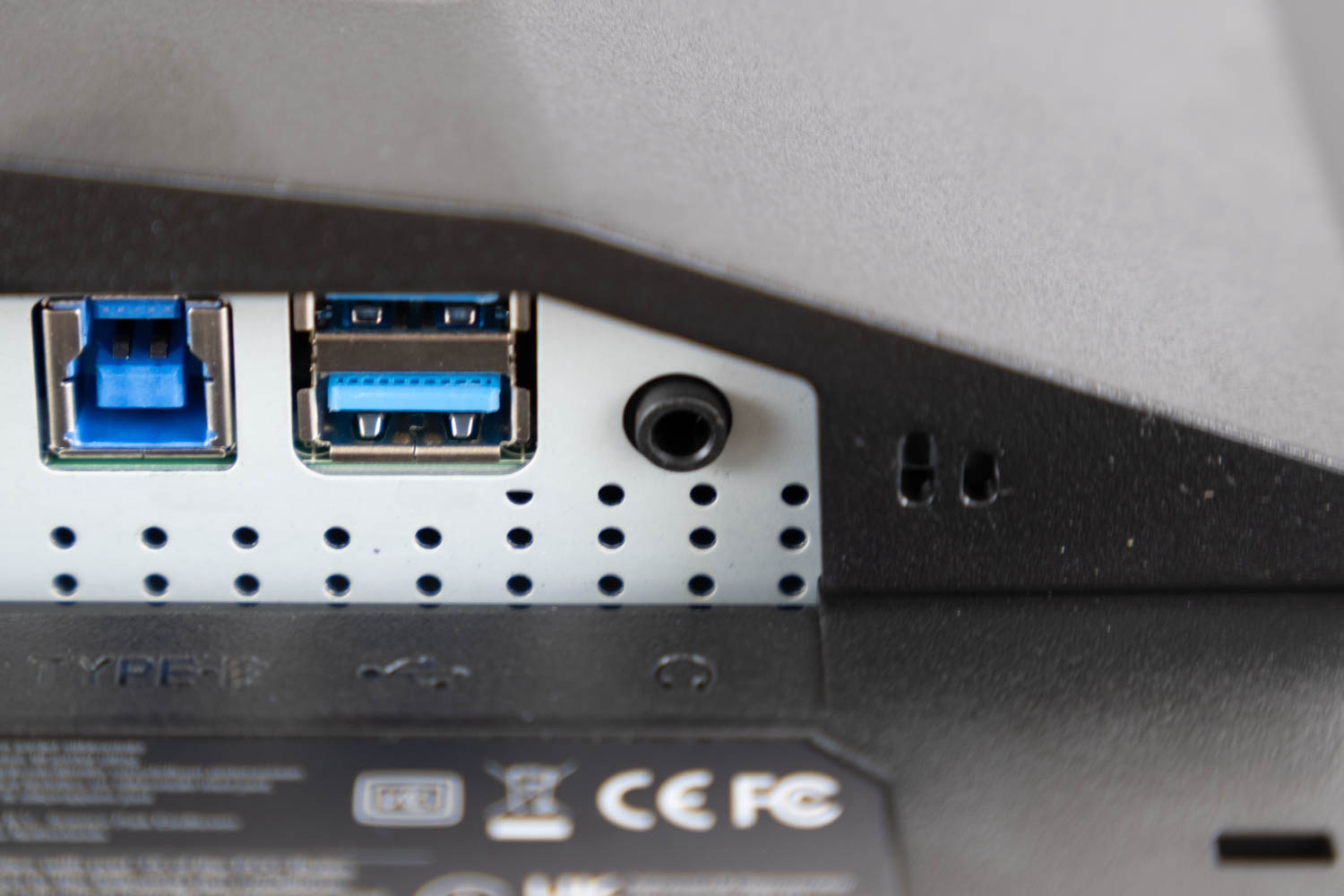
Next to the USB ports there's a 3.5 mm headphone jack.

The USB hub consists of two downstream 5 Gbps USB Type-A ports and one upstream USB Type-B port. You connect the monitor to your PC with the USB Type-B upstream connector, after which the two USB Type-A ports act as a regular USB 3.2 Gen 1 hub for peripherals such as a keyboard, mouse, headset dongle, or external SSD. If you use the monitor's USB-C DP Alt Mode connection with a laptop, the same hub is exposed over that single cable, so you can effectively dock the laptop and gain access to all connected peripherals without additional cabling.
The monitor also offers an integrated KVM switch. To use the KVM functionality, one device must be connected via the USB-C DP Alt Mode port, while the second should use the USB Type-B upstream port for data, along with either an HDMI or DisplayPort connection for video. The KVM switch is fully automated: selecting a video input in the OSD immediately switches the connected USB devices to the corresponding source, with no manual toggling required.


To test the USB-C port's rated 98 W power delivery, I used a combination of the WITRN C5 USB voltage/current meter, connected directly to the monitor's USB-C port, and the ATORCH BW150 electronic load with a PD 3.1 trigger module. The two devices were linked using a high-quality Thunderbolt 4 (40 Gbps, 240 W) cable. In my testing, the MPG 271QR QD-OLED X50 was able to sustain a 20 V/5 A load, at which point it delivered 99.68 W of power through its USB-C interface. The ATORCH BW150 registered 95.32 W on the receiving end, with the difference primarily due to cable losses.
Power Consumption

The MSI MPG 271QR QD-OLED X50 uses an integrated power supply, meaning there's no bulky external power brick to deal with, which is a welcome design choice for aesthetics, but means a faulty power supply can't be easily replaced.
To test power consumption, I used the Meross MSS315 Matter Smart Wi-Fi Plug and its companion app to measure draw at different brightness levels. All measurements were taken after resetting the monitor to factory defaults.
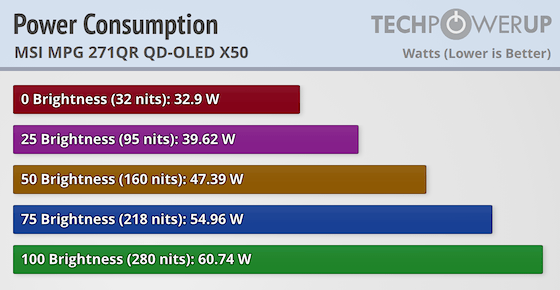
Power consumption is very reasonable for a 500 Hz QD-OLED. The monitor reaches 280 cd/m² at maximum SDR brightness while drawing 60.7 W. At lower brightness levels the monitor stays efficient, drawing only 32.9 W at minimum output. Even at 75% brightness, where the panel outputs a comfortable 218 cd/m², power consumption stays under 55 W. Worth noting is that the default Eco profile ships with a dim 71 cd/m² output, which most users will want to change immediately.
Nov 26th, 2026 09:57 CST
change timezone
Latest GPU Drivers
New Forum Posts
- What's your main Black Friday / Cyber Monday purchase? (18)
- Wireless Internet sharing between PC and router both-ways, is it possible? (24)
- Can you guess Which game it is? (366)
- Post your CrystalDiskMark speeds (658)
- Making a game in Godot engine (20)
- X79 and/or rampage IV OC'ing thread for those of us still left.... (2459)
- Exploring Local LLMs: Models, Hardware and Setup Experiences (4)
- Linpack Xtreme Released (513)
- Claude credits purchased on or after Dec. 7 now have an expiry date (20)
- Acer TravelMate P414-51 (i5-1135G7): CPU stuck at x4 / ~200 MHz effective under 100% load, no throttle flags. How to find who's clamping it? (1)
Popular Reviews
- ASRock X870E Challenger Wi-Fi White Review
- VZMORE AX9 Max Review
- Upcoming Hardware Launches 2027 (Updated Nov 2026)
- Microsoft Surface Laptop Ultra Review - The Next-gen Arm Laptop
- AMD Ryzen 7 9800X3D Review - The Best Gaming Processor
- AMD Zen 6 Technical Deep Dive
- Corsair RM1200e (Second Generation) Review
- Phantom Blade Zero Performance Benchmark Review - 35 GPUs Tested
- Montech CyberFlow ARGB 360 Review
- Pulsar Office Tour & First Look at P1 Dual-Sensor Mouse
TPU on YouTube
Controversial News Posts
- Jensen Huang Reinstated as CEO of NVIDIA (585)
- NVIDIA Co-Founder and CEO Jensen Huang Officially Resigns (492)
- Report: Jensen Huang Eyes NVIDIA Comeback (281)
- Open Letter Asking NVIDIA to Reinstate Jensen Huang Passes 115,000 Signatures (184)
- OpenAI CEO Argues Home PCs Waste the World's Limited DRAM Supply (152)
- NVIDIA Launches Investigation Into Jensen Huang's Relationship With Suspected Chinese Spy (136)
- Intel "Raptor Lake Next" 16-Core and 20-Core CPUs Surface (130)
- Intel Razor Lake Gets a 12 P-Core bLLC Chip With No E-Cores, Per Leak (94)