 17
MSI MPG 322URX QD-OLED Review - Top-tier 4K Gaming
Value & Conclusion »Gaming Performance
The MSI MPG 322URX features a 240 Hz, third-generation QD-OLED panel. It carries the "NVIDIA G-SYNC Compatible" badge, meaning adaptive synchronization is supported on all modern GPUs.Response Time and Overdrive
I tested the response time with the Open Source Response Time Tool Pro (OSRTT Pro), developed by Andrew McDonald of TechTeamGB. It's a nifty tool that, combined with the OSRTT Launcher app, measures panel response times and presents them through detailed graphs and easy-to-read heatmaps. You can find everything you might want to know about the OSRTT in its technical documentation and on the official website, where you can order your unit, too. The OSRTT Launcher gives us three interesting heat maps to observe.Perceived Response Time tells us how much time the panel took to transition from one color to another. This measurement is expressed in milliseconds and includes overshoot. In other words, if the panel exceeded the target value, the perceived response time also includes the time it took for the transition to recover from overshoot and stabilize on the target value. I'm running my tests with recommended settings, so with a fixed RGB 5 tolerance level and with gamma-corrected RGB values.
RGB Overshoot tells us how much a specific transition missed the target value. For example, if the panel was transitioning from RGB 51 to RGB 204, and it initially landed on RGB 212, the overshoot RGB value is 8. Overshoot can be both positive and negative, and it commonly occurs at extreme overdrive settings when pixels are driven by high voltage. In practice, an overshoot manifests as an afterimage or a halo around a moving object. It can be easily spotted even when doing something as basic as scrolling through a webpage.
Visual Response Rating is the most abstract heatmap generated by the OSRTT Launcher; in essence, it's an ever-evolving scoring system. To quote OSRTT's technical documentation, it is a finite score rather than a direct measurement. The calculation is pretty simple; it's: "100 – (Initial Response Time + Perceived Response Time)". Since both metrics use the same tolerance level, if a display doesn't overshoot, both times will be identical. This essentially rewards displays that are fast with a small amount of overshoot over displays that aren't as fast even if they don't overshoot at all – while still overall preferring ultra-fast, accurate monitors.
Here's how the MSI MPG 322URX fares in the pixel response time test.
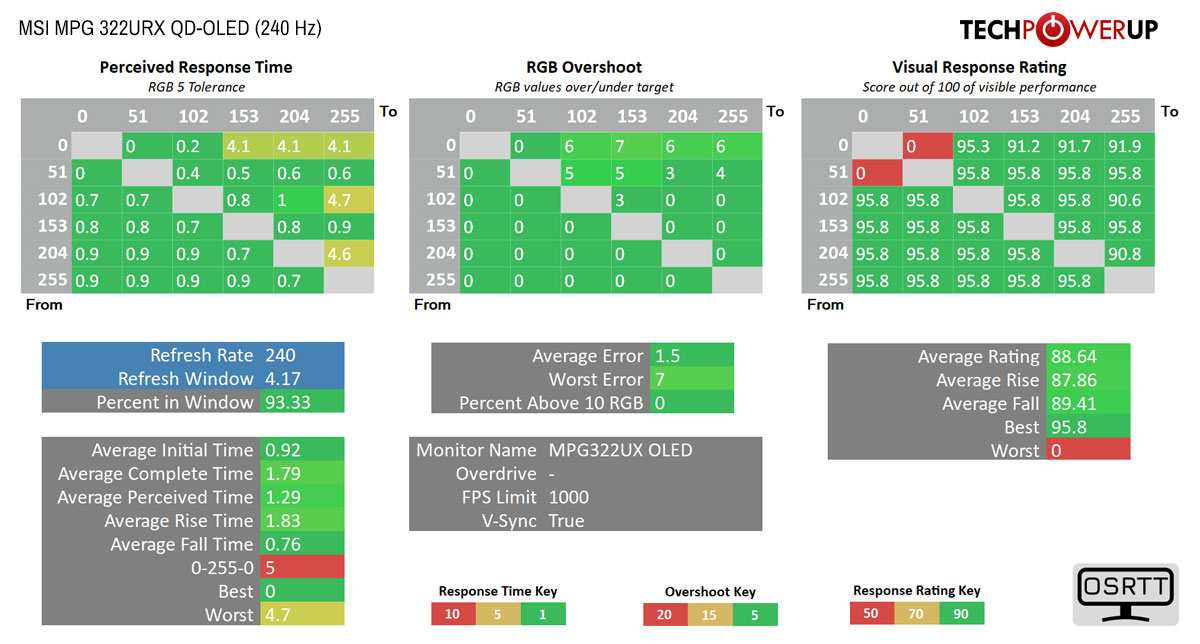
The pixel response results confirm that the MPG 322URX delivers the kind of motion performance expected from a modern OLED panel. Average perceived response time lands at 1.29 ms, with complete transitions averaging 1.79 ms, which keeps virtually all pixel changes well inside the 240 Hz refresh window. The heatmap shows consistently fast transitions across the entire RGB matrix, with only a few moderately slower cases when moving from very dark values to bright tones. Even then, the slowest measured transition is just 4.7 ms, still far quicker than what high-end LCDs typically deliver. Overall motion performance is superb.
Input Lag
To measure the input lag of a monitor, I switched from using the LDAT V2 (Latency Display Analysis Tool), which I've covered extensively in my NVIDIA Reflex review, to the OSRTT Pro Tool. The OSRTT Pro Tool and the accompanying software include a DirectX code developed by Andrew McDonald of TechTeamGB, which allows the OSRTT Launcher to track the events and capture the frame time, making it possible to isolate the monitor latency from other factors that come into play when using the click-to-photon testing methodology, namely the USB polling rate and game render time. For a deeper insight, I suggest you watch an excellent overview video made by Andy himself.Here's how the MSI MPG 322URX holds up in terms of input lag after doing 100 iterations of the input lag test.
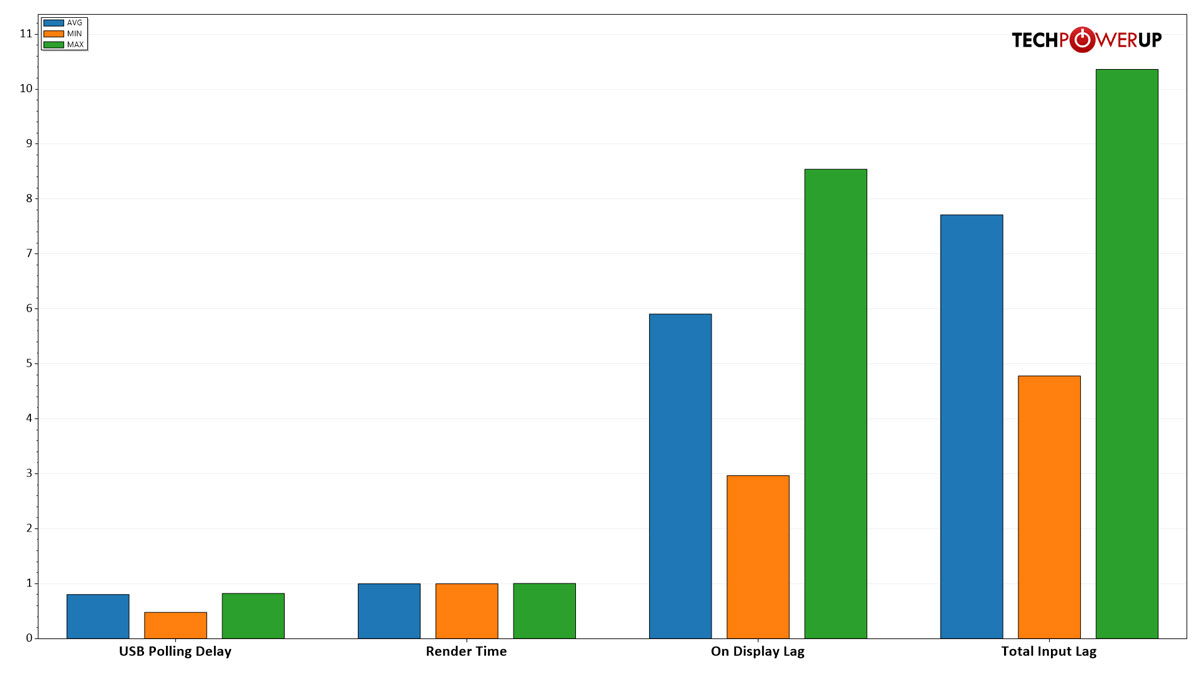
The average on-display lag measures 5.9 ms, with a low of 2.9 ms and a high of 8.5 ms. At 240 Hz, a single refresh cycle lasts 4.17 ms, which means even the average delay stays within roughly one and a half refresh intervals. The minimum result shows that the panel is capable of extremely quick transitions when conditions align, while the maximum value is still well below what would be noticeable during gameplay. What matters is consistency, and the spread between the best and worst samples is narrow enough that the monitor never feels unstable or unpredictable. There is no sign of added processing steps or frame buffering that would inflate latency. In real-world use, this ensures a responsive, snappy feel in fast shooters, rhythm games, and any scenario where timing matters.
Nov 25th, 2026 21:27 CST
change timezone
Latest GPU Drivers
New Forum Posts
- What's your main Black Friday / Cyber Monday purchase? (10)
- Exploring Local LLMs: Models, Hardware and Setup Experiences (0)
- Smokin Hot Lappy (10)
- Gacha Games - Discussions, Pulls, Updates, etc. (1165)
- Linpack Xtreme Released (511)
- Sexy Hardware Close-Up Pic Clubhouse. (10345)
- AAF Optimus Modded Driver For Windows 10 & 11 - Only for HDAUDIO Chips [WINDOWS 11 RECOMMENDED] (1155)
- Which ryzen am5 cpu ? (219)
- {NA} 2026 Black November prices / deal (7)
- TPU's Nostalgic Hardware Club (22208)
Popular Reviews
- ASRock X870E Challenger Wi-Fi White Review
- VZMORE AX9 Max Review
- Upcoming Hardware Launches 2027 (Updated Nov 2026)
- Microsoft Surface Laptop Ultra Review - The Next-gen Arm Laptop
- AMD Ryzen 7 9800X3D Review - The Best Gaming Processor
- AMD Zen 6 Technical Deep Dive
- Corsair RM1200e (Second Generation) Review
- Phantom Blade Zero Performance Benchmark Review - 35 GPUs Tested
- Pulsar Office Tour & First Look at P1 Dual-Sensor Mouse
- Ocypus lota P1000 Review
TPU on YouTube
Controversial News Posts
- Jensen Huang Reinstated as CEO of NVIDIA (573)
- NVIDIA Co-Founder and CEO Jensen Huang Officially Resigns (492)
- Report: Jensen Huang Eyes NVIDIA Comeback (281)
- Open Letter Asking NVIDIA to Reinstate Jensen Huang Passes 115,000 Signatures (184)
- OpenAI CEO Argues Home PCs Waste the World's Limited DRAM Supply (152)
- NVIDIA Launches Investigation Into Jensen Huang's Relationship With Suspected Chinese Spy (136)
- Intel "Raptor Lake Next" 16-Core and 20-Core CPUs Surface (130)
- Intel Razor Lake Gets a 12 P-Core bLLC Chip With No E-Cores, Per Leak (94)