 166
NVIDIA DLSS 5 Technical Preview - Neural Rendering is Here
Image Quality »The Developer Decides Everything
Gabriele's part of the presentation is the answer to the backlash that followed the GTC announcement, when 58% of nearly 20,000 TechPowerUp readers told us that AI should not alter games at all. NVIDIA's response is that the developer must decide all tuning aspects of DLSS 5.Edward put the same idea in technical terms: "All the previous DLSS have to have a ground truth that is correct, and that's their target—that's why it's called reconstruction. DLSS 5 does not have a ground truth. The artist's direction is the new ground truth."
Although in practice that overstates it, and the modders have already proved as much. Every community build running today does so with nothing but the global sliders—no masking, no per-object groups, no per-character work—and the results don't look bad at all. Most of them look pretty good, in games where not a single artist was involved in the decision. Whether "pretty good" is the same thing as "right" is a separate question, and it is the one this page is really about.
What the controls are undoubtedly extremely useful for is that the studio can say "not on this character's face," "not on that logo," "less on the foliage"—decisions that matter a lot to developers who already have an opinion about how their game should look, and it's important that this happens when the artists are thinking about this kind of rendering. In reality, I rather suspect that the opposite will end up being true. Someone will post-add DLSS 5, on a nearly final build, just like it's been done for all the other DLSS versions, too.
The ramen chef from NVIDIA's second tech demo is the scene they used to make the point. Turning DLSS 5 on adds the contact shadow between the fabric on his head and his scalp, subsurface scattering through the ear, occlusion inside it, sheen across the skin, and reflections in the eyes—every one of which is very expensive, so games would typically skip these effects, or only put them on the most important characters.
Whose Intent, Exactly?
This deserves pushing on harder than NVIDIA pushed on it, because "artistic intent" has become a never-ending argument against DLSS 5, and I'm getting a bit tired of hearing it.Nobody can look inside an art director's head. Intent is not something you can inspect, measure or diff. What you can observe is the shipped frame—and the shipped frame is almost never what anyone envisioned. It is what made it through three constraints that have nothing to do with the original vision: time, money, and FPS.
The final frame in a shipped game is never purely what the artist wanted—it is a compromise between artistic intent and the performance budget. Lights get cut, material complexity gets dialed back, contact shadows and subsurface scattering get approximated or dropped. Something that should have been dynamic gets baked because there was no time left to fix it. A character gets the cheaper hair because budget ran out. A bunch of lights get removed from a scene, because the framerate has to reach 60 FPS, and then someone pushed back and said "let's use fake subsurface scattering, so we can use the better hair."
While we, as players, can approximate the decisions that went into performance budget, by playing the game and thinking about scenes, there is no way we can know about time and money. Virtually every game ships late, and over budget, tons of features have been cut before anyone saw them, and I'm sure many artists shed tears in their little cubicles.
That's still not a free pass to mess around in the images. We need a compromise, and NVIDIA's developer controls enable that, giving the studio the right control over it. But enabling those controls is not a free pass for NVIDIA either, so they can blame the developers, and it's never DLSS's fault. NVIDIA still built the model and the sliders, and their ranges, so it will be interesting to see whether shipping games all gravitate towards a typical set of configs used, or whether developers really go the extra mile.
Models A, B and C
DLSS 5 ships with three models, trained differently with different weights, producing visibly different output. A developer is not locked into one for the whole game—they can use one model for indoor scenes, another for outdoors, another for cutscenes and another for gameplay.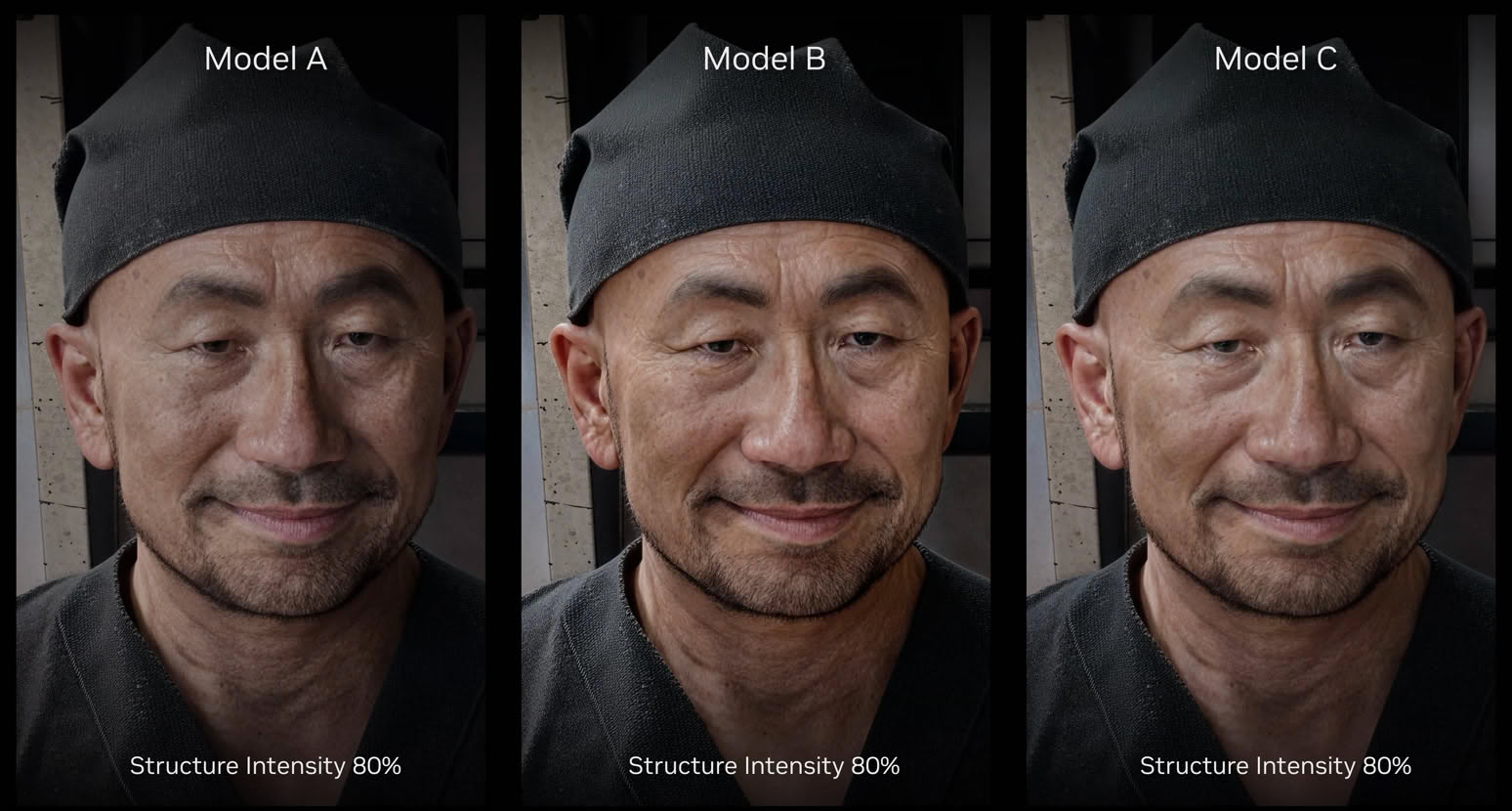
Here are all three on the same face at a fixed Structure Intensity of 80%, so the only variable is the model. The differences are real but subtle—look at the skin around the eyes and the way each one handles the sheen on the forehead.
Importantly, there is no performance difference between A, B and C, NVIDIA confirmed in the Q&A that switching between them does not change performance.
Structure Intensity and Tone Intensity
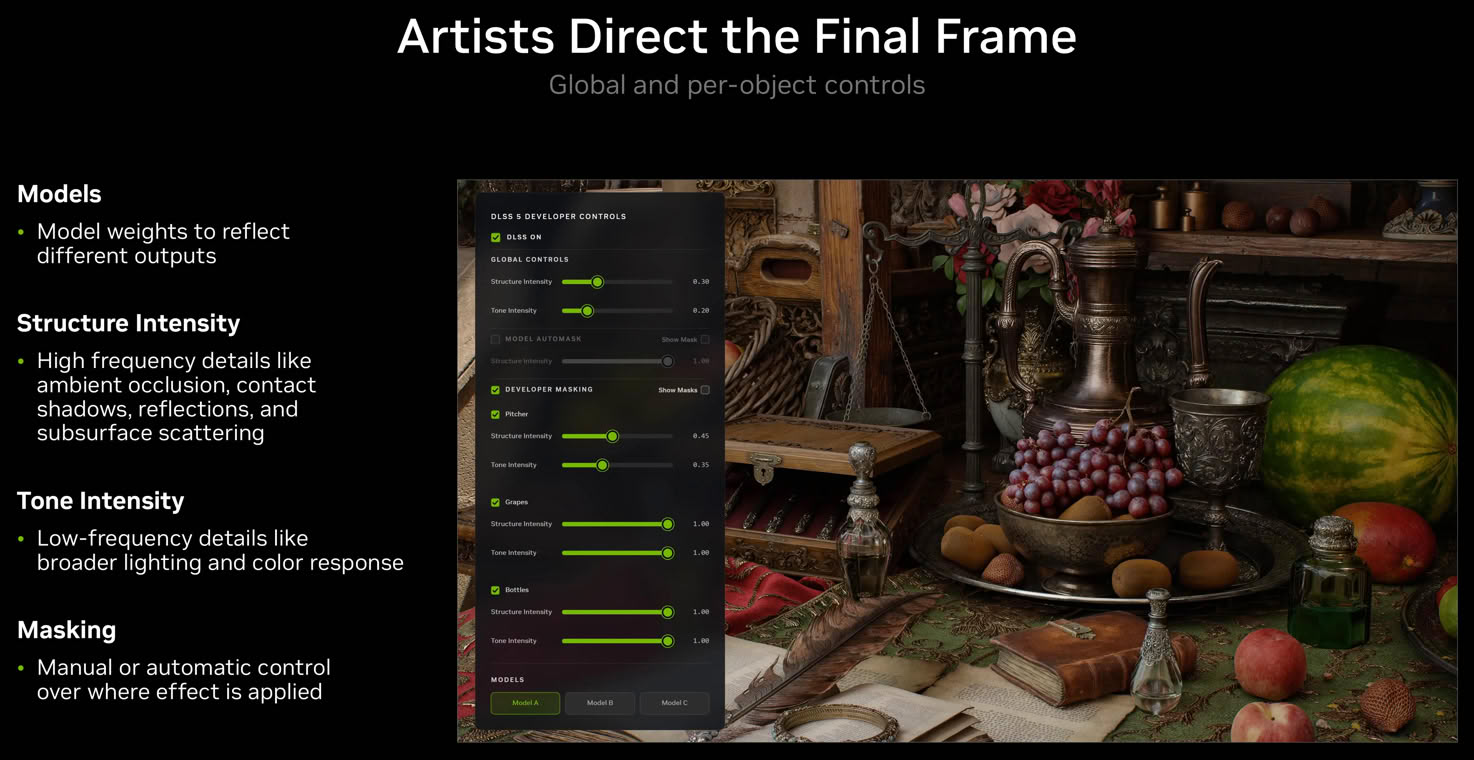
Two global sliders, both running from 0 to 1.
- Structure Intensity handles high-frequency detail: ambient occlusion, contact shadows, reflections and subsurface scattering.
- Tone Intensity handles low-frequency detail: broader lighting and color response.
Gabriele mentioned that the studios he is working with have converged on a pattern: environments and backgrounds pushed to maximum uplift, because they like what it does there, while characters and faces get tuned individually and much more conservatively.
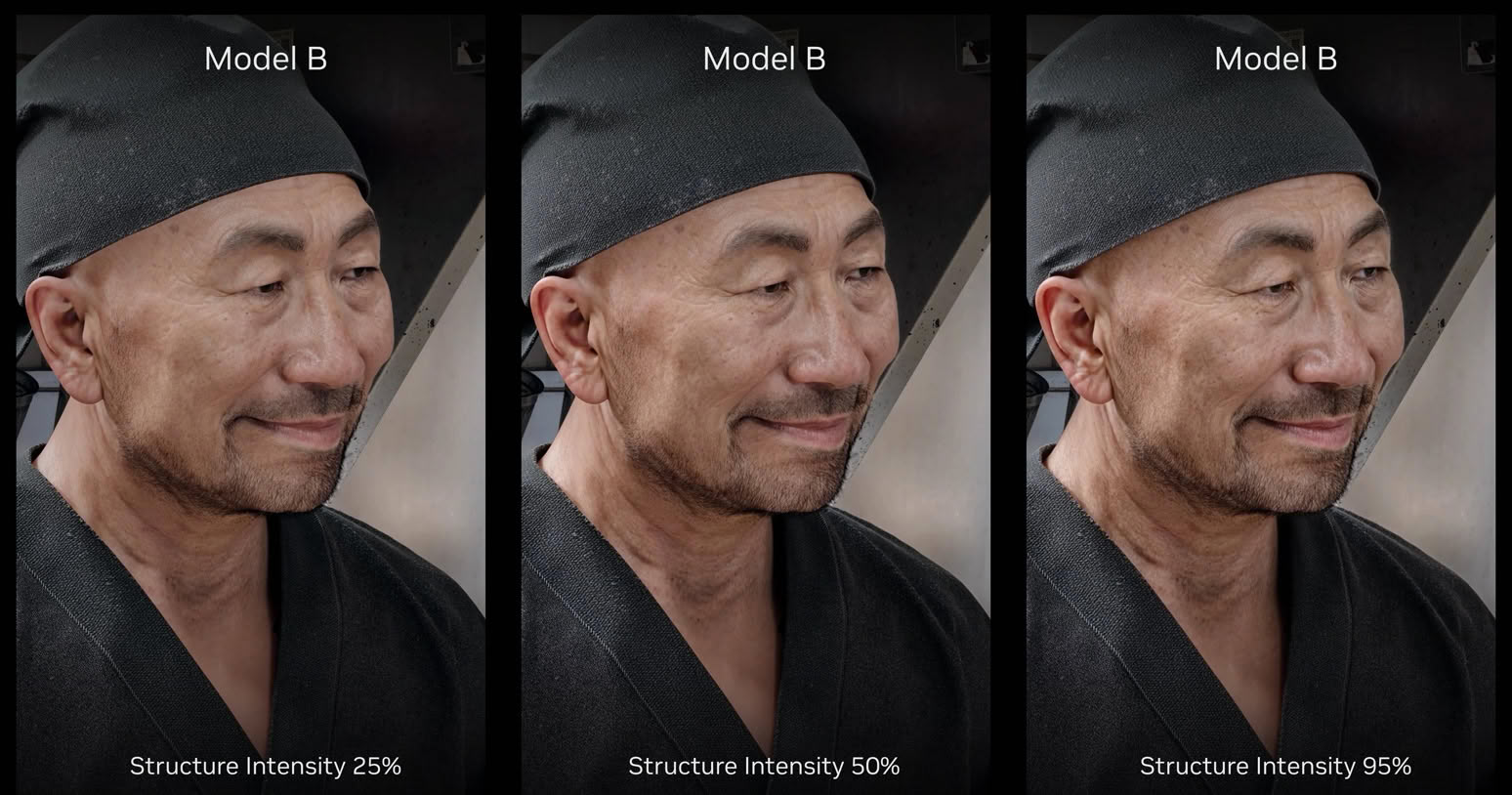
This is the same model—Model B—at Structure Intensity 25%, 50% and 95%. It is a useful slide to look at closely, because it is NVIDIA showing you their own range. At 25% the effect is subtle and sits close to the rendered frame; at 95% you get the full uplift.
Two Kinds of Masking
This is where it gets more interesting than the sliders.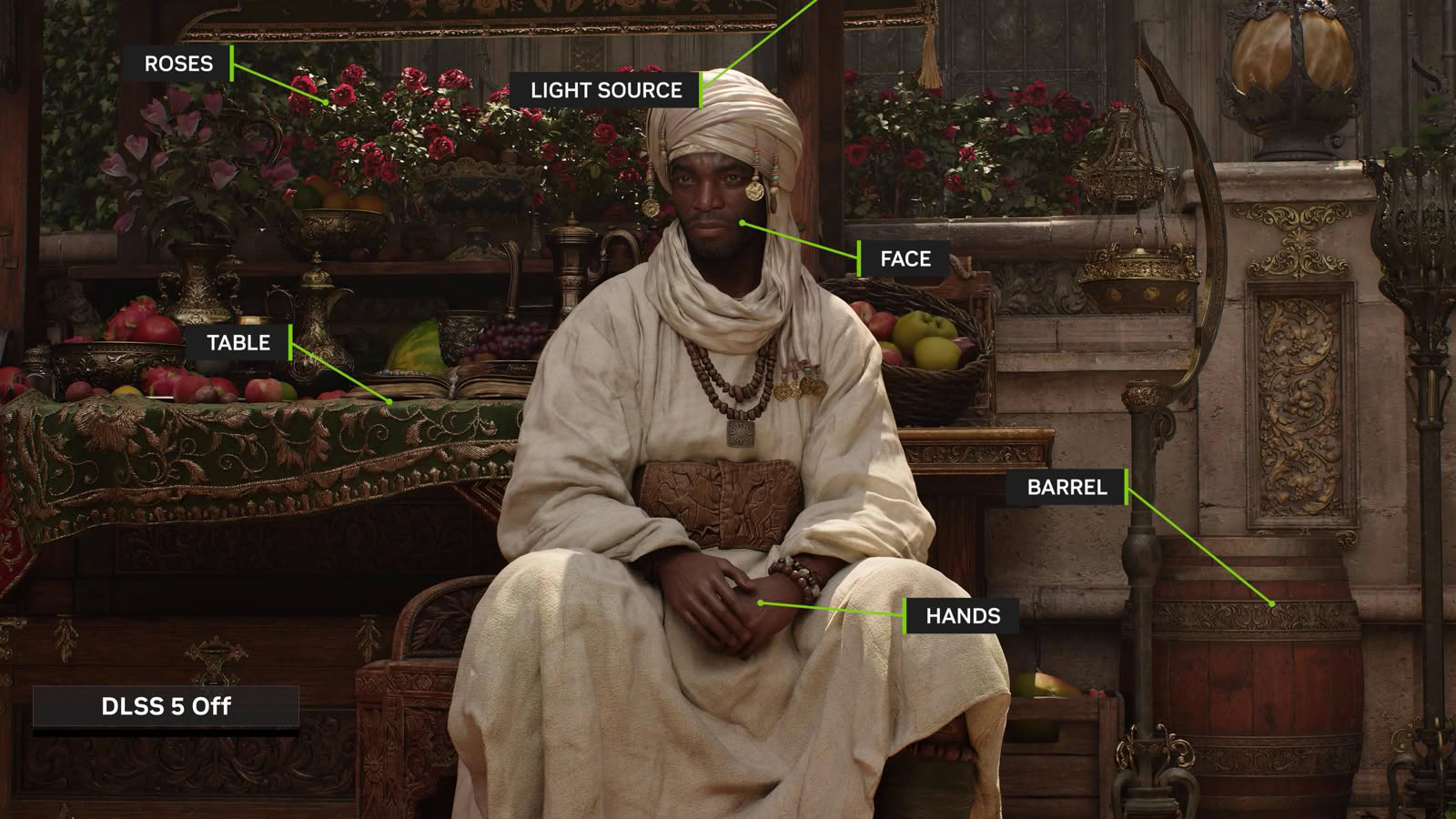
NVIDIA's own illustration of what that understanding covers: roses, light source, face, table, barrel and hands are all identified as distinct things in a frame the model only ever received as color and motion vectors.
Model auto-masking comes from the model itself. Because DLSS 5 understands the scene, it can split it up without help—it knows which pixels are the character, what's the table behind him, which are background. Gabriele demonstrated dropping Structure Intensity to zero on an auto-masked character while the rest of the frame stayed at full uplift, and made a point of showing that the character's hands stopped being enhanced along with the face, because the model understands them as one entity.
Developer masking comes from the engine side. Studios can mask individual objects or group them, with separate settings per group, and there is no limit: hundreds of masks or groups are possible. Gabriele's examples were grouping all the food in a game, or all the foliage, and treating each group differently. In the Zorah demo he switched between "produce" and "textiles" groups and changed each independently.
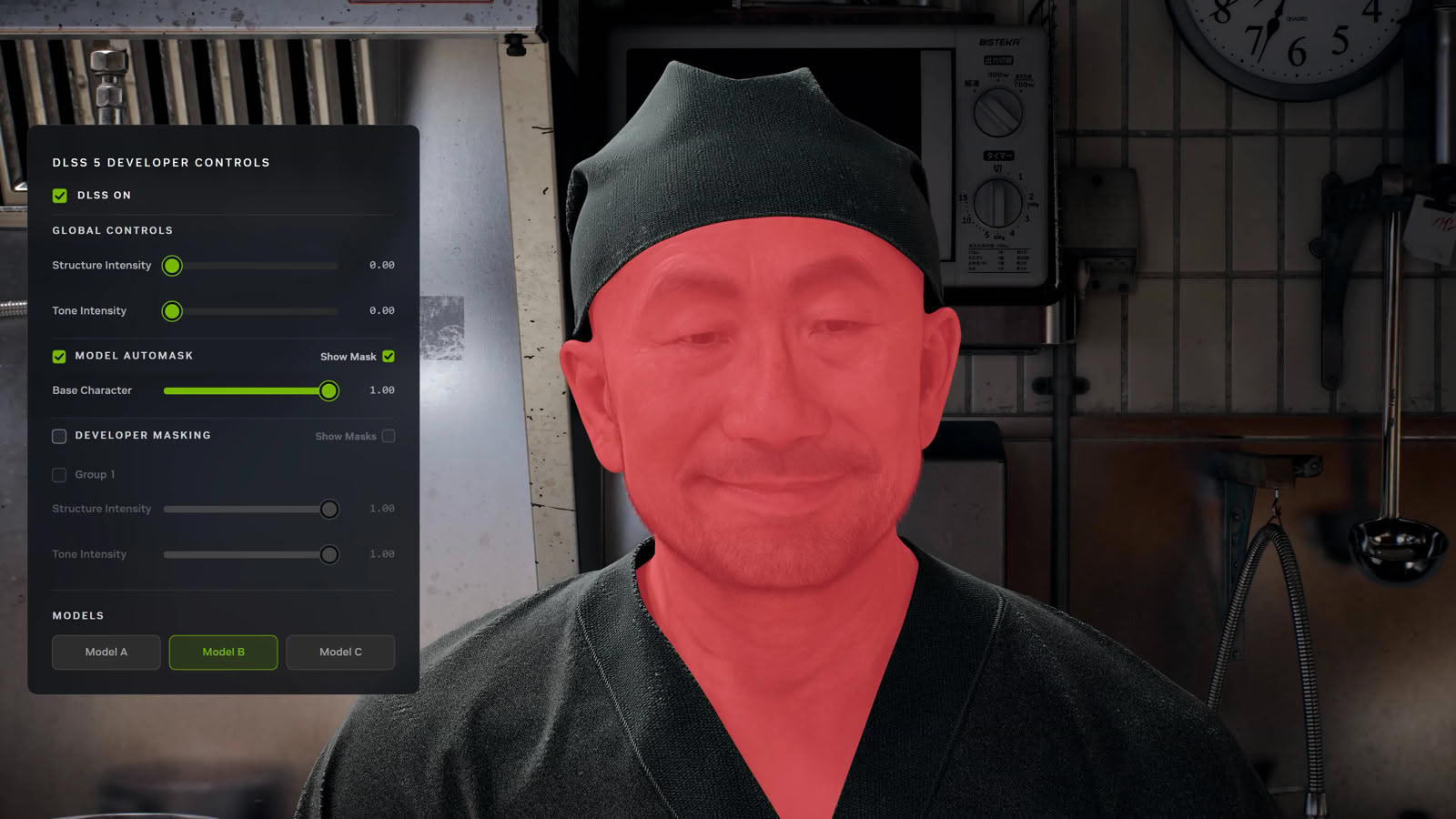


The developer control panel in the Zorah demo gives you the shape of the whole system at a glance: a global Structure and Tone Intensity pair, a Model Automask section with its own Structure and Tone pair, a Developer Masking list where every group gets another pair, a "Visualize Stencil Mask" toggle, and the Model A / B / C selector along the bottom.
Those first two shots are worth comparing. The red overlay on the chef is the model's own automask—nobody authored it, DLSS 5 worked out where the character was. The green pitcher, blue grapes and yellow bottles in the second are developer-authored mask groups, each with its own Structure and Tone pair in the panel on the left. Both kinds of mask feed the same screen-space control buffer, which is why neither costs anything.
None of this costs performance. We asked about this directly, and it was put to NVIDIA more than once. The model consumes a single screen-space buffer holding the developer's control values, and it runs identically no matter what is in that buffer. The only cost is whatever the engine spends filling the buffer in the first place, which is engine-dependent. Mask count, group count, slider positions—none of it changes the model's cost.
What It Costs the Studio
The practical question got asked too: how much work is it to create the metadata that lets DLSS 5 tell foliage from furniture from metalware, if you want different treatment per asset type? The answer was that it depends entirely on the studio and the engine, and that the granularity is theirs to choose. They can go per object if they want. They can do something far coarser—indoor versus outdoor, gameplay versus cutscene. Gabriele's framing was that this is no different from adopting any other rendering technique: "just like for other rendering algorithms, they will have to do similar work to see how they bring in the best. This is just another tool."This means that many games can ship "DLSS 5 Support," using defaults everywhere, while others give you a game that's tuned scene by scene with much more love. Even though I find the latter highly unlikely—console games are the moneymakers, and a feature that's PC-exclusive, RTX 50 only won't be getting that much attention.
What I like is that the minimum requirement is very low, very simple. The model wants the color buffer and motion vectors—exactly what Super Resolution already requires, and Super Resolution is in essentially everything now, so studios have figured that part out long ago. There is no new data to generate and no special render pass. The only thing left is the user interface: somebody has to put a toggle on the graphics options screen.
Everything expensive is optional. The stencil masks, the per-object groups, the per-character tuning—none of it is required to have working DLSS 5, only to have better DLSS 5. Contrast this to Ray Reconstruction, where we're talking about 20+ engine buffers.
When asked about games that are not photorealistic, NVIDIA answered that the low integration cost means a developer can simply try it and judge for themselves.
The Sliders Are Not For You
I asked NVIDIA how DLSS 5 control is exposed in the game—whether there is anything at all beyond on and off. The answer was no, gamers get a DLSS neural rendering on/off toggle in the game's own settings, and what they see when they switch it on is what the developer decided they should see. NVIDIA left the door slightly open to developers shipping their own settings presets in the future, but would not commit to anything.
Nov 18th, 2026 05:33 CST
change timezone
Latest GPU Drivers
New Forum Posts
- Without Jensen, PC gaming will be (41)
- Wireless Internet sharing between PC and router both-ways, is it possible? (12)
- GIGABYTE - H55N-USB3 ITX Upgrade experience (3)
- What are you playing? (26233)
- DTS DCH Driver for Realtek HDA [DTS:X APO4 + DTS Interactive] (2811)
- Gacha Games - Discussions, Pulls, Updates, etc. (1155)
- RX 580 2048SP 8GB Samsung – Black Screens in Games, Looking for a Compatible BIOS (1)
- 9070 GRE 3.9ghz validation reached. (20)
- Will zen 6 mobos have anything extra vs current ones? (54)
- [Poll] 12V-2x6 Connector Protection: What Are You Using? (WireView / Ampinel / Equalizer / Other / Nothing) (31)
Popular Reviews
- Acemagic Retro X3 Review
- Upcoming Hardware Launches 2027 (Updated Nov 2026)
- AMD Zen 6 Technical Deep Dive
- ASUS ROG Strix B850-I Gaming Wi-Fi7 W Review
- Corsair HX1000i Shift Crystal Review
- Chieftec Iceberg PRO 360 DARK Review
- AMD Ryzen 7 9800X3D Review - The Best Gaming Processor
- Biwin Black Opal NV7400 2 TB Review
- Phantom Blade Zero Performance Benchmark Review - 35 GPUs Tested
- Montech King 95 3D PRO Review
TPU on YouTube
Controversial News Posts
- NVIDIA Co-Founder and CEO Jensen Huang Officially Resigns (468)
- Open Letter Asking NVIDIA to Reinstate Jensen Huang Passes 115,000 Signatures (184)
- Report: Jensen Huang Eyes NVIDIA Comeback (158)
- OpenAI CEO Argues Home PCs Waste the World's Limited DRAM Supply (152)
- NVIDIA Launches Investigation Into Jensen Huang's Relationship With Suspected Chinese Spy (136)
- Intel "Raptor Lake Next" 16-Core and 20-Core CPUs Surface (130)
- Legendary Game Studio BioWare Shuts Down Following EA Layoffs (104)
- Dell CEO Says the Memory Shortage Will Get Worse in 2027 (95)