 6
NZXT N9 Z890 Review
(6 Comments) »Value and Conclusion
- The NZXT N9 Z890 is available online for $230
- Recent price cut makes it much more affordable
- Looks fantastic
- Excellent VRM temperatures
- Overclockable
- VRM fans can be fine-tuned
- Excellent VRM temperatures
- Decent number and speed of USB ports
- Front USB 3.2 Gen 2x2 20 Gbps Type-C header
- No bandwidth sharing
- Two Thunderbolt 4 40 Gbps ports
- EFI lacks basic fan control features, forcing the use of software
- VRM fans noisy out of the box
- Poor M.2 SSD temperatures
- Top M.2 heatsink isn't tool free
- VRM fans can only respond to CPU temperature
- Lower M.2 heatsink requires GPU removal
- No enhanced GPU release
- NZXT CAM is only easy way to adjust fan speeds
- Lack of cutting-edge features
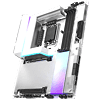
NZXT has made plenty of improvements compared to its initial foray into motherboards, and we're liking what we see. It's carved out an aesthetic niche that's now instantly-recognizable, even if there aren't many other unique selling points. There are good takeaways from the N9 Z890 too, such as excellent VRM temperatures, fantastic-looking RGB lighting, a well-rounded feature set that includes PCIe Gen 5 SSD and GPU support, plus Thunderbolt 4 Type-C ports, Wi-Fi 7 and 5 Gbps Ethernet, all with zero bandwidth sharing.
The price is a very important factor, though, as this conclusion would probably be very different were we looking at the board at its full price of $500. With a cut to a fantastically low $230 for what is its flagship motherboard, the N9 seems like a steal, and a reason to overlook any significant shortcomings if you want a high-end Z890 motherboard. That massive price cut means that instead of competing against excellent—but extremely expensive—competition, you get many features boards costing upwards of $100 more have, in addition to overclocking support. Intel's Core Ultra 200 CPUs are also far cheaper than at launch, that means that combined with the N9 Z890, it's hard not to see the value proposition.
If we look at what the best the competition has to offer at this price, such as the excellent Gigabyte Z890 Aorus Elite X Ice, it has fewer fast USB ports, 2.5 Gbps Ethernet, slightly warmer VRMs and no onboard RGB lighting. However, it otherwise stacks up well to the N9 Z890, taming our PCIe Gen 5 SSD while the N9 could not, had more tool-free heatsinks, enhanced GPU release, and perhaps more importantly, has a better EFI with a proper modern fan control suite as well as thermistor probes. It's clear, then, that despite the price cut, it's still quite easy to pick holes in the N9 Z890, where far cheaper options compared to its original launch price are superior in some areas and offer better-rounded packages. It's also not the only board to receive hefty price cuts over the last few months either. The ASRock Phantom Gaming Z890 Riptide Wi-Fi has fallen from $300 when we looked at it in the summer to just $200 now, and again, has the better of the N9 Z890 in a couple of areas such as SSD temperatures, tool-free heatsinks and the inclusion of a thermistor probe and more 4-pin fan headers. The ASUS TUF Gaming Z890-Pro Wi-Fi too, has fallen from $270 to $240, does better with SSD temperatures and also includes 30 W PD 3.0 output over its front panel Type-C header, while offering the excellent ASUS EFI. It's a similar situation with the MSI MAG Z890 Tomahawk Wi-Fi too, which performs well out of the box and also features more tool-free heatsinks and 27 W power delivery over its Type- C front panel header, for $230.
You're likely here because you want overclocking support thanks to the Z890 chipset, but if not, then B860 is also worth considering. Boards here can still perform just as well, if not better in the case of the $160 ASRock B860 Steel Legend Wi-Fi, which offered better SSD temperatures as well as not seeing many cutbacks elsewhere, managing to include Realtek's ALC1220 audio codec, PCIe Gen 5 SSD and GPU support and even Thunderbolt 4, but does dip down to Wi-Fi 6E.
In short, the NZXT N9 Z890's price cut is very welcome, and if you're sold on its design and don't mind its shortcomings then ultimately as an overall package, it's hard to argue against in terms of value. Peel away the snazzy outer layers, though, and similarly-priced competition starts to make more sense in terms of features, but it's rare that the N9 Z890 doesn't have some kind of edge, and if you prefer software rather than the EFI for controlling your fans then it might just be the board for you. Just avoid double-sided PCIe Gen 5 SSDs and make sure you rein in the VRM fans.
The price is a very important factor, though, as this conclusion would probably be very different were we looking at the board at its full price of $500. With a cut to a fantastically low $230 for what is its flagship motherboard, the N9 seems like a steal, and a reason to overlook any significant shortcomings if you want a high-end Z890 motherboard. That massive price cut means that instead of competing against excellent—but extremely expensive—competition, you get many features boards costing upwards of $100 more have, in addition to overclocking support. Intel's Core Ultra 200 CPUs are also far cheaper than at launch, that means that combined with the N9 Z890, it's hard not to see the value proposition.
If we look at what the best the competition has to offer at this price, such as the excellent Gigabyte Z890 Aorus Elite X Ice, it has fewer fast USB ports, 2.5 Gbps Ethernet, slightly warmer VRMs and no onboard RGB lighting. However, it otherwise stacks up well to the N9 Z890, taming our PCIe Gen 5 SSD while the N9 could not, had more tool-free heatsinks, enhanced GPU release, and perhaps more importantly, has a better EFI with a proper modern fan control suite as well as thermistor probes. It's clear, then, that despite the price cut, it's still quite easy to pick holes in the N9 Z890, where far cheaper options compared to its original launch price are superior in some areas and offer better-rounded packages. It's also not the only board to receive hefty price cuts over the last few months either. The ASRock Phantom Gaming Z890 Riptide Wi-Fi has fallen from $300 when we looked at it in the summer to just $200 now, and again, has the better of the N9 Z890 in a couple of areas such as SSD temperatures, tool-free heatsinks and the inclusion of a thermistor probe and more 4-pin fan headers. The ASUS TUF Gaming Z890-Pro Wi-Fi too, has fallen from $270 to $240, does better with SSD temperatures and also includes 30 W PD 3.0 output over its front panel Type-C header, while offering the excellent ASUS EFI. It's a similar situation with the MSI MAG Z890 Tomahawk Wi-Fi too, which performs well out of the box and also features more tool-free heatsinks and 27 W power delivery over its Type- C front panel header, for $230.
You're likely here because you want overclocking support thanks to the Z890 chipset, but if not, then B860 is also worth considering. Boards here can still perform just as well, if not better in the case of the $160 ASRock B860 Steel Legend Wi-Fi, which offered better SSD temperatures as well as not seeing many cutbacks elsewhere, managing to include Realtek's ALC1220 audio codec, PCIe Gen 5 SSD and GPU support and even Thunderbolt 4, but does dip down to Wi-Fi 6E.
In short, the NZXT N9 Z890's price cut is very welcome, and if you're sold on its design and don't mind its shortcomings then ultimately as an overall package, it's hard to argue against in terms of value. Peel away the snazzy outer layers, though, and similarly-priced competition starts to make more sense in terms of features, but it's rare that the N9 Z890 doesn't have some kind of edge, and if you prefer software rather than the EFI for controlling your fans then it might just be the board for you. Just avoid double-sided PCIe Gen 5 SSDs and make sure you rein in the VRM fans.
Nov 19th, 2026 12:21 CST
change timezone
Latest GPU Drivers
New Forum Posts
- How to prevent OLED burn damage due to PC freezes or power outtages? (13)
- GTA VI (5)
- FINAL FANTASY XIV: Dawntrail Official Benchmark (226)
- Anthrophics IPO (3)
- Help with fixing Overclock (11)
- Why my RX 6800 XT read that it operate at x8 not x16 ? (47)
- Got the EOL 32GB TridentZ 6000 CL26 1.4V (10)
- Honestly, do you care about GTA VI? (162)
- Dual B70 or Dual R9700 Pro on Linux (9)
- Anime Nation (13187)
Popular Reviews
- Acemagic Retro X3 Review
- Ugreen NASync DXP4800 GT Review
- Upcoming Hardware Launches 2027 (Updated Nov 2026)
- Pulsar Office Tour & First Look at P1 Dual-Sensor Mouse
- AMD Zen 6 Technical Deep Dive
- Biwin Black Opal NV7400 2 TB Review
- Sapphire Radeon RX 7700 XT Pure Review
- Sapphire Radeon RX 7700 XT Pulse Review
- AMD Ryzen 7 9800X3D Review - The Best Gaming Processor
- Chieftec Iceberg PRO 360 DARK Review
TPU on YouTube
Controversial News Posts
- NVIDIA Co-Founder and CEO Jensen Huang Officially Resigns (484)
- Report: Jensen Huang Eyes NVIDIA Comeback (221)
- Open Letter Asking NVIDIA to Reinstate Jensen Huang Passes 115,000 Signatures (184)
- OpenAI CEO Argues Home PCs Waste the World's Limited DRAM Supply (152)
- NVIDIA Launches Investigation Into Jensen Huang's Relationship With Suspected Chinese Spy (136)
- Intel "Raptor Lake Next" 16-Core and 20-Core CPUs Surface (130)
- Legendary Game Studio BioWare Shuts Down Following EA Layoffs (104)
- Dell CEO Says the Memory Shortage Will Get Worse in 2027 (95)