 14
ORIGIN CODE Vortex DDR5-6000 192 GB CL26 Review
Value & Conclusion »AMD Memory Overclocking
Overclocking Tips and Tricks
In the overclocking department, we often set our sights on pushing the memory beyond what XMP/EXPO can provide. However, here with the system already burdened by four DIMMs, we faced a tough decision on where to focus our efforts. With two DIMMs and four ranks in total per memory channel, the challenges ahead were clear. Our goal in the memory overclocking section has always been to achieve results that others can replicate, so excessive DRAM or CPU IMC voltage was off the table. Reaching 6400 MT/s while maintaining a UCLK:MCLK/1 (1:1) ratio was not feasible, nor was hitting DDR5-8000 in a 2:1 mode because of the CPU IMC.
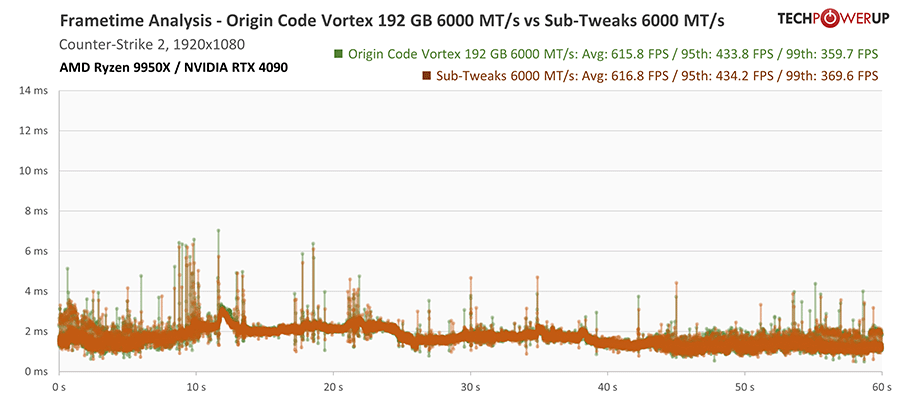
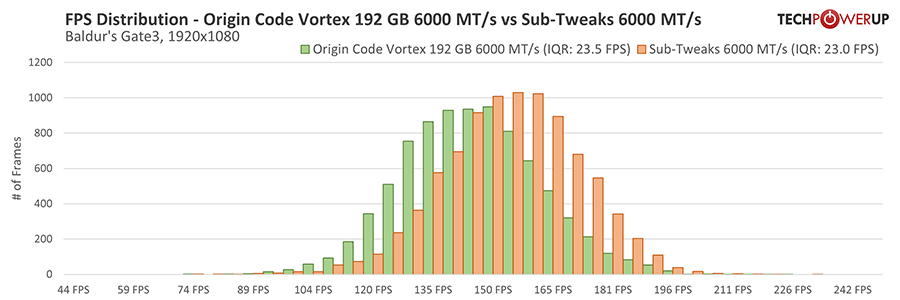
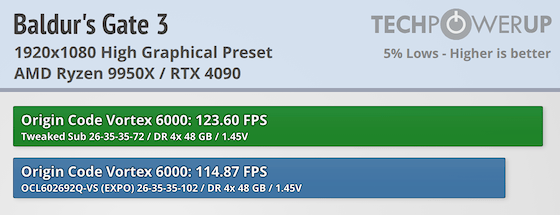
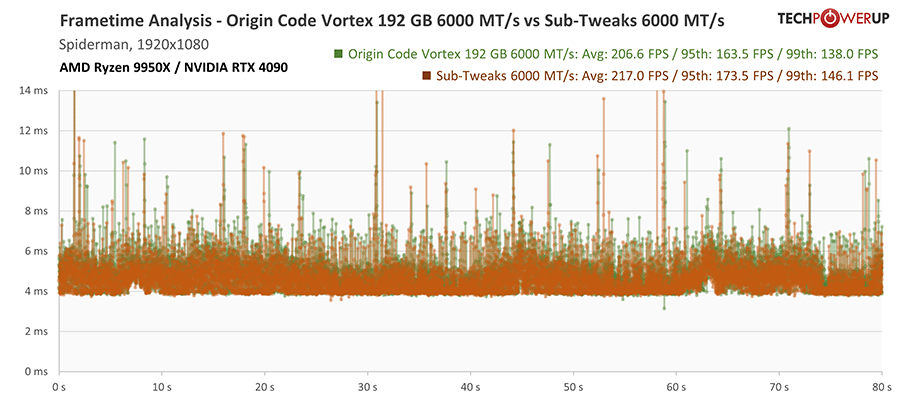
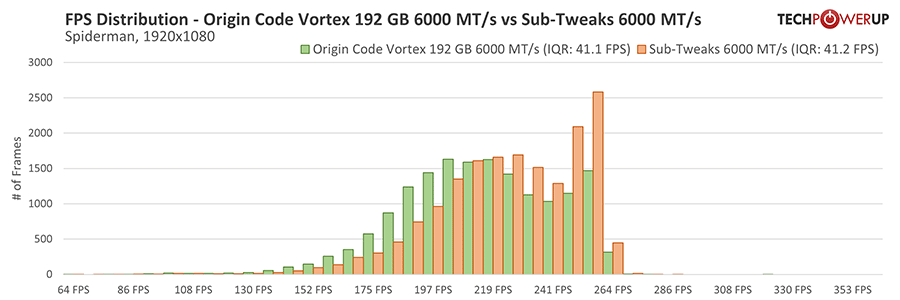
Starting with a EXPO/XMP of CAS 26, it is already the lowest you can go realistically at 6000 MT/s for long periods of uptime, so going down more was ruled out as well. This left us with only one option. That is to focus on a few sub-timings and see what performance gains it brings. Without changing the voltage or frequency, we adjusted parameters like tRRDs, tRRDL, tRDRDSCL, tWRWRSCL, and tREFi to achieve a straightforward small overclock. We steered clear of modifying tRFC2 and tRFCSB values, as these remain experimental on AMD platforms with the introduction of AGESA 1.2.8.0's new Refresh Management (RFM) BIOS option. This approach ensures a balance between performance gains and system stability, a crucial consideration for any serious overclocking enthusiast.
AMD Overclocking Results


DDR5-6000 CL26 y-cruncher 25B HWBot Submission
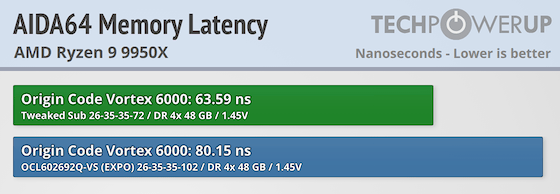
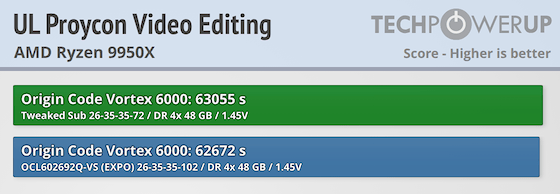
Counter-Strike 2 Overclocking Results
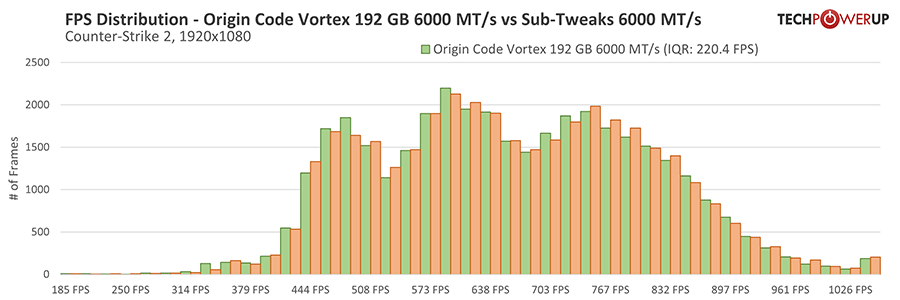
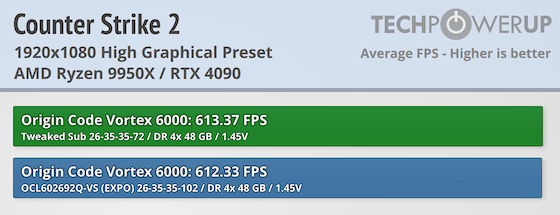
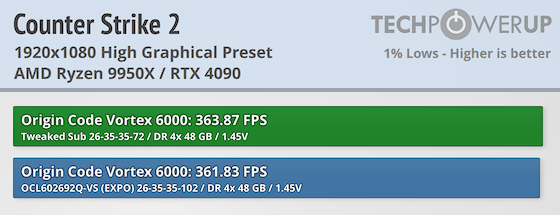

Baldur's Gate 3 Overclocking Results
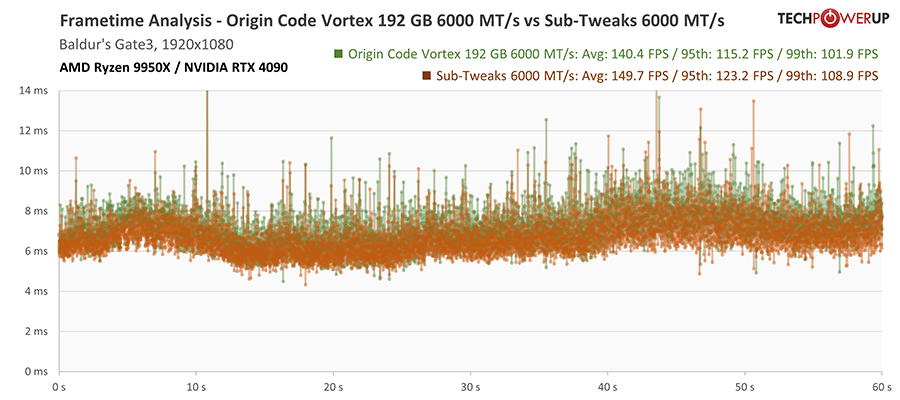


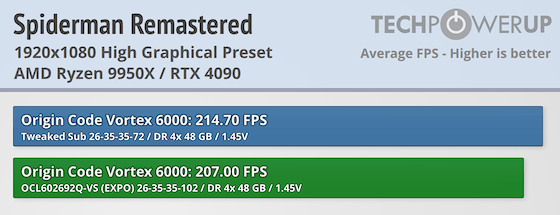
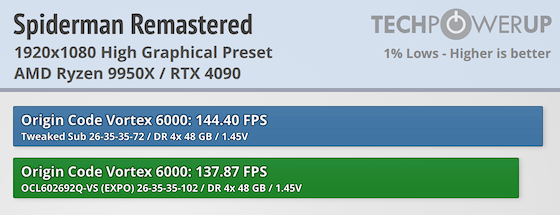
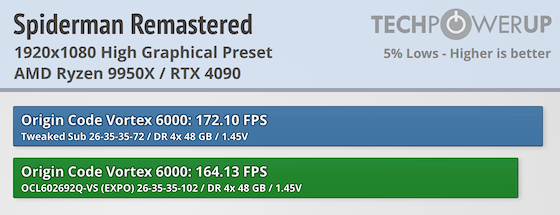
Spider-Man Remastered Overclocking Results
Nov 11th, 2026 18:17 CST
change timezone
New Forum Posts
- When you could finally run Crysis maxed out? (44)
- WarpCoreBench scores! (14)
- Warning for Windows 10 and 11 users running newer AMD GPU drivers (49)
- Bought MAX-P495 - Which model? (29)
- GeekMagic Ultra Smart WiFi Weather Station (3)
- DTS DCH Driver for Realtek HDA [DTS:X APO4 + DTS Interactive] (2809)
- Rare GPUs / Unreleased GPUs (2271)
- Samsung 870 EVO - Beware, certain batches prone to failure! (1486)
- Windows new update 26H2 - Throttlestop (10)
- TPU's F@H Team (20569)
Popular Reviews
- AMD Zen 6 Technical Deep Dive
- Upcoming Hardware Launches 2027 (Updated Nov 2026)
- XPG NIMBUS PLUS Review - Mid-range Chair With Strong Competitors
- NZXT H7 RGB+ Review
- NZXT H5 Review
- Phantom Blade Zero Performance Benchmark Review - 35 GPUs Tested
- NZXT C1200 Platinum Review
- Gigabyte Z890I Aorus Ultra Review
- Montech King 95 3D PRO Review
- INNOCN 45C1R Review - Two QHD Screens, Zero Bezels
TPU on YouTube
Controversial News Posts
- OpenAI CEO Argues Home PCs Waste the World's Limited DRAM Supply (152)
- NVIDIA Launches Investigation Into Jensen Huang's Relationship With Suspected Chinese Spy (136)
- Intel "Raptor Lake Next" 16-Core and 20-Core CPUs Surface (130)
- Legendary Game Studio BioWare Shuts Down Following EA Layoffs (104)
- Dell CEO Says the Memory Shortage Will Get Worse in 2027 (95)
- NVIDIA GeForce RTX 50-Series Scheduled for up to $500 Price Hike This Week (89)
- AMD Radeon Owners Can Now Run Nearly Every DLSS Feature Through Fan-Made Mod (80)
- Modder Fits RTX 5090 With Four 8-Pin Connectors, Halving Current per Wire (80)