 27
Patriot Viper Xtreme 5 DDR5-8200 48 GB CL38 Review
Value & Conclusion »Had an Overclocking Dream Lately?
Overclocking Tips and Tricks
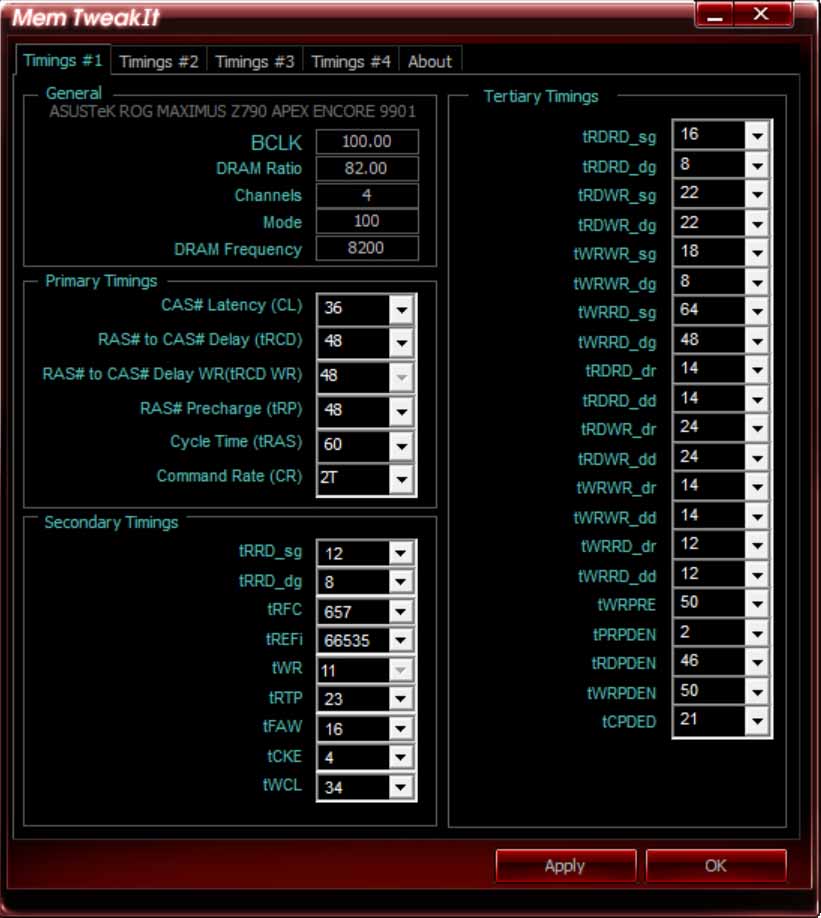
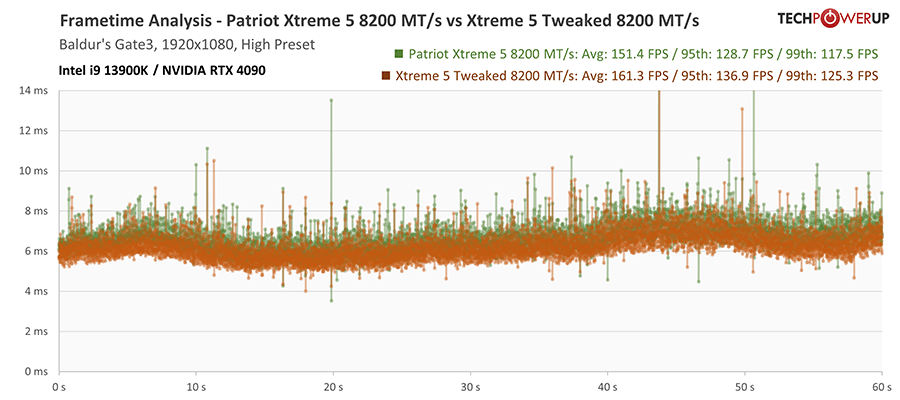
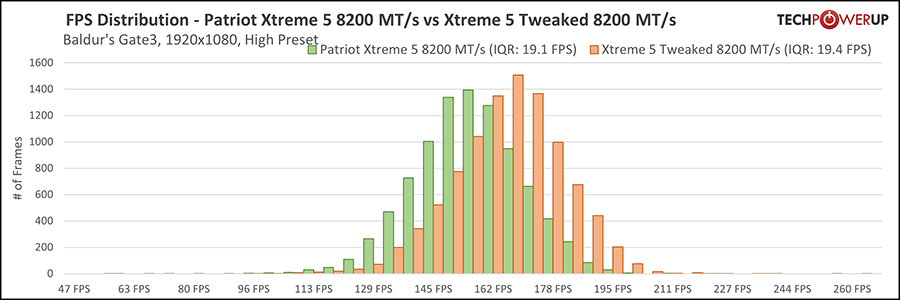
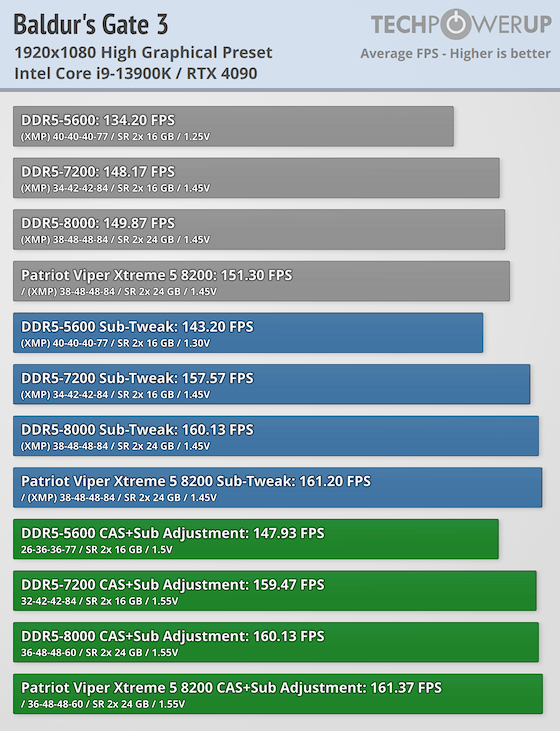
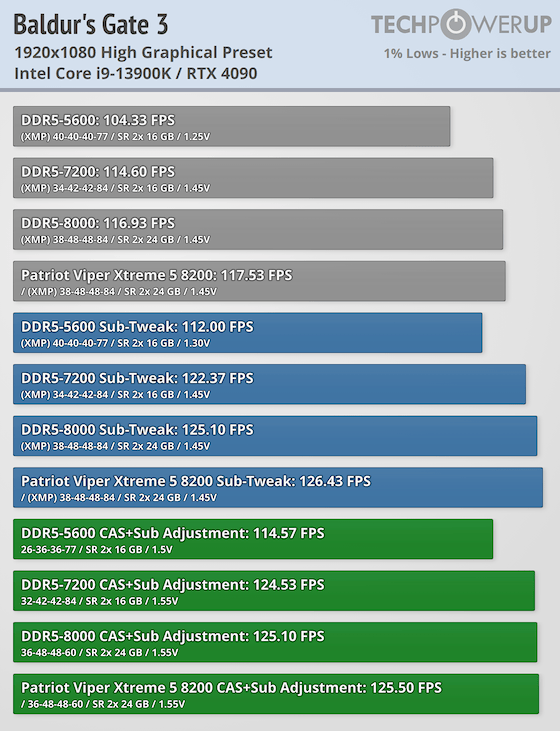
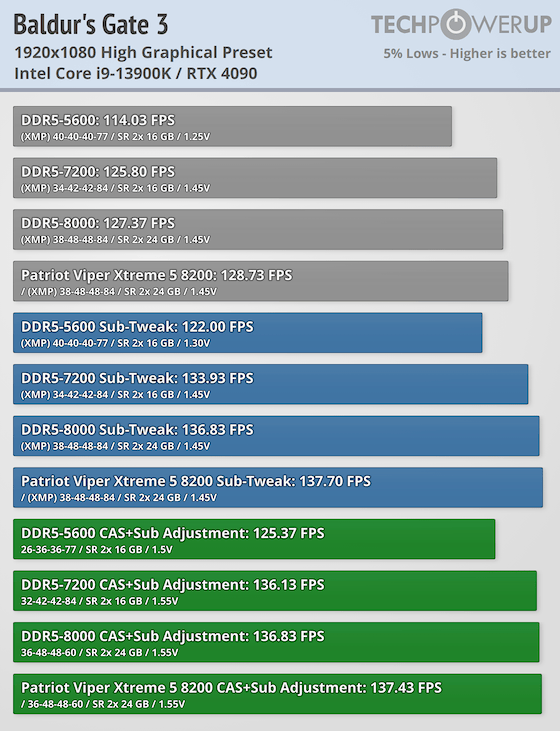
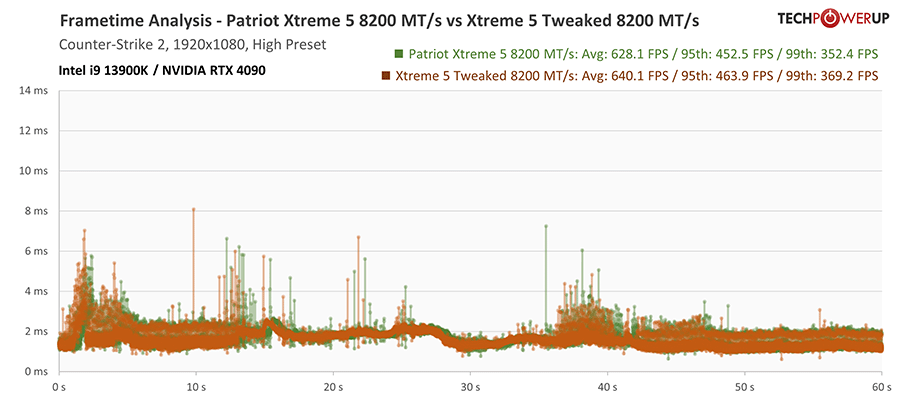
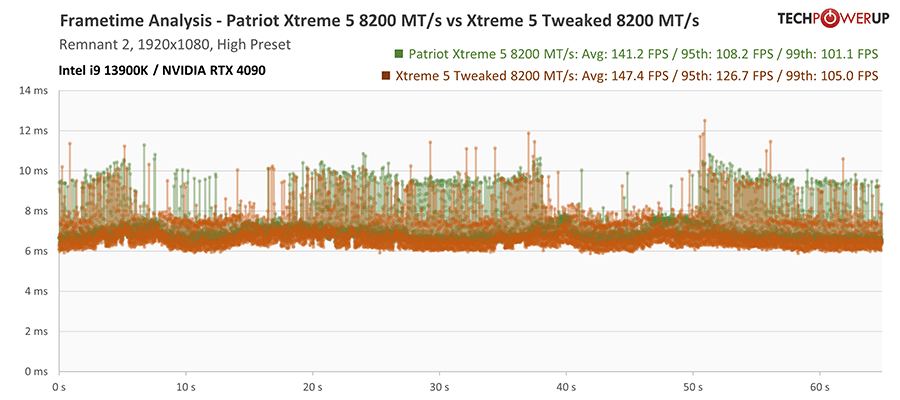
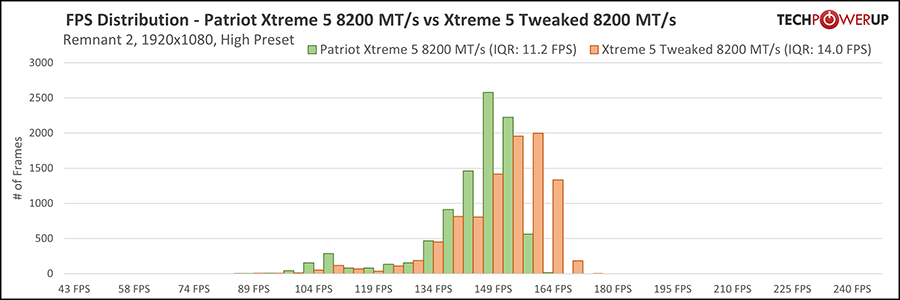
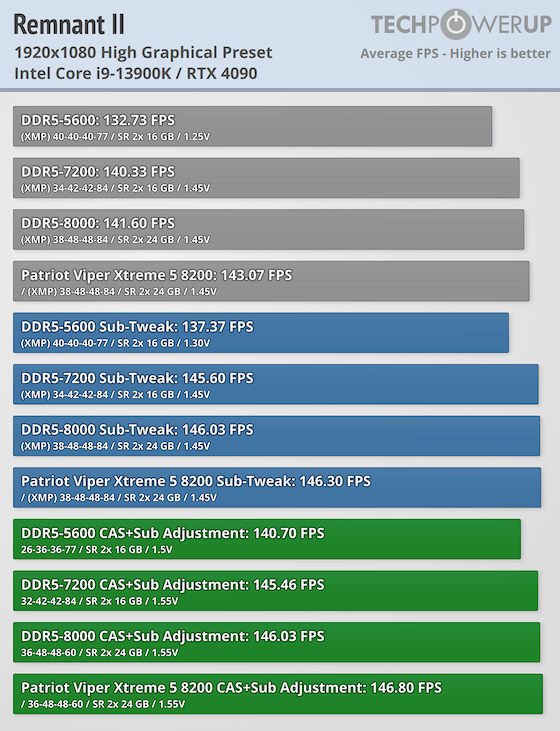
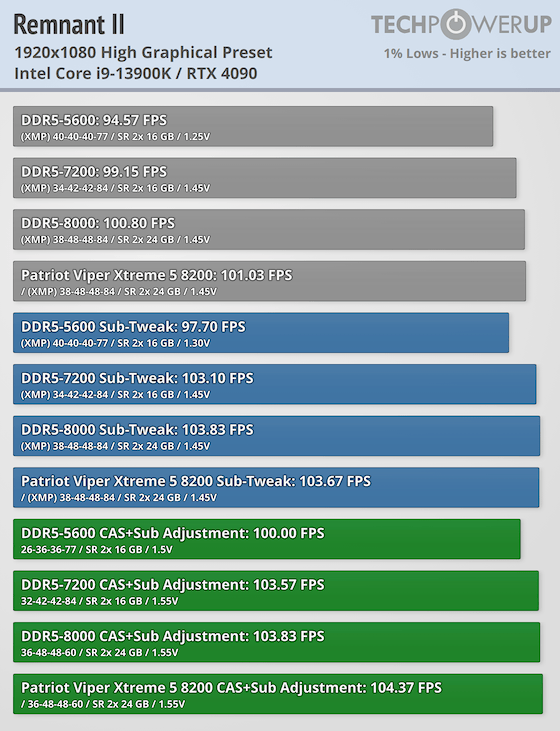
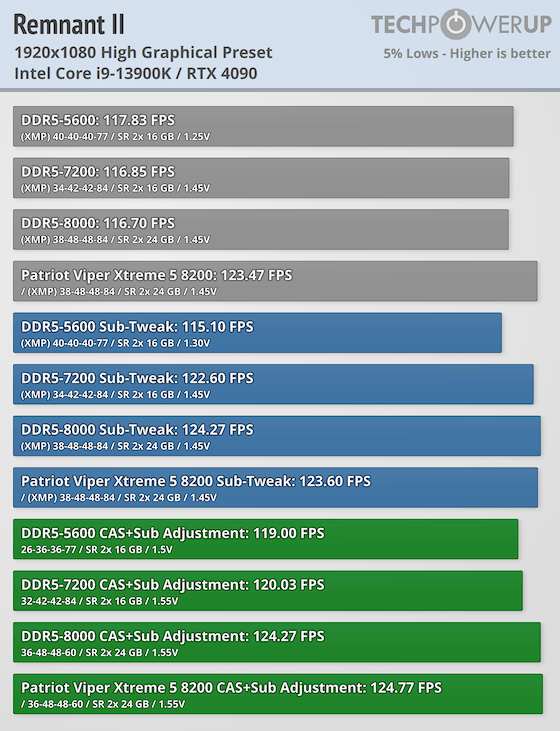
The common expectation for memory overclocking in a review is to go for the highest possible frequency, which then is used to gauge how "good" the memory is overall. This can be misleading, as each memory kit will differ per batch to a certain degree. Secondly, this data does not benefit the majority of users who do not have the required computer components to reach these same overclocking values. Instead, in this section going forward, we will pit memory that has the basic XMP profiles applied to ones that are manually adjusted at using the same frequency. This means all the sub-timings not included in the SPD data are set by the motherboard. This is how the benchmarks are complied by. Next we adjust the sub-timings to relatively low values without changing the XMP primary timings or voltage. Lastly, we adjust the CAS values along with the previous sub-timings and raise the voltage (if necessary) to accomplish this. These individual settings can be found in the image gallery below.
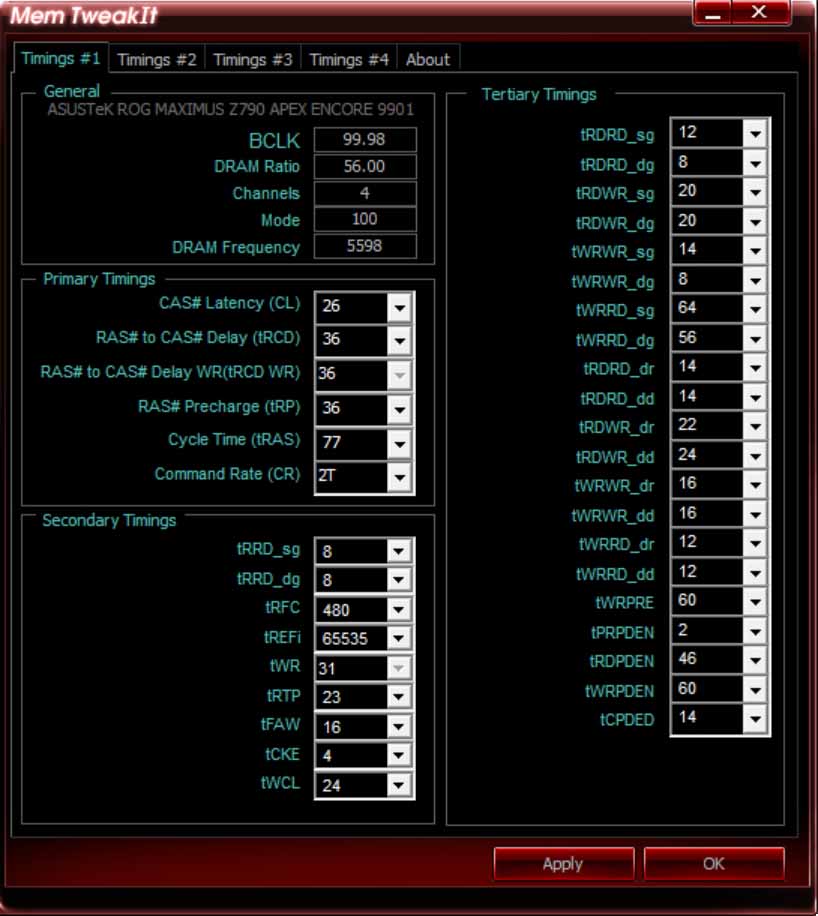
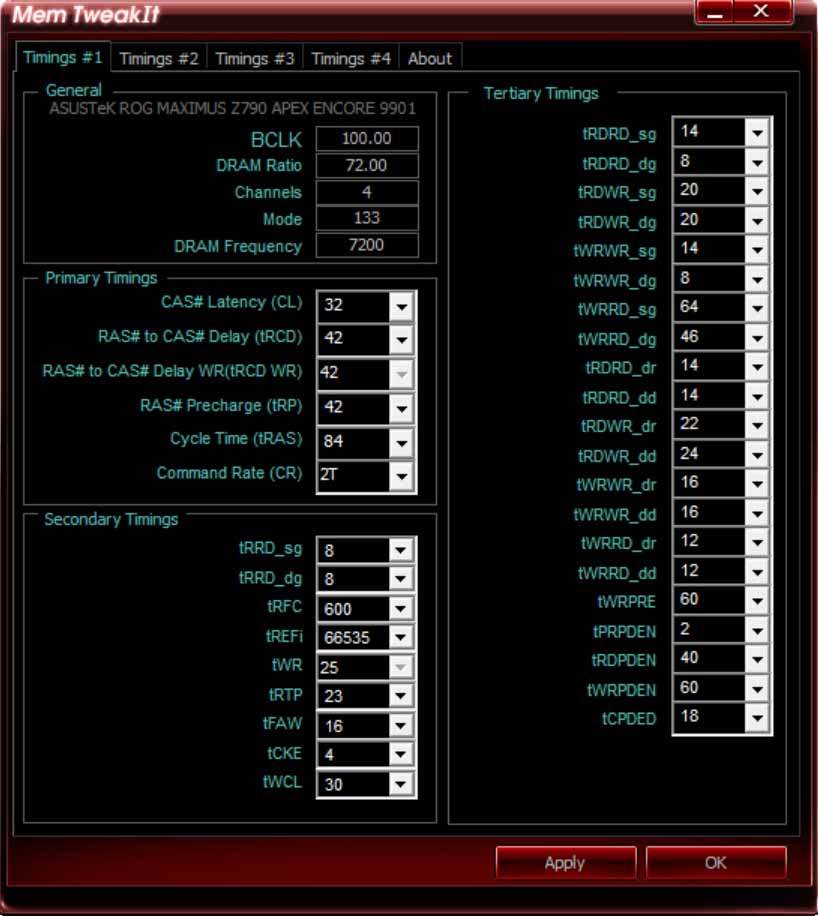
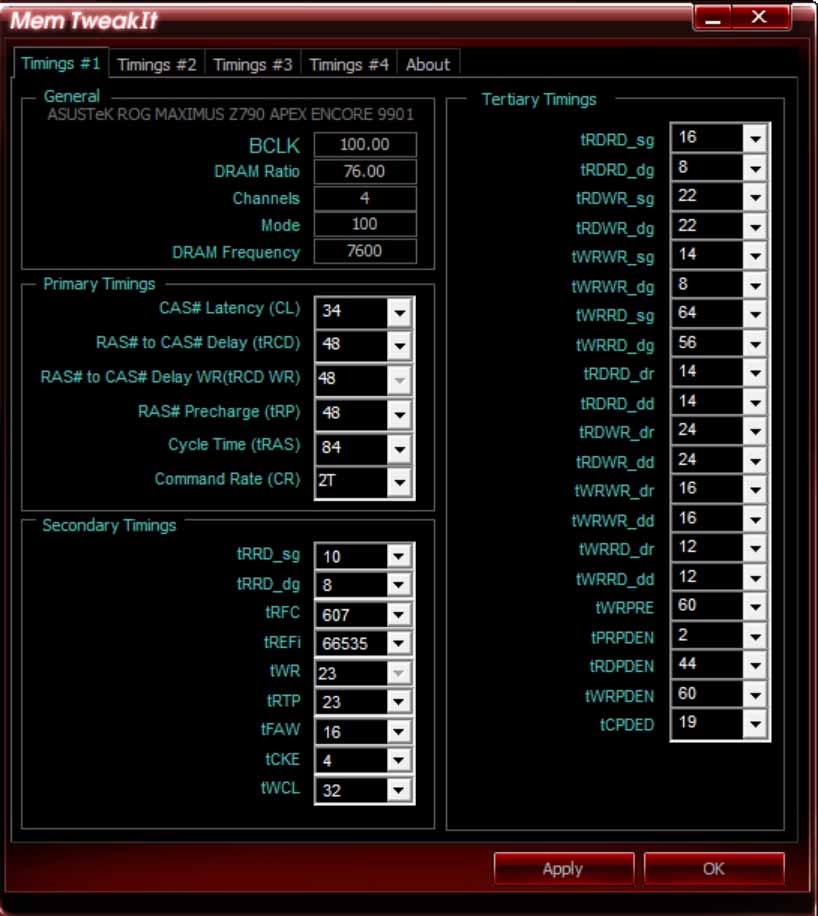
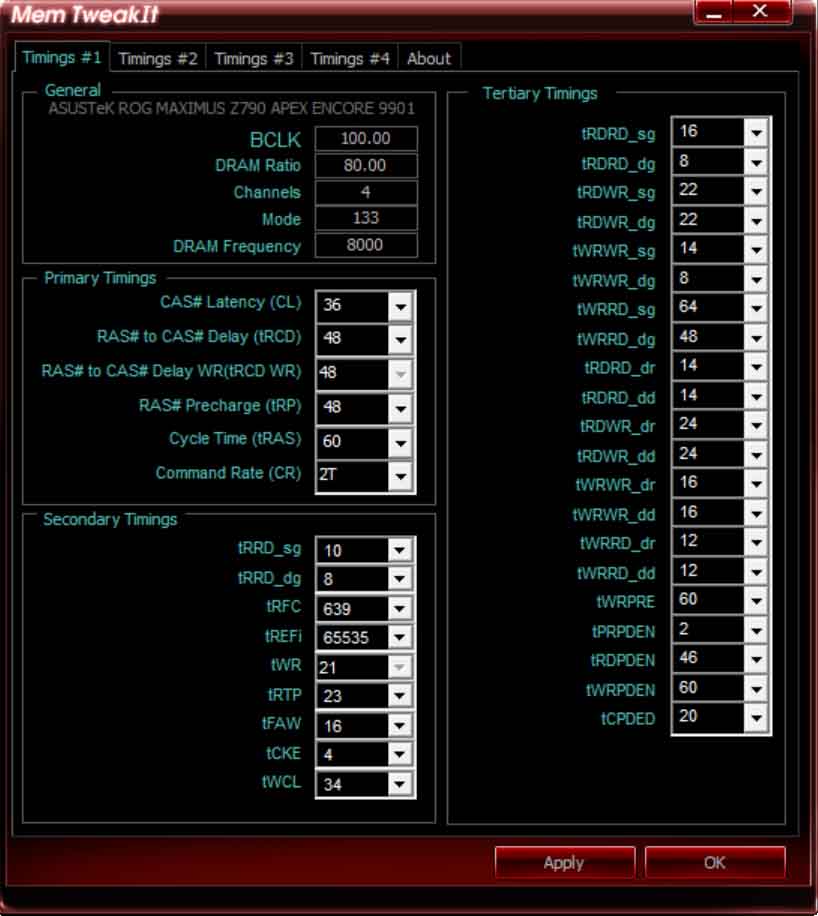
Before we continue further there are a few quick observational notes related to the secondary and tertiary timings. These values for the most part are limited by the type of memory ICs, revision and or it's "quality," along with the signal integrity of the motherboard traces and trace length. Overall, with the exception of tRFC(1,2,SB) values and tREFI that are both highly dependent on temperature, the rest have a rather low factor for temperature sensitivity. In which, neither a bump in DRAM voltage nor an operating temperature between 43-53°C will factor into the lowest these values can be set to.
Intel Results
Being this is a Patriot flagship "halo" product, a bit of extra time spent on the overclocking aspect was necessary. The same process was applied to this kit as well as the rest. A tedious, methodical process of changing each value and validating if, in fact it was stable for long periods of time. This does not guarantee 24/7 stability, but it is enough for a normal home computer use-case. These results below were validated to pass y-cruncher 2.5B and reach 6000% or higher in the memory stress testing software Karhu. Because of this longer stability test, temperatures are a big factor. This required the sub-timings to be adjusted to withstand the heavy stress test placed upon the memory. Some additional small adjustments could have been made to the secondary and tertiary timings, but the gains would be minimal and likely harder to stabilize in the long run.Going in two separate directions for overclocking this time ended with the same problem as usual - temperature control. The highest frequency reached was DDR5-9000 with a single DIMM. While this booted into Windows and worked in a few benchmarks and games, it wasn't ever stable to begin with. No surprise there. Next try was working off of 8200 MT/s XMP profile and seeing how low the primary timings could be set to. CAS 34 required 1.60 V to boot and 1.65 V to pass y-cruncher 2.5B. tRCD and tRP could not be lowered below 48 without an instant BSOD. Once the memory's SPD temperature sensor reached 40°C, errors would start to appear in Karhu. Any hope of using CAS 34 for long uptimes would require a waterblock for this particular memory kit.
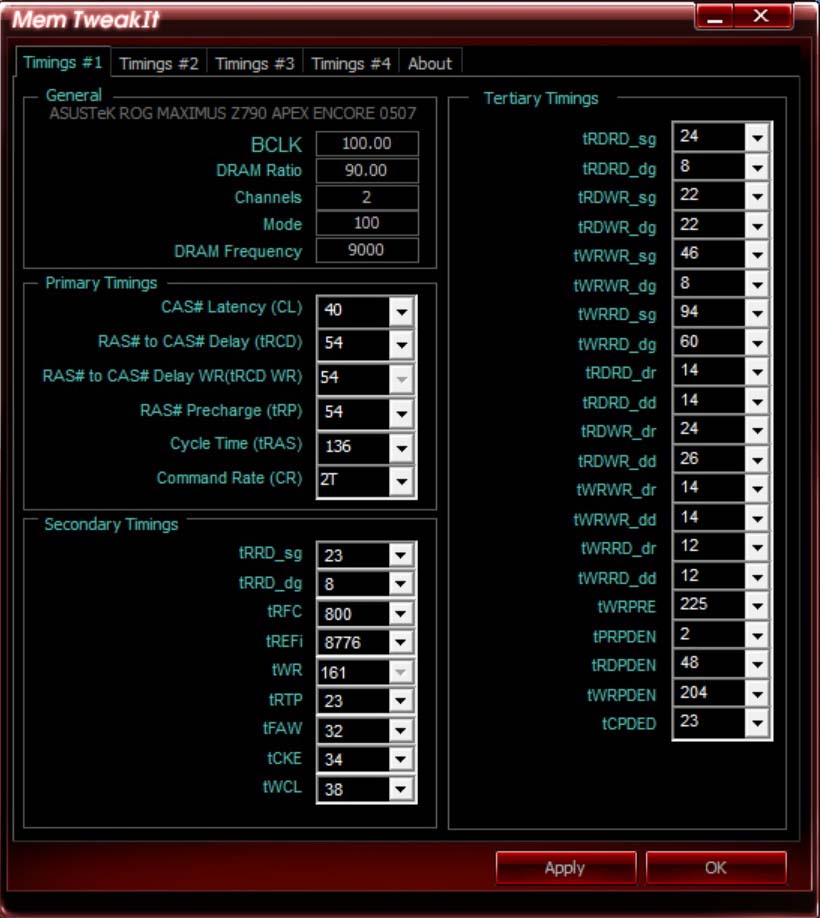
Ultimately, the stable values entered were very similar to the current 8000 MT/s setup, but with an increased of the value tWRWR_SG by 2 to reach 6000% in Karhu memory test. No matter the memory kit that is being tweaked, the big five; tRFC, tFAW, tRRD_sg, tRDRD_sg and tWRWR_sg, can arguably be the most impactful outside the main primary timings. The biggest gains with minimal effort would be adjusting the secondary and tertiary timings without needing to change the voltage.
Baldur's Gate 3 Results
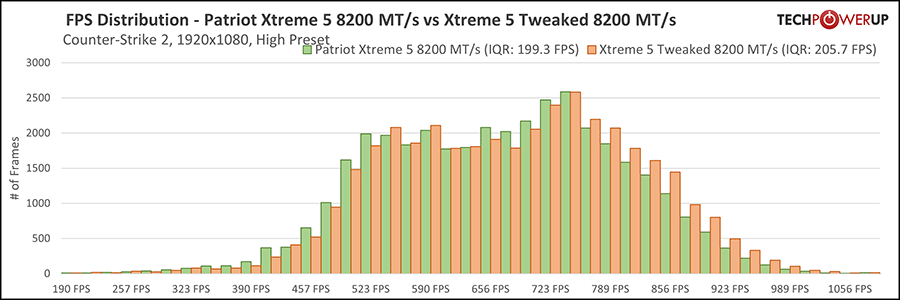
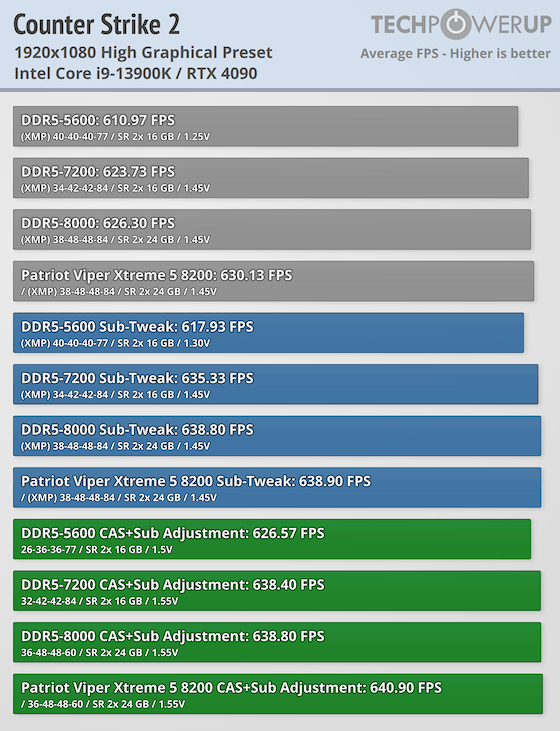
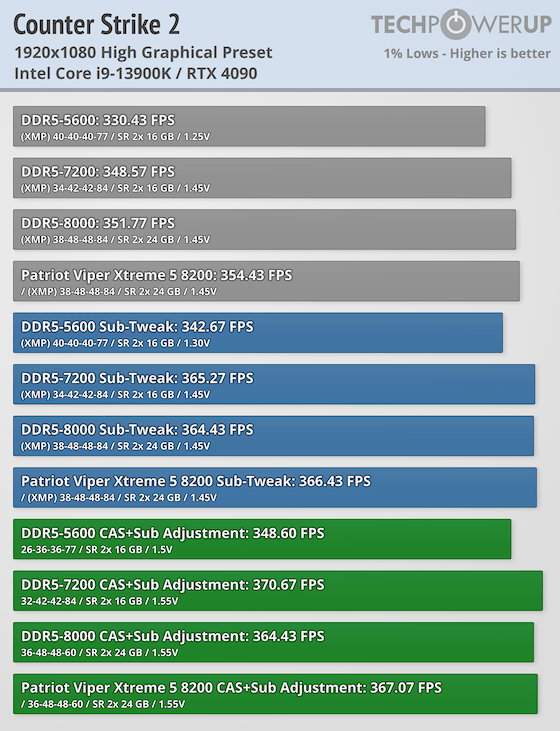
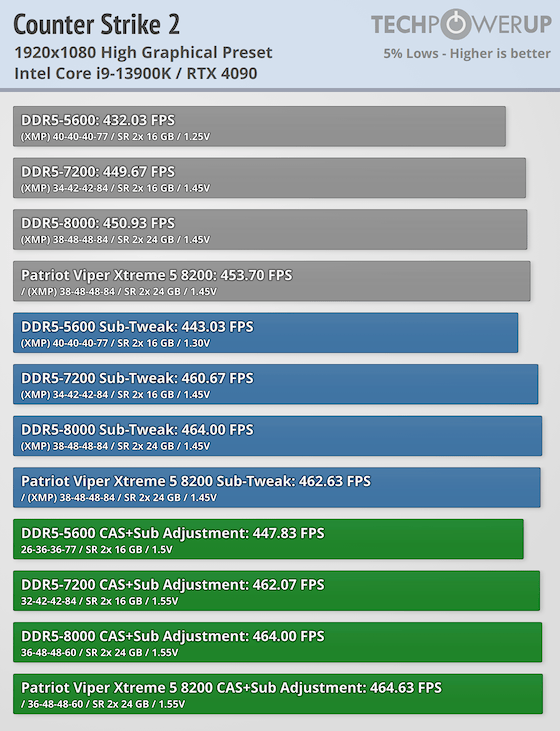
Counter-Strike 2 Results
Remnant 2 Results
Nov 22nd, 2026 20:51 CST
change timezone
Latest GPU Drivers
New Forum Posts
- Increasing Power Limit? (8)
- DTS DCH Driver for Realtek HDA [DTS:X APO4 + DTS Interactive] (2818)
- Honestly, do you care about GTA VI? (266)
- What are you playing? (26240)
- UPS what one to get? (48)
- Your PC ATM (36458)
- Gacha Games - Discussions, Pulls, Updates, etc. (1157)
- Last game you purchased? (1414)
- Making a game in Godot engine (19)
- Intel D270 (5)
Popular Reviews
- Microsoft Surface Laptop Ultra Review - The Next-gen Arm Laptop
- Corsair RM1200e (Second Generation) Review
- Upcoming Hardware Launches 2027 (Updated Nov 2026)
- Pulsar Office Tour & First Look at P1 Dual-Sensor Mouse
- Ugreen NASync DXP4800 GT Review
- AMD Ryzen 7 9800X3D Review - The Best Gaming Processor
- AMD Zen 6 Technical Deep Dive
- AMD Ryzen 7 5800X3D 10th Anniversary Review
- Phantom Blade Zero Performance Benchmark Review - 35 GPUs Tested
- Biwin Black Opal NV7400 2 TB Review
TPU on YouTube
Controversial News Posts
- NVIDIA Co-Founder and CEO Jensen Huang Officially Resigns (492)
- Report: Jensen Huang Eyes NVIDIA Comeback (266)
- Open Letter Asking NVIDIA to Reinstate Jensen Huang Passes 115,000 Signatures (184)
- OpenAI CEO Argues Home PCs Waste the World's Limited DRAM Supply (152)
- NVIDIA Launches Investigation Into Jensen Huang's Relationship With Suspected Chinese Spy (136)
- Intel "Raptor Lake Next" 16-Core and 20-Core CPUs Surface (130)
- NVIDIA GeForce RTX 50-Series Scheduled for up to $500 Price Hike This Week (89)
- Intel Razor Lake Gets a 12 P-Core bLLC Chip With No E-Cores, Per Leak (86)