 5
PELADN H05 HX 370 Review
Web & Office Productivity »General Performance
AIDA64 Cache and Memory
First up in our performance analysis is AIDA64's memory benchmark. This test gives a clear picture of how quickly the CPU and memory subsystem can move data. Since the Radeon iGPU relies on system RAM, bandwidth and latency play a direct role in both everyday performance and graphics performance.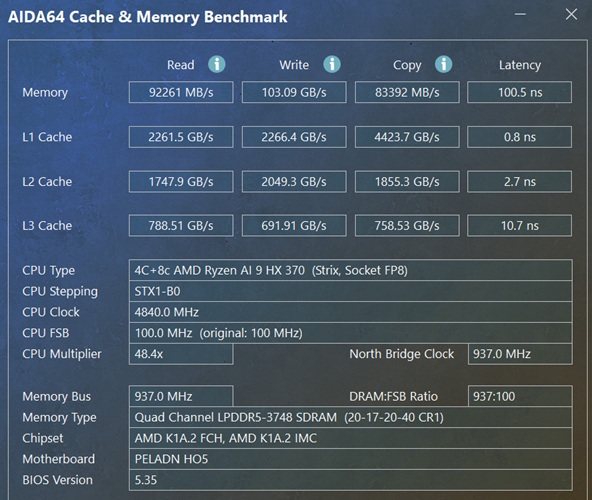
On the PELADN H05, memory read reaches 92,261 MB/s, write jumps to 103.09 GB/s, and copy comes in at 83,392 MB/s, with latency measured at 100.5 ns. That is a major step up from DDR5-4800 class systems. The higher write bandwidth in particular gives the integrated Radeon 890M more headroom, which shows up later in graphics-heavy tests.
Cache performance is equally strong, with L1 pushing over 2.2 TB/s for both read and write, L2 sitting around the 1.7 to 2.0 TB/s range, and L3 hovering near 790 GB/s. These cache speeds help reduce memory stalls during heavier workloads and keep things moving smoothly when switching between apps or handling mixed CPU and GPU tasks. Overall, the H05's memory subsystem plays a big role in why this Ryzen AI 9 HX 370 platform performs so well across both compute and graphics workloads.
Cinebench
Cinebench measures how well the CPU handles both single-threaded and multithreaded rendering. It is a simple way to compare real compute performance across systems.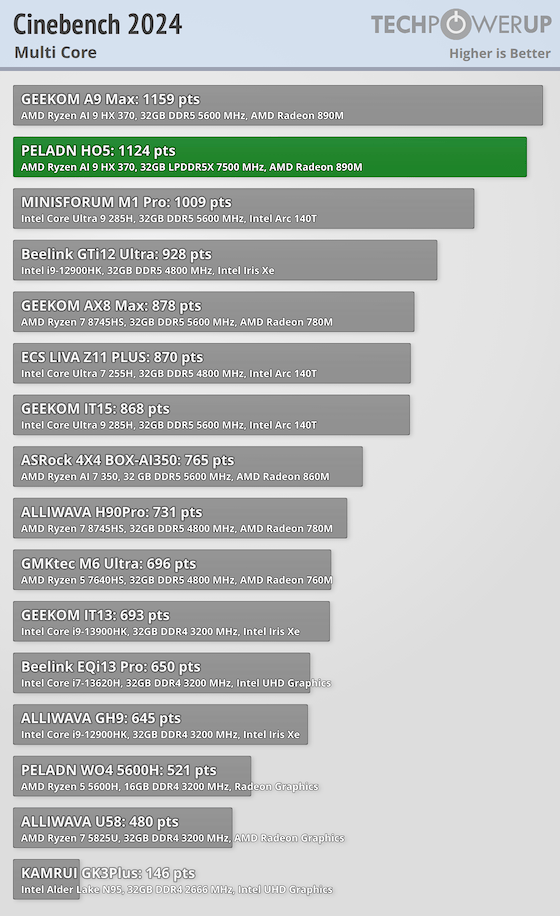
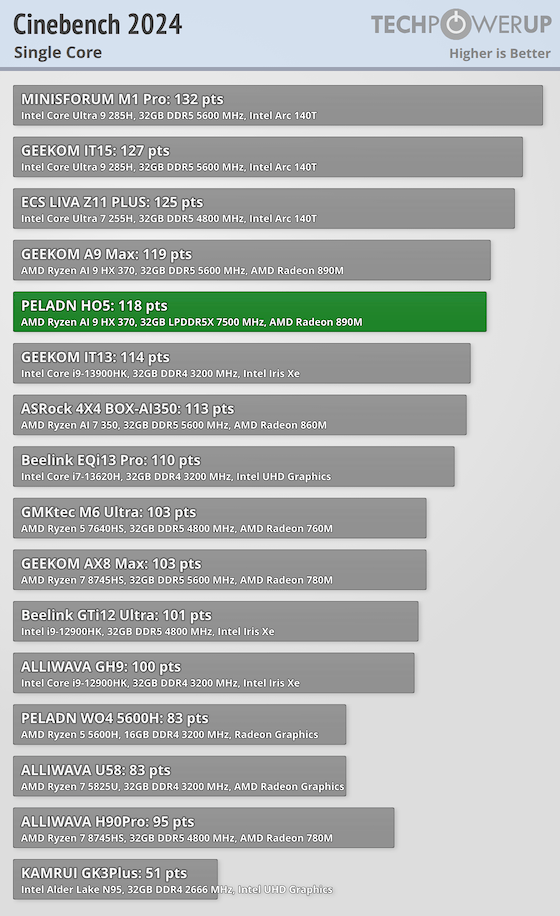
The H05 scores 1,124 in Cinebench 2024 multicore, putting it right alongside other Ryzen AI 9 HX 370 systems and well ahead of Ryzen 7 and Ryzen 5 Mini-PCs. For CPU-heavy work such as compiling, rendering, or large exports, the H05 will perform very well.
7-Zip
7-Zip's internal benchmark stresses compression and decompression, which shows how the CPU handles file-heavy tasks like installs, archiving, and packaging.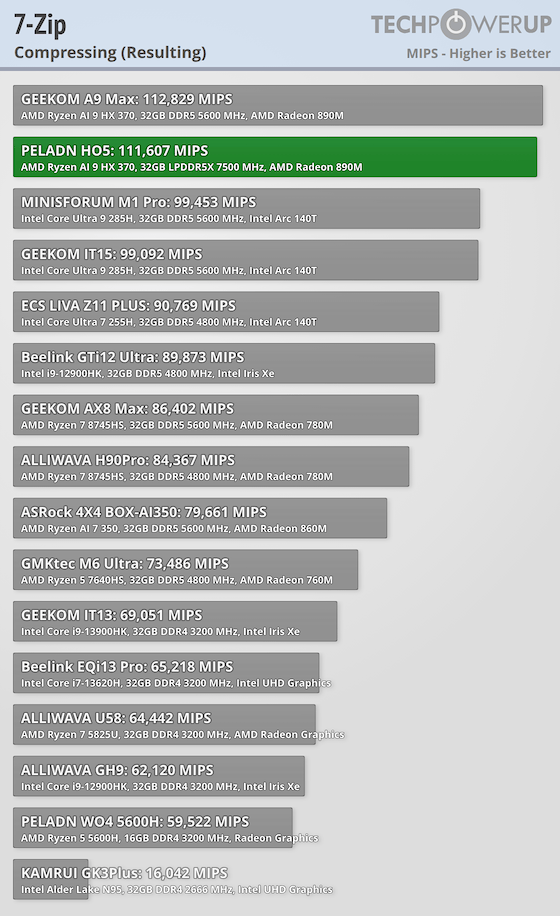
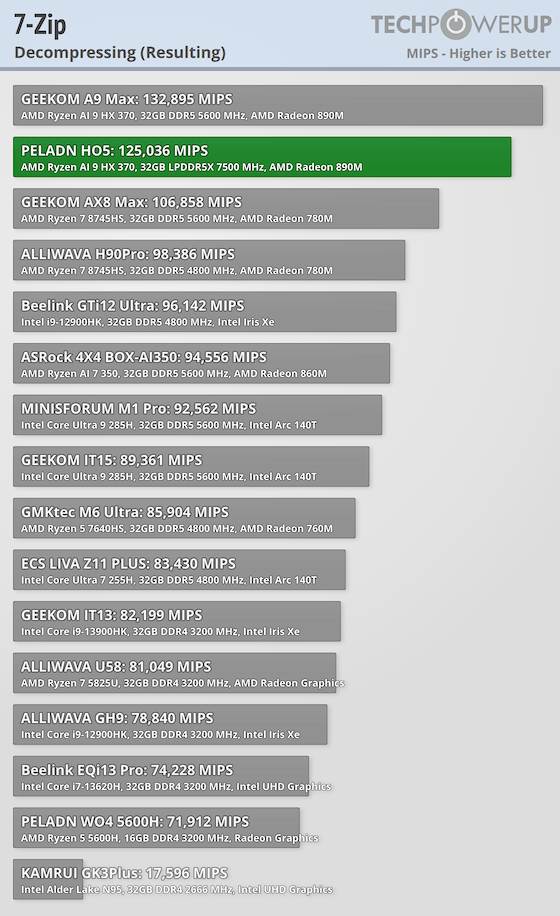
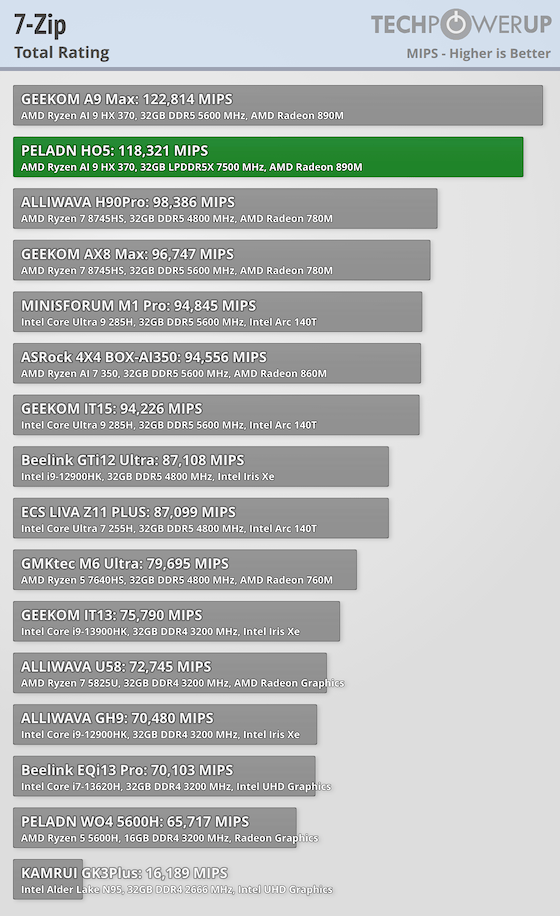
Here, the H05 posts 111,607 MIPS in compression and 125,036 MIPS in decompression, resulting in a total score of 118,321. Both numbers are well ahead of typical Ryzen 5 Mini-PCs and show strong performance for file-heavy tasks.
PCMark 10
PCMark measures day-to-day responsiveness across web, conferencing, documents, multitasking, and light content creation.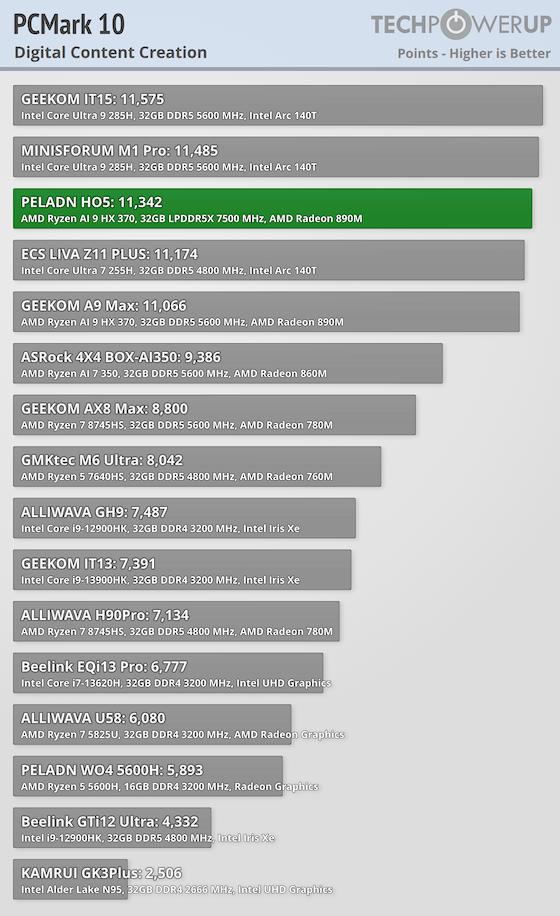
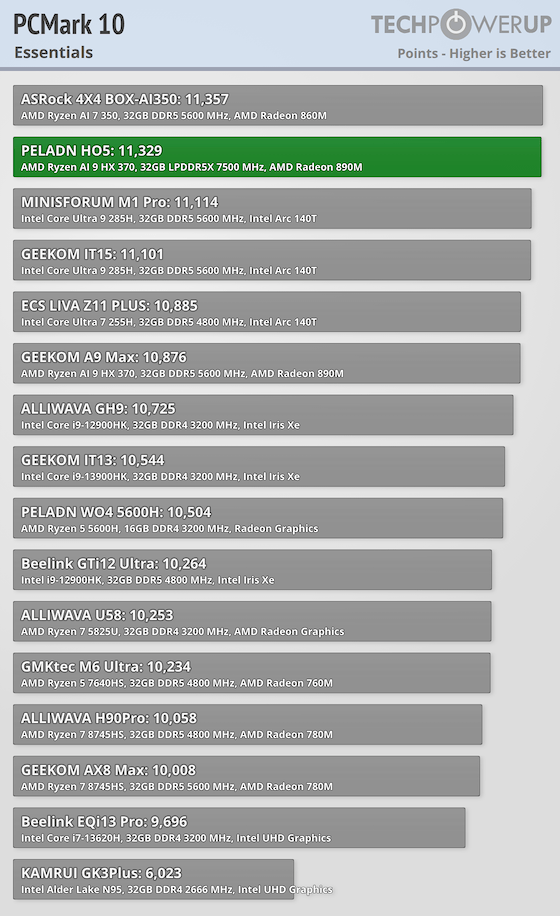
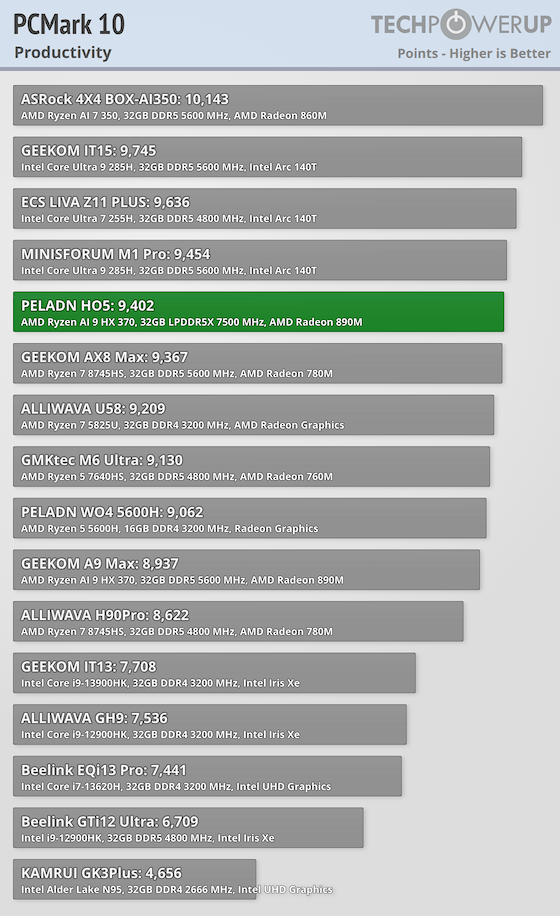
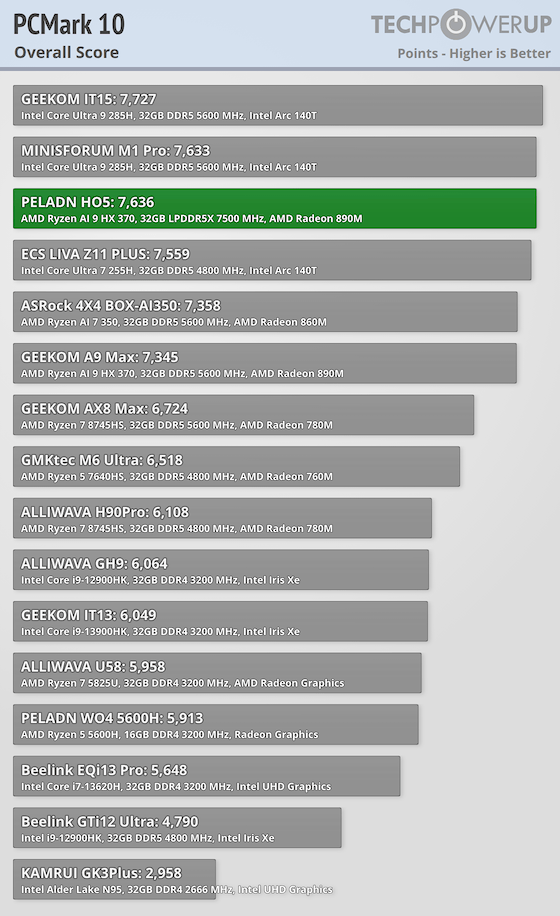
The H05 posts great results in Essentials and Productivity, showing us how fast the system feels during real desktop use. Opening apps, moving between workloads, and handling heavier multitasking all benefit from the extra cores and memory bandwidth.
Y-Cruncher
Y-Cruncher stresses the CPU with an extremely heavy math workload, making it a good stress test for stability and raw compute.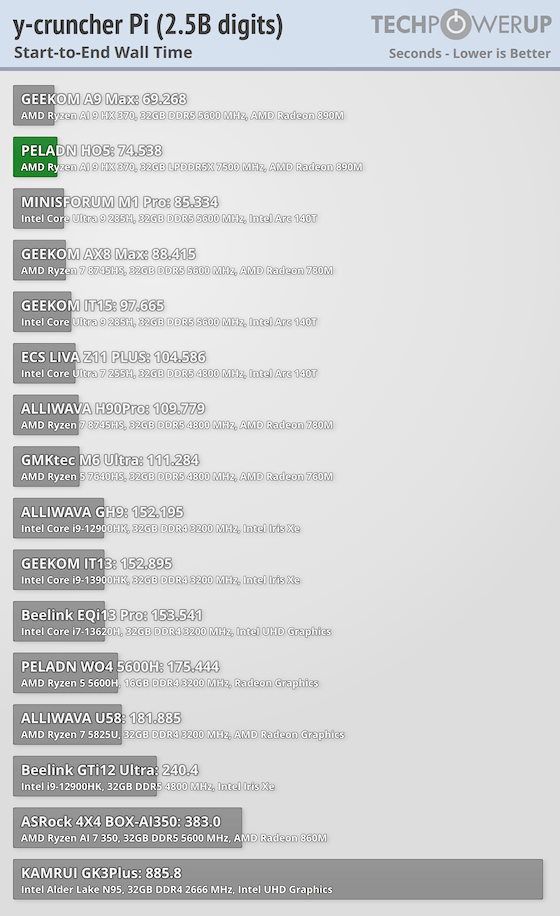
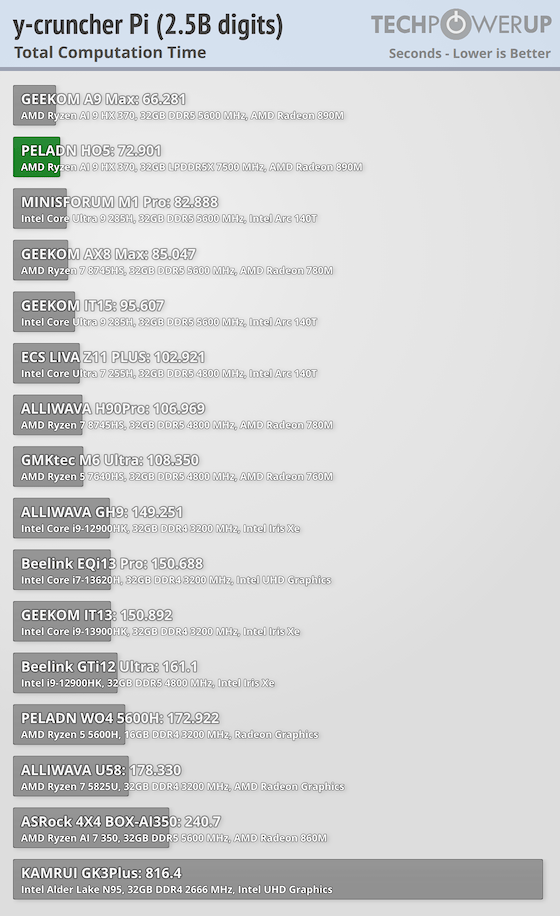
The H05 completes the 2.5B Pi calculation in 72.901 seconds, with a wall time of 74.538 seconds. That puts it well ahead of most compact Ryzen systems and closer to what you would expect from larger desktops.
Geekbench
Geekbench covers a wide range of real workloads and gives a balanced look at CPU strength.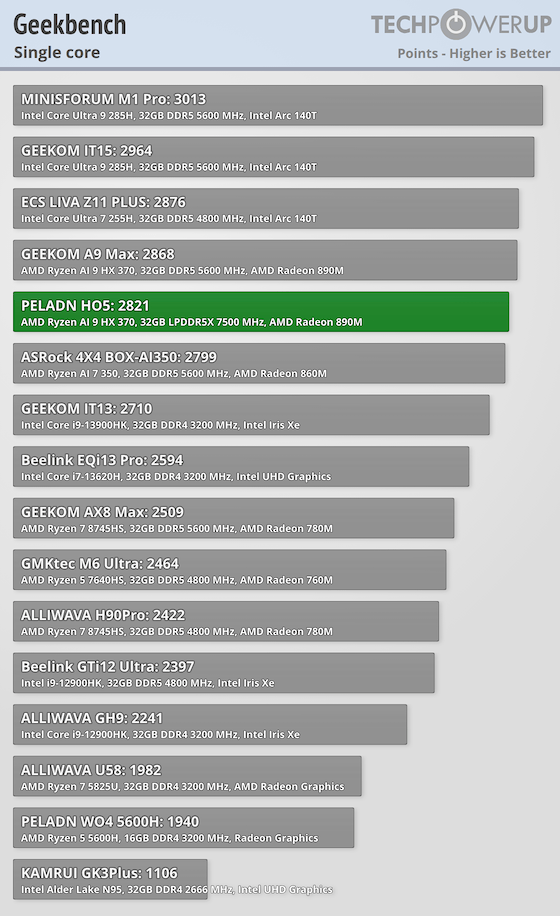
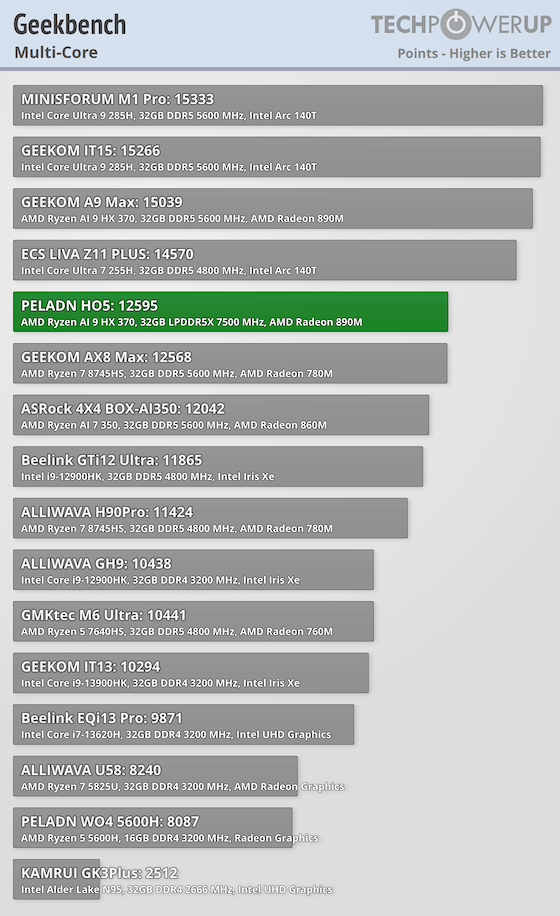
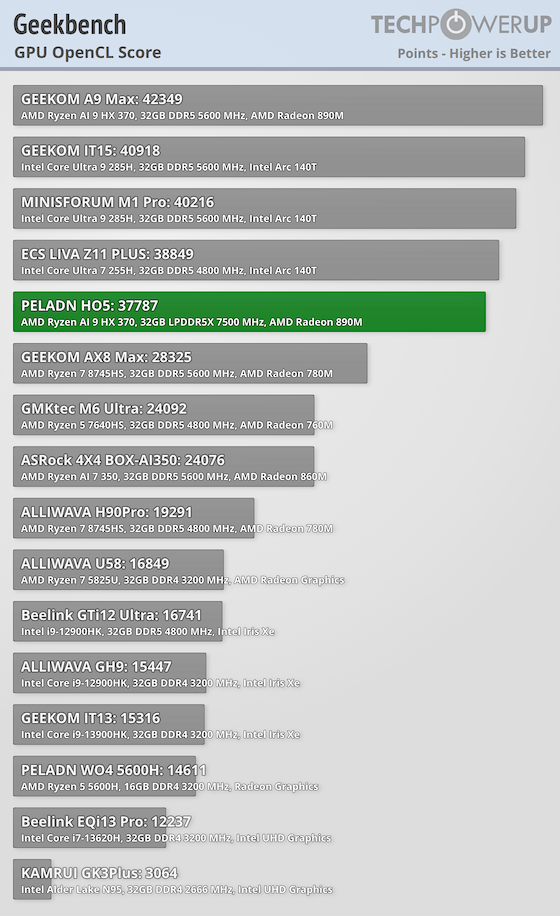
On the PELADN H05, Geekbench comes in with solid results including 2,821 single-core and 12,595 multicore. For GPU compute, it hits 37,787 in OpenCL.
Nov 20th, 2026 14:31 PST
change timezone
Latest GPU Drivers
New Forum Posts
- Logitech Headsets Modded Driver — Unlock Dolby in G HUB (23)
- 1 - 5 person file storage server equivalent accasible from anywhere + general VM server. (1)
- WarpCoreBench scores! (81)
- How to prevent OLED burn damage due to PC freezes or power outtages? (48)
- Honestly, do you care about GTA VI? (208)
- When you could finally run Crysis maxed out? (63)
- GTA VI (20)
- Anthrophics IPO (25)
- GeekMagic Ultra Smart WiFi Weather Station (8)
- Very unusual two gaming-pc scenarios. (35)
Popular Reviews
- AMD Zen 6 Technical Deep Dive
- Microsoft Surface Laptop Ultra Review - The Next-gen Arm Laptop
- Ugreen NASync DXP4800 GT Review
- Corsair RM1200e (Second Generation) Review
- Acemagic Retro X3 Review
- Upcoming Hardware Launches 2027 (Updated Nov 2026)
- Pulsar Office Tour & First Look at P1 Dual-Sensor Mouse
- Biwin Black Opal NV7400 2 TB Review
- AMD Ryzen 7 9800X3D Memory Performance Scaling
- AMD Ryzen 7 9800X3D Review - The Best Gaming Processor
TPU on YouTube
Controversial News Posts
- NVIDIA Co-Founder and CEO Jensen Huang Officially Resigns (490)
- Report: Jensen Huang Eyes NVIDIA Comeback (256)
- Open Letter Asking NVIDIA to Reinstate Jensen Huang Passes 115,000 Signatures (184)
- OpenAI CEO Argues Home PCs Waste the World's Limited DRAM Supply (152)
- NVIDIA Launches Investigation Into Jensen Huang's Relationship With Suspected Chinese Spy (136)
- Intel "Raptor Lake Next" 16-Core and 20-Core CPUs Surface (130)
- Legendary Game Studio BioWare Shuts Down Following EA Layoffs (104)
- Dell CEO Says the Memory Shortage Will Get Worse in 2027 (95)