 42
Phantom Blade Zero Performance Benchmark Review - 35 GPUs Tested
(42 Comments) »Introduction
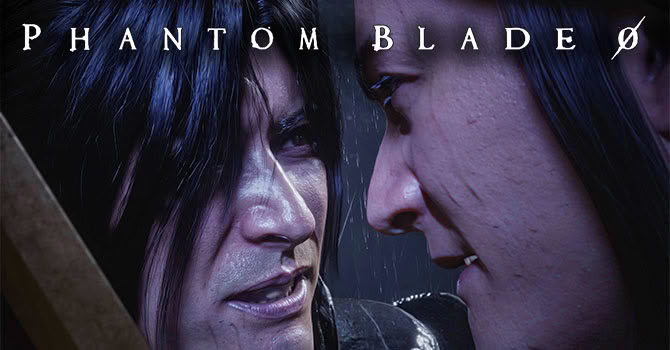
Phantom Blade Zero is made by S-GAME—a Chinese game studio based in Beijing that nobody had heard of until the game was shown at PlayStation Showcase in May 2023. The studio has been making games for much longer than that, but it's really only known within China. They've been building the same martial-arts world for many titles, the Phantom Blade series grew out of those, and this game "Zero," is supposed to be the spiritual rebirth of the original Rainblood. No need to know any of that to enjoy the game though.You play Soul, an assassin working for a secret order, who gets blamed for his master's death and nearly killed in the fight that follows. A mythical Flesh Sculptor saves his life and gives him a choice: a hollow heart that saves his life but takes everything he feels with it, or a tainted heart that leaves him whole and kills him in 66 days. He takes the 66 days, and uses them to find and hunt down whoever set him up. S-GAME calls the look "Kungfupunk"—wuxia cinema with mechanical prosthetics, industrial ruins and rock music in it.
This is one of the first big releases using Unreal Engine 5.7, and supports a lot of technologies: All three upscalers: DLSS 4.5, FSR 4.1 and XeSS 2.0, with DLAA and native rendering. Frame generations for all vendors: NVIDIA up to 6x and dynamic, AMD and Intel at 2x, Hardware ray tracing, and Path Tracing with Ray Reconstruction.
This review will evaluate the performance of Phantom Blade Zero across a wide range of contemporary graphics cards, compare image quality settings, and analyze the game's VRAM usage to provide insight into the hardware requirements needed for an optimal experience.
Screenshots
All screenshots were taken at the "Ultra" settings profile, with DLSS Quality upscaling. The gallery can be navigated with the cursor keys.


Graphics Settings
The options are split across two tabs.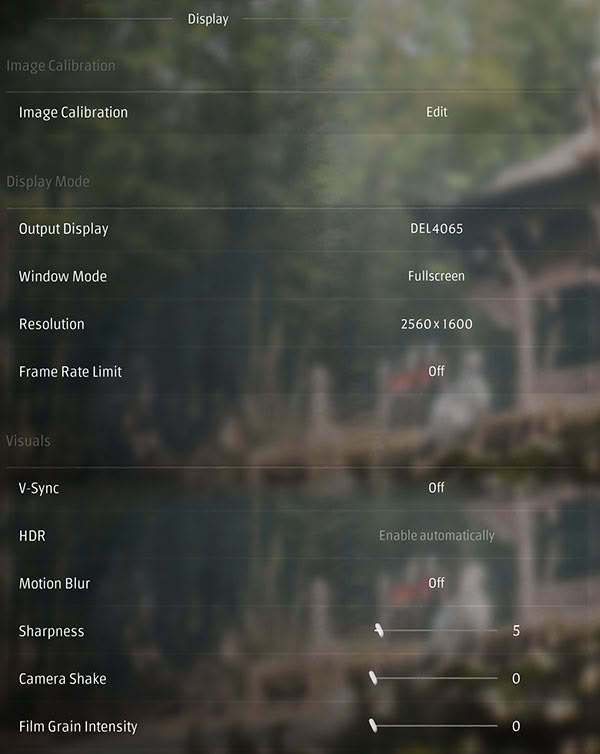
- The first tab, "Display" deal with the usual monitor-related settings
- "Window Mode" offers all three options: exclusive fullscreen, borderless fullscreen and windowed.
- You may disable V-Sync, and "Frame Rate Limit" can be set to "Off," there is no hidden FPS cap.
- Motion blur, camera shake and film grain each get a row of their own and can all be turned off. Camera shake and film grain are already at 0 by default, which is the right choice.
- "Image Calibration" opens a separate screen for setting the brightness.
- There is no field of view setting, anywhere. The default FOV is quite a bit too narrow imo (I'm kinda sensitive to that), and there is no option to adjust it
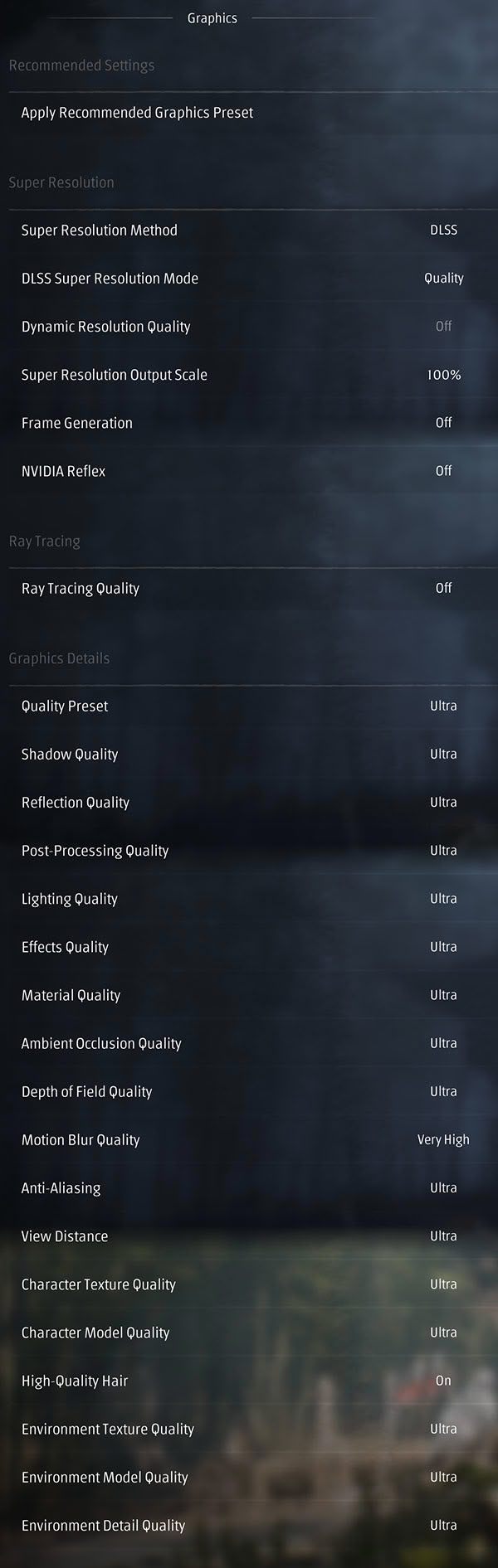
- The upscaler choice is DLSS, FSR, XeSS or TSR, so all three vendors are covered and TSR is the neutral fallback. The mode below it holds the usual quality tiers, plus DLAA and an off setting for native rendering.
- "Super Resolution Output Scale" is a second percentage that applies on top of the upscaler's own mode, and "Dynamic Resolution Quality" adds a dynamic resolution target. Three ways to scale resolution in one group is more than most games give you, and a bit confusing I have to admit
- Frame generation on NVIDIA goes up to 6x plus a "Dynamic" mode that varies the multiplier, AMD and Intel are 2x.
- "Ray Tracing Quality" lets you select between "off," "ray tracing" and "path tracing"
- When RT or PT is enabled, and DLSS is active, too, you get an additional option here for ray reconstruction
- "Quality Presets" are "Low," "Medium," "High," "Very High" and "Ultra," with tons of individual quality rows below it that you can set yourself.
- Motion blur turns up a second time here as "Motion Blur Quality." The on/off switch is on the Display tab, the quality level is on this one.
Our Patreon Silver Supporters can read articles in single-page format.
Nov 16th, 2026 08:43 CST
change timezone
Latest GPU Drivers
New Forum Posts
- need an ide to sata adapter that lets me burn cds on an ide cdrw drive (that doesn't power down while burning or copying) (55)
- Windows 11 General Discussion (7729)
- Honestly, do you care about GTA VI? (62)
- Meeting point of those who broke their GPUs. Please share what GPUs you've burned, shattered, ionized or melted accidentally. (36)
- What storage medium you lost the most data thus far from failure? HDD/SSD Flash, etc (53)
- Samsung MZ-HPU256T/004 (12)
- Recommendations Wanted - Affordable Enterprise SSD for Boot (10)
- Samsung 860 Evo MZ-76E2TO 2tb. 2018-10 (1)
- no "PhysX" workable (16)
- What can the FX 8320 do today? Here is the answer. (64)
Popular Reviews
- ASUS ROG Strix B850-I Gaming Wi-Fi7 W Review
- Corsair HX1000i Shift Crystal Review
- AMD Zen 6 Technical Deep Dive
- Upcoming Hardware Launches 2027 (Updated Nov 2026)
- Montech King 95 3D PRO Review
- NZXT C1200 Platinum Review
- Phantom Blade Zero Performance Benchmark Review - 35 GPUs Tested
- AMD Ryzen 7 9800X3D Review - The Best Gaming Processor
- NZXT H7 RGB+ Review
- NZXT H5 Review
TPU on YouTube
Controversial News Posts
- NVIDIA Co-Founder and CEO Jensen Huang Officially Resigns (431)
- Open Letter Asking NVIDIA to Reinstate Jensen Huang Passes 115,000 Signatures (184)
- OpenAI CEO Argues Home PCs Waste the World's Limited DRAM Supply (152)
- NVIDIA Launches Investigation Into Jensen Huang's Relationship With Suspected Chinese Spy (136)
- Intel "Raptor Lake Next" 16-Core and 20-Core CPUs Surface (130)
- Legendary Game Studio BioWare Shuts Down Following EA Layoffs (104)
- Dell CEO Says the Memory Shortage Will Get Worse in 2027 (95)
- NVIDIA GeForce RTX 50-Series Scheduled for up to $500 Price Hike This Week (89)