 34
Synology RT6600ax Wireless Router Review
(34 Comments) »Introduction


Most of you know Synology for its NAS products, which are among the best along with QNAP's offerings, but Synology also has some competent WiFi router products. I have already reviewed the RT1900ac and RT2600ac in my MR2200ac mesh router review. So far, Synology hasn't had a WiFi 6 or 802.11ax compatible wireless router, but this changes with the RT6600ax capable of notably higher performance than the aged, but still fully capable RT2600ac. The purpose of this review is not to compare 802.11ac and the newest 802.11ax, so I won't go into much detail about WiFi 6. The only thing you need to know is that it is notable faster than 802.11ac, especially in crowded environments. It is also more power-efficient, which is important for devices using batteries (e.g., smartphones).
The RT6600ax has tri-band support at up to 5.9 GHz (UNII-4 WiFi band), so it isn't compatible with the new WiFi 6E, which supports the 6 GHz wireless spectrum for even faster speeds because of more spectrum and less interference in frequencies above 6 GHz. In April 2020, the Federal Communications Commission opened up the 6 GHz band for unlicensed use, but Synology apparently already had the RT6600ax project under wraps and couldn't add WiFi 6E support because it would have required massive changes to the radio circuits of the router. Some brands have already announced WiFi 6E routers, so Synology should probably start working on an updated RT6600ax version.
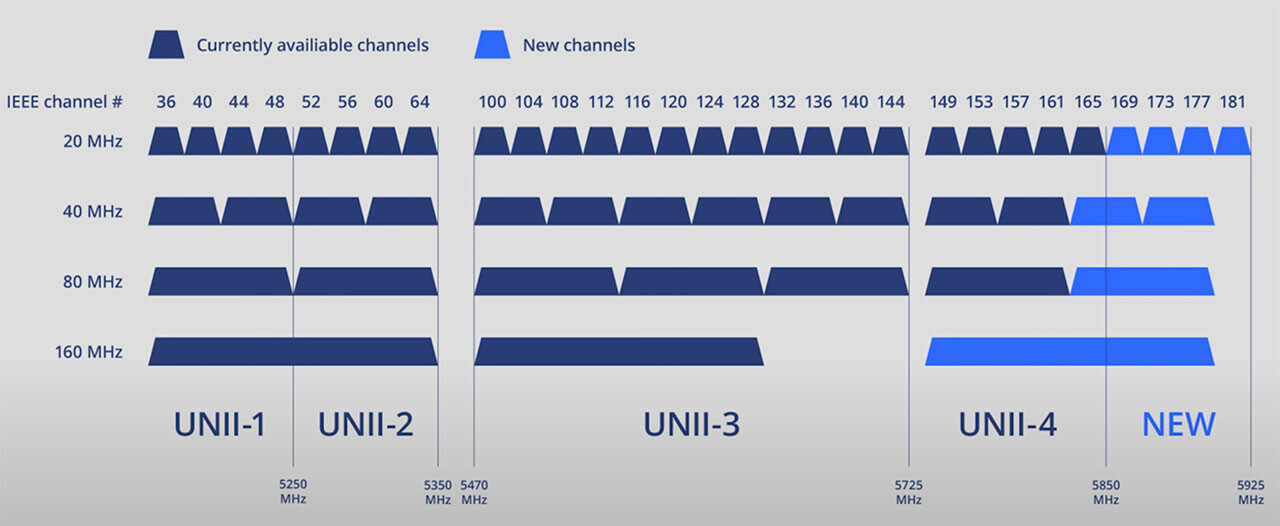
Some more details on UNII-4. It adds a total of four 20 MHz WiFi channels, but the key is that it allows for a third 160 MHz wide channel, which may be handy in congested locations. You can read more about UNII-4 in our news post of the RT6600ax here.
Another significant feature of the RT6600ax is the configurable 2.5 GbE WAN/LAN port for increased throughput. Since I am pretty picky, I would like more 2.5 GbE Ethernet ports. Finally, the most critical aspect of the RT6600ax, which does provide it with a considerable edge over competing offerings, is Synology Router Manager (SRM), which is a mature operating system with a tremendous number of options. My home router is an RT2600ac, so I am quite familiar with SRM and its capabilities, which allowed me to do stuff that would be harder or even impossible to do with other routers; examples would be the combining of two separate, different internet access lines and load balancing routes to different devices on two different networks effortlessly without having to use terminal commands.
By using two RT6600ax routers, you can also expand the WiFi coverage of your network, eliminating dead zones in your home or business environment. Wireless mesh networks are very popular as they eliminate the need for cable infrastructure, which can be expensive, messy, and restrictive. Briefly, in a mesh network, you use one main router/access point which connects to the internet through a modem and install multiple smaller ones, also called nodes, which cooperate with your main access point to efficiently cover a large area. Synology so far only has the MR2200ac mesh router available, but my best guess is that it will soon release a WiFi 6 compatible model.
Specifications
| Synology RT6600ax Specifications | |
|---|---|
| WiSOC: | Qualcomm Atheros IPQ6018 quad-core ARM 64-bit A53 1.8 GHz processor |
| WLAN Chipset: | Qualcomm QCN9024 |
| Operating System: | Synology Router Manager (SRM) |
| Memory: | 1 GB DDR3 |
| Flash Memory: | 4 GB (MLC) |
| Antenna Type: | 4x4 MIMO high-performance external antenna (2.4 GHz & 5 GHz) |
| LAN/WAN Ports: | 2.5 GbE (RJ-45) x 1, 1 Gigabit (RJ-45) x 1 |
| LAN Ports: | 1 Gigabit (RJ-45) x 3, 2.5 Gigabit (RJ-45) x 1 |
| External Ports: | USB 3.0 x1 |
| USB File System Support: | EXT4, FAT, NTFS, HFS+ |
| Buttons and Switches: | WPS, power, reset, Wi-Fi on/off |
| Dimensions: | 69 x 281 x 183 mm (height x width x depth) |
| Weight: | 1.18 kg |
| Power Consumption: | Idle: 5.21 W In operation: 12.95 W |
| Power Supply: | External, 100–240 V |
| Operating Temperature: | 5–40°C (40–104°F) |
| WiFi Technology: | Tri-band WiFi 6 support |
| 3G/4G Mobile Dongle Support & Tethering: | Yes |
| Parental Control Support: | Yes |
| Mobile Apps: |
|
| Packaging Content: |
|
| Fan: | N/A (passively cooled) |
| Warranty: | 2 years |
| Price excl. VAT (when reviewed): | $299 |
The router uses a quad-core CPU and has enough memory for a router.
Packaging

Since I got pre-release samples for the review, the packaging isn't fancy. Still, it protects the router adequately.
Our Patreon Silver Supporters can read articles in single-page format.
Nov 21st, 2026 11:30 PST
change timezone
Latest GPU Drivers
New Forum Posts
- UPS what one to get? (21)
- Can you guess Which game it is? (343)
- RX 580 2048SP 8GB - SK Hynix - Brand Unknown - BIOS Needed (0)
- Zen 3 IF/IMC degradation (243)
- State of the HPC-AI Market 2026: Processing Elements (0)
- 1 - 5 person file storage server equivalent accasible from anywhere + general VM server. (3)
- Honestly, do you care about GTA VI? (225)
- RX 9000 series GPU Owners Club (2251)
- Windows 11 General Discussion (7746)
- How to prevent OLED burn damage due to PC freezes or power outtages? (51)
Popular Reviews
- Microsoft Surface Laptop Ultra Review - The Next-gen Arm Laptop
- Ugreen NASync DXP4800 GT Review
- Corsair RM1200e (Second Generation) Review
- Pulsar Office Tour & First Look at P1 Dual-Sensor Mouse
- Upcoming Hardware Launches 2027 (Updated Nov 2026)
- Acemagic Retro X3 Review
- Biwin Black Opal NV7400 2 TB Review
- AMD Ryzen 7 9800X3D Review - The Best Gaming Processor
- AMD Zen 6 Technical Deep Dive
- Chieftec Iceberg PRO 360 DARK Review
TPU on YouTube
Controversial News Posts
- NVIDIA Co-Founder and CEO Jensen Huang Officially Resigns (492)
- Report: Jensen Huang Eyes NVIDIA Comeback (260)
- Open Letter Asking NVIDIA to Reinstate Jensen Huang Passes 115,000 Signatures (184)
- OpenAI CEO Argues Home PCs Waste the World's Limited DRAM Supply (152)
- NVIDIA Launches Investigation Into Jensen Huang's Relationship With Suspected Chinese Spy (136)
- Intel "Raptor Lake Next" 16-Core and 20-Core CPUs Surface (130)
- NVIDIA GeForce RTX 50-Series Scheduled for up to $500 Price Hike This Week (89)
- Intel Razor Lake Gets a 12 P-Core bLLC Chip With No E-Cores, Per Leak (86)