 6
UPERFECT UStation Delta Max Review - Two Screens In One
Value & Conclusion »Gaming Performance
Bizarrely, the technical specification sheet for the UPERFECT UStation Delta Max claims that the monitors have a 100 Hz refresh rate. In reality, both can be set to 120 Hz regardless of the connection type, as HDMI has enough bandwidth to support 120 Hz at Full HD.Response Time and Overdrive
I tested the response time with the Open Source Response Time Tool Pro (OSRTT Pro), developed by Andrew McDonald of TechTeamGB. It's a nifty tool that, combined with the OSRTT Launcher app, measures panel response times and presents them through detailed graphs and easy-to-read heatmaps. You can find everything you might want to know about the OSRTT in its technical documentation and on the official website, where you can order your unit, too. The OSRTT Launcher gives us three interesting heat maps to observe.Perceived Response Time tells us how much time the panel took to transition from one color to another. This measurement is expressed in milliseconds and includes overshoot. In other words, if the panel exceeded the target value, the perceived response time also includes the time it took for the transition to recover from overshoot and stabilize on the target value. I'm running my tests with recommended settings, so with a fixed RGB 5 tolerance level and with gamma-corrected RGB values.
RGB Overshoot tells us how much a specific transition missed the target value. For example, if the panel was transitioning from RGB 51 to RGB 204, and it initially landed on RGB 212, the overshoot RGB value is 8. Overshoot can be both positive and negative, and it commonly occurs at extreme overdrive settings when pixels are driven by high voltage. In practice, an overshoot manifests as an afterimage or a halo around a moving object. It can be easily spotted even when doing something as basic as scrolling through a webpage.
Visual Response Rating is the most abstract heatmap generated by the OSRTT Launcher; in essence, it's an ever-evolving scoring system. To quote OSRTT's technical documentation, it is a finite score rather than a direct measurement. The calculation is pretty simple; it's: "100 – (Initial Response Time + Perceived Response Time)". Since both metrics use the same tolerance level, if a display doesn't overshoot, both times will be identical. This essentially rewards displays that are fast with a small amount of overshoot over displays that aren't as fast even if they don't overshoot at all – while still overall preferring ultra-fast, accurate monitors.
Here's how both panels of the UPERFECT UStation Delta Max perform in the pixel response time test. There are no overdrive settings to adjust, so while we won't be using this test to find the optimal setting, it's still useful to examine the actual response times.
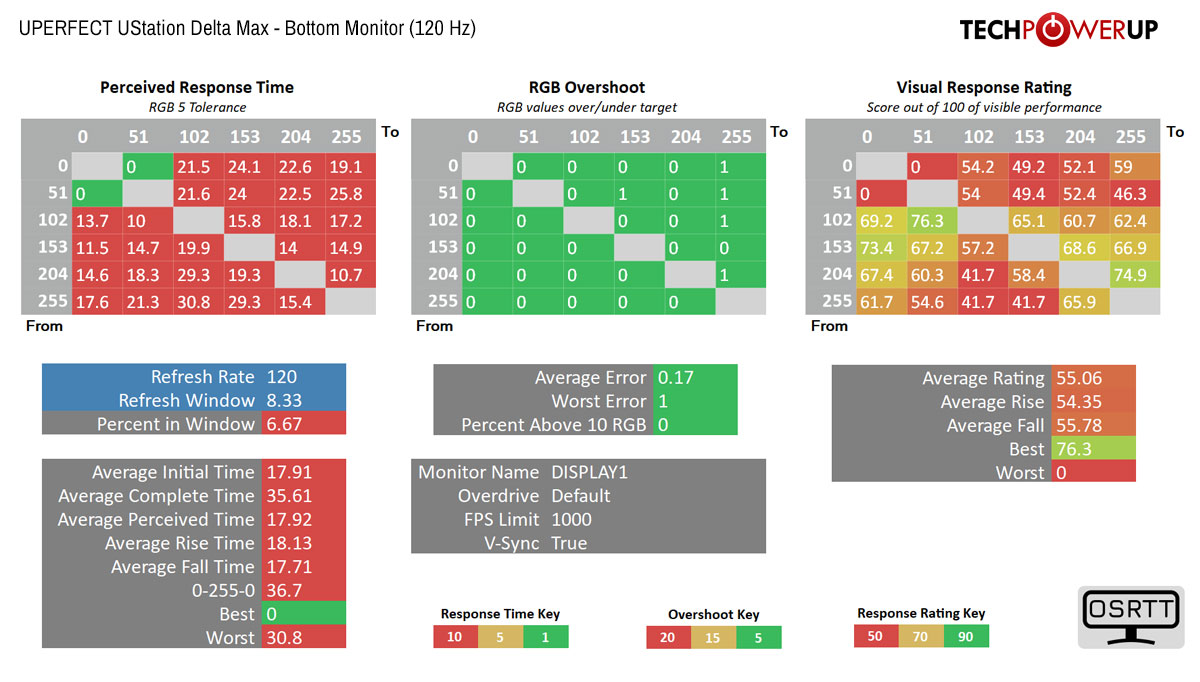
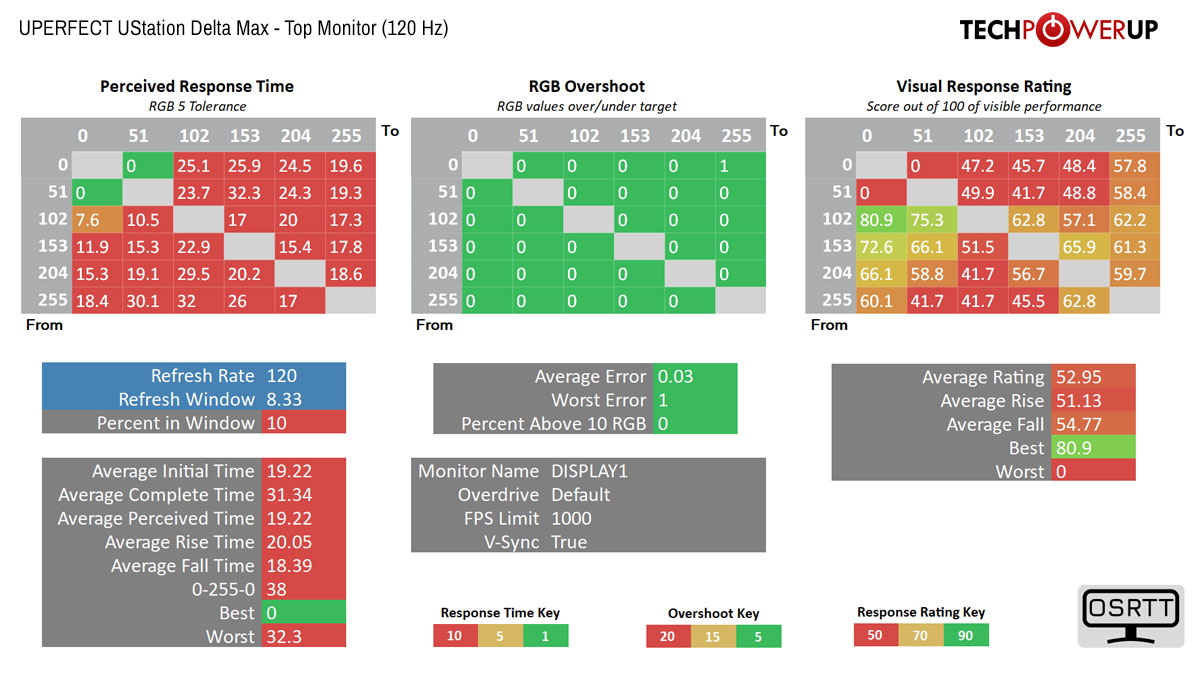
As expected, the response times are slow and somewhat inconsistent between the panels, with the bottom one offering slightly quicker (17.92 ms) pixel transitions than the top one (19.22 ms). If you're looking for a portable monitor better suited for gaming, you should consider the UPERFECT UGame K118 (reviewed here) instead, as its gaming performance far surpasses that of the UStation Delta Max.
Input Lag
To measure the input lag of a monitor, I switched from using the LDAT V2 (Latency Display Analysis Tool), which I've covered extensively in my NVIDIA Reflex review, to the OSRTT Pro Tool. The OSRTT Pro Tool and the accompanying software include a DirectX code developed by Andrew McDonald of TechTeamGB, which allows the OSRTT Launcher to track the events and capture the frame time, making it possible to isolate the monitor latency from other factors that come into play when using the click-to-photon testing methodology, namely the USB polling rate and game render time. For a deeper insight, I suggest you watch an excellent overview video made by Andy himself.While I used a consistent methodology in all my previous LDAT-based monitor reviews and kept everything the same, switching to the OSRTT-based approach isolates me from potential issues, such as game engine updates (I based my tests on Overwatch, which transformed into Overwatch 2), and allows me to move on to a different testing system at will. Thanks to Andy for his tireless work on the OSRTT Tool and the OSRTT Launcher software!
Here's how the UPERFECT UStation Delta Max holds up in terms of input lag after doing 100 iterations of the input lag test.


The input lag is high enough to be noticeable when using the monitors. Once again, there is a discrepancy between the panels, with the bottom panel having over 5 ms less input lag than the top panel on average. However, even the bottom panel averages close to 10 ms, which isn't ideal for anything beyond casual gaming. The aforementioned UPERFECT UGame K118, on the other hand, has an average input lag of under 6 ms, making it a much better choice for gaming.
Nov 21st, 2026 07:57 PST
change timezone
Latest GPU Drivers
New Forum Posts
- UPS what one to get? (4)
- TPU's Nostalgic Hardware Club (22180)
- Windows 11 General Discussion (7744)
- Cpu waterblock water shows some tinting = Bad? (19)
- Anthrophics IPO (33)
- Bought MAX-P495 - Which model? (33)
- RX 9000 series GPU Owners Club (2250)
- Honestly, do you care about GTA VI? (221)
- GeekMagic Ultra Smart WiFi Weather Station (9)
- What's your latest tech Freebie? (87)
Popular Reviews
- Microsoft Surface Laptop Ultra Review - The Next-gen Arm Laptop
- Ugreen NASync DXP4800 GT Review
- Corsair RM1200e (Second Generation) Review
- Pulsar Office Tour & First Look at P1 Dual-Sensor Mouse
- Upcoming Hardware Launches 2027 (Updated Nov 2026)
- Acemagic Retro X3 Review
- Biwin Black Opal NV7400 2 TB Review
- AMD Ryzen 7 9800X3D Review - The Best Gaming Processor
- AMD Zen 6 Technical Deep Dive
- Chieftec Iceberg PRO 360 DARK Review
TPU on YouTube
Controversial News Posts
- NVIDIA Co-Founder and CEO Jensen Huang Officially Resigns (492)
- Report: Jensen Huang Eyes NVIDIA Comeback (259)
- Open Letter Asking NVIDIA to Reinstate Jensen Huang Passes 115,000 Signatures (184)
- OpenAI CEO Argues Home PCs Waste the World's Limited DRAM Supply (152)
- NVIDIA Launches Investigation Into Jensen Huang's Relationship With Suspected Chinese Spy (136)
- Intel "Raptor Lake Next" 16-Core and 20-Core CPUs Surface (130)
- Legendary Game Studio BioWare Shuts Down Following EA Layoffs (104)
- NVIDIA GeForce RTX 50-Series Scheduled for up to $500 Price Hike This Week (89)