 5
XPG Novakey RGB DDR5-6000 32 GB CL30 Review
Value & Conclusion »AMD Memory Overclocking
Overclocking Tips and Tricks
After the previous review covering EXPO ULL memory, we opted to try the same configuration on another memory kit; this one. Once again we'll be limiting ourselves to a maximum of 1.45 V, as this should be within the safe range for beginners and enthusiasts alike. It's important to note for newcomers that it's crucial to understand that each IC responds differently to voltage changes. SK hynix tends to be more forgiving, whereas Samsung and Micron ICs have a much lower threshold before risking damage. Always verify the brand of your ICs before increasing DRAM voltages to avoid any mishaps.
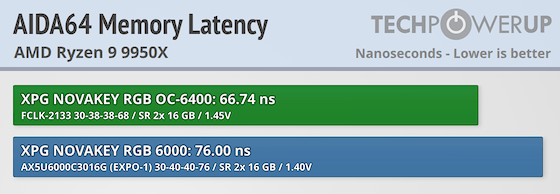
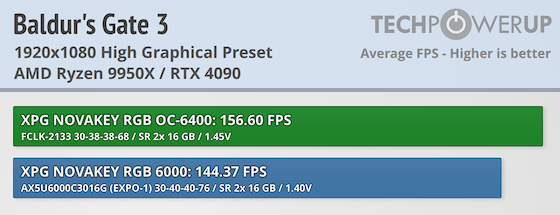
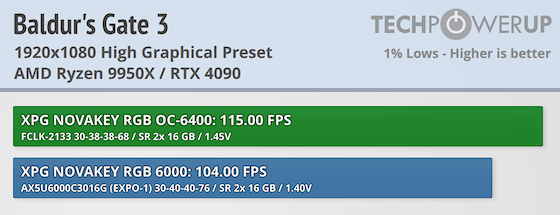
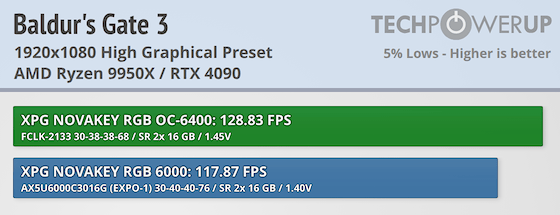
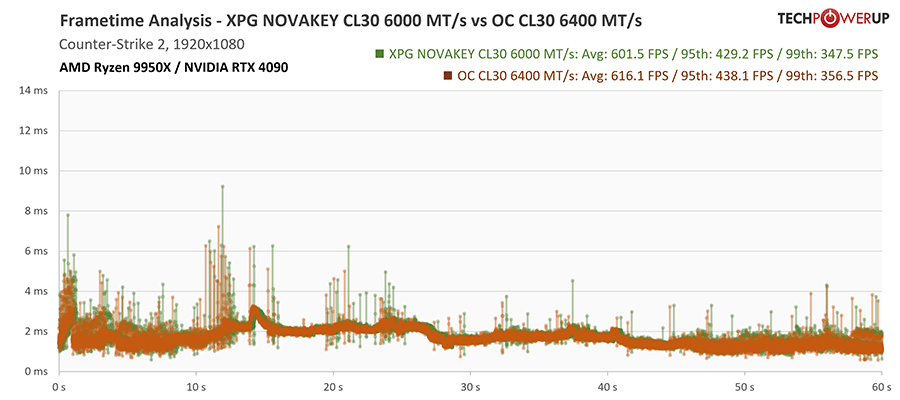
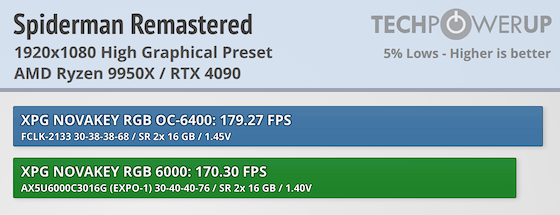
It's deja vu here with overclocking because these modules also use SK hynix M-Die (16 Gbit). That meant reducing the CAS latency to CL26 is simply not feasible. We tried anyway and even with 1.5 V these will not boot that low. Therefore, we opted to go for CL30 6400 MT/s with a FCLK of 2133 MHz for the maximum impact. Using the TPU DRAM Latency Calculator we changed the tRFC2 and tRFCSB values to keep the same ns ratio at 6400 MT/s using the aggressive EXPO ULL tRFC2/sb values.
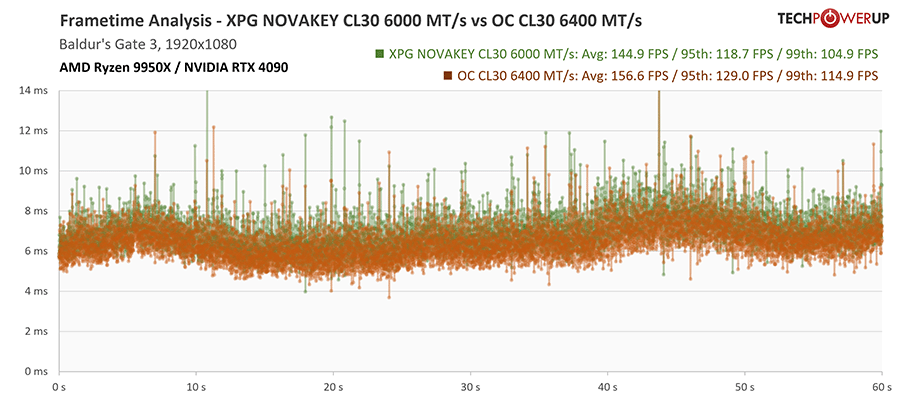
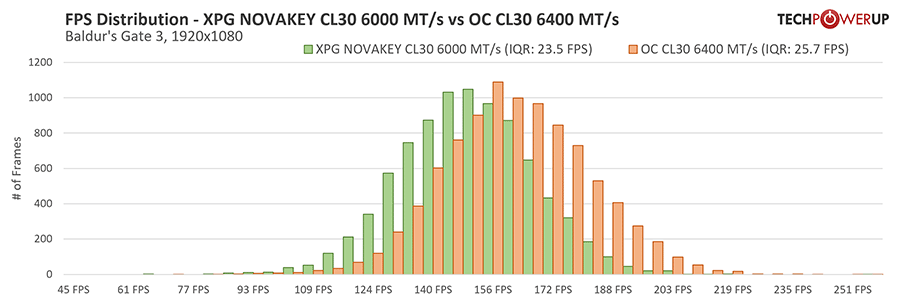
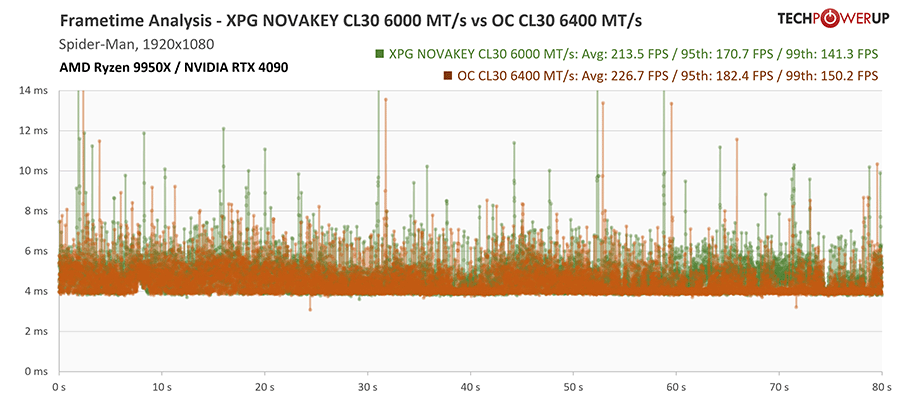
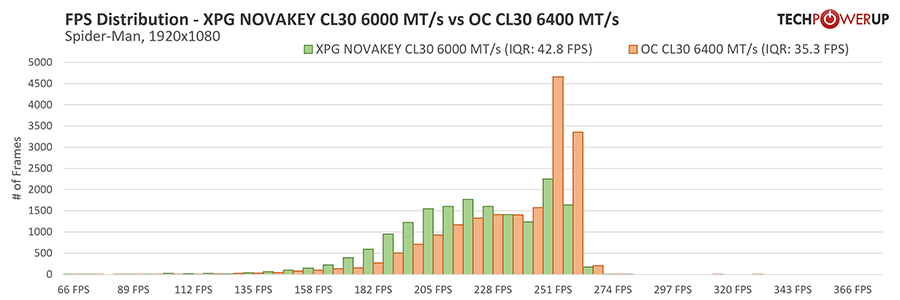
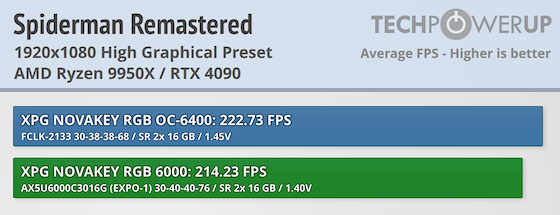
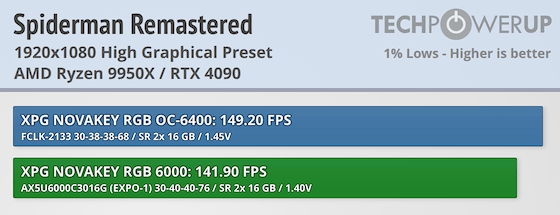
The gains are quite noticeable, which is a good for those who are willing to overclock the memory beyond the XMP profile. However, there is still performance left on the table. For those willing to invest the time to tweak each timing to its absolute minimum, there's a slight performance bump to be had in certain games.
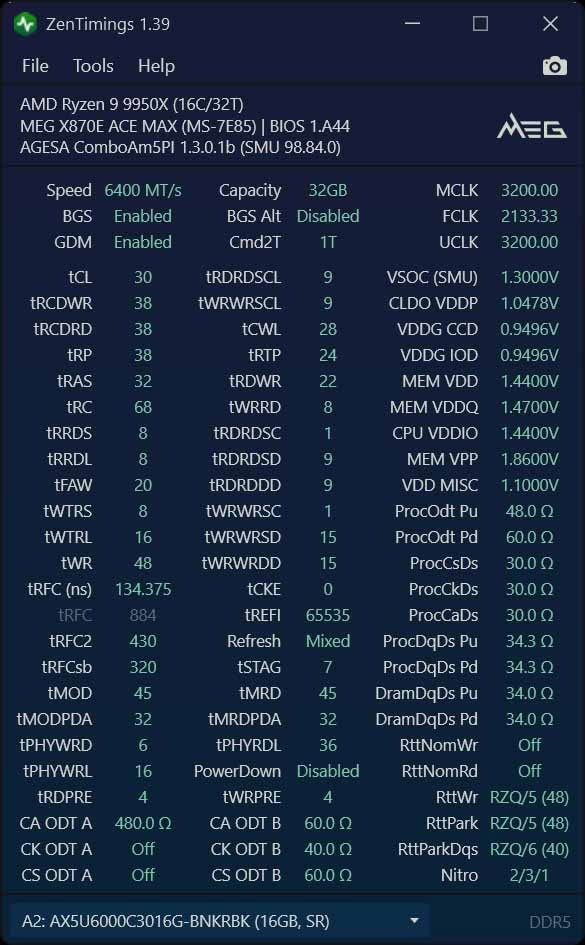
DDR5-6400 FLCK-2133 CL30 y-cruncher 2.5B HWBot Submission
Baldur's Gate 3 Results
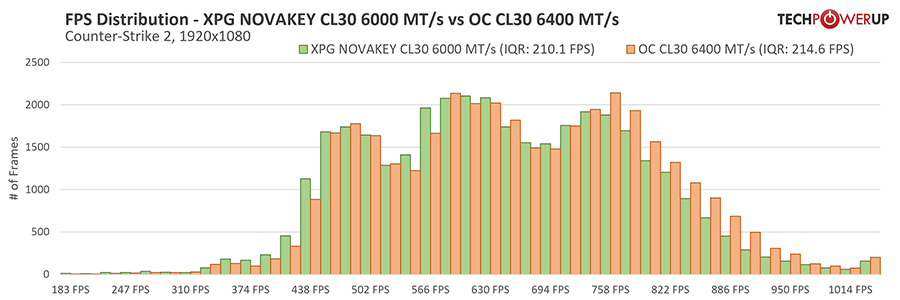
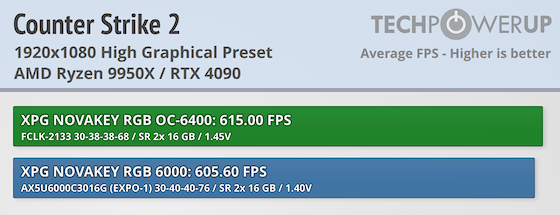
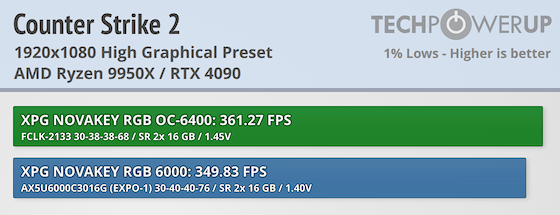
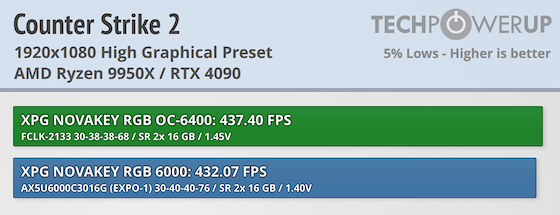
Counter-Strike 2 Results
Spider-man Remastered
Nov 26th, 2026 23:23 CST
change timezone
Latest GPU Drivers
New Forum Posts
- Using sodimm+adapter instead of full size dimm DDR5? (102)
- Will zen 6 mobos have anything extra vs current ones? (62)
- What's your main Black Friday / Cyber Monday purchase? (25)
- Dell Dimension E510 Retro Gaming PC Upgrade & Modification (3)
- X79 and/or rampage IV OC'ing thread for those of us still left.... (2460)
- Gacha Games - Discussions, Pulls, Updates, etc. (1166)
- Wireless Internet sharing between PC and router both-ways, is it possible? (27)
- WarpCoreBench scores! (116)
- Can you guess Which game it is? (371)
- ASUS Prime 5060 ti 16gb x4 instead of x8 PCIe (12)
Popular Reviews
- VZMORE AX9 Max Review
- Upcoming Hardware Launches 2027 (Updated Nov 2026)
- ASRock X870E Challenger Wi-Fi White Review
- AMD Ryzen 7 9800X3D Review - The Best Gaming Processor
- Microsoft Surface Laptop Ultra Review - The Next-gen Arm Laptop
- AMD Zen 6 Technical Deep Dive
- Montech CyberFlow ARGB 360 Review
- Phantom Blade Zero Performance Benchmark Review - 35 GPUs Tested
- Corsair RM1200e (Second Generation) Review
- Pulsar Office Tour & First Look at P1 Dual-Sensor Mouse
TPU on YouTube
Controversial News Posts
- Jensen Huang Reinstated as CEO of NVIDIA (615)
- NVIDIA Co-Founder and CEO Jensen Huang Officially Resigns (492)
- Report: Jensen Huang Eyes NVIDIA Comeback (281)
- Open Letter Asking NVIDIA to Reinstate Jensen Huang Passes 115,000 Signatures (184)
- OpenAI CEO Argues Home PCs Waste the World's Limited DRAM Supply (152)
- NVIDIA Launches Investigation Into Jensen Huang's Relationship With Suspected Chinese Spy (136)
- Intel Razor Lake Gets a 12 P-Core bLLC Chip With No E-Cores, Per Leak (94)
- NVIDIA GeForce RTX 50-Series Scheduled for up to $500 Price Hike This Week (89)