Saturday, January 21st 2012

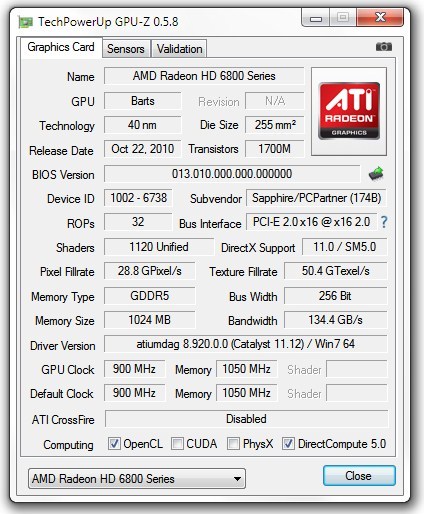
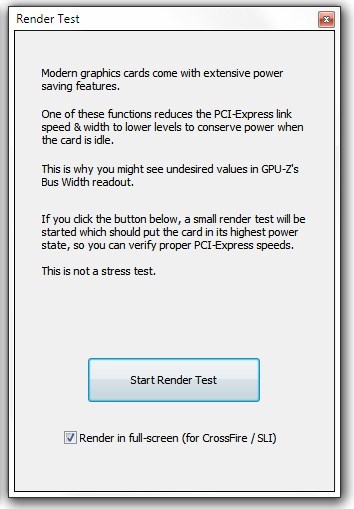
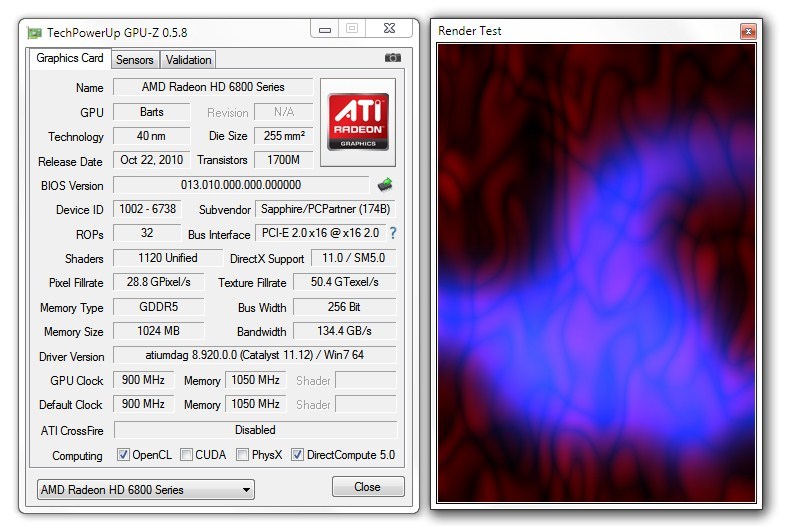
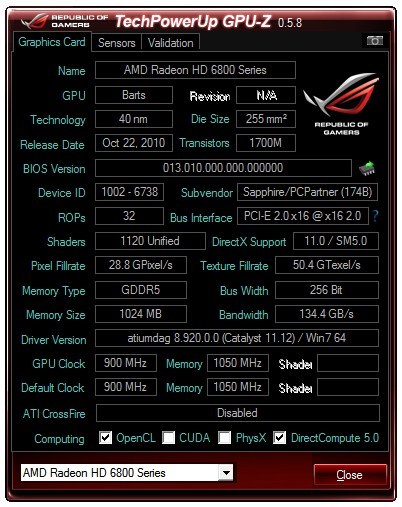
TechPowerUp today released the latest version of GPU-Z, our popular video subsystem information and diagnostic utility that provides you with accurate information about the graphics hardware installed, and lets you monitor their clock speeds, fan speeds, voltages, VRAM consumption, etc., in real-time. Version 0.5.8 introduces two new features. The first one is a render test that applies sufficient load (not stress) on the GPU to pull it out of PCI-Express link-state power-management, to ensure the Bus information is accurate. If you find the PCI-Express bus link speed or PCIe version displayed incorrectly, simply click on the "?" button next to the field to launch the load test.

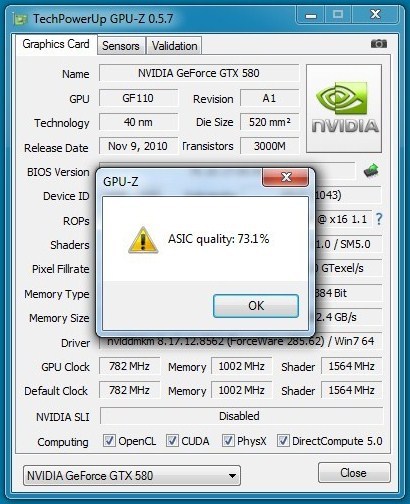
The next new feature is ASIC quality, designed for NVIDIA Fermi (GF10x and GF11x GPUs) and AMD Southern Islands (HD 7800 series and above), aimed at advanced users, hardware manufacturers, and the likes. We've found the ways in which AMD and NVIDIA segregate their freshly-made GPU ASICs based on the electrical leakages the chips produce (to increase yield by allotting them in different SKUs and performance bins), and we've found ways in which ASIC quality can be quantified and displayed. Find this feature in the context menu of GPU-Z. We're working on implementing this feature on older AMD Radeon GPUs.
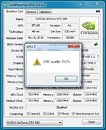
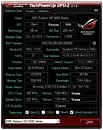
DOWNLOAD: TechPowerUp GPU-Z 0.5.8, TechPowerUp GPU-Z 0.5.8 ASUS ROG Themed

The full change-log follows.
  • Added explanation about PCI-Express power savings and 3D render test to accurately measure bus config under load
  • Added function to display ASIC quality for Fermi and Southern Islands. (Located in the GPU-Z system menu)
  • Fixed crash on older ATI cards
  • Added voltage monitoring for HD 7970
  • Improved real-time clock monitoring for HD 7970
  • Fixed OpenCL detection for AMD Antilles, Whistler, Seymour, Blackcomb
  • Improved default clock reading for AMD HD 7970 and Fusion
  • Added support for AMD FirePro V7900, HD 6930, HD 7690M, HD 6410D
  • Fixed Intel Sandy Bridge IGP to be DirectX 10.1, 32 nm
  • Added support for NVIDIA Tesla C2075, GeForce GT 630M
posted by btarunr - 9:13 AM |  Related News

User comments
1 to 26 of 134 | Go to Page 1 2 3 4 5 6    Previous | Next
by buggalugs (9:22 AM) - Reply
I like it!! So if the Asic quality is 73% is that good or bad? What is the ideal range?
by kaktus1907 (9:24 AM) - Reply
My GTX 460 1GB's production date is 25th week of 2010.. and according to GPU-Z ASIC quality test it's rated 72,9%, it's default vid is 987mV, i can use it 900MHz@1100mV, 975MHz @1212mV..
by theonedub (9:38 AM) - Reply
My 580 Lightning has an ASIC of 80.6% and my OE GT530 has an ASIC of 87.4% For those who may not know, you open the context menu by pressing Alt then pressing your down arrow :D Nice little update, W1z :cool:
by slyfox2151 (9:41 AM) - Reply
i dont know... but my GTX560 TI has a rating of 77.1%
by kaktus1907 (9:42 AM) - Reply
by: theonedub
My 580 Lightning has an ASIC of 80.6% and my OE GT530 has an ASIC of 87.4% For those who may not know, you open the context menu by pressing Alt then pressing your down arrow :D Nice little update, W1z :cool:
wonder what're your oc numbers? thats very high asic quality, no surprise binned chips are used in lightning series card.. for GT530 it's rather very small chip and yields are high.. so it's normal that it has higher ASIC quality
by NC37 (9:45 AM) - Reply
So I have an ASIC of 78.9 on one 460 and then 47.7 on the other. Thats bad isn't it?
by W1zzard (9:45 AM) - Reply
by: NC37
So I have an ASIC of 78.9 on one 460 and then 47.7 on the other. Thats bad isn't it?
how do the two cards compare in max oc results ?
by theonedub (9:47 AM) - Reply
by: kaktus1907
wonder what're your oc numbers? thats very high asic quality, no surprise binned chips are used in lightning series card.. for GT530 it's rather very small chip and yields are high.. so it's normal that it has higher ASIC quality
Haven't bothered pushing the Lightning, stock voltage is 1.006 and I run it @ 875core. I wonder if having access to this rating will start to factor into the resell value of cards? I can see people claiming 'golden' GPUs and using this as a method of validating. Wonder if that is warranted?
by NC37 (9:49 AM) - Reply
by: W1zzard
how do the two cards compare in max oc results ?
I've had them both up to about 830Mhz on the core from 715Mhz stock. Didn't push higher than that, but I tested to 850. Think if I remember right it didn't like it that high.
by LAN_deRf_HA (9:49 AM) - Reply
It will only have value if it turns out to have any bearing on overclocking, and maybe voltage efficiency depending on what you're going for. Need more data.
by kaktus1907 (9:49 AM) - Reply
by: W1zzard
how do the two cards compare in max oc results ?
Hi W1zzard, great update thx.. i wonder is there anything related with on chip numbers to ASIC quality.. as i said my chip rated as 72.9% quality and on chip it's written NN7288.M2P.. is there any relations with them ?
by W1zzard (9:50 AM) - Reply
by: kaktus1907
Hi W1zzard, great update thx.. i wonder is there anything related with on chip numbers to ASIC quality.. as i said my chip rated as 72.9% quality and on chip it's written NN7288.M2P.. is there any relations with them ?
no idea. what gpu?
by LAN_deRf_HA (9:52 AM) - Reply
by: W1zzard
no idea. what gpu?
Scroll up.
by W1zzard (9:53 AM) - Reply
by: LAN_deRf_HA
Scroll up.
ah, thanks. for nvidia, most probably not edit: i just checked my 7970. no numbers in the gpu markings that match asic quality
by kaktus1907 (9:53 AM) - Reply
by: W1zzard
no idea. what gpu?
it's Gigabyte GTX 460 1 GB OC the first batch i guess,, i bought it first week August 2010.. i posted gpu shot my earlier post #3..
by NC37 (9:54 AM) - Reply
by: NC37
I've had them both up to about 830Mhz on the core from 715Mhz stock. Didn't push higher than that, but I tested to 850. Think if I remember right it didn't like it that high.
Oh, the 44.7 one does run hotter than the other. But I thought it was always just case placement. Although, come to think of it, when I transferred into this Storm Sniper with a big fan over the slots, I didn't see really any improvement in it's temp.
by W1zzard (9:55 AM) - Reply
by: NC37
Oh, the 44.7 one does run hotter than the other
asic quality directly controls voltages on a lot of cards
by NC37 (9:56 AM) - Reply
So the voltages might be different? Hmmm. Well it is running almost 10c hotter than the other.
by NC37 (9:59 AM) - Reply
Ahh yep...one 460 is running @ around .9750v right now while the other runs @ 1.0370v...hmmm, the lower voltage one is fluctuating a lot while the other isn't moving at all. Just like it is stuck at 1.0370v.
by puma99dk| (10:02 AM) - Reply
how to get the "ASIC quality" popup if it should start with GPU-Z it doesn't on my pc ^^;
by LAN_deRf_HA (10:03 AM) - Reply
Should we start compiling numbers somewhere? I'd guess score, VDDC at 3d clocks (no load), and maybe volts for a high, stable overclock? I wouldn't bother with heat given case and paste job inconsistencies.
by W1zzard (10:05 AM) - Reply
by: LAN_deRf_HA
Should we start compiling numbers somewhere? I'd guess score, VDDC at 3d clocks (no load), and maybe volts for a high, stable overclock? I wouldn't bother with heat given case and paste job inconsistencies.
make a new thread in the graphics card forum if you want to take care of it
by LAN_deRf_HA (10:06 AM) - Reply
I don't want to take care of it haha. Somebody else do it.
by Q9650 (10:07 AM) - Reply
how to use asic quailty feature?
by theonedub (10:09 AM) - Reply
Open context menu by pressing ALT on your keyboard, press down arrow to open menu, either scroll down to ASIC or use your mouse to click it.
1 to 26 of 134 | Go to Page 1 2 3 4 5 6    Previous | Next
7723 Users online, 4.44 mbps
Quick Search
Already a member?
Username:
Password:
Register Here!
TechPowerUp on Facebook 
TechPowerUp on Google+ 
TechPowerUp Mobile App
New Forum Posts
14:45 by CaptainFailcon
3dfx Voodoo5 6000 Silver Edition (15)
14:37 by theeldest
[Benchmark] IOMeter Results Thread (21)
14:34 by Cold Storm
Anime Nation (9785)
14:25 by DonInKansas
Serious Giveaway (25)
14:15 by Kreij
TPU Minecraft Server (1954)
13:58 by lordjohn
i7 960 too hot 80c (44)
13:40 by Random Murdere...
TPU's Nostalgic Hardware Club (398)
Popular Reviews

Latest VGA Drivers

ATI Catalyst 12.4 WHQL

XP32 | XP64 | W7 32 | W7 64

NVIDIA GeForce 296.10 WHQL

XP32 | XP64 | W7 32 | W7 64