• Home
  • Reviews
  • Forums
  • Downloads
  • Case Mod Gallery
  • Databases
    • VGA Bios Collection
    • GPU Database
    • CPU Database
    • Review Database
  • Our Software
    • GPU-Z
    • RealTemp
    • TPUCapture
  • More
    • Articles
    • Old Stuff
    • Computer Trivia
    • Free Image Hosting
  • Contact Us

HAF 932 Red Dragon MOD
« Previous Mod Return to Index Random Mod Next Mod »
Owner: Super XP
Send email
Send private message
Posted: January 15th 2010
Updated: October 9th 2011 - 11:57 PM
Viewed: 26,696 times
Rating:
Superb (8.1)
Voting Graph 51 votes total
Submit vote:

Please register on the forums & login to vote.
Key Features: High Rated AMD CPU AMD CrossFire Custom paint job Water cooled
Homepage: http://www.techpowerup.com/gallery/2442.html
Worklog: http://aggressivehidef.com/home.html
This user's other mods:
  • Massive FPS Gaming PC
System Specs: » AMD Phenom II X4 940 @ 3.60GHz » Sapphire Radeon HD6970 2GB GDDR5 (Used to be CrossfireX'ed with 2 x 4870's) » Asus VE248H 24" WS 1080p, 2ms, LED, 10,000,000:1 » Asus M3A79-T Deluxe AM2+ 790FX/SB750 » OCZ DDR2-1066 8GB (4x2GB) Reaper HPC (5-5-5-15) » Corsair H50 CPU Cooling » WD 250GB SATA300 w/16MB buffer x 2 (RAID 0) » WD 1TB SATA300 w/ 32MB buffer » LG GGC H20L Blu-ray/HD DVD/DVD/RW, SATA » HAF 932 Red Dragon MOD (Custom) » Corsair TX Series 750W » Windows 7 Ultimate x64
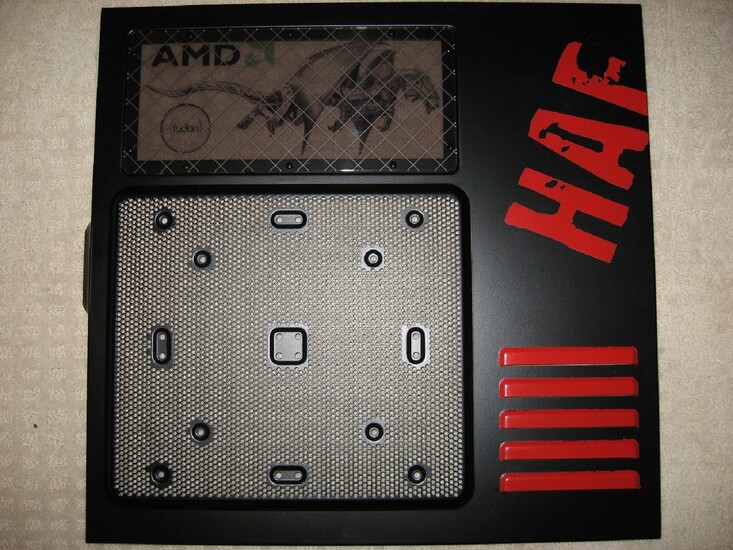
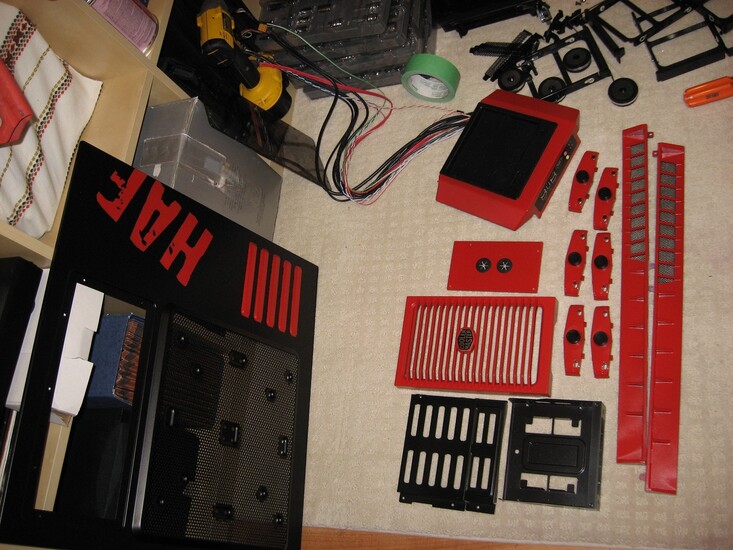
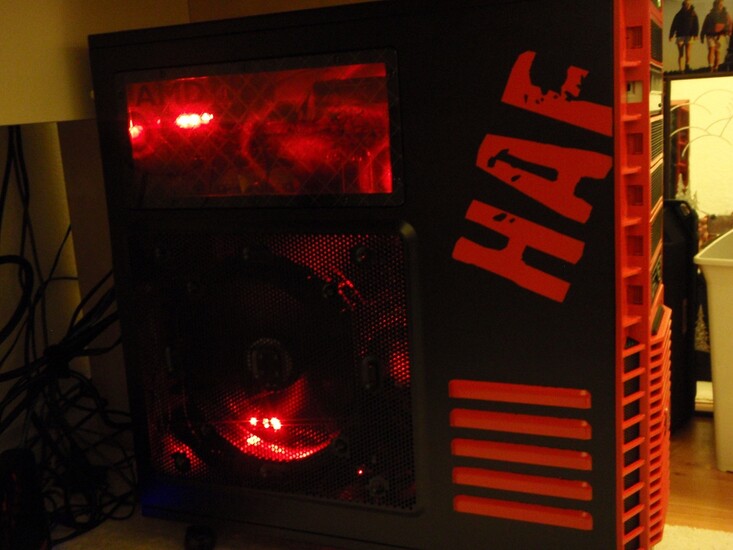
Performed Mods: Prep, Primed & Painted. The sanding was tricky along with the taping. It took me some time to tape up the "HAF" on the side of the case. I did not sand the plastic. Big mistake, DO NOT SAND THE PLASTIC because it's not plastic, its PVC piping plastic. If you sand it it comes out like spaghetti. I stopped just in time and prevented damage to my case. Just clean it with soap & water, then give it about 4 to 5 thin coats of primer to get it fully covered. Then paint away. It seems as though CoolerMaster put some sort of residue on the exposed steel parts of the case. So sanding then priming is a must.
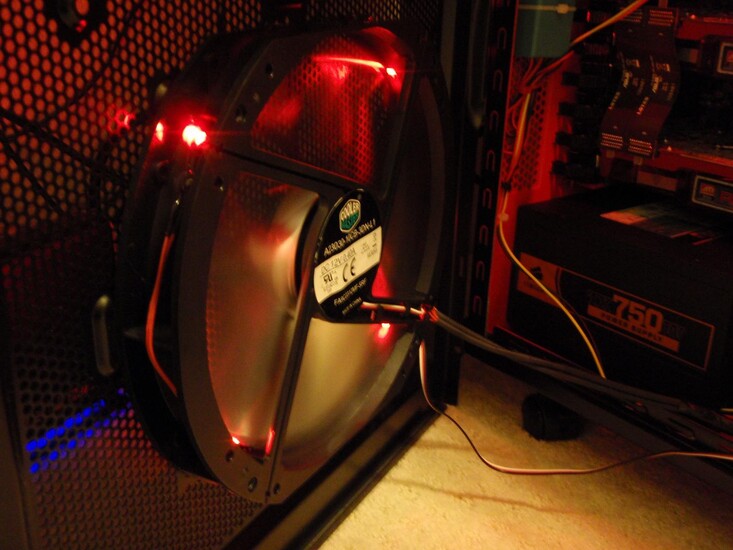
Finished the 2 x 230mm Black fans. Added RED LED's on them and painted the fins bright Chrome Metallic. I'll be adding new photos in the coming days. Air blowing inside the case from the side, bottom & back fans and hot air blowing out of the case from the top fans (230mm & 120mm). Hope you all like my Mod...
Add your own comment

111 Comments

#1
Super XP
2000 Posts
Hope you guys like my mod. I still need to put my hardware inside. I'll be adding more pictures later. I am waiting for my RED LED CoolerMaster 230mm fans to arrive along with my Corsair H50 cpu cooler.

Similar looking to the AMD Limited Edition version, though I rather have the side cooling for my Crossfire Setup. But that dragon on the panel does look good on the AMD Limited Edition.

I am trying to add a few more pics and its not letting me. I get an error message lol
OK, I figured it out, my picture res was way to large, so I made them all 1600 x 1200 and they loaded up super fast without error.
Regards,
Posted on Jan 15th 2010, 0:27 Edit | Reply
#2
CALIBRE
I voted 10/10 i llove ur colour:-)nice job
check out my pc n vote plz
http://www.techpowerup.com/gallery/2423.html
Posted on Jan 15th 2010, 2:57 Edit | Reply
#3
Super XP
2000 Posts
by: CALIBRE
I voted 10/10 i llove ur colour:-)nice job
check out my pc n vote plz
http://www.techpowerup.com/gallery/2423.html
Thank you very much. I can't wait to put in my hardware and my red led colour fans.
Posted on Jan 15th 2010, 3:09 Edit | Reply
#4
assaulter_99
1000 Posts
Nice work on the haf. I'll vote when I see the end project though lol. One question though, why is it a must to prime before painting? To prevent it from rusting or making the paint stick more to it? Cause I've done a trial (before touching my new case) with a cheapo one, just sprayed paint on it and it ended up good, so is it really a must?
Posted on Jan 15th 2010, 3:30 Edit | Reply
#5
CALIBRE
by: Super XP
Thank you very much. I can't wait to put in my hardware and my red led colour fans.
Thats ganna look amazing:-)
Posted on Jan 15th 2010, 3:34 Edit | Reply
#6
Super XP
2000 Posts
by: assaulter_99
Nice work on the haf. I'll vote when I see the end project though lol. One question though, why is it a must to prime before painting? To prevent it from rusting or making the paint stick more to it? Cause I've done a trial (before touching my new case) with a cheapo one, just sprayed paint on it and it ended up good, so is it really a must?
Yes it's a REAL MUST. What happens is the paint flakes off. One hit from a tool or a screw and it can flake off. The primer bonds to the metal and the paint sticks to the primer.

If you want a real good example, try screwing a screw in a hole where you painted, once that screw touches the case as you tighten it, if your paint does not flake off, then you should be OK.

Oh, they do have paint with primer together. But it costs like $20+ for a can lol.
Posted on Jan 15th 2010, 3:35 Edit | Reply
#7
assaulter_99
1000 Posts
I understand now why! Holy cr*p, $20? I'll have to save up before even trying it then! I guess I'll wait some more, till i'm fed up with the steelie look!
Posted on Jan 15th 2010, 3:40 Edit | Reply
#8
Super XP
2000 Posts
by: assaulter_99
I understand now why! Holy cr*p, $20? I'll have to save up before even trying it then! I guess I'll wait some more, till i'm fed up with the steelie look!
I just told you why, because your paint will flake off lol.
But if you want just coat it with a nice Clear Coat Paint to protect it and make your paint finish stronger!
Posted on Jan 15th 2010, 3:43 Edit | Reply
#9
assaulter_99
1000 Posts
Yeah. lol Anyways did you take the case down entirely? Cause the 922 have some rivets that will prevent me from parting the top from the case. I've thought about masking it but that's a hell of a job! ;)
Posted on Jan 15th 2010, 3:47 Edit | Reply
#10
Super XP
2000 Posts
by: assaulter_99
Yeah. lol Anyways did you take the case down entirely? Cause the 922 have some rivets that will prevent me from parting the top from the case. I've thought about masking it but that's a hell of a job! ;)
Yes most of it. I used my drill to drill out the rivets. I had to buy a rivet tool and some rivets to put the case back together when I finished painting it.
Posted on Jan 15th 2010, 11:31 Edit | Reply
#11
Super XP
2000 Posts
O.K. all my hardware is now in my new modded case. The CoolerMaster fans are not all that bright I've noticed. Anyway, I've attached 4 more pictures in the Case Gallery.

Hope you all like my Mod.
Feel free to tell me what you think.
Posted on Jan 15th 2010, 23:25 Edit | Reply
#12
dr.rooke84
5 Posts
i must say the cables need a little bit more of a tidy then i will give you a 8/10
Posted on Jan 16th 2010, 4:52 Edit | Reply
#13
sweeper
500 Posts
Love the colors.... both my favorite. Probably why I still have my Tt XaserII case. Wish I had the patience to paint the inside. Mine would be rather easy but I just am to lazy I guess. Good job on yours though!!! +10
Posted on Jan 16th 2010, 7:24 Edit | Reply
#14
kian
I like red and black combination. :)
http://www.techpowerup.com/gallery/2116.html

8/10
Posted on Jan 16th 2010, 7:48 Edit | Reply
#15
Fourstaff
TPU Janitor
Nice. 9/10
Posted on Jan 16th 2010, 8:57 Edit | Reply
#16
cerver
25 Posts
looks sick mate, 10/10
Posted on Jan 16th 2010, 11:50 Edit | Reply
#17
assaulter_99
1000 Posts
Merits a 10 for all the work done. I like the red and black combination. Me thinks it's an example if I ever wanna start some serious case modding!
Posted on Jan 16th 2010, 13:27 Edit | Reply
#18
Super XP
2000 Posts
Thanks guys for your votes.
by: dr.rooke84
i must say the cables need a little bit more of a tidy then i will give you a 8/10
I think I know what you mean with the cables in the case, I have a problem and that is a few cables are way too short. They were meant for a mid tower case. My 3.5 inch Floppy/Multi-Card reader's USB cable is darn short, and it's real tight around my heatsink & DDR Ram when I try to tuck it away nicely.
Perhaps I can get an extension or something. I will try and work on the cables in the case to further clean them up. I value your vote and everybody elses votes.
Posted on Jan 16th 2010, 23:37 Edit | Reply
#19
Hunt3r
200 Posts
was pretty much your case
Posted on Jan 17th 2010, 7:22 Edit | Reply
#20
Super XP
2000 Posts
I further cleaned up the cables in my case. I'll try and add some pics a little later on. And my Corsair H50 is on its way, should get this sometime this week. I already have 2 x CoolerMaster 120mm x 25mm Red Led fans waiting for it.
Posted on Jan 17th 2010, 14:00 Edit | Reply
#21
blkhogan
1000 Posts
Love it. Well done.
Posted on Jan 17th 2010, 15:07 Edit | Reply
#22
Super XP
2000 Posts
by: blkhogan
Love it. Well done.
Thank you very much.
Posted on Jan 18th 2010, 1:31 Edit | Reply
#23
CALIBRE
Mate ur case looks amazing! I LOVE IT!
Posted on Jan 18th 2010, 7:55 Edit | Reply
#24
Super XP
2000 Posts
That's funny I uploaded a picture of the inside of the case but don't see it anymore? I will have to try again later on tonight after work.
by: CALIBRE
Mate ur case looks amazing! I LOVE IT!
Thanks,
Posted on Jan 18th 2010, 14:19 Edit | Reply
#25
Super XP
2000 Posts
by: ABILITY
Seriously SWEET!!! u get 10/10 on my vote!!
Awesome, thanks man.

I had a hard time organizing my Power Supply cables even though there's a lot of room in this case. There are so many strands of thick wire, it sort of mimics tangled spaghetti lol, but I managed to clean her up as much as possible.
My original CPU temps were ranging in around 48-55OC at idle and around 63-66OC after 2 hours of L4D2 gaming in my Antec 900 mid tower gaming case which did push a lot of air, but organizing the cables was really hard and somewhat sloppy.

But now with my Red Dragon case, my temps have dropped more than 10OC all across the board. And with the addition of my upcoming Corsair H5O, it should further improve Big Time. Organizing the power supply cables I now realize is of the up most importance in any gaming case!
Posted on Jan 19th 2010, 14:44 Edit | Reply
#26
Super XP
2000 Posts
Hopefully in about a week I will be doing a minor update to my MOD. I am building my own custom red fan controller. I am also planning on modifying the side panel which I already had planned originally but didn't have the time.
Posted on Jan 20th 2010, 12:13 Edit | Reply
#27
nt300
500 Posts
Long live the red dragon. What do U mean you are modding your case fans? What led's in them and paint them.
Posted on Jan 21st 2010, 14:27 Edit | Reply
#28
dr emulator (madmax)
1000 Posts
i only gave you 9 because you didn't cut out that fan grill at the back ;)
still a nice job :)
Posted on Jan 24th 2010, 4:06 Edit | Reply
#29
Jetster
2000 Posts
I think you could do better with the wire management. But the colors are great
Posted on Jan 24th 2010, 4:30 Edit | Reply
#30
Super XP
2000 Posts
Thanks for the input. I just installed my Corsair H50 cooler with double fan. And I am almost finished moding my 2 x 230mm black fans. I am adding Red Led's to them and spray painting them metalic red/silver chrome. New pics coming soon. I also have a bag of heat shrink toobing to further clean up the interior.
by: dr emulator (madmax)
i only gave you 9 because you didn't cut out that fan grill at the back ;)
still a nice job :)
Fan grill? U mean where the 140mm sits.
Thanks for the 9/10.
Posted on Jan 24th 2010, 11:04 Edit | Reply
#31
AceCombat
A good mod to the HAF wording, do you mind teach me or guide me how you painted it?
It's awesome.
Posted on Jan 25th 2010, 3:21 Edit | Reply
#32
nt300
500 Posts
by: AceCombat
A good mod to the HAF wording, do you mind teach me or guide me how you painted it?
It's awesome.
I'm thinking about moding my case too. The best way to do it is to lighly sand down the metal, clean it good and give it a few coats of good primer. Then get some nice colored spray paint of your choice. This should help the paint stick on. XP probably did the same i guess. You should also try and remove panels off the case. Remove the rivets by drilling them out. Get a rivet gun to put them back on.
Posted on Jan 25th 2010, 12:45 Edit | Reply
#33
AceCombat
@nt300
I know how to paint a casing, just i wonder how he traced the "HAF" wording and paint it like that :D
Posted on Jan 25th 2010, 20:41 Edit | Reply
#34
Super XP
2000 Posts
by: AceCombat
@nt300
I know how to paint a casing, just i wonder how he traced the "HAF" wording and paint it like that :D
It took me about 4 days (approx: 2-4hrs per day) to tape up that "HAF" symbol. After taping it with painters tape, I gave it a nice prime then painted it.
I took my dear time and taped it very slow cutting ever single little piece of green painters tape with scissors. Darn that was time consuming, but I really wanted this to look professional. I hope I accomplished that.

I chose the colour red because I always did used blue, and red is a great colour for gaming, it’s also a difficult colour to find stuff in like fan controllers & case fans. Blue & Green are everywhere lol. No thanks.

Now I am custom building my own RED LED fan controller to quiet my case alittle more and adding LED's with Chrome and RED Metalic primer/paint to my 2 x 230mm fans which came with the HAF. If you are interested in adding LED's to those fans let me know, I know the best place to get them online.

And thanks for Voting...
Posted on Jan 25th 2010, 22:22 Edit | Reply
#35
nt300
500 Posts
Wow, 4 days to tape up that haf lol. nice
Posted on Jan 26th 2010, 6:19 Edit | Reply
#36
Super XP
2000 Posts
Here's a new PIC, more to come. Finally installed my Corsair H5O.

Posted on Jan 27th 2010, 21:14 Edit | Reply
#37
nt400
This is the best HAF 932 I've seen in all of the internet. wow, you get a 10/10.
Posted on Feb 3rd 2010, 16:49 Edit | Reply
#38
Super XP
2000 Posts
Thanks alot. My fans are almost done and my custom Red fan controller is complete, just waiting for a 2nd coat of paint.
Posted on Feb 4th 2010, 7:46 Edit | Reply
#39
DavidV
5 Posts
I have that case also but have not done anything with it. I like your colors red/black is cool.Stuff you have in there is nice.
Posted on Feb 5th 2010, 21:53 Edit | Reply
#40
nt300
500 Posts
This case is rocking. I want to see pics with your moded 230mm fans and that red led fan controller you built.
Posted on Feb 5th 2010, 21:57 Edit | Reply
#41
Super XP
2000 Posts
by: nt300
This case is rocking. I want to see pics with your moded 230mm fans and that red led fan controller you built.
Holy avatar, where do you get them from lol
Here's those modded fans. I have more pics in my first post.

Posted on Feb 8th 2010, 16:20 Edit | Reply
#42
nt300
500 Posts
Oh very nice indead. I think I try the same thing with my 230 mm fans. Isn't painting the fan blades metallic red better than chrome? it looks great either way.
Posted on Feb 9th 2010, 22:01 Edit | Reply
#43
Super XP
2000 Posts
O.K. I finally completed my custom Black & RED LED fan controller. New Pic's added.
It controlls 4 fans, so it's now nice and quiet when need be. I crank it up while gaming lol


Posted on Feb 10th 2010, 8:55 Edit | Reply
#44
assaulter_99
1000 Posts
Wow your custom fan controller rocks man, how did you do it?
Posted on Feb 10th 2010, 9:23 Edit | Reply
#45
Super XP
2000 Posts
I took apart one of my older Blue LED fan controllers, ripped out the 5 Blue LED's and wired up 3 stronger Red LED's by using my custom wires to plug them in for power. I also used some nice heat shrink for a pro look. Gave it a nice sand, prime, paint with some heat glue assembly.

Reason I did this, for the love of RED, I just couldn't find anything but Blue, Green & Blue. I am sick of Blue/Green lol

I have one more Blue fan controller but I don't know if I am going to assault that one just yet lol I bought about 20 Red LED's so, we'll see.
Posted on Feb 10th 2010, 16:45 Edit | Reply
#46
nt300
500 Posts
by: assaulter_99
Wow your custom fan controller rocks man, how did you do it?
That controller does look good. Make me one lol
Posted on Feb 10th 2010, 22:01 Edit | Reply
#47
brandonwh64
Addicted to Bacon and StarCrunches!!!
I got a AMD version of the HAF 932 on my way!! your mod gets a 10/10! your paint job it GREAT!

IF your interested in having the AMD side panel mine comes with then we might can do a trade?

Posted on Feb 10th 2010, 22:08 Edit | Reply
#48
nt300
500 Posts
I wish I can switch with you but my girl will eat me alive. Come to think about it, I may very well like that lol
Posted on Feb 11th 2010, 2:12 Edit | Reply
#49
Super XP
2000 Posts
by: brandonwh64
I got a AMD version of the HAF 932 on my way!! your mod gets a 10/10! your paint job it GREAT!

IF your interested in having the AMD side panel mine comes with then we might can do a trade?

http://images.tigerdirect.com/SkuImages/gallery/large/C283-1224-08.jpg
Tempting, but no thank you. I really like how my side panel looks now ever since I modded it. You should try posting it on a new thread I am sure somebody will want the AMD side panel easily.
Posted on Feb 11th 2010, 9:36 Edit | Reply
#50
SabreWulf69
Banned
Very nice work indeed. Cable management looks like it was tricky, good work man, top stuff :-)
Posted on Feb 13th 2010, 5:50 Edit | Reply
#51
brandonwh64
Addicted to Bacon and StarCrunches!!!
yes this is a very beautiful mod! thanks super XP! yea ill probly put it in the FS/FT forum once it gets here
Posted on Feb 13th 2010, 6:14 Edit | Reply
#52
Super XP
2000 Posts
I am sure you'll find somebody rather quick, that case side is nice. Cable management was hard, half my wires were too short lol, but in worked out in the end. My CPU temps with the Corsair H50 kept my CPU cool at 55C in idle & 65C under load. Once I futher cleaned up the cables my temps went down to 43C idle & approx: 55C load.

The fan controller I built made a load of difference, it keeps my system extremely quiet when need be.
Posted on Feb 13th 2010, 9:12 Edit | Reply
#53
brandonwh64
Addicted to Bacon and StarCrunches!!!
yea my idle and load temps with H20 is about the same with a 38 Deg idle and a 63 Deg load.
Posted on Feb 13th 2010, 9:18 Edit | Reply
#54
Super XP
2000 Posts
You got yourself a sweet setup with a nice OC.
I love the H20 but I do have one minor issue. When I unpacked it and cleaned off the copper surface I noticed a deep single scratch on it. It was real deep. I really didn't want to deal with RMA so I cleaned it off nice and filled that scratch with AS5. So for now it seems to be working great. My temps are getting better by the day. I guess just as the AS5 cures.
Posted on Feb 13th 2010, 22:27 Edit | Reply
#55
nt300
500 Posts
Funny I just used the original thermal paste that came with my corsair water cooler. Try looking that up on the corsair forums, most likely somebody ran into the same issue. It must be a QC problem from the sounds of it.
Posted on Feb 14th 2010, 14:16 Edit | Reply
#56
Super XP
2000 Posts
I did and didn't find anything about having a deep scratch on the copper surface. For now its working great so I won't worry about it. But I am a little ticked off though because this cooler does cost a lot more than a good air cooler.
Posted on Feb 15th 2010, 0:30 Edit | Reply
#57
nt300
500 Posts
If its working out for you than no problem i guess. I hope this Corsair will fit the Bulldozer socket when it gets released in 2011.
Posted on Feb 15th 2010, 14:31 Edit | Reply
#58
brandonwh64
Addicted to Bacon and StarCrunches!!!
by: Super XP
You got yourself a sweet setup with a nice OC.
I love the H20 but I do have one minor issue. When I unpacked it and cleaned off the copper surface I noticed a deep single scratch on it. It was real deep. I really didn't want to deal with RMA so I cleaned it off nice and filled that scratch with AS5. So for now it seems to be working great. My temps are getting better by the day. I guess just as the AS5 cures.
maybe you could do a minor lapping job to fix the deep scratch!?
Posted on Feb 15th 2010, 14:42 Edit | Reply
#59
Super XP
2000 Posts
by: brandonwh64
maybe you could do a minor lapping job to fix the deep scratch!?
Not sure if I understand what you mean by lapping lol, but I did fill in that scratch with Arctic Silver 5, then buffed the base surface, so it was almost invinsible to the eye. But perhaps this lapping job may fix it.
Posted on Feb 16th 2010, 12:00 Edit | Reply
#60
brandonwh64
Addicted to Bacon and StarCrunches!!!
lapping process is simple to some

you start off with
o 400 Grit Super Fine Wet/Dry
o 600 Grit Ultra Fine Wet/Dry
o 800 Grit Ultra Fine Wet/Dry
o 1000 Grit Ultra Fine Wet/Dry
o 1500 Grit Mirror Fine Wet/Dry
o 2000 Grit Mirror Fine Wet/Dry

Then go 30 times in all 4 directions on each type of sand paper starting @ 400 grit

it will turn it into a mirror like finish when your done and buff out that deep scratch
Posted on Feb 16th 2010, 12:24 Edit | Reply
#61
Super XP
2000 Posts
Wow, interesting. Don't know if I have the time for that one, but I will keep it in mind if ever I plan on re-applying the Corsair H50. Thanks for the info, it will help alot.
Posted on Feb 17th 2010, 1:57 Edit | Reply
#62
nt300
500 Posts
by: brandonwh64
lapping process is simple to some

you start off with
o 400 Grit Super Fine Wet/Dry
o 600 Grit Ultra Fine Wet/Dry
o 800 Grit Ultra Fine Wet/Dry
o 1000 Grit Ultra Fine Wet/Dry
o 1500 Grit Mirror Fine Wet/Dry
o 2000 Grit Mirror Fine Wet/Dry

Then go 30 times in all 4 directions on each type of sand paper starting @ 400 grit

it will turn it into a mirror like finish when your done and buff out that deep scratch
That's great to know maybe you should get a new thread and post this info so people will have an idea with what to do.
Posted on Feb 17th 2010, 13:57 Edit | Reply
#63
nt300
500 Posts
Who keeps on givinig you 6/10 ?? This case at the very least should be getting around 8 or 9 out of 10.
Why dont you submit your case to cpu magazine Super? I think its the best looking Haf so far.
Posted on Feb 25th 2010, 6:45 Edit | Reply
#64
Frontosa30
great paint job! pretty done! i love red and black combination...

same combination here as well

http://www.techpowerup.com/gallery/2500.html

Posted on Feb 26th 2010, 14:08 Edit | Reply
#65
Super XP
2000 Posts
Black and Red do look great, you got a mod. Your HAF 922 looks good. Put my mod beside your mod and they would look like brothers.

nt300, people vote what they want. I don't worry too much, I just enjoy gaming with my case in its Black & Red glory.
Posted on Feb 27th 2010, 5:21 Edit | Reply
#66
nt300
500 Posts
True, just thought it was unfair that all. Can't wait to mod my case when I get the chance. Don't know about black and red maybe red and silver chrome lol just for a little change.

Hey should I upgrade my MSI 790FX-GD70 to the newer 890FX or just wait for Bulldozer and that chipset when it comes out? I like what I have right now it does everything I want and I can always get another XFX HD 5770 for crossfire yes?
Posted on Mar 6th 2010, 18:04 Edit | Reply
#67
Super XP
2000 Posts
I'm still planning on doing a minor upgrade on the side panel. Once I have time, hoping in around a few months time.
Posted on Mar 11th 2010, 15:47 Edit | Reply
#68
nt300
500 Posts
Hummm, I am pushing myself to also mod my haf-932. I just don't have the time, maybe in summer I will spend a few days and play with it.
Posted on Mar 17th 2010, 17:07 Edit | Reply
#69
nt300
500 Posts
Hopefuly this weekend I will strip down my Haf 932 and clean then prime it good. Maybe a nice dark red and yellow or something lol
Posted on Mar 25th 2010, 13:32 Edit | Reply
#70
Super XP
2000 Posts
Good Luck
Posted on Mar 29th 2010, 7:07 Edit | Reply
#71
nopower09
deleted
Posted on Apr 7th 2010, 9:28 Edit | Reply
#72
nopower09
10/10

your's haf just like your a big ati fans - sorry if i'm wrong :), although i'm a neutral one
Posted on Apr 7th 2010, 9:28 Edit | Reply
#73
Super XP
2000 Posts
Thanks for the 10/10. I used to have NVIDIA chipset based motherboards and also video cards, but had way too many RMA's for some reason which is one reason why turned to ATI. So now I prefer ATI graphics. It works great with ATI chipset. I also loved my ATI Radeon 9700Pro back in the day which I bought after my 2nd or 3rd NVIDIA RMA.
Posted on Apr 8th 2010, 13:29 Edit | Reply
#74
AMDGuy64
by: Super XP
Thanks for the 10/10. I used to have NVIDIA chipset based motherboards and also video cards, but had way too many RMA's for some reason which is one reason why turned to ATI. So now I prefer ATI graphics. It works great with ATI chipset. I also loved my ATI Radeon 9700Pro back in the day which I bought after my 2nd or 3rd NVIDIA RMA.
I love your case! I just ordered one last week got it Tuesday! I tore it down & started sanding & priming but I have a few questions if you'd be so kind to answer them?

1-do you think it is ok to use a metal primer on the plastic parts?

2-Do you think i'll be ok with 4 coats of a blue enamel instead of 2 coats then 2 coats of clear? I rather not use clear coat since some times it alters the color just slightly & I don't want that but I want my paint well protected.

3-did you repaint the black areas of the case? I didn't plan on it but I might finish all my blue parts & let everything dry for 48+ hours then redo all the black b/c it is a really cheap light paint job if you ask me :(

thanks in advance for any replies....just want my case to be perfect & well protected.
Posted on Apr 17th 2010, 14:37 Edit | Reply
#75
Super XP
2000 Posts
Thanks for your kind remarks.
1) No I did not redo the original black, it does have a good strong black finish IMO.

2) Not sure about metal primer on plastic parts. Personally I would use an all purpose primer that does both metal and plastic just to be 100% sure. The last thing you want is your paint to flake off. Try to get the good stuff, may set you back a few more $$'s but it will be well worth it.

3) Clear Coat? No thinks, I wouldn't use it. Today's spray paints are a lot better now that do not require clear coat IMO. I would stick with about 2-3 lite primer coats, then 1 steady primer coat to make sure you got it all, then I would repeat the same for the spray paint.

Good luck, can't wait to see your finished case.
Posted on Apr 17th 2010, 16:03 Edit | Reply
#76
AMDGuy64
thanks for the response, sadly I did not get it until after I went to the store. I have a Rustoleum plastic primer but I'm going to attempt to return it(b/c thanks to my new build i am really short on cash) then buy a an all purpose primer no matter what the price.
I'll be sure to try & post pics once it is finished ( i said try b/c i suck with software just good at painting & building them lol) but I will wait to post pics until my 1090T arrives!
Thanks again for the advice & your case really does look amazing. All the hard work shows & I absolutely love the layout of your paint job. The only things I'm doing different is there will be a black border around the CM logo on the front of the case, my HDD cage will be blue with black clips, & I'm not painting the top fan grill blue/red for yours.
Posted on Apr 17th 2010, 17:38 Edit | Reply
#77
ERazer
1000 Posts
this mod gave me ideas how to mod my haf as well, great mod
Posted on Apr 17th 2010, 17:40 Edit | Reply
#78
AMDGuy64
by: Super XP
Thanks for your kind remarks.
1) No I did not redo the original black, it does have a good strong black finish IMO.

2) Not sure about metal primer on plastic parts. Personally I would use an all purpose primer that does both metal and plastic just to be 100% sure. The last thing you want is your paint to flake off. Try to get the good stuff, may set you back a few more $$'s but it will be well worth it.

3) Clear Coat? No thinks, I wouldn't use it. Today's spray paints are a lot better now that do not require clear coat IMO. I would stick with about 2-3 lite primer coats, then 1 steady primer coat to make sure you got it all, then I would repeat the same for the spray paint.

Good luck, can't wait to see your finished case.
oh also doing one more thing...not 100% if I will do it yet but I want to remove my plastic housing on my XFX 5770 & paint the all the red blue except the fan just leave it red since no one will see it facing down & all. I'm not sure yet on this one. I might pull an old card. test the paint & stress test it to see if it holds up but the paint says it supports up to 200 degrees which is more than enough for the temp in my pc & my card only runs at 37C idle 65-69 max load. so no wear near still got like 25C to go or something.
Posted on Apr 17th 2010, 18:27 Edit | Reply
#79
Super XP
2000 Posts
Thanks guys, your votes are greatly appreciated.
Oh by the way those push button clips which holds the DVD drives etc. were a pain in the aris taking them off and even worst putting the buggers on lol, but lucky that Coolermaster built them strong, so I painted them red.
Posted on Apr 17th 2010, 21:39 Edit | Reply
#80
AMDGuy64
by: Super XP
Thanks guys, your votes are greatly appreciated.
Oh by the way those push button clips which holds the DVD drives etc. were a pain in the aris taking them off and even worst putting the buggers on lol, but lucky that Coolermaster built them strong, so I painted them red.
I watched a video on taking them off & the first one I removed, the springs shot all over the room! lol but then I had the hang of it & I contained the rest. They were not too difficult to remove but I have a feeling you're very right & they'll be a huge pain to put back on without breaking the clips. time is patience is all i can offer though.
Posted on Apr 18th 2010, 14:20 Edit | Reply
#81
Super XP
2000 Posts
Yes I remember the 1st one I took off lol, it was tricky. I hated putting them back on, its tricky. I was forced to pry back the metal a little on a few of them for some reason. But not all is working very well.
Posted on Apr 18th 2010, 21:25 Edit | Reply
#82
nt300
500 Posts
Yes I remember this mod, very nice super.
Posted on Apr 19th 2010, 7:46 Edit | Reply
#83
AMDGuy64
by: Super XP
Yes I remember the 1st one I took off lol, it was tricky. I hated putting them back on, its tricky. I was forced to pry back the metal a little on a few of them for some reason. But not all is working very well.
Ok getting them off was easy but I though I paid attention to how they go back on...guess I was wrong. lol. How do I get the toolless disk drive clips back together so they function properly? any help? please! lol. Just ordered my 1090T this morning, last piece of my new build!
Posted on Apr 27th 2010, 16:41 Edit | Reply
#84
nt300
500 Posts
Hey i tried taking mine off. It's tricky maybe I take picture OK.
Posted on Apr 28th 2010, 7:12 Edit | Reply
#85
AMDGuy64
by: nt300
Hey i tried taking mine off. It's tricky maybe I take picture OK.
Thanks, I appreciate it. Idk if it is the toolless design or me just not being used to such an open airy case...but all I can hear is my hard drive reading & writing. hard to adjust to such a noticeable sound. I might just use screws to hold it in, see if it makes a difference.
Anyways for anyone who is curious I just finished building my new rig, tweaking my BIOS, & installing all my MB features. Now to test the Phenom II x6 1090T hands on!!
Posted on Apr 28th 2010, 18:45 Edit | Reply
#86
Super XP
2000 Posts
nt300 that would be great, I am trying to remember, lol. It's been a while since I modded my case. The harddrive clips or should I say the DVD rom clips was sort of tricky to take off and put on.

Try putting one together in your hand and push the button, make sure when you press it the little metal pin that pops out (holds the harddrive or DVD rom in place) then pops back in with a clicking sound. That is how I figured out how it went on. It really is quite easy once you get it.

Did you try checking the internet for more info?
Posted on Apr 28th 2010, 21:47 Edit | Reply
#87
AMDGuy64
by: Super XP
nt300 that would be great, I am trying to remember, lol. It's been a while since I modded my case. The harddrive clips or should I say the DVD rom clips was sort of tricky to take off and put on.

Try putting one together in your hand and push the button, make sure when you press it the little metal pin that pops out (holds the harddrive or DVD rom in place) then pops back in with a clicking sound. That is how I figured out how it went on. It really is quite easy once you get it.

Did you try checking the internet for more info?
I'm so excited about my new build I've been gaming too much to try it again lol. I'm sure it is easier than I am making it. Thanks for the help, I'm gonna take another shot at it today bc i want to have those clips back on & working correctly before I order my AeroCool Touch 2000.
Posted on Apr 30th 2010, 4:45 Edit | Reply
#88
Super XP
2000 Posts
Sounds good. Love to see some pics of your new modded build when you have the chance.
Posted on May 2nd 2010, 9:04 Edit | Reply
#89
AMDGuy64


http://www.facebook.com/settings/?tab=privacy#!/photo.php?pid=242675&id=100000295846001&fbid=118965401456654

http://www.facebook.com/settings/?tab=privacy#!/photo.php?pid=242674&id=100000295846001&fbid=118965394789988
Posted on May 2nd 2010, 9:37 Edit | Reply
#90
AMDGuy64
http://www.facebook.com/settings/?tab=privacy#!/photo.php?pid=242676&id=100000295846001&fbid=118965408123320
Posted on May 2nd 2010, 9:37 Edit | Reply
#91
nt300
500 Posts
Hey i dont have a facebook account.
Posted on May 4th 2010, 12:48 Edit | Reply
#92
Super XP
2000 Posts
by: AMDGuy64
http://www.facebook.com/settings/?tab=privacy#!/photo.php?pid=242676&id=100000295846001&fbid=118965408123320
Oh, love the BLUE, and nice job on the HAF. You should post it on TechPowerUP.
Posted on May 7th 2010, 22:24 Edit | Reply
#93
nt400
Very clean looking. I like red but the blue looks great.22
Posted on May 17th 2010, 10:13 Edit | Reply
#94
Super XP
2000 Posts
by: nt400
Very clean looking. I like red but the blue looks great.22
How on Gods green earth do you have a AMD (Bulldozer Prototype) X4 @ 3.30 GHz ?????
Posted on May 18th 2010, 22:13 Edit | Reply
#95
logan
75 Posts
by: Super XP
How on Gods green earth do you have a AMD (Bulldozer Prototype) X4 @ 3.30 GHz ?????
Kidding?

I have the Core i500000 with 5 million terabytes of DDJesus ram (Double data jesus) , golden plate joseph smith edition with buddha heatsinks.

my graphicard is zeus edition with odin ram and my monitor extends into space.

you can make stuff up, too! give it a try!
Posted on May 18th 2010, 23:58 Edit | Reply
#96
Super XP
2000 Posts
LOL, I just find it wierd he would really put something like that in his sig. Though I do have to admit I got some serious PC hardware too, including a Achilles E-Space 2000W power supply that only runs on 2 cylinders when not gaming along with a Heracles HD 8970 in CFX lol
Posted on May 20th 2010, 9:09 Edit | Reply
#97
Super XP
2000 Posts
I've confirmed the AMD (Bulldozer Prototype) X4 @ 3.30 GHz he states he has is BS.
Posted on Jun 6th 2010, 18:51 Edit | Reply
#98
nt300
500 Posts
Ya somethig up with that setup he has.
Posted on Jun 7th 2010, 12:48 Edit | Reply
#99
brandonwh64
Addicted to Bacon and StarCrunches!!!
For those who dont have facebook, here is AMDs machine


Posted on Jun 7th 2010, 12:52 Edit | Reply
#100
nt300
500 Posts
Ohh, a blue version of supers MOD, awesome indead. You do a great job dude. Wheres your Techpowerup mod link so I can vote on your case.
Posted on Jun 7th 2010, 15:54 Edit | Reply
#101
Super XP
2000 Posts
Very nice brandonwh64. I am glad it turned out great for you, happy gaming. Nothing like shooting zombies in the head, in the dark and in the Blue, and in my case in the RED lol,
Posted on Jun 7th 2010, 21:52 Edit | Reply
#102
babolgam
5 Posts
the red and black combination tingles all my six senses..oopps i mean five
Posted on Jul 1st 2010, 23:21 Edit | Reply
#103
nt300
500 Posts
by: babolgam
the red and black combination tingles all my six senses..oopps i mean five
A agree.
Posted on Jul 6th 2010, 7:29 Edit | Reply
#104
Super XP
2000 Posts
I am still working on my Dragon Picture. I am thinking about putting it on the side where the red led fan is or perhaps in front of the case.
That is the reason why I called my MOD the HAF 932 Red Dragon MOD.

I should be able to post new pics soon, hopefully within 2 weeks time or less.
Posted on Jul 13th 2010, 22:44 Edit | Reply
#105
nt300
500 Posts
Can wait to see the dragon you plan on putting on the side panel.
Posted on Jul 21st 2010, 12:45 Edit | Reply
#106
Super XP
2000 Posts
by: brandonwh64
For those who dont have facebook, here is AMDs machine

http://hphotos-snc3.fbcdn.net/hs631.snc3/31658_118965401456654_100000295846001_242675_1330224_n.jpg
http://sphotos.ak.fbcdn.net/hphotos-ak-ash1/hs541.ash1/31658_118965408123320_100000295846001_242676_7615987_n.jpg
http://sphotos.ak.fbcdn.net/hphotos-ak-snc3/hs601.snc3/31658_118965394789988_100000295846001_242674_1676414_n.jpg
R U planning on putting your MOD on TechPowerUP? The blue looks wild.
Posted on Jul 26th 2010, 17:04 Edit | Reply
#107
nt300
500 Posts
Hey Super, where that dragon you talk about? Look forward to seeing it mate,
Posted on Sep 17th 2010, 15:32 Edit | Reply
#108
Super XP
2000 Posts
by: nt300
Hey Super, where that dragon you talk about? Look forward to seeing it mate,
I'm just finishing up the Dragon on my side panel. I should have some pics up in about a weeks time.
Posted on Oct 3rd 2010, 20:56 Edit | Reply
#109
Super XP
2000 Posts
K, I add a picture with the dragon I was working on, on the side of the case.
Posted on Nov 9th 2010, 6:51 Edit | Reply
#110
nt300
500 Posts
by: ERazer
this mod gave me ideas how to mod my haf as well, great mod
So did you finally mod your HAF? Pictures if you have please, Im curious to see how it turn out.
Posted on Mar 9th 2012, 13:41 Edit | Reply
#111
titienzo18
I voted 5/10 because:

bof
Posted on Dec 3rd 2012, 19:50 Edit | Reply
Add your own comment
Jun 19th, 2013 23:40 EDT change timezone
Sign in / Register

TechPowerUp Mobile App

for Android for iPhone

New Forum Posts

  • 23:38 by Rowsol
    Far Cry 3- Worth it? (19)
  • 23:33 by The Von Matrices
    Bitcoins! (752)
  • 23:02 by james888
    Have you got pie today? (7697)
  • 23:01 by Delta6326
    Current sales/deals on games (steam, impulse, etc.) (4175)
  • 22:58 by bigbigbuddy
    Need help flashing vBIOS to Mobility Radeon HD3100 (9613) - Toshiba Satellite (0)
  • 22:58 by Delta6326
    The next gen of gaming consoles - PS4 vs Xbox One vs Wii U - Which would you choose? (61)
  • 22:58 by The Mac
    AMD Catalyst 13.x (13.150.0.0 May 23) (31)
  • 22:48 by [Ion]
    WCG Daily Numbers (7563)
  • 22:36 by [Ion]
    TPU's WCG/BOINC Team (23241)
  • 22:35 by AsRock
    Microsoft announces next-generation Xbox One console(uses windows kernel)) (154)

Popular Reviews

  • Jun 10th, 2013
    Computex 2013: Booth Babes Review
  • Jun 12th, 2013
    ASUS GTX 780 DirectCU II OC 3 GB Review
  • Jun 14th, 2013
    Nanoxia Deep Silence 2 Review
  • Jun 10th, 2013
    ASUS GRYPHON Z87 (Intel LGA 1150) Review
  • Jun 5th, 2013
    AMD Elite A-Series A10-6800K APU (Socket FM2) Review
  • Jun 11th, 2013
    SteelSeries Sensei [RAW] Frost Blue Edition Gaming Mouse Review
  • Mar 1st, 2013
    Intel Core i5-3570K vs. i7-3770K Ivy Bridge Review
  • Jun 18th, 2013
    MSI GTX 770 Lightning 2 GB Review
  • Jun 1st, 2013
    Intel Core i7-4770K Haswell Review
  • Jun 13th, 2013
    QPAD QH-90 Gaming Headset Review

Latest VGA Drivers

AMD Catalyst 13.4 WHQL

XP32 | XP64 | W7 32 | W7 64

NVIDIA GeForce 320.18 WHQL

XP32 | XP64 | W7 32 | W7 64
Copyright © 2004-2013 www.techpowerup.com. All rights reserved
All trademarks used are properties of their respective owners.