Tuesday, January 24th 2023

Samsung 990 PRO Flagship SSD Has an Endurance Problem, Users Notice Rapid Drive-Health Drops

Samsung 990 PRO is the company's flagship client SSD, which is among the fastest Gen 4 NVMe SSDs you can buy. It also commands a very high price premium, with the 1 TB variant priced at $170, and the 2 TB variant at $290. When you're buying in this segment, you expect the highest endurance figures for your SSD. Client SSD endurance figures are already on the rise, as NAND flash technology evolves. Neowin noticed that their 990 PRO isn't meeting this vital expectation, and with a little digging, found that there are others with this problem, and they didn't just get a bad drive.

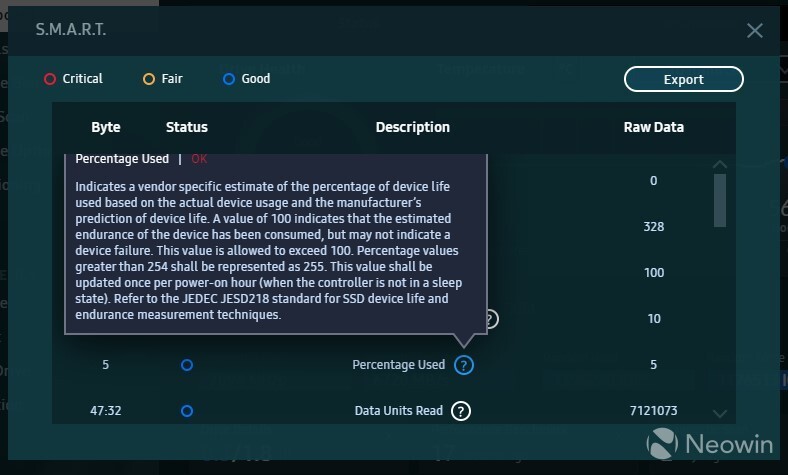
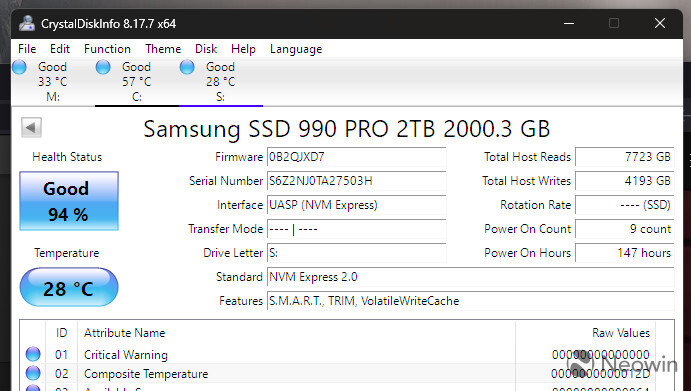
Apparently, the "drive health" reading in Samsung Magician—the utility software for Samsung SSDs—drops rather rapidly for the 990 PRO. After a clean software installation on a new drive, Neowin observed that their drive's health reading was already at 99% (something very unexpected for a new drive); and what's worse was that even with regular use of the drive in the following days, the drive health would drop by 1 percentage point every day. Drive health is interchangeable with endurance, as it indicates the number of program-erase (PE) cycles left on the NAND flash memory before regions of the drive's user-area become unwritable.
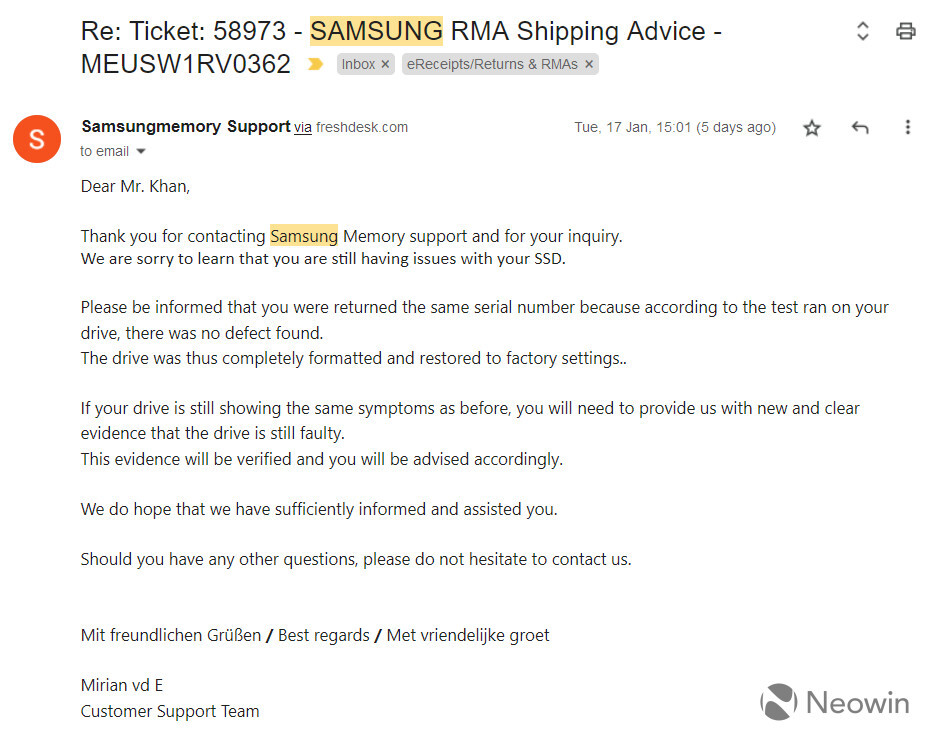
Such a rapid drop in endurance used to be a problem in the very first generations of client SSDs some 15 years ago, but it's highly unusual for a flagship product like the Samsung 990 PRO. This user on Twitter claims that their drive health dropped down to 64% at just 2 TB of total bytes written—something you don't expect even entry-level SSDs to end up with. Neowin's initial RMA request was rejected (the drive returned) as the company found "no defect" with it, but once it realized that it was dealing with the press, it quickly reached out to replace the drive and try to reproduce the issue.
Source: Neowin
Add your own comment

80 Comments on Samsung 990 PRO Flagship SSD Has an Endurance Problem, Users Notice Rapid Drive-Health Drops

#26
cfenton
This sounds like a firmware bug to me. There's no way it's actually using that much of the drive's life. Even the worst QLC drives don't wear that fast.
Posted on Reply
#27
GabrielLP14
SSD DB Maintainer
Am i reading this correctly? People freaking out because of 6%
Posted on Reply
#28
TotallyRandomPerson
I've got four Samsung sata ssds in one machine - 1TB 850 evo from 2015, a 1TB & 2TB 860 evo from 2020 and a 4TB 870 evo from 2021, and they're all "99% good"...but...man, if a company comes along and says "no" to a legitimate enquiry, then changes their tune when they find out that they're actually dealing with the press, then I'll go elsewhere next time.
Posted on Reply
#29
okidna
GabrielLP14Am i reading this correctly? People freaking out because of 6%
What about 36% with less than 2 TB written?
Posted on Reply
#30
chodaboy19
CrackongI put comsumer grade SSDs(Samsung, Seagate, Crucial) in NAS / workstations in RAID and only Samsung had this rapid failing issue.
Funny that you mention that, I bought 2x 970 Evo Plus 1TB nvme drives in my NAS and one failed within 3 months with barely any writes. I've also had 2x ADATA XPG SX8200 Pro 1TB nvme in the same NAS and they worked without issues for 3 years. Samsung did replace with failed 970 Evo Plus with a refurbished unit, is that normal for a 3 month old nvme ssd?
Posted on Reply
#31
Punkenjoy
cfentonThis sounds like a firmware bug to me. There's no way it's actually using that much of the drive's life. Even the worst QLC drives don't wear that fast.
This is exactly what i though
Posted on Reply
#32
xorbe
Are you sure the "raw value" on this drive is 1% increments and not something much finer grained?
Posted on Reply
#33
GabrielLP14
SSD DB Maintainer
okidnaWhat about 36% with less than 2 TB written?
Now that is in fact something to be raise questions.
Posted on Reply
#34
ThrashZone
okidnaWhat about 36% with less than 2 TB written?
Hi,
If you're samsung/... they would prefer you stop looking like the majority of buyers and just wait for it to die a natural death :laugh:
Posted on Reply
#35
Tomorrow
cfentonThis sounds like a firmware bug to me. There's no way it's actually using that much of the drive's life. Even the worst QLC drives don't wear that fast.
Would not be the first time.

I had and still have some Samsung PM9A1's. It's essentially an OEM version of 980 Pro without the copper heatspreader. When Gen4 drives came out it was the cheapest (but still expensive costing ~350 for 2TB). That is why i bought 3 of them. One for OS. One for games and one for data. Got rid of of 3 SATA drives and 6 cables thanks to that.

But soon after the rated performance dropped. It was supposed to be around 5000/5000 but dropped to 1400/3000.
Nothing i did fixed it. And later it started spitting out errors. Specifically Media Errors in SMART data. This resulted in corrupted files on the drive.

Eventually i managed to find a command line utility to upgrade the firmware (OEM drives cant be updated trough Magician). But it was too late for one of the drives.
It went into read only mode and soon after did not display anything but was still visible in BIOS and device manager.
It was the one where i had games. So not a big loss.

After the firmware update the media error count stopped going up on the two remaining drives and performance is restored.
But the whole experience has not left a good impression. I mean i knew what i was getting into buying an OEM drive but these errors and drop in performance was not what i expected from Samsung.

Still waiting for RMA on the failed drive. Been waiting since November last year.
My next drive will NOT be Samsung.
Posted on Reply
#36
Blaazen
Note that TBW is almost impossible to test. We have to believe to manufacturer. We have detailed reviews here on TPU, synthetic benchmarks, real world benchmarks and even pictures from thermal camera. But do the drives have really declared TBW? That's unanswered.
Posted on Reply
#37
Nanochip
I remember when Samsung used to be the top dog in the consumer ssd market but their drives have been plagued with issues. The 970 EVO had a firmware bug that crashed macOS if installed in a Macintosh but that got resolved.

This issue here with endurance problems is a shame.
Posted on Reply
#38
ssdpro
Silly. Samsung hasn't used high endurance quality NAND since the MLC 970 Pro. Those drives are a tank and plenty fast.
Posted on Reply
#39
evernessince
You have to assume that Samsungs RMA SOPs are flawed if a drive can drop to that low health with so few hours, especially given the rated endurance.
PerfectWavemy sabrent nvme 1tb on crystal info say 96% health for only 1917gb written. Sabrent utility say 100% health LUL...
What's the TBW rating of your drive? 96% is extremely low for only 1.917 TBW. Doing the math, that would mean your drive's endurance is only 47.925 TBW. It's more likely that Crystal Disk Info is misreporting your drive's health or there are other SMART issues aside from endurance. It's more likely that the Sabrent Utility is reporting the correct health value as manufacturer utilities know how to interpret raw SMART values of their own drives. Each manufacturer reports different raw SMART values so it's not possible for Crystal Disk Info to always be accurate.
Posted on Reply
#40
Tomorrow
evernessinceYou have to assume that Samsungs RMA SOPs are flawed if a drive can drop to that low health with so few hours, especially given the rated endurance.


What's the TBW rating of your drive? 96% is extremely low for only 1.917 TBW. Doing the math, that would mean your drive's endurance is only 47.925 TBW. It's more likely that Crystal Disk Info is misreporting your drive's health or there are other SMART issues aside from endurance. It's more likely that the Sabrent Utility is reporting the correct health value as manufacturer utilities know how to interpret raw SMART values of their own drives. Each manufacturer reports different raw SMART values so it's not possible for Crystal Disk Info to always be accurate.
Samsung's own Magician reports the same numbers as CDI.

Some stats from my two Samsung drives:
512GB PM9A1: 52TB written. 92% life remaining.
2TB PM9A1: 11TB written. 100% life remaining.

But the initial impression was the same. It dropped 1-2% on the 512GB by just benchmarking and installing the OS.
Posted on Reply
#41
john_
VerpalSome ultra cheap controller paired with DRAMLESS design, sometime with QLC too just to add insult to injury, and you get a SSD on wheelchair.
I was looking at those two replies I got from them. The text from my previous post was in their second reply. In their first reply they where saying (in my opinion)BS about SLC cache and SSD usage over 70% that was leading to those performance drops. I mean, yeah, a reply saying more or less "if you fill your SSD over 70%, then it's a feature to have speeds at 5MB/sec. Don't worry". And stuff like "Oh, format your SSD, empty it completely and then run those benchmarks.

Anyway for me TeamGroup is a no go and I bet Samsung will lose some customers with their reply in this case. But in the end companies probably lose less by losing some customers to the next one than having to fulfill those RMAs. Because in the end it's a circle.

Customer A is angry with company X, decides to buy only products of company Y
Customer B is angry with company Y, decides to buy only products of company Z
Customer C is angry with company Z, decides to buy only products of company V
Customer D is angry with company V, decides to buy only products of company X

It's a circle.

PS. About Samsung. Let's not forget their firmware problems with 830 EVO also.
Posted on Reply
#42
zlobby
Huehuehue!

Imagine the poor SOBs who need to claim warranty. Samsung will put them through hell before they honor a warranty.
Posted on Reply
#43
Minus Infinity
ssdproSilly. Samsung hasn't used high endurance quality NAND since the MLC 970 Pro. Those drives are a tank and plenty fast.
Yeah to call the 980 a PRO when it is clearly just a 980 EVO is a joke. It's actually slower than the 970 Pro in a fair few benchmarks and even gets beatne by the 970 EVO Plus in a few too. Overpriced and better alternatives abound.
Posted on Reply
#44
Crackong
chodaboy19Funny that you mention that, I bought 2x 970 Evo Plus 1TB nvme drives in my NAS and one failed within 3 months with barely any writes. I've also had 2x ADATA XPG SX8200 Pro 1TB nvme in the same NAS and they worked without issues for 3 years. Samsung did replace with failed 970 Evo Plus with a refurbished unit, is that normal for a 3 month old nvme ssd?
In my case it was 3x 4TB 870 evo aged 1 year / 6 months / 3 months in RAID5 respectively.
They all had bad sector error around the same time, then all died within 2 weeks.

Thankfully,
Warranty service replaced them with new drives and I simply restored everything from a backup.
Posted on Reply
#45
zlobby
Lulz! I just realized my S23 is on preorder.
CrackongIn my case it was 3x 4TB 870 evo aged 1 year / 6 months / 3 months in RAID5 respectively.
They all had bad sector error around the same time, then all died within 2 weeks.

Thankfully,
Warranty service replaced them with new drives and I simply restored everything from a backup.
Still a horror story in my book! I get the hair on my back rise if even one disk in a RAID shows signs of failure. I can't possibly imagine a catastrophic failure like that, even though I use georedundancy.
Posted on Reply
#46
AsRock
TPU addict
I was watching a video about a user having this issue, 93% after no more than 10TB ( owned for a month ) writes and apparently samsung told them it's a none issue.

We'll see.
Posted on Reply
#47
Crackong
zlobbyLulz! I just realized my S23 is on preorder.

Still a horror story in my book! I get the hair on my back rise if even one disk in a RAID shows signs of failure. I can't possibly imagine a catastrophic failure like that, even though I use georedundancy.
To keep my【Treasure】:) safe I do regular backup to a secondary RAID within the same NAS ( with hard drives) then rotational backup to 2 USB external drives.
Since the failure only breaches the primary RAID, drive replacement + restore from the secondary RAID is all it needed.
Downtime is about 2 days

Thank god I did all the preparation.
Posted on Reply
#48
Psychoholic
Looks Like I got lucky with my 2TB 990 Pro
Posted on Reply
#49
ironmanjakarta
CrystaldiskInfo 8
Samsung SSD 850 EVO 500GB 500.1 GB
Windows 10
43TB WRITES
95% GOOD

Is that good?
Posted on Reply
#50
zlobby
CrackongTo keep my【Treasure】:) safe I do regular backup to a secondary RAID within the same NAS ( with hard drives) then rotational backup to 2 USB external drives.
Since the failure only breaches the primary RAID, drive replacement + restore from the secondary RAID is all it needed.
Downtime is about 2 days

Thank god I did all the preparation.
Sounds like a georedundancy with extra steps. :D
ironmanjakartaCrystaldiskInfo 8
Samsung SSD 850 EVO 500GB 500.1 GB
Windows 10
43TB WRITES
95% GOOD

Is that good?
Looks a bit off to me, but for an EVO might be normal.
Posted on Reply
Add your own comment
Nov 15th, 2026 12:09 CST change timezone

New Forum Posts

Popular Reviews

TPU on YouTube

Controversial News Posts