Wednesday, April 15th 2026

Alienware Launches 27-inch 240 Hz QD-OLED Gaming Monitor at $350

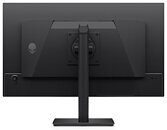
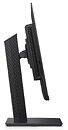
Alienware has launched the AW2726DM, a 27-inch QD-OLED gaming monitor priced at $350. This makes it one of the most affordable entries into QD-OLED displays to date, with Alienware saying it is targeting users looking to move beyond traditional LCD panels. The monitor features a 2560 x 1440 Fast QD-OLED panel with a 240 Hz refresh rate and a 0.03 ms GtG response time. It covers 99% of the DCI-P3 color space and supports HDR10, alongside AdaptiveSync and AMD FreeSync Premium. Connectivity includes DisplayPort 1.4 for full 240 Hz operation, as well as two HDMI ports limited to 1440p at 120 Hz. The AW2726DM includes a fully adjustable stand with height, tilt, swivel, and pivot adjustments, as well as an anti-reflective screen coating and wide 178° viewing angles. A built-in microphone is also integrated.

There are a couple of things worth mentioning. SDR brightness is rated at just 200 cd/m², which is on the low end for a QD-OLED panel as most competing 27-inch models do better here. That figure will also affect peak HDR brightness despite the monitor supporting HDR10. The other notable omission is G-Sync compatibility, which is absent here. AMD FreeSync Premium and VESA AdaptiveSync are supported as mentioned above, but there is no NVIDIA certification. The AW2726DM positions itself as a lower-cost entry into QD-OLED, though it does so with a more restrained feature set compared to the usual Alienware premium offerings. The monitor was quietly announced in a blog post that was mostly focused on the Alienware Collegiate Clash 2026 university esports event.
Sources: Alienware Arena, Dell (product page)
Add your own comment

18 Comments on Alienware Launches 27-inch 240 Hz QD-OLED Gaming Monitor at $350

#1
tsunami2311
well they are getting cheaper? while nerfing there specs? not sure why monitor need a built in mic though..
Posted on Reply
#2
trsttte
Damn!!! This basically kills a vast majority of the gaming monitor market, no competition at all. Clearly some corners were cut - no USB ports and nerfed HDMI - but still, the price is pretty amazing. At this point you can afford for it to burn in after 3 years and get a new one

The microphone though is a dumb inclusion, what's the use case!? How do you even use it, the 3.5mm port is labeled as headphone out, you use a splitter to take out the microphone component assuming it's a TRRS connector and link to mic on your PC, but again why? Could have made the monitor 348$ instead of 350$ :D
Posted on Reply
#3
TheinsanegamerN
trsttteDamn!!! This basically kills a vast majority of the gaming monitor market, no competition at all. Clearly some corners were cut - no USB ports and nerfed HDMI - but still, the price is pretty amazing. At this point you can afford for it to burn in after 3 years and get a new one

The microphone though is a dumb inclusion, what's the use case!? How do you even use it, the 3.5mm port is labeled as headphone out, you use a splitter to take out the microphone component assuming it's a TRRS connector and link to mic on your PC, but again why? Could have made the monitor 348$ instead of 350$ :D
the 200 nit max brightness kills a gaming monitor, namely, itself. Any other OLED that level of brightness would appear broken.
Posted on Reply
#4
Chaitanya
trsttteDamn!!! This basically kills a vast majority of the gaming monitor market, no competition at all. Clearly some corners were cut - no USB ports and nerfed HDMI - but still, the price is pretty amazing. At this point you can afford for it to burn in after 3 years and get a new one

The microphone though is a dumb inclusion, what's the use case!? How do you even use it, the 3.5mm port is labeled as headphone out, you use a splitter to take out the microphone component assuming it's a TRRS connector and link to mic on your PC, but again why? Could have made the monitor 348$ instead of 350$ :D
There is no USB port either to use that mic as USB mic. quite a wierd inclusion unless that 3.5mm jack is supposed to connect to line in/mic in port of PC(not specified in manual either).
TheinsanegamerNthe 200 nit max brightness kills a gaming monitor, namely, itself. Any other OLED that level of brightness would appear broken.
I prefer monitor set to around 150nits of brightness and most monitors out of the box come with similar brightness levels, maybe in couple of months Dell have this monitor on sale with price falling below $300 making a decent consideration.
Posted on Reply
#5
dgianstefani
TPU Proofreader
tsunami2311well they are getting cheaper? while nerfing there specs? not sure why monitor need a built in mic though..
It's an old panel generation.
Posted on Reply
#6
thestryker6
TheinsanegamerNthe 200 nit max brightness kills a gaming monitor, namely, itself. Any other OLED that level of brightness would appear broken.
Until recently most QD-OLEDs have been ~250 nits so this isn't exactly a huge downgrade.

I'm guessing you probably haven't used an OLED monitor on your system. I was a little leery myself before getting mine (250 nits rating), but the difference in technology is quite stark and I don't even have the brightness set as high as on my old VA panel which was rated ~300 nits. I think this was a driver behind Samsung coming up with their "TrueBright" testing as OLEDs have gotten cheaper and more prevalent.
Posted on Reply
#7
Vayra86
TheinsanegamerNthe 200 nit max brightness kills a gaming monitor, namely, itself. Any other OLED that level of brightness would appear broken.
Exactly, you should be skipping this entirely. I mean you CAN run a 180 nits calibrated panel (sweet spot for color accurate work on many monitor types), but then you also need to have the ambient lighting conditions to match, and more often than not, you won't.

400-500cd/m2 peak is definitely required.
Posted on Reply
#9
Onasi
Vayra86Exactly, you should be skipping this entirely. I mean you CAN run a 180 nits calibrated panel (sweet spot for color accurate work on many monitor types), but then you also need to have the ambient lighting conditions to match, and more often than not, you won't.

400-500cd/m2 peak is definitely required.
The fuck? You people run your personal PC rooms in the middle of the sun or something? I don’t think I ever had circumstances where a 150-ish nits screen wouldn’t be plenty bright. Hell, I am currently running 120 in a room with fairly bright 4000K overhead lights.
Posted on Reply
#10
Legacy-ZA
OnasiThe fuck? You people run your personal PC rooms in the middle of the sun or something? I don’t think I ever had circumstances where a 150-ish nits screen wouldn’t be plenty bright. Hell, I am currently running 120 in a room with fairly bright 4000K overhead lights.
Have to agree.

People are running retina-searing brightness levels; it's crazy, I can't even look at HDR, it hurts my eyes. :roll:

Besides, it's a lot cheaper to control ambient light than to buy overpriced OLED monitors. Close a damn curtain, turn the lights off.
Posted on Reply
#11
Vayra86
OnasiThe fuck? You people run your personal PC rooms in the middle of the sun or something? I don’t think I ever had circumstances where a 150-ish nits screen wouldn’t be plenty bright. Hell, I am currently running 120 in a room with fairly bright 4000K overhead lights.
*peak* brightness. The metric that says at least some small percentage of the screen should be able to reach momentarily. Not 100% canvas.

These are screens that supposedly can do HDR and the low black point gives them excellent contrast rates, but those only 'pop' if the peak brightness is high enough. The only environment where the highlights at ~200cd/m2 are perceived as highlights, are artificially lit rooms that do not get direct daylight, put differently, you have adapted the lighting conditions to suit a lower brightness. But even then, peak 200cd/m2 just IS pretty dimmed, even if your baseline is 120~150. It also matters a lot whether the light comes from ceiling rather than through a window horizontally - and this is exactly what I mean with adapted lighting conditions to match the screen. Maybe you would always use it that way, but it does severely limit its use cases; realistically the only viable setup for this monitor is 'Man Cave' - and it better not have windows you can't blind.

Additionally, and this is pretty big in this case... QD OLED does NOT reach an absolute zero in black point, its rather much closer (visually) to a quality VA in that sense than it is to WOLED. Add low peak brightness and you have a pretty limited contrast range for an OLED after all - vastly different from OLED's true capabilities.
Legacy-ZABesides, it's a lot cheaper to control ambient light than to buy overpriced OLED monitors. Close a damn curtain, turn the lights off.
That's exactly what I am saying, aren't I :D

People may think this price point is an omgwtf moment but really, you might need to reconsider how important OLED really is when it loses its most eye catching advantages. You still DO have a panel with self emission that degrades faster than LCD. And if this OLED starts pixel refreshing, the brightness will drop further.
Posted on Reply
#12
Tomorrow
tsunami2311well they are getting cheaper? while nerfing there specs? not sure why monitor need a built in mic though..
Nerfing what exactly? Compared to what?

1440p 240Hz is above most 1440p IPS monitors in this price class.
Yeah so it's not a 540HZ OLED or a 4K OLED, but at $350 no one expects it to be.
trsttteDamn!!! This basically kills a vast majority of the gaming monitor market, no competition at all.
Not quite, but it does make the argument for $200+ IPS monitors dubious. The sealing for those is shrinking all the time as OLED comes down in price.
Also if $350 is the price Alienware asks, then i wonder what price AOC will ask for example as they're generally cheaper.
trsttteClearly some corners were cut - no USB ports and nerfed HDMI - but still, the price is pretty amazing. At this point you can afford for it to burn in after 3 years and get a new one
Lack of USB ports is a nonissue mostly, but the HDMI nerfing is weird. I mean i can understand if it included HDMI 2.1, but not at the full 48Gbps bandwidth, but to limit HDMI only to 2.0 1440p 120Hz which isn't even the max this panel can support is just bizarre.
trsttteThe microphone though is a dumb inclusion, what's the use case!? How do you even use it, the 3.5mm port is labeled as headphone out, you use a splitter to take out the microphone component assuming it's a TRRS connector and link to mic on your PC, but again why? Could have made the monitor 348$ instead of 350$ :D
Agreed. Another area where they could have cut costs is ergonomics like swivel and to a degree (pun intended) tilt. Tho saving on ergonomics as lower end monitors tend to do never ends up saving much. So perhaps it's better they didn't do that.
TheinsanegamerNthe 200 nit max brightness kills a gaming monitor, namely, itself. Any other OLED that level of brightness would appear broken.
Stop with the incessant need for absurd levels of brightness. This isn't a 30k mastering monitor.
dgianstefaniIt's an old panel generation.
Compared to what?

Samsung hasn't produced a newer 1440p panel since they launched the 1440p 500Hz QD-OLED panels.
So if this is too old then ask Samsung why they haven't ported their newest true RGB and purple glare reducing technologies to 1440p size yet.

Meanwhile it's possible to get the very newest WOLED 280Hz panel from 499€
Posted on Reply
#13
thestryker6
Vayra86*peak* brightness. The metric that says at least some small percentage of the screen should be able to reach momentarily. Not 100% canvas.

These are screens that supposedly can do HDR and the low black point gives them excellent contrast rates, but those only 'pop' if the peak brightness is high enough. The only environment where the highlights at ~200cd/m2 are perceived as highlights, are artificially lit rooms that do not get direct daylight, put differently, you have adapted the lighting conditions to suit a lower brightness. But even then, peak 200cd/m2 just IS pretty dimmed, even if your baseline is 120~150. It also matters a lot whether the light comes from ceiling rather than through a window horizontally - and this is exactly what I mean with adapted lighting conditions to match the screen. Maybe you would always use it that way, but it does severely limit its use cases; realistically the only viable setup for this monitor is 'Man Cave' - and it better not have windows you can't blind.
Perhaps before writing walls of text you should educate yourself on the specifications of what you're writing about. The 200 nits figure is the full screen brightness which has nothing to do with the peak brightness.
Vayra86Additionally, and this is pretty big in this case... QD OLED does NOT reach an absolute zero in black point, its rather much closer (visually) to a quality VA in that sense than it is to WOLED.
That's just false they turn off just like WOLED. The only black issue with QD-OLEDs is related to how they interact with light. In a bright room it will look worse and direct light will make it even worse (why one would have a setup which does this is beyond me) but that's it.
TomorrowI mean i can understand if it included HDMI 2.1, but not at the full 48Gbps bandwidth, but to limit HDMI only to 2.0 1440p 120Hz which isn't even the max this panel can support is just bizarre.
It means they saved money on the scaler used for this monitor. It's not a corner I'd normally like to see cut these days, but DP will cover the specs without DSC and the MSRP is low.
Posted on Reply
#14
MikOnTopGG
OnasiThe fuck? You people run your personal PC rooms in the middle of the sun or something? I don’t think I ever had circumstances where a 150-ish nits screen wouldn’t be plenty bright. Hell, I am currently running 120 in a room with fairly bright 4000K overhead lights.
Yeah, I know right? Like you really don't need anything brighter than 150 nits in a medium lit room if you don't want your eyes to strain.
Posted on Reply
#15
Tomorrow
Reducing brightness is the first thing i do on a new monitor. This has been the case for decades now.
I've never bought a monitor where i felt i had to increase the brightness. Much less being in a situation where i felt 100% was not enough and was limiting me.

But people are weird and eyesight is weird. I would put this in the same category as people who want 27" 4K or even 24" 4K screens and then proceed to lose all that resolution advantage by using aggressive DPI scaling because they cant see anything with 100% scaling.

Or the whole matte vs glossy that seems to split people in half in terms of what they prefer.
I've always preferred matte and i always will. I have had the "displeasure" of trying to use glossy and the novelty factor has worn off quickly.
Posted on Reply
#16
Nathaaab
It's 200 nits SDR, up to 400 nits HDR.
Posted on Reply
#17
tsunami2311
TomorrowNerfing what exactly? Compared to what?

1440p 240Hz is above most 1440p IPS monitors in this price class.
Yeah so it's not a 540HZ OLED or a 4K OLED, but at $350 no one expects it to be.
Compared to just every OLED that has higher nits? then again I reduce brightness on most displays 100% brightness to much 50% or less i most cases varies dependent on the display wont even run my UHDTV at max brightness or anything in "HDR" it bright enough
Posted on Reply
#18
ikjadoon
If only this had ELMB / ULMB. I'm used to low brightnesses.
Posted on Reply
Add your own comment
Nov 27th, 2026 14:56 CST change timezone

New Forum Posts

Popular Reviews

TPU on YouTube

Controversial News Posts