Tuesday, April 21st 2026

Akasa Introduces 10 Gigabit PCIe Network Card

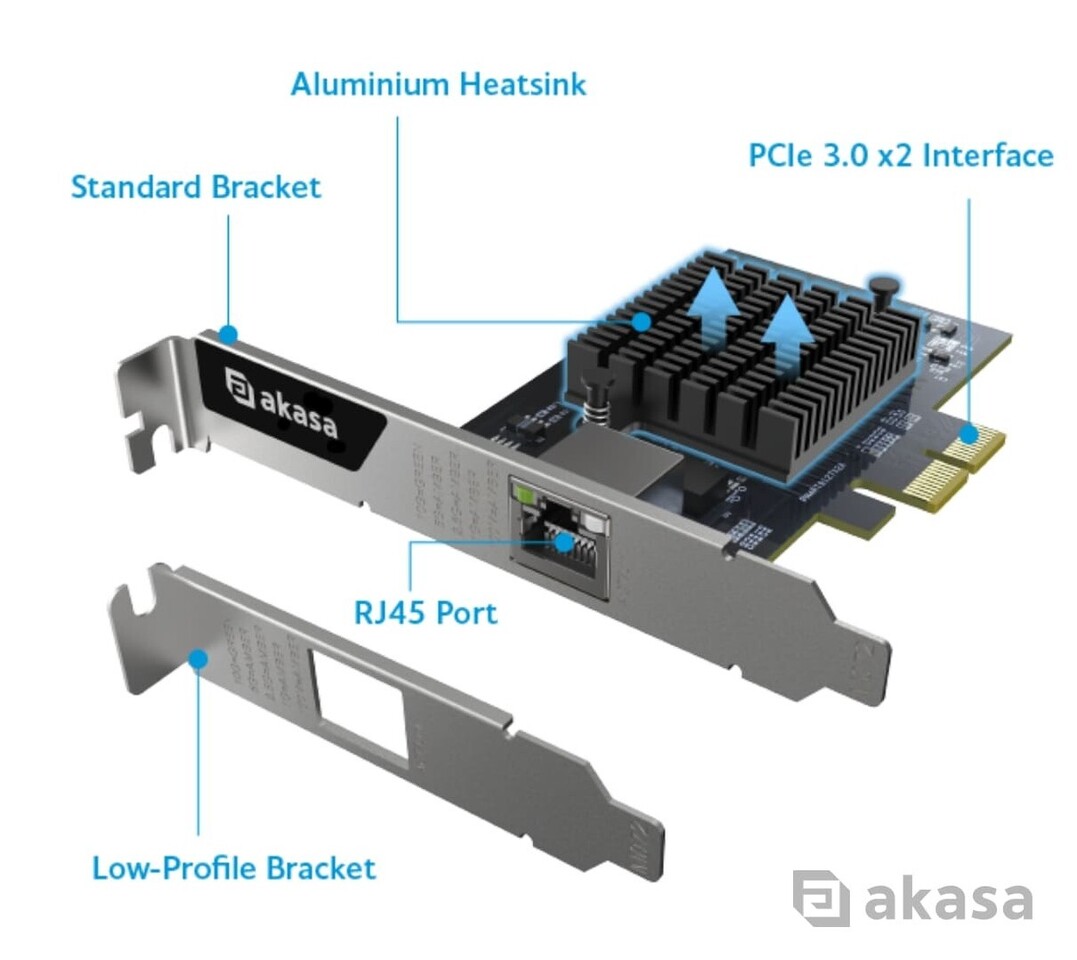
Akasa, a leading provider of computer hardware and PC accessories, has launched a 10 Gigabit PCIe Network Interface Card (NIC), designed to upgrade desktops, workstations, servers and embedded systems to multi-gigabit Ethernet connectivity. Powered by the Realtek RTL8127AT chipset and featuring a PCIe 3.0 x2 interface, the card supports six auto-negotiating speed tiers from 10 Gbps, 5 Gbps, 2.5 Gbps, 1 Gbps, 100 Mbps to 10 Mbps, while fitting PCIe x4, x8 and x16 slots and remaining compatible with x2 slots where present on server and workstation boards.

Compliant with IEEE 802.3bz (2.5GBASE-T/5GBASE-T) and IEEE 802.3an (10GBASE-T), the card incorporates built-in IEEE 802.3az (Energy Efficient Ethernet) support, which reduces power consumption during low-traffic periods without interrupting network availability. Additional features including Wake-on-LAN (WoL) and jumbo frame support up to 16K further extend operational efficiency, enabling remote power management and reducing CPU overhead on large data transfers.
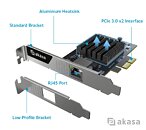
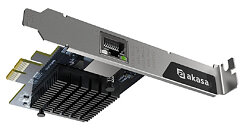
This card features a single RJ45 port equipped with a green activity LED and dual-color green/amber link speed LED for at-a-glance status monitoring. Fitted with an aluminium heatsink for effective thermal dissipation, both full-height and low-profile brackets are included to support installation across standard ATX, small form-factor (SFF) and rack-mounted enclosures.

It is compatible with Windows 10/11 and Windows Server 2003/2008/2022, as well as Linux kernel 3.10 and later, offering flexible deployment across modern and legacy enterprise operating environments.

The 10 Gigabit PCIe Network Card is well-suited to a range of applications requiring continuous network connectivity with efficient power consumption, including:
  • Desktops and workstations
  • Server and NAS enclosures
  • Embedded systems and communications platforms
  • Industrial computing systems
  • Edge computing and data-intensive deployments
Specification
  • Application: PCIe 1-Port 10G BASE-T Multi-Gigabit Network Card
  • Chipset: Realtek RTL8127AT
  • Transfer Rate: 10 Gb / 5 Gb / 2.5 Gb / 1 Gb / 100 Mb / 10 Mb Ethernet
  • Ports: RJ45
  • LED Indicators: Green (Activity) x1, Green and Amber Dual Color (Speed) x1
  • Operating Temperature: 0℃-55℃
  • Storage Temperature: -10℃-70℃
  • Bracket: Full-height and low-profile options included
  • OS Compatibility: Windows 10/11, Windows Server 2003/2008/2022, Linux 3.10 or later
  • Product Code: AK-PCCE10-01
Pricing and Availability
  • The 10 Gigabit PCIe Network Card starts at £76.00 / €78.80 (prices may vary by reseller).
  • The 10 Gigabit PCIe Network Card is available to order throughout the UK, Europe, North America and Asia.
Source: Akasa
Add your own comment

18 Comments on Akasa Introduces 10 Gigabit PCIe Network Card

#1
Wye
We had 10 gbit NICs for 23 years.
Slow news day or adverticle?
Posted on Reply
#2
r00tcz
10G=GREEN
5G=AMBER
2.5G=AMBER
1G=AMBER
100M=AMBER
When there would be a perfectly valid reason to have an RGB led on the product, they don't do it...

Also PCIe x2 is such a weird number of lanes, there are no x2 slots, so you have to waste x4 for this.
Posted on Reply
#3
TheLostSwede
News Editor
WyeWe had 10 gbit NICs for 23 years.
Slow news day or adverticle?
I guess you're not really following the technology development?
Show me a 10 Gbps Ethernet card that is below 2 W that is older than 12 months.
This is based on the RTL8127 and it's the first non xinesium card to appear.
Price is still too high, these should really be sub $50/€50, but more like $30-35, as the components are quite cheap.
r00tczAlso PCIe x2 is such a weird number of lanes, there are no x2 slots, so you have to waste x4 for this.
Right, they went with the weird one of course, all about backwards compatibility, but this does indeed require a x4 slot, but you can use a PCIe 3.0 instead of a PCIe 4.0 slot for it, so it's a bit hit and miss depending on your needs.

Shame they went with an external transformer though, as Realtek's reference model had it built into the connector, which makes for a cleaner looking card.
Posted on Reply
#4
Forge
TheLostSwedeI guess you're not really following the technology development?
Show me a 10 Gbps Ethernet card that is below 2 W that is older than 12 months.
This is based on the RTL8127 and it's the first non xinesium card to appear.
Price is still too high, these should really be sub $50/€50, but more like $30-35, as the components are quite cheap.


Right, they went with the weird one of course, all about backwards compatibility, but this does indeed require a x4 slot, but you can use a PCIe 3.0 instead of a PCIe 4.0 slot for it, so it's a bit hit and miss depending on your needs.

Shame they went with an external transformer though, as Realtek's reference model had it built into the connector, which makes for a cleaner looking card.
I guess it's cool that wattage has dropped, but if 4W is good enough, I've been buying these easily for over three years at a similar price point. Also, I don't have to deal with Realtek issues.

www.amazon.com/dp/B0F1F61PKD
Posted on Reply
#5
Wirko
r00tczAlso PCIe x2 is such a weird number of lanes, there are no x2 slots, so you have to waste x4 for this.
They mention "fitting PCIe x4, x8 and x16 slots and remaining compatible with x2 slots where present on server and workstation boards". Perhaps x2 slots, intended specifically for NICs, are more common on those boards.
Posted on Reply
#6
Forge
WirkoThey mention "fitting PCIe x4, x8 and x16 slots and remaining compatible with x2 slots where present on server and workstation boards". Perhaps x2 slots, intended specifically for NICs, are more common on those boards.
All the boards I've worked with tend to go straight from 1X to 4X or more. Pretty good coverage of HP, Lenovo, SuperO and Dell gear, too.
Posted on Reply
#7
Wirko
TheLostSwedeShow me a 10 Gbps Ethernet card that is below 2 W
Is it really? The heatsink looks huge for 2 W, even considering the possibility of small and poorly ventilated enclosures.

Also the list of compatible Windows server versions is über strange. 2003/2008/2022? Really, Akasa?
Posted on Reply
#8
Chaitanya
r00tczWhen there would be a perfectly valid reason to have an RGB led on the product, they don't do it...

Also PCIe x2 is such a weird number of lanes, there are no x2 slots, so you have to waste x4 for this.
Ubiquity already offers RGB for that exact reason on their network products.
Posted on Reply
#9
mechtech
featuring a PCIe 3.0 x2 interface

wth boooooooo

PCIe 4.0 1x interface or bust...........
Posted on Reply
#10
TheLostSwede
News Editor
WirkoThey mention "fitting PCIe x4, x8 and x16 slots and remaining compatible with x2 slots where present on server and workstation boards". Perhaps x2 slots, intended specifically for NICs, are more common on those boards.
Quite a few recent-ish AMD boards have a PCIe 3.0 x2 slot as a full length x16 slot. It kind of makes sense for those boards.
ForgeAll the boards I've worked with tend to go straight from 1X to 4X or more. Pretty good coverage of HP, Lenovo, SuperO and Dell gear, too.
Physical x2 slots doesn't appear to exist, so you're correct there, but see above.
ForgeI guess it's cool that wattage has dropped, but if 4W is good enough, I've been buying these easily for over three years at a similar price point. Also, I don't have to deal with Realtek issues.

www.amazon.com/dp/B0F1F61PKD
The chip Akasa is using is actually 1.8 W.

Not sure why people keep regurgitating "Realtek issues" as they have fewer issues than Intel these days...
Also, Aquantia/Marvell has had its fair share of issues too, albeit they've been mostly fixed via firmware updates.

The card you linked to is PCIe 3.0 x4 though and most cards based on the RTL8127x are PCIe 4.0 x1 cards. The Realtek ones can already be had for less, even though this specific product from Akasa is more expensive.

WirkoIs it really? The heatsink looks huge for 2 W, even considering the possibility of small and poorly ventilated enclosures.
Yes, see pic above from Realtek's booth at Computex. This specific SKU is only 1.8 W. Heatsinks are mostly for show, same on all 2.5 Gbps and 5 Gbps cards with Realtek chips.
mechtechfeaturing a PCIe 3.0 x2 interface

wth boooooooo

PCIe 4.0 1x interface or bust...........
Unless you have a board with a PCIe 3.0 x2 slot, like a lot of at least AMD boards have.
There are plenty of PCIe 4.0 x1 cards based on a different SKU of the RTL8127 as pointed out above.
Posted on Reply
#11
MTS-C
TheLostSwedeNot sure why people keep regurgitating "Realtek issues" as they have fewer issues than Intel these days...
Not in the server space, but outside of Intel 2.5Gb junk (which shouldn't exist) Intel was the gold standard for desktop too. And I say this as I have an Aquantia 107 in my desktop right now.
Posted on Reply
#12
TheLostSwede
News Editor
MTS-CNot in the server space, but outside of Intel 2.5Gb junk (which shouldn't exist) Intel was the gold standard for desktop too. And I say this as I have an Aquantia 107 in my desktop right now.
And have you had problems with your AQC-107 card? I have two original Aquantia branded cards that are still going strong almost nine years later.
Realtek has obviously stepped up their game, as there aren't really any complaints about their hardware any more.
I got an RTL8127 PCIe 4.0 x1 cards a few months ago and didn't notice any issues, but I guess we'll see how it functions in a year or two.
TheLostSwede in RTL8127 10 Gbps Ethernet card quick testJust a quick tests to show what the Realtek RTL8127 is capable of. Testing against an AQC113. Iperf3 client, jumbo frames enabled at 9k Connecting to host 10.0.0.253, port 5201 local 10.0.0.59 port 63…
Posted on Reply
#13
Wirko
TheLostSwedeUnless you have a board with a PCIe 3.0 x2 slot, like a lot of at least AMD boards have.
There are plenty of PCIe 4.0 x1 cards based on a different SKU of the RTL8127 as pointed out above.
Looking at the photo you posted above, I assume that the same "AT" chip that can do either. But it has to be configured by the NIC maker and can't dynamically switch between 3.0 x2 and 4.0 x2.
Posted on Reply
#14
TheLostSwede
News Editor
WirkoLooking at the photo you posted above, I assume that the same "AT" chip that can do either. But it has to be configured by the NIC maker and can't dynamically switch between 3.0 x2 and 4.0 x2.
The reason I posted it, is because that's the variant Akasa lists in the specs.
I don't know if it can use either or, but a card with a PCIe x2 edge connector would need an open ended x1 slot for that to work, or a x4+ slot.
The only other variant that supports PCIe 3.0 x2 is the ATF version, where F stands for Fiber.
The plain 8127 and the AP version (which supports remote management) are only available as PCIe 4.0 x1 parts.
The AT makes sense as an onboard solution, at least on AMD boards, as a lot of them don't utilise all the PCIe 3.0 lanes.
Posted on Reply
#15
MTS-C
TheLostSwedeAnd have you had problems with your AQC-107 card? I have two original Aquantia branded cards that are still going strong almost nine years later.
Realtek has obviously stepped up their game, as there aren't really any complaints about their hardware any more.
I got an RTL8127 PCIe 4.0 x1 cards a few months ago and didn't notice any issues, but I guess we'll see how it functions in a year or two.
TheLostSwede in RTL8127 10 Gbps Ethernet card quick testJust a quick tests to show what the Realtek RTL8127 is capable of. Testing against an AQC113. Iperf3 client, jumbo frames enabled at 9k Connecting to host 10.0.0.253, port 5201 local 10.0.0.59 port 63…
Yes I did, quite a bit. I actually replaced it with an X540 for a while but had to put that in a server and went back to the AQC. Firmware updates later and making sure certain settings are off it stabilized. Now did that fix anything realistically? I don't know. Most of my issues came while playing online. Since I quit playing competitive games online I can't really say for sure. I did play the BF6 beta and outside of the usual server side common Battlefield issues I don't believe I experienced any localized issues. I could run iperf or speedtests all day without a single problem, it was when I went to play online games that I'd experience issues. Realtek side, different set of issues on an X570 board with built in 2.5Gb. When I mained that setup I moved to the Intel 1Gb and problems vanished. My oldest son still has that board and we were not able to use the Realtek onboard with his setup either. I found he was using wifi one day and asked why, I switched him to Intel 1Gb and problems vanished. Broadcom server side is a nightmare at home and at work. If it's serious, I'll put an Intel in it without question. Will I ever use the Intel 2.5Gb on my current board? Absolutely not lol.
Posted on Reply
#16
TheLostSwede
News Editor
MTS-CYes I did, quite a bit. I actually replaced it with an X540 for a while but had to put that in a server and went back to the AQC. Firmware updates later and making sure certain settings are off it stabilized. Now did that fix anything realistically? I don't know. Most of my issues came while playing online. Since I quit playing competitive games online I can't really say for sure. I did play the BF6 beta and outside of the usual server side common Battlefield issues I don't believe I experienced any localized issues. I could run iperf or speedtests all day without a single problem, it was when I went to play online games that I'd experience issues. Realtek side, different set of issues on an X570 board with built in 2.5Gb. When I mained that setup I moved to the Intel 1Gb and problems vanished. My oldest son still has that board and we were not able to use the Realtek onboard with his setup either. I found he was using wifi one day and asked why, I switched him to Intel 1Gb and problems vanished. Broadcom server side is a nightmare at home and at work. If it's serious, I'll put an Intel in it without question. Will I ever use the Intel 2.5Gb on my current board? Absolutely not lol.
I've had zero issues with my AQC107 cards after Aquantia released a firmware that made them work properly with the AM4 platform, as it was brand new when I got the cards and they hadn't tested them on that platform properly. Their engineers made a new firmware for the card to solve that issue in a mere three weeks.

Not had any issues with anything but Intel's 2.5 Gbps stuff, which I used when I moved back to Sweden with the ISP provided router I had then and that crap kept disconnecting from the router every once in a while, so I had to use the Aquantia card which solved the issue. I used the RTL8127 card for about a month without a single issue, but as I use the AQC107 to test NASes with, I switched back to it, as otherwise I'd have to retest a bunch of stuff.
Posted on Reply
#17
MTS-C
TheLostSwedeI've had zero issues with my AQC107 cards after Aquantia released a firmware that made them work properly with the AM4 platform, as it was brand new when I got the cards and they hadn't tested them on that platform properly. Their engineers made a new firmware for the card to solve that issue in a mere three weeks.

Not had any issues with anything but Intel's 2.5 Gbps stuff, which I used when I moved back to Sweden with the ISP provided router I had then and that crap kept disconnecting from the router every once in a while, so I had to use the Aquantia card which solved the issue. I used the RTL8127 card for about a month without a single issue, but as I use the AQC107 to test NASes with, I switched back to it, as otherwise I'd have to retest a bunch of stuff.
When I originally started using the 107 I was on X299. Looking back at text messages the random disconnects were the same issues we've had for the Realtek 2.5Gb on the X570 board. I assume if I used the Intel 2.5Gb I'd have the same problem.
Posted on Reply
#18
TheLostSwede
News Editor
MTS-CWhen I originally started using the 107 I was on X299. Looking back at text messages the random disconnects were the same issues we've had for the Realtek 2.5Gb on the X570 board. I assume if I used the Intel 2.5Gb I'd have the same problem.
That might be something else then, keep in mind that some of these things are compatibility issues between different brands of hardware, just like in the Wi-Fi world, where not all device chipsets behave nicely with all router chipsets.
Posted on Reply
Add your own comment
Nov 14th, 2026 04:49 CST change timezone

New Forum Posts

Popular Reviews

TPU on YouTube

Controversial News Posts