Thursday, June 11th 2026
New Airra Kickstarter Launch Reinvents the Wheel in the Name of Scrolling Efficiency
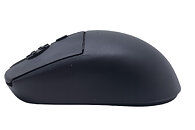
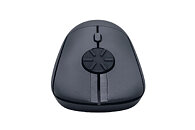
We covered a number of interesting and innovative peripherals in our recent Computex 2026 coverage, but a new Kickstarter, the Rotary Mouse by Airra, may take the cake for a subtle change that might make a world of difference to the right people. The Rotary Mouse is mostly just a regular wireless mouse—not even a particularly heavy one, at just 59 g—but it switches out the traditional scroll wheel for a horizontal dial that fulfills the same function. The Rotary Mouse is slated to be released on Kickstarter on June 17 with a 65% discount, bringing the price down to $49, from the original MSRP of $139.
The designer of the Rotary Mouse claims that it combines the high-speed scrolling of a free scroll wheel, as found on the likes of the Logitech MX Master series, with the accuracy of a traditional notched scroll wheel, since the Rotary Mouse still features detents in the rotary wheel. The Airra also says that the rotary scroll can help prevent finger joint RSIs that could be caused by the repetitive back and forth motion of a traditional scroll wheel. The product page of the Rotary Mouse demonstrates the rotary wheel's usefulness in a number of applications, from mundane office work involving long documents to timeline scrubbing and even a use case in racing games as steering input, although that will need to be manually programmed. The Rotary Mouse will feature both 2.4 GHz and Bluetooth for wireless connectivity, and it will have tactile left and right click buttons, although there do not seem to be any traditional backward and forward side buttons. The Kickstarter page also hints at a potential vertical version in the works, although there is no firm indication this is coming.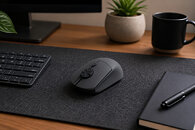

The designer of the Rotary Mouse claims that it combines the high-speed scrolling of a free scroll wheel, as found on the likes of the Logitech MX Master series, with the accuracy of a traditional notched scroll wheel, since the Rotary Mouse still features detents in the rotary wheel. The Airra also says that the rotary scroll can help prevent finger joint RSIs that could be caused by the repetitive back and forth motion of a traditional scroll wheel. The product page of the Rotary Mouse demonstrates the rotary wheel's usefulness in a number of applications, from mundane office work involving long documents to timeline scrubbing and even a use case in racing games as steering input, although that will need to be manually programmed. The Rotary Mouse will feature both 2.4 GHz and Bluetooth for wireless connectivity, and it will have tactile left and right click buttons, although there do not seem to be any traditional backward and forward side buttons. The Kickstarter page also hints at a potential vertical version in the works, although there is no firm indication this is coming.


47 Comments on New Airra Kickstarter Launch Reinvents the Wheel in the Name of Scrolling Efficiency
Over time it will mess up your finger joint just as much if not more than clicking.
I've worked a repetitive factory like/assembly job for 5+ years that required me to do a small rotate/twist with my right index finger and thumb for each piece and that made those 2 fingers/joints hurt like hell and is one of the main reasons why I've finally dropped that part of my job a few weeks ago.
It used to be so bad on some days with both fingers when I had to overwork that I could barely click on the mouse.
I've never had finger/joint pain from simply playing games and clicking and I did grew up on ARPGs like Diablo 2 so I have my share of clicks for sure yet this job that required me this specific rotate/twist movement with my fingers messed them up in a matter of years.
This is why I avoid kickstarters as a whole. Kickstarter falls into a few category's if not all of them:
(A) People trying to reinvent the wheel with their product - It doesnt need reinventing.
(B) People trying to sell you a solution to a problem that doesnt exist.
(C) People hoping they'll fool a lot of other people with their "get rich quick" scheme. i.e selling you a solution to a problem that doesnt exist or selling you a dumb idea and fooling people into thinking its a great idea.
Rarely is a kickstarter for a physical product genuinely worth it. The world seems to be full of people who think they are smart and people who are dumb enough to fall for such BS at the same time.
The only MMO I ever played was Funcom's The Secret World, and the other game for me where it was really useful was DotA 2. But I play almost all my games with a controller in my left hand (for movement) and the G600 / Naga V2 HS in my right. Trust me, since you probably don't know, playing this way brings comfort, precision, and speed while avoiding misclicks. It's a real gaming pleasure. (Battlefield) Sure, there's an adaptation period depending on the person, but trust me, I'm never going back to a mouse with only two thumb buttons.
If someone can type fast on a keyboard, they can easily hit the buttons they need with their thumb on this mouse with a bit of muscle memory, it's child's play (12 thumb buttons + left/right click and scroll wheel for those mice, ABXY, 4 D-pad directions, RT, RB, Start, Select = 12 buttons, and you can use the controller's LT/LB). Basically, you move your character smoothly with the left stick (walk / jog) and have all the buttons you need right under your thumb/right hand.
And even for web browsing... next/previous tab, page forward/back, enter/escape, moving the active window left/right to another monitor, left/right arrows to scrub forward/back in a video, and tons of other options. With this setup and a right-click, you don't even need to touch your keyboard except to type.
It's weird that you laugh at these mice. I see it as an optimization of controls. And I couldn't care less that my mouse is a bit heavier with an AA battery and/or a few grams in weight (built-in batteries aren't for me, or maybe I'm just an old grump who had a bad experience with them back in the day...).
As for this new scroll wheel, I don't really know what to think. It needs testing, but from what I saw in the video, it doesn't look very stable or solid... maybe a v2 or v3 will look and feel more stable and durable in use.
And yes, being able to assign the controls you want to the mouse is so cool; I did it with my Bloody Naraka, and I use it everywhere just like you.
Everything else about it is pure garbage, from the ergonomics to the stupid charging port on the bottom, I hope there's a section of hell reserved for everyone involved in that!
But oh wait, everyone these days has 50% keyboards, lol
Got a bunch of magnetic hexes the other day for on the fly custom dungeons. Its great. Took a year too long to arrive, but ok.
www.kickstarter.com/projects/theshopofmanythings/realm-brew-magnetic-map-tiles-for-dandd
Numbers wise it was around 1000-1400 pieces/shift on average so about 6000+ a week since I work 5 days a week.
Doesn't sound much but that did add up over the years and it did cause me a lot of pain in my finger joints.
I've been gaming since the 486 days with keyboard+mouse and simply clicking never caused that so yeah idk about that rotation being less damaging.
For context I'm only 36 soon 37 years old and in general I'm in a fairly good shape with no real health issues.
I never heard of RSI on scroll wheel, its usually keyboard, and no matter how much they reinvent with anti RSI keyboard, most people will use the normal straight keyboard
Hopefully it won't be too pricey like a lot of mice these days.
So that you can grab the $49 super early bird pricing (only 40 units available). It includes free shipping to the US, UK, CA, EU, etc.
Honestly, we're making a loss with this price 🫤
Disclosure: I'm from Airra Labs.
Who would scroll down so much by rolling instead of clicking the middle button to go as fast as you need, to where you need?
Or if someone really uses the scroll wheel that much, he can adjust how many lines to scroll in the mouse settings.
Or just use so many different ways to navigate the page.
Or as someone once said:
We have 14 rules; that’s unacceptable—we’ll create a new master rule!
And now we have 15 rules...
If you adjust too many lines to scroll, your mouse skips too rapidly, making it hard to catch where the lines jumped to.
But if it doesn’t work, no problem—there’s Page Up/Down, Home/End, the up/down arrows (+Ctrl), you can use the left mouse button to scroll with the scroll bar, and with Ctrl+F you can search for something on the page.
The middle mouse button is sometimes used in games too (I can reconfigure mine to use it as three different buttons in games).
But yes, the new mouse will be useful for some people—I’m sure of it.