Friday, July 10th 2026

Keychron Launches K5 Ultra 8K Low Profile Mechanical Keyboard with Wood Accents

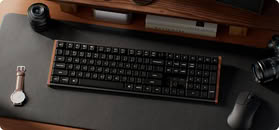
Following the recent launch of the Keychron K4 Ultra and K10 Ultra, the accessory maker has officially launched the new K5 Ultra 8K, a low-profile wireless mechanical keyboard with a full 100% layout and sleek cherry wood accents. The K5 Ultra is the latest version of the low-profile K Ultra-series, which means it uses the same ZMK firmware and has the same 2.4 GHz and Bluetooth 5.2 wireless connectivity as the previously announced K3 Ultra had. The K5 Ultra has launched with an MSRP of $114.99, and is available in black on the Keychron online store or on Amazon. The K5 Ultra is also capable of refresh rates of up to 8 kHz over both the wired USB Type-C connection and the 2.4 GHz connection. Wireless connectivity is powered by a 2,400 mAh battery, and Keychron cites 370 hours of use from a single charge with the backlighting disabled and the keyboard running at an 8 kHz polling rate.

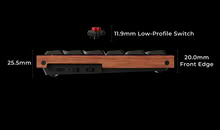
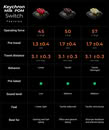
The Keychron K5 Ultra uses a proper full-size layout and includes both a programmable knob above the backspace key and a macro row above the num pad. The K5 Ultra is available with Keychron's relatively new Milk POM low-profile switches—which follow the Gateron Low-Profile 2.0 pin layout—in three switch flavors. Milk POM Reds are linear with a 45 gf actuation force, while the Milk POM Browns are tactile with a 50 gf actuation force, and the Milk POM Banana switches are a strong tactile switch with 57 gf actuation force. All three switches have 3.1 mm of total travel, but the Reds have 1.3 mm of pre-travel, while the two tactile varieties have 1.7 mm pre-travel. The K5 Ultra measures in at 436.6 x 128.29 mm and has a 15.55 mm front height. It also features two-stage flip-out feet for different typing angles.
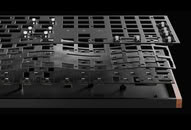
The K5 Ultra uses north-facing RGB LEDs, and the keyboard is completely remappable in the browser-based Keychron Launcher interface. The case itself is made of ABS plastic, but it has metal rails on the top and bottom, and the side panels are made from rose wood. The keycaps on the K5 Ultra are Keychron's LSA profile, and they're double-shot PBT, meaning they should resist shining and other forms of wear fairly well.
Source: Keychron
Add your own comment

15 Comments on Keychron Launches K5 Ultra 8K Low Profile Mechanical Keyboard with Wood Accents

#1
bug
The problem with wireless keyboards (besides the batteries) is that you lose any USB or audio pass through. It's so convenient to have a USB port literally at your fingertips...
Posted on Reply
#2
shuffy_losys
bugThe problem with wireless keyboards (besides the batteries) is that you lose any USB or audio pass through. It's so convenient to have a USB port literally at your fingertips...
Chances are if you're using a wireless keyboard, you're also using a wireless mouse.
Posted on Reply
#3
Exilarch
As a Keychron owner myself, I can say that I'm not happy with my keyboard and will never buy another Keychron or recommend it to anyone else. Just a lot of weird behavior all over the place.
Posted on Reply
#4
bonehead123
ExilarchAs a Keychron owner myself, I can say that I'm not happy with my keyboard and will never buy another Keychron or recommend it to anyone else. Just a lot of weird behavior all over the place.
Care to elaborate please, before I spend (or waste) my money on one ?

Cause I like almost everything about this keeb, and it's one of only 3-4 that I can say that about, but those others being just as nice but way to much $$, unlike this one which is reasonable IMHO...
bugThe problem with wireless keyboards (besides the batteries) is that you lose any USB or audio pass through. It's so convenient to have a USB port literally at your fingertips...
Don't care about or use usb audio.....(this one is rechargeable), plus I have a 7-port USB-C/A hub that sits right on top of my mini-me box :)
shuffy_losysChances are if you're using a wireless keyboard, you're also using a wireless mouse.
And yes, I use wireless rodents, and everything else on my desks, except for my 3 monitors :D
Posted on Reply
#5
shuffy_losys
bonehead123Care to elaborate please, before I spend (or waste) my money on one ?
I don't know what they experienced but I've bought like... 5-6 Keychron boards I don't have a problem and I've only had one dud in that it's wireless features don't work. But works fine otherwise.
Posted on Reply
#6
Wasteland
shuffy_losysI don't know what they experienced but I've bought like... 5-6 Keychron boards I don't have a problem and I've only had one dud in that it's wireless features don't work. But works fine otherwise.
Yeah, I have two low profile Keychrons, both about four years old. To be fair, the bluetooth sucks, but I never wanted the wireless functionality anyway. Otherwise they've been great.

Presumably the wireless angle is covered on the newer versions with 2.4 GHz dongles.
Posted on Reply
#7
Almenszin
ExilarchAs a Keychron owner myself, I can say that I'm not happy with my keyboard and will never buy another Keychron or recommend it to anyone else. Just a lot of weird behavior all over the place.
Same here, i have K17, bought it more than year ago, on 2.4 dongle and bluetooth keyboard acts weird, sometimes it dont recognize the button pressed, sometimes makes it double. Battery life is a joke, i need to charge it every week and i dont even use backlight. Few weeks ago bluetooth/calbe/2.4Ghz switch broke, so i just bought 20€ Eternico Wireless keyboard and its just so much better. Keychron is by far worst keyboard i ever used, also the layout is somewhat weird, i never got used to it.
Posted on Reply
#8
Vayra86
WastelandYeah, I have two low profile Keychrons, both about four years old. To be fair, the bluetooth sucks, but I never wanted the wireless functionality anyway. Otherwise they've been great.

Presumably the wireless angle is covered on the newer versions with 2.4 GHz dongles.
Gotta admit I dont use wireless if a cable can be used and I have no complaints on my Keychron currently
Posted on Reply
#9
Exilarch
bonehead123Care to elaborate please, before I spend (or waste) my money on one ?
Bluetooth issues, battery issues, even key presses issues. Also, firmware update just doesn't work for this model that I have, nearly bricked the keyboard twice. It's just... bad, if you spend a lot of time typing. I mean I could go on, but just do yourself a favor and get something else. I can't recommend which keyboard you should buy, but in my experience just avoid Keychron.
Posted on Reply
#10
Dammeron
I have the OG K5 with optical brown switches and while I'm happy about the overall quality of build and never had any connection or "keys-don't-work" issues, the problem with those switches is that they activate way before the tactile jump happens. It's easy to make a misclick by just resting your fingers on top of the keys without actually pressing them.
Posted on Reply
#11
bug
shuffy_losysChances are if you're using a wireless keyboard, you're also using a wireless mouse.
Huh? I didn't suggest the USB for the mouse. It's literally for everything else. I frequently plug the flash drive or my USB DAC in there. I have USB ports on my case (which sits under the desk) and on my monitor (which farther back on the desk). The USB port on my keyboard sees 10x more usage than the others, that's how convenient it is.
I mean, sure, it has its drawbacks, keyboards will not support USB 3.2 anytime soon. Despite that, it's so practical, I'd like to see one on every $100+ keyboard. I wouldn't mind if it didn't work in wireless mode and you could use it only when using the keyboard wired. Just add it in there, it's probably $5-10 on your BoM.
Posted on Reply
#12
shuffy_losys
bugHuh? I didn't suggest the USB for the mouse. It's literally for everything else. I frequently plug the flash drive or my USB DAC in there. I have USB ports on my case (which sits under the desk) and on my monitor (which farther back on the desk). The USB port on my keyboard sees 10x more usage than the others, that's how convenient it is.
I solved the problem of having a conveniently accessible USB port by both having a monitor that has USB ports and having my computer in a convenient spot. In total I have at least 7 conveniently accessible USB ports, and two more that are slightly less convenient but still accessible without getting up. Even if you're in a similar boat, having one more port in my setup isn't going to make my life any easier, especially when I rarely use more than two of these ports at a given time.
bugI mean, sure, it has its drawbacks, keyboards will not support USB 3.2 anytime soon. Despite that, it's so practical, I'd like to see one on every $100+ keyboard. I wouldn't mind if it didn't work in wireless mode and you could use it only when using the keyboard wired. Just add it in there, it's probably $5-10 on your BoM.
If you're going to need a feature that requires a wireless keyboard to be wired in order to operate said feature, you should get a wired keyboard.
Posted on Reply
#13
bug
Yeah, well, I never thought having a USB port inside my keyboard would make much of a difference either. And then I got one ;)
Posted on Reply
#14
cvaldes
bugYeah, well, I never thought having a USB port inside my keyboard would make much of a difference either. And then I got one ;)
Funny, I own an Apple Keyboard (78 key, wired) Model A1242 from 2008 which has a USB port and I can't for the life of me figure out why wired keyboards got rid of this port. And many keyboards of that era never included a USB port (like the Microsoft Natural Keyboard).

It's very handy for plugging in a wired mouse rather than using up another USB port on your computer or hub. So today I have a USB hub mounted underside my desk with a short extension cable so I have easy access to a USB port. But that's like a $40 solution to a problem that didn't exist in 2008. Sometimes design and convenience goes backwards.

Anyhow the Keychron K5 Ultra looks nice if you want the wood accents. Their keyboard product line is pretty extensive these days; as an early customer I can't keep track of their offerings these days, there are so many of them. If you don't like the wood treatment, they have plenty of other designs at different price levels.

Keychron also routinely discontinues old models so it's important to look at the corporate website to see what is currently being marketed and look at the clearance section of their online store to see if there's something you might like before it's discontinued forever.
Posted on Reply
#15
silapakorn
Keychron's LP keycap probably uses the lowest quality of PBT. Mine become shiny like ABS plastic only after a year, especially on frequently used keys, like CTRL and arrow keys.
Cpt.JankThe keycaps on the K5 Ultra are Keychron's LSA profile, and they're double-shot PBT, meaning they should resist shining and other forms of wear fairly well.
Posted on Reply
Add your own comment
Nov 24th, 2026 00:05 CST change timezone

New Forum Posts

Popular Reviews

TPU on YouTube

Controversial News Posts