Tuesday, November 17th 2026
Typing 365 Turns PC Building, Technology and More into Typing Practice
Typing faster is useful, but what if practice could also teach you something? Typing 365 is a free native Windows app that combines structured typing lessons, educational content, and competitive challenges.
With over 100,000 installs and nearly 4 million typing races completed worldwide, Typing 365 has grown into more than a speed test. Its Albums Store offers themed collections covering technology, science, history, psychology, and more. Build Your PC: A Free Album for First-Time Builders
The new Build Your PC album features 40 free typing exercises about desktop hardware. It covers motherboards, component compatibility, assembly, first boot, operating system installation, and troubleshooting.
Here's the idea in practice: instead of just reading a guide, you type passages such as "Before buying a CPU, check that its socket matches your motherboard and that the board's BIOS supports it." By the end of the album, you've practiced thousands of keystrokes while picking up the fundamentals of building a PC.
You might already know your way around a PC case, but it's an easy recommendation for students, first-time builders, or that friend whose build you always end up helping with.
Why a Native Windows App?
Browser-based typing sites are great for a quick test. Typing 365 is designed for consistent practice, combining a dedicated Windows experience with structured courses, progress tracking, and detailed performance statistics.
Beginners can start with Typing 101, a free course that gradually introduces keys before moving on to complete sentences. Other courses cover keyboard rows, punctuation, and speed development.
During practice, an on-screen keyboard and optional hand guidance support finger placement. The app tracks words per minute (WPM), characters per minute (CPM), accuracy, and mistakes. You can also turn your own notes or technical material into typing exercises. Find Your Weak Spots with PRO Analytics
The free app offers plenty of practice material, while Typing 365 PRO adds detailed analytics for users who want to improve their skills. View speed trends, session history, and keyboard heatmaps, or identify slow words, characters, and letter pairs for targeted practice.
PRO also unlocks exclusive albums, advanced courses such as Typing 102, which focuses on building typing speed, plus additional fonts, keyboard sounds, avatars, and customization options.
PRO is available through a monthly subscription or a one-time lifetime purchase, with US pricing starting at $2.99/month or $29.99 lifetime. Prices may vary by region.
Race Against Other Typists
Prefer competition? Join ranked typing races, compare your results with other players, and climb the global leaderboards. Whether you're chasing a personal best or a higher rank, every race offers a new challenge.
Practice in Five Languages
Typing 365 supports English, German, Spanish, Russian, and Arabic, allowing users to practice across languages and keyboard layouts.
From learning keyboard basics to understanding how a PC comes together, Typing 365 turns everyday practice into something worth your time.
Download Typing 365 for free from the Microsoft Store and start typing.
Typing 365 is available for Windows PCs, with optional premium albums and PRO features.
With over 100,000 installs and nearly 4 million typing races completed worldwide, Typing 365 has grown into more than a speed test. Its Albums Store offers themed collections covering technology, science, history, psychology, and more.
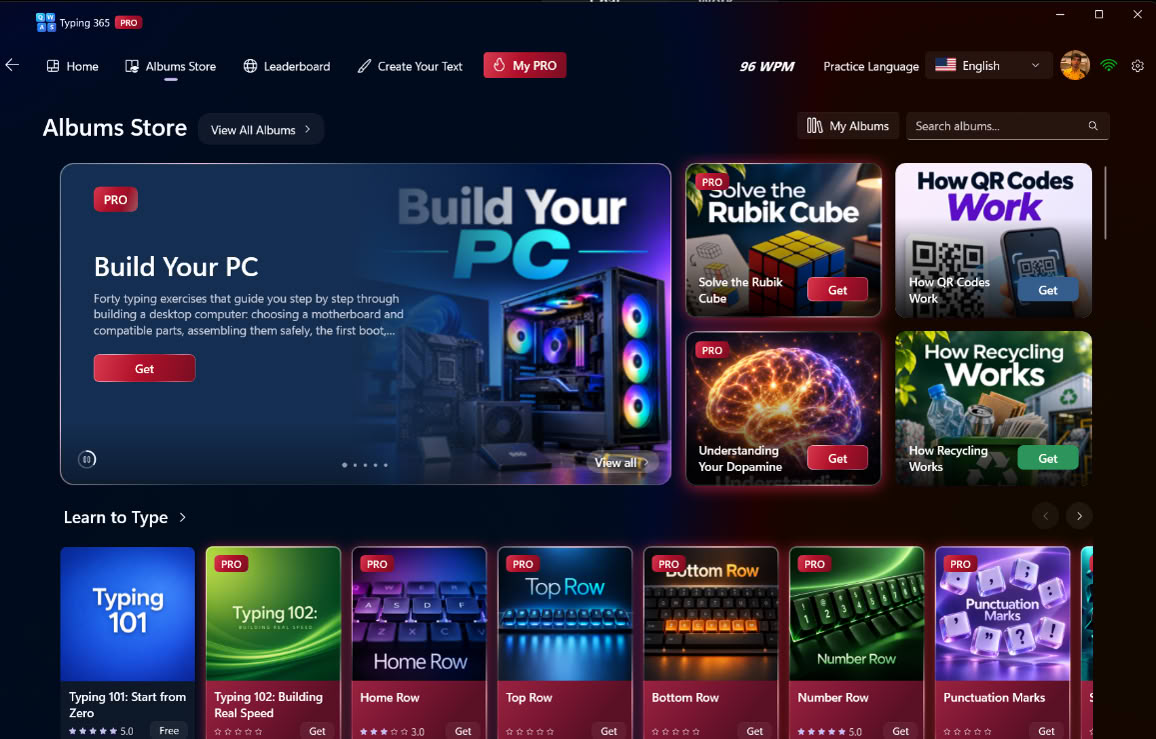
The new Build Your PC album features 40 free typing exercises about desktop hardware. It covers motherboards, component compatibility, assembly, first boot, operating system installation, and troubleshooting.
Here's the idea in practice: instead of just reading a guide, you type passages such as "Before buying a CPU, check that its socket matches your motherboard and that the board's BIOS supports it." By the end of the album, you've practiced thousands of keystrokes while picking up the fundamentals of building a PC.
You might already know your way around a PC case, but it's an easy recommendation for students, first-time builders, or that friend whose build you always end up helping with.
Why a Native Windows App?
Browser-based typing sites are great for a quick test. Typing 365 is designed for consistent practice, combining a dedicated Windows experience with structured courses, progress tracking, and detailed performance statistics.
Beginners can start with Typing 101, a free course that gradually introduces keys before moving on to complete sentences. Other courses cover keyboard rows, punctuation, and speed development.
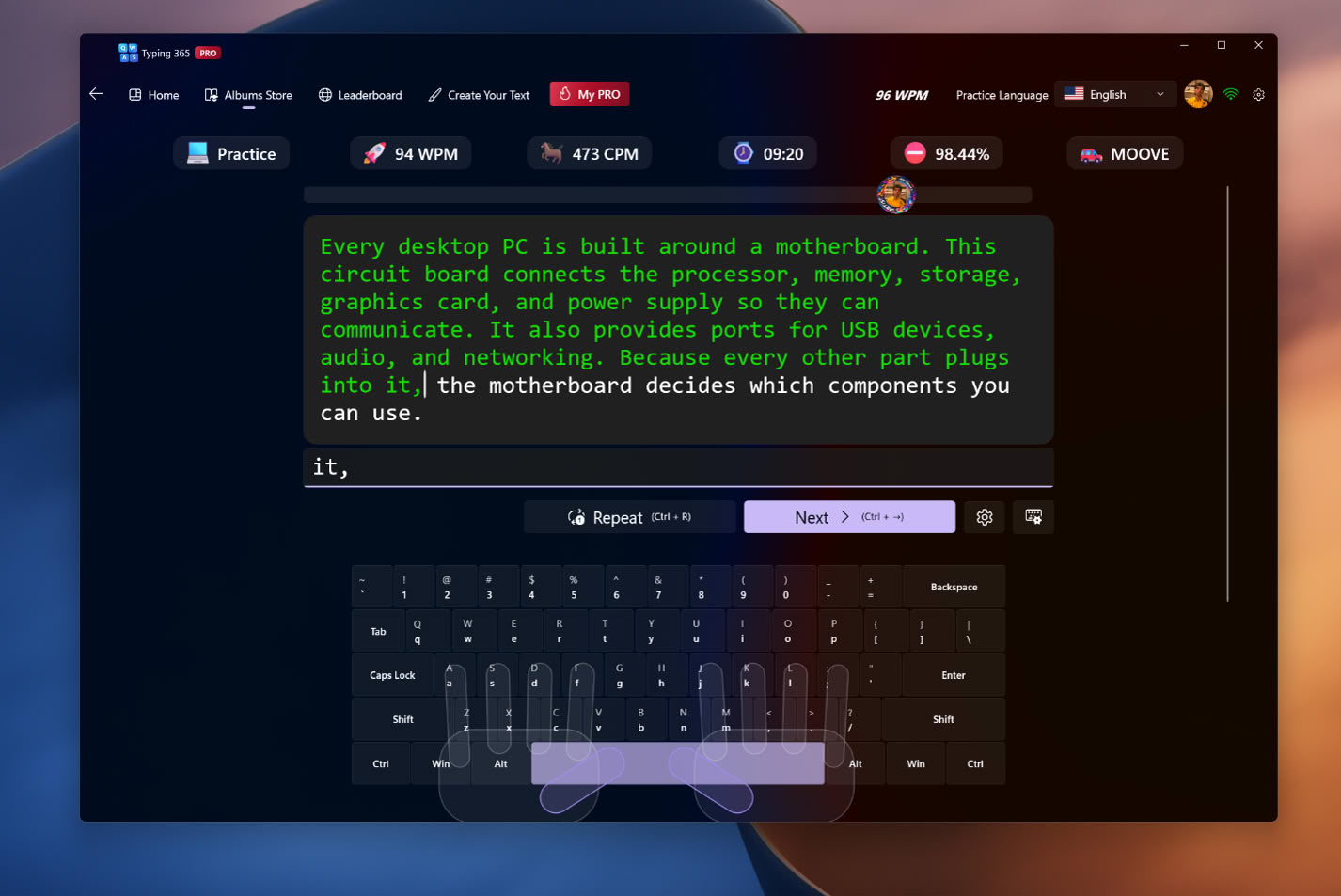
During practice, an on-screen keyboard and optional hand guidance support finger placement. The app tracks words per minute (WPM), characters per minute (CPM), accuracy, and mistakes. You can also turn your own notes or technical material into typing exercises.
The free app offers plenty of practice material, while Typing 365 PRO adds detailed analytics for users who want to improve their skills. View speed trends, session history, and keyboard heatmaps, or identify slow words, characters, and letter pairs for targeted practice.
PRO also unlocks exclusive albums, advanced courses such as Typing 102, which focuses on building typing speed, plus additional fonts, keyboard sounds, avatars, and customization options.
PRO is available through a monthly subscription or a one-time lifetime purchase, with US pricing starting at $2.99/month or $29.99 lifetime. Prices may vary by region.
Race Against Other Typists
Prefer competition? Join ranked typing races, compare your results with other players, and climb the global leaderboards. Whether you're chasing a personal best or a higher rank, every race offers a new challenge.
Practice in Five Languages
Typing 365 supports English, German, Spanish, Russian, and Arabic, allowing users to practice across languages and keyboard layouts.
From learning keyboard basics to understanding how a PC comes together, Typing 365 turns everyday practice into something worth your time.
Download Typing 365 for free from the Microsoft Store and start typing.
Typing 365 is available for Windows PCs, with optional premium albums and PRO features.