Wednesday, November 18th 2026

Latest NVIDIA Drivers Might Cause Excessive SSD Writing

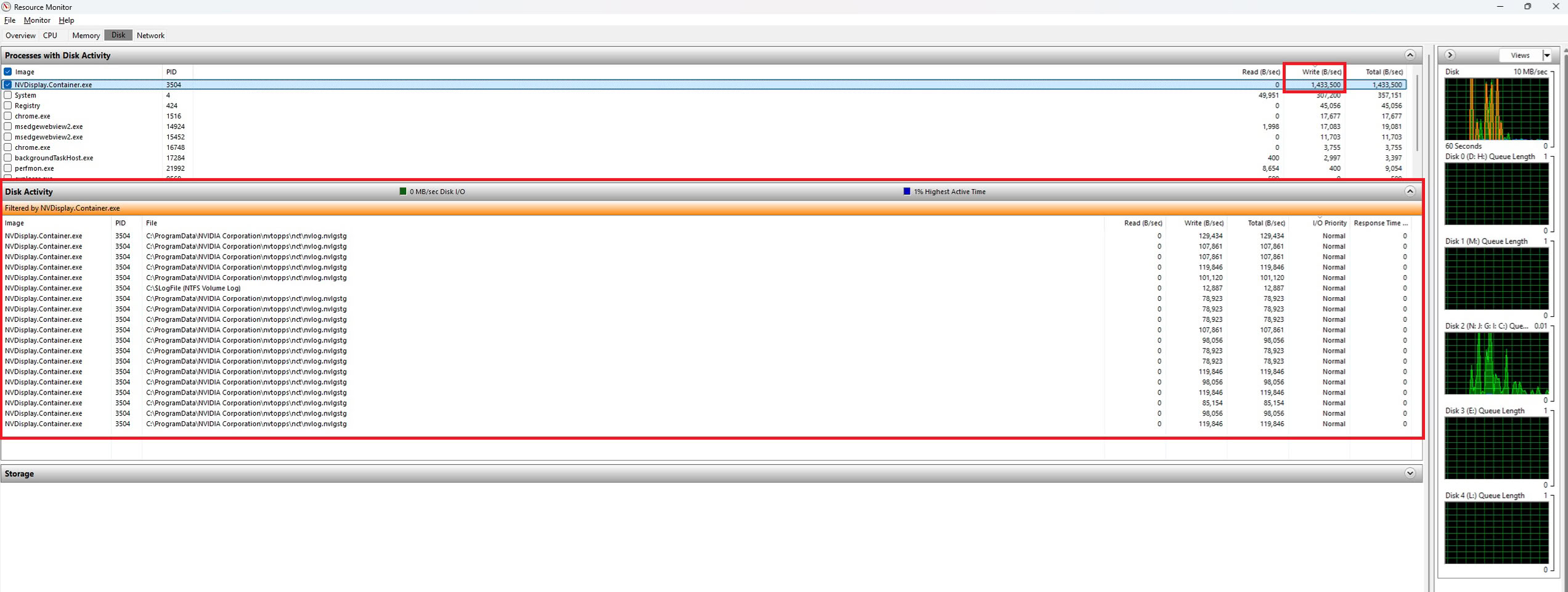
NVIDIA's latest GeForce Game Ready GPU drivers are reportedly causing excessive SSD writing on multiple systems. Users have been reporting numbers of up to 30 GB per hour of SSD writes, even when no typical writing activity is occurring. With driver version 621.01 installed, the NVIDIA Display Container process recorded less than 2 MB of writes while the PC was idle. However, with the upgrade to the version 621.14, released on November 4, the same five-minute check resulted in approximately 515 MB of writes. Another report indicates write activity as high as 30 GB per hour with the newer 621.24 driver. Reports collected by TroubleGrid and posts on NVIDIA's forums point to a binary log named nvlog.nvlgstg, stored in the NVIDIA Corporation folder under C:\ProgramData.

While this may seem minor, it's important to remember that systems can run for extended periods, and the writing can accumulate over time, potentially leading to SSD wear and tear. SSD lifespan largely depends on its ability to endure constant random writes, and forcing random writes onto an SSD will undoubtedly shorten its lifecycle. This is particularly concerning given the high cost of NAND Flash, as users are operating expensive SSDs that could undergo unnecessary wear. Users monitoring the file found that NVDisplay.Container.exe seemed to rewrite it repeatedly. GeForce owners can check their systems by opening the Disk tab in Windows Resource Monitor and looking for NVDisplay.Container.exe under Disk Activity. Disabling recording and overlay features reduced activity in some cases. Below resource monitor is an image from Wccftech.

Some users report that reverting to version 621.01 reduced idle writes. Others found temporary relief by stopping the NVIDIA Display Container LS service, deleting the log, and restarting the service. However, leaving the service disabled can interfere with the NVIDIA Control Panel and NVIDIA App. If readers recall, AMD had a similar issue a few days ago with Radeon drivers causing excessive SSD writing, which has been fixed in a subsequent optional driver update. NVIDIA will likely follow with that idea, which means we are expecting a new driver update soon.
Sources: TroubleGrind, via VideoCardz, Wccftech
Add your own comment

32 Comments on Latest NVIDIA Drivers Might Cause Excessive SSD Writing

#1
N3utro
I have none of this with 621.14 with overlay and default data usage turned off
Posted on Reply
#2
windwhirl
Up to 10 MB/s... and people thought AMD had it bad :roll:
Posted on Reply
#3
Sergie
The explicit denial in the ACL for NT AUTHORITY\SYSTEM causes the NVDisplay.ContainerLocalSystem service to encounter an ACCESS_DENIED error when attempting to open a write descriptor for nvlog.nvlgstg; consequently, it aborts the dump loop without affecting the rest of the container or the control panel. This can be a temporal fix.
Posted on Reply
#4
Kwadratowicz
Trrrryt
are they using the same llm to produce those drivers? :roll:
Posted on Reply
#5
Inferna
For once AMD was first for something.
Posted on Reply
#6
_roman_
It is very positive that users test such and tech sites pick it up.

It is very bad taht tech sites themselves do not do such things and write their own thesis. They just repost stuff. I am very certain microslop windows has many more bugs inside.
Posted on Reply
#7
Hecate91
Both Nvidia and AMD using AI to vibe code drivers.
But it feels like this is being done on purpose to break SSD's.
Posted on Reply
#8
xxxZAURxxx
Huawei, start producing GPUs for gamers already. Let them miscalculate AI operations.
Posted on Reply
#10
dtoxic
Nvidia slop coding doing more writes then a full fledged database on high load....impressive in a backwards way
Posted on Reply
#11
Hecate91
xxxZAURxxxHuawei, start producing GPUs for gamers already. Let them miscalculate AI operations.
Huawei is on the AI hype train like everyone else, we need Intel back making gaming GPU's again.
InfernaFor once AMD was first for something.
Then Nvidia said hold my beer, up to 30GB per hour as Videocardz reports is a lot worse yet I don't see the "OMG DRIVERS NUKING YOUR SSD" clickbait.
Posted on Reply
#12
Inferna
Hecate91Then Nvidia said hold my beer, up to 30GB per hour as Videocardz reports is a lot worse yet I don't see the "OMG DRIVERS NUKING YOUR SSD" clickbait.
As usual Nvidia doing much better than AMD. Now lets see how much time they need to fix it.

Joke aside are we sure it's not coming from people that keep the instant replay ON with the highest settings ?
Posted on Reply
#13
xxxZAURxxx
Hecate91Huawei is on the AI hype train like everyone else, we need Intel back making gaming GPU's again.

Then Nvidia said hold my beer, up to 30GB per hour as Videocardz reports is a lot worse yet I don't see the "OMG DRIVERS NUKING YOUR SSD" clickbait.
I hope that whoever created artificial intelligence brings about their own end.
Posted on Reply
#14
Vincero
In a different thread I said of AMD "Anything anyone else can do, we can do Derpier".... I was wrong.

Nvidia liked to brag that they have this massive supercomputer AI cluster doing constant automated driver validation testing.... Hmmmm, well that's working out well.
Posted on Reply
#15
Rulumi
Hecate91Then Nvidia said hold my beer, up to 30GB per hour as Videocardz reports is a lot worse yet I don't see the "OMG DRIVERS NUKING YOUR SSD" clickbait.
Because it took AMD over a month to fix it and their original plan was to only release a fix with today's November 18 released driver, they only released an optional update with a hotfix because of the public outrage. Well, technicallly the hotfix was only for RDNA 3 and RDNA 4, the fix for RDNA 1 and RDNA 2 with that issue was only shipped today with the Adrenalin 26.11.2 driver.
Posted on Reply
#16
zenyxia
Reverting back to 621.01 solves this for me.
Posted on Reply
#17
3DVCash
Sonova... why is everything a problem lately?
Posted on Reply
#18
windwhirl
VinceroNvidia liked to brag that they have this massive supercomputer AI cluster doing constant automated driver validation testing
That one I didn't hear about. I heard they had a supercomputer checking that their DLSS stuff ran well in the sense of actually improving the image as it scaled it up from whatever internal resolution. I didn't hear about them doing driver testing
Posted on Reply
#19
Vincero
windwhirlThat one I didn't hear about. I heard they had a supercomputer checking that their DLSS stuff ran well in the sense of actually improving the image as it scaled it up from whatever internal resolution. I didn't hear about them doing driver testing
From them in a page they haven't updated since 2022:
Currently, a total of 89 desktop and laptop GPUs are supported by our Game Ready Drivers, and each one needs to be rigorously tested with each game and driver build throughout development, and beyond. But a PC or laptop isn’t just a GPU, it also includes CPU and RAM, and users can load one of several distinctly different operating systems with unique behaviors and eccentricities.

The solution: a massive, automated testing matrix with coverage for over 4,500 configurations of GPUs, CPUs, RAM and OS, with hardware dating as far back as 2012. We test each game and driver across these desktop and laptop configurations, maximizing reliability for Game Ready Drivers and games.

“NVIDIA’s Game Ready Driver teams act as an extension to our own internal teams to help better optimize our games and maximize compatibility across a ton of PC configurations, giving GeForce players a better, more reliable experience.” - Nicolas Rioux, Global Deputy VP of Production Technology, Ubisoft

In a single day, NVIDIA’s Game Ready Driver testing process involves over 1,000 different tests across a wide variety of launched and upcoming titles. This amounts to over 1.8 million hours of testing in 2021 alone. To put this in context, that’s over 214 calendar years invested into Game Ready Driver quality in a single year! And if necessary, engineers will jump in and debug specific issues and edge cases, ensuring complete coverage.
There is no way they haven't applied some AI analytics or control in there somewhere by now. But there was a blurb from years ago about how they run testing and how they do some software based virtual testing before actual - apparently it was working well for them - if I knew it would ever be thing to reference I'd have kept a note.

EDIT: I found an even older reference to their testing lab thing from 2011: www.cgw.com/Press-Center/Web-Exclusives/2011/Inside-Nvidias-Emulation-Lab.aspx
There was something I saw newer than that where they'd upped their game even more. Who knows what level of exotic those extra billions can buy.
Posted on Reply
#20
SiliconSeraph
zenyxiaReverting back to 621.01 solves this for me.
honestly, not planning to move off of this for awhile—-seems stable
Posted on Reply
#21
Apocalypsee
Will nvcleaninstall and using old control panel remove this issue? I need to check when I get back home, I can't remember what driver version I'm using.

EDIT: I still uses pre 600 driver 596.49 of course disc activity is 0
Posted on Reply
#22
phints
Running latest driver 621.24 (aka final jensen driver), not seeing this at all. Resource Monitor is showing mostly 0 with tiny spikes to 1 MB/sec total (all running tasks not just nvidia) typing this right now.
Posted on Reply
#23
notoperable
Jensen effect, drivers are overwhelmed by sentiment
pirty_waggenLeather face goodbye kiss?
rumor is, nvidians now check under their beds for the ai boogieman before turning lights off
Posted on Reply
#24
tfp
AI slop coders forgot to turn off debug messages when shipping.
Posted on Reply
#25
Bigshrimp
I stopped and disabled the NVIDIA Display Container LS service. That's my temp fix until I install an older version or until Ngreedia one day fixes this obviously vibe coded junk driver.
Posted on Reply
Add your own comment
Nov 19th, 2026 18:16 CST change timezone

New Forum Posts

Popular Reviews

TPU on YouTube

Controversial News Posts