News Posts matching #DirectX 12

Return to Keyword Browsing

Microsoft Unifies GPU Crash Diagnostics with DirectX Dump Files

Microsoft is bringing some of its Xbox console technology to Windows PCs with the introduction of DirectX Dump Files. When a GPU crashes on your PC, you can investigate what happened in the same way Xbox developers do with their GPU crashes, gaining insight into the underlying issues. With the latest Agility SDK 1.620 and PIX 2610.28, DirectX Dump Files provide data from Windows, Direct3D, and GPU drivers to help investigate a crash, understand its cause, and improve the graphics rendering pipeline to prevent future crashes. Joining Microsoft in this effort are AMD, Intel, NVIDIA, and Qualcomm.

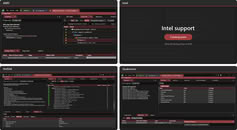
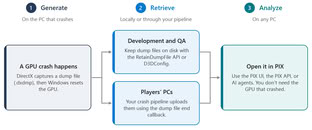
The process begins with a GPU crash. Once the GPU stops its graphics processing, DirectX creates a new dump file containing traces of what occurred before Windows resets the GPU. This includes the last Direct3D runtime state, hardware and driver data, and up to 2 MB of data from the game developer that might be traced. These files can be saved on developers' machines, but on players' PCs in production, they aren't saved by default. However, game developers can set up a crash pipeline to send crash data back to them for analysis. Once the data is available, Microsoft's PIX tool, used for performance-tuning and debugging DirectX 12 games, helps analyze the situation. PIX decodes data, analyzes dump files, identifies hang points, and traces shaders and resources that caused the crash. This allows developers to quickly isolate and fix the problem.
NVIDIA RTXPT 1.9 Path Tracer Gets Around 20% Faster, Adds Windows on Arm Support

NVIDIA has released version 1.9.0 of RTX Path Tracing (RTXPT), its open-source reference path tracer on GitHub, claiming roughly 20% better performance than the previous 1.8.1 release, with comparable or better image quality. RTXPT is a code sample for developers, meant as a starting point for building a path tracer or as a reference for NVIDIA's other ray tracing SDKs. Several changes add up to that uplift. The path tracer can now optionally trace only three quarters, half, or a quarter of the pixels each frame, and the built-in performance presets use this by default, along with lower bounce limits in the faster modes.

On DirectX 12, async compute lets the previous frame's DLSS Ray Reconstruction and post-processing overlap with the next frame's path tracing, and TLAS instance generation has moved to the GPU. Lighting got some attention too. NEE-AT light sampling now handles up to 2 million lights, up from 512K, and the SHaRC radiance cache is on by default in real-time mode, apparently feeding more indirect lighting into DLSS Ray Reconstruction at about the same cost. Version 1.9 also adds Windows on ARM64 support. The release notes don't say why, though it's probably no coincidence, given NVIDIA's own Arm-based RTX Spark chip for Windows PCs.

AMD Radeon Owners Can Now Run Nearly Every DLSS Feature Through Fan-Made Mod

Daniel Blanco's DLSS-NR on AMD project has grown well past its original scope. The mod first got NVIDIA's DLSS 5 Neural Rendering running on Radeon cards back in September, and later pulled off a 74% performance jump in a single day. The new Alpha 0.8.0 release, published on October 17, now brings almost the whole DLSS stack to AMD GPUs. That includes DLSS 4.5 Super Resolution (Models M and L), Ray Reconstruction (Model F), and Frame Generation with up to 4x multi-frame generation (MFG) in games that expose DLSS FG inputs. FSR 4.1.1 is also bundled, so it no longer depends on the driver, and a new NeuralHub mod manager handles game detection and installation.

According to the developer, this is a ground-up reimplementation of the DLSS runtimes using custom HIP kernels rather than a translation layer, and users have to supply their own NVIDIA DLLs. RDNA 4 and RDNA 3 cards get the full feature set, while RDNA 2 support is still experimental and limited to Neural Rendering. The developer says DLSS 5 Neural Rendering now runs at roughly 90 to 100 FPS at 1080p on an RX 9070 XT, and the goal is to match an RTX 5070 Ti. Early results with Ray Reconstruction are mixed, however. One Reddit user reported no performance loss in Cyberpunk 2077 with path tracing at 1440p on an RX 9070 XT, while others saw drops of up to 25%. The mod only works in DirectX 12 games on Windows 11, and anti-cheat software blocks it, so readers are advised to stick to single-player titles.

Intel Arc GPU Graphics Drivers 101.9033 Beta Released

Intel has released its latest Arc GPU graphics drivers, version 101.9033 beta, which brings day-one support for the new game CONTROL Resonant. We conducted an in-depth review of the game's performance on both traditional discrete GPUs and handheld devices with integrated graphics, including Intel's. In addition to adding support for this game, the GPU driver still contains a range of issues from previous releases that have not been fixed in this beta version. While the beta release focuses on game support, issues like Mafia: The Old Country crashing on "Panther Lake" and Arena Breakout Infinite potentially crashing on Arc "Battlemage" and Arc "Alchemist" remain. Check out the full list of known issues that persist in this driver, but expect a fix in the upcoming WHQL driver update.

DOWNLOAD: Intel Arc GPU Graphics Drivers 101.9033 Beta

NVIDIA Releases RTX Kit 2026.3 and RTX Mega Geometry 2.0 SDK for Developers

NVIDIA has rolled out RTX Kit 2026.3 alongside version 2.0 of its RTX Mega Geometry SDK, giving game developers a fresh batch of neural rendering and path tracing tools. The headline feature is support for streaming continuous level-of-detail clusters for high-density meshes, shown off in a new textured glTF version of the Zorah demo. The rest of the RTX Kit update covers RTX Character Rendering 1.4, RTX Dynamic Illumination 3.1 with DLSS Ray Reconstruction integration, RTX Neural Shading 1.4, and RTX Texture Filtering 1.3, which adds Collaborative Texture Filtering.

RTX Neural Texture Compression 0.10 is still in beta, but it now supports the DirectX 12 Agility SDK preview with Linear Algebra, letting Tensor Cores accelerate neural texture decompression in DirectX shaders. It and RTX Texture Filtering 1.3 also gain Windows ARM64 support, which seems to be groundwork for the RTX Spark PCs NVIDIA says start shipping in October. NTC was already running on Windows on Arm back in August.

Acer Broadens Portfolio with Two New Laptops Powered by the Latest Snapdragon Processors

Acer today introduced the Swift Spin 14 AI and the Aspire Go 15, broadening the company's laptop portfolio with a greater range of devices powered by Snapdragon. A premium ultraportable AI laptop, Swift Spin 14 AI features a Snapdragon X2 Elite or Snapdragon X2 Plus processor.

"Snapdragon X2 Series processors deliver leading performance combined with a highly portable, convertible design, coalescing to result in more than the sum of their parts in Acer Swift Spin 14 AI," said James Lin, General Manager, Notebooks, Acer Inc. "With these synergies, this laptop powered by Snapdragon is the ultimate engine for high-output achievers who demand uncompromising speed, AI integrated processing, and multi-day battery life."

Intel Arc GPU Graphics Drivers 101.8737 Beta Released

Intel today released its latest Arc GPU graphics drivers with the version 101.8737 Beta brining new game-ready support for two new releases, including an RPG game Heros of Might & Magic Olden Era, as well as Neverness to Everness open world title. What is perhaps the most interesting thing with this beta driver release is the series of fixed issues in the Pragmata game with DirectX 12 API, which resulted in application crashes when loading into game menu on Intel Arc GPUs. This used to occur on everything from "Panther Lake," "Lunar Lake," and "Meteor Lake" integrated graphics, all the way to discrete Arc "Alchemist" and "Battlemage" solutions. Now the problem is resolved, but some issues remain. For example, Fortnite might crash on "Wildcat Lake" systems during launch, and discrete GPUs might experience some graphics corruption in games like Call of Duty Black Ops 6 and Dune: Awakening. For a full list of known issues, check out the changelog below.
DOWNLOAD: Intel Arc Graphics Driver 101.8737 Beta.

Microsoft's Shader Model 6.10 Opens Direct Access to GPU AI Engines

Microsoft has released the Shader Model 6.10 preview, included in the new AgilitySDK 1.720-preview build. This preview introduces a compelling feature related to GPU-dedicated AI engine control. According to the developer blog, Shader Model 6.10 features a new, streamlined algebra matrix API that reveals all known matrix operations for popular gaming GPUs from AMD, Intel, and NVIDIA. This means that modern GPUs have dedicated hardware for processing AI workloads, typically involving matrix multiplication and accumulation. Modern machine learning-based upscaling relies on this hardware, whether it's Tensor cores from NVIDIA, XMX cores from Intel, or AI accelerators in AMD GPUs, each with its own communication method. To unify access, Microsoft is introducing a new API from the class linalg::Matrix, which will expose all matrix operations to the shader language. This allows neural rendering operations to be executed across multiple GPUs with a single programming effort.

As the developer behind the DirectX 12 API, Microsoft is observing a significant increase in graphics features utilizing neural network-based rendering techniques to enhance user graphics. This will require more matrix units in modern gaming GPUs. To provide a unified layer of abstraction for programming and executing neural rendering operations, Microsoft hopes that Shader Model 6.10 will become the standard for every GPU maker. Interestingly, this feature is supported across all NVIDIA RTX hardware, as it includes Tensor cores. Intel support is planned for an upcoming release, with B-series GPUs expected to be compatible. Only AMD's RDNA 4-based Radeon RX 9000 series GPUs support this feature, with no support planned for older models like the RX 7000 series and below.

Intel Arc GPU Graphics Drivers 101.8724 WHQL Released

Intel today released its latest Arc GPU graphics drivers with the version 101.8724 WHQL bringing support for new hardware and new games. Yesterday, the company launched its Core Series 3 "Wildcat Lake" processors with up to six CPU cores and two Xe3 GPU cores. Expected to land in over 70 different laptop designs, Intel today enabled full gaming support with the Arc GPU driver update. In addition to new hardware, the new driver release adds game-ready support for Pragmata and fixes a lot of the old issues that persisted with the previous releases. These include fixes for flickering in Crimson Desert running DirectX 12, No Man's Sky experiencing corruptions on certain terrains, and importantly issues with Adobe Premier Pro crashing when exporting media based on HEVC codec has been fixed. For a complete picture of fixes and remaining issues, we have posted the changelog below.
DOWNLOAD: Intel Arc Graphics Driver 101.8724 WHQL

NVIDIA Launches Auto Shader Compilation for Faster Game Loading and Less Stuttering

The NVIDIA App update today introduced some interesting features, such as DLSS 4.5 dynamic multi-frame generation and a 6x mode. Additionally, the app now includes a new beta version of NVIDIA Auto Shader Compilation (ASC). This feature takes DirectX 12 shaders from games and quietly compiles them while the system is idle or not running any graphically intensive tasks. Typically, when you start a game, you have to wait for all assets to load and shaders to compile before you can begin playing. However, with ASC, NVIDIA aims to shorten this process by pre-compiling shaders to reduce loading times and, interestingly, decrease in-game stuttering, which can occur when shaders don't load properly. NVIDIA states that this feature is opt-in within the NVIDIA App and can be enabled by navigating to the Graphics Tab > Global Settings > Shader Cache. Once in the menu, users can access a range of settings, including the option to turn on Auto Shader Compilation.

Since ASC uses a separate folder, users will need to allocate sufficient disk space to store the shaders that ASC will access. In the NVIDIA App, gamers can choose the "Compile Now" option to pre-compile all game shaders immediately by clicking on three dots, or they can wait for the system to do it automatically when it becomes idle. As compiling shaders requires some computing power, there are settings to control system utilization, with the default set to medium. The NVIDIA App will also display the date of the last compilation. Interestingly, ASC will perform its functions once a game is downloaded and after a new driver update is installed for optimal performance. NVIDIA requires GeForce Game Ready Driver 595.97 WHQL or newer for ASC to work, and more optimizations are expected as the beta testing concludes in the coming weeks.

Imagination Teases PowerVR GPU Running on Windows with DirectX 11 Support

Imagination Technologies has demonstrated 3DMark Fire Strike running on its D-Series GPU using the DirectX 11 API. While this might seem like a minor achievement, it is a significant milestone for the company. Imagination Technologies aims to make its entire GPU IP family compatible with the Windows ecosystem and support Windows gaming seamlessly. Since DirectX is the most influential graphics API, the company is focused on achieving full DirectX 11 support, which has now been successfully implemented on D-Series GPUs based on the PowerVR architecture. For those unfamiliar, the PowerVR GPU architecture was initially used in Apple SoCs, which later evolved into a fully custom Apple solution. This GPU architecture is one of the most influential, alongside AMD's GCN and NVIDIA's CUDA.

3DMark Fire Strike is a DirectX 11 benchmark, so getting it to run on the D-Series is a promising indication that the GPU IP can handle real desktop-style workloads and gaming, rather than just lightweight or embedded graphics tasks. Imagination has described DXD as its first D-Series product with hardware-based DirectX 11 Feature Level 11_0 support. The company aims to demonstrate that its GPUs can manage demanding DirectX workloads in actual silicon. Imagination states that DXD is designed for desktop graphics and cloud gaming, supporting DirectX 11, DirectX 12, Vulkan 1.4, OpenGL 4.6, and OpenCL 3.0. This gives it a much broader software target compared to older mobile-first GPU designs. Imagination also offers E-Series GPU IP, which includes DirectX 12 Feature Level 11_0 support. This suggests that we might see more DirectX 12 enablement once most of the DirectX 11 functionality is complete.

AMD Releases FSR SDK v2.2 with FSR 4.1 and Ray Regeneration 1.1

AMD has released its official FSR Software Development Kit version 2.2, which includes the latest set of FSR technologies. This release features FSR Upscaling 4.1 and Ray Regeneration 1.1, showcased late last week as part of the Adrenalin Edition 26.3.1 WHQL driver. The updated FSR "Redstone" SDK v2.2 introduces a much improved FSR 4.1 upscaling technology for the RDNA 4 family of graphics cards. The transition from FSR 4.0 to FSR 4.1 demonstrates that the latest version provides much finer details of game scenery, especially when objects are in motion. In the Crimson Desert game demo, grass moved by the wind appears much more detailed with FSR 4.1 compared to FSR 4.0, which previously applied a somewhat blurry effect to the grass. This improvement brings the visuals closer to native rendering.

Additionally, AMD has included Ray Regeneration 1.1 in the FSR SDK 2.2. AMD's FSR Ray Regeneration processes the noisy output that ray tracing naturally produces and cleans it up in real time, resulting in noticeably sharper and more polished visuals without requiring developers to overhaul their existing pipelines. With the update to version 1.1, it delivers much better and deeper shadows, immersive lighting, and more. You can check out the images below for comparison. The latest SDK also includes AMD FSR Frame Generation 4.0.0 in its vanilla version, as well as AMD FSR Radiance Caching 0.9.0, which is now in technical preview.

Microsoft Reveals Next-Gen DirectX Ray Tracing: Clustered Geometry, Partitioned TLAS, and GPU-Driven Acceleration Ops

Microsoft has finally released a second DirectX Ray Tracing (DXR) functional specification file that outlines what its ray tracing pipeline is expected to look like, the goals the company is pursuing, and what the technology does behind the scenes. In the original file, Microsoft described the ray tracing pipeline from ray shader generation, scheduling, and acceleration structure, all the way to the shading of the actual game. This time, the company has shared insights into areas such as clustered geometry, partitioned top-level acceleration structures (TLAS), and indirect acceleration structure operations.

Firstly, Microsoft introduces the concept of clustered geometry. Readers need to understand that the core graphics elements are triangles, which are the building blocks of the 3D worlds we have today. However, DXR clustered geometry treats groups of nearby triangles as common building blocks or multiple building blocks, allowing the GPU to build, move, and instantiate geometry in bulk. Instead of handling this separately with multiple calls for triangles, the GPU's task is now much more simplified. DXR even defines compact vertex encodings and predefined template formats to ensure that the GPU memory and bandwidth required to execute bulk geometry building and moving are sufficient. As a result, the GPU doesn't have to update or duplicate existing geometry, and DXR will help render foliage, crowds, and in-game props once, allowing them to be moved around easily. This reduces the GPU load and improves the performance of ray tracing in games.

Chinese Lisuan LX 7G106 GPU Arrives June 18 with Support for Major AAA Games

Last year, Lisuan Technology introduced its Lisuan LX 7G106 graphics card, one of the most promising GPU technologies for gamers emerging from China. Today, during the AWE 2026 stream on the Chinese BiliBili platform, the company announced that its GPUs will ship on June 18, with pre-orders starting on March 17. The 7G106 GPU is powered by a monolithic die manufactured at TSMC's facilities using the older 6 nm DUV node. This N6 node is approved for Lisuan to utilize TSMC's mature node capacity. Designed for gaming, this GPU accelerates games and 3D applications with broad API support, including DirectX 12, Vulkan 1.3, and OpenGL 4.6. While it supports DirectX 12, it does not include ray tracing, meaning there is no DirectX 12 Ultimate. However, it will support DirectX 12 games, and Lisuan notes that some of these titles include popular games on Steam, such as Cyberpunk 2077, Black Myth: Wukong, and Resident Evil 4 Remake.

Underneath the 7G106 features a SIMD engine capable of running calculations with FP32 and the new INT8 data type. The GPU has a maximum throughput of 24 TeraFLOPS in FP32, placing it high in compute. The primary compute language is OpenCL 3.0. Internally, the SIMD engine is supported by a large raster graphics pipeline, with up to 192 TMUs and 96 ROPs on the silicon. In terms of memory, it offers 12 GB of GDDR6 across a 192-bit wide memory bus, although the company has not yet finalized the exact memory frequencies. The 7G106 is equipped with a modern video acceleration engine, capable of hardware-accelerated AV1 and HEVC decoding at resolutions up to 8K at 60 FPS. It also supports hardware-accelerated AV1 encoding at 4K at 30 FPS and HEVC encoding at 8K at 30 FPS. For monitor connectivity, it includes four DisplayPort 1.4 outputs with support for DSC 1.2b. The GPU does not feature HDMI outputs, likely due to the licensing costs required by the HDMI Consortium for each installed HDMI port.

Microsoft DirectStorage 1.4 Brings Quicker Load Times and Smoother Asset Streaming

Microsoft has released its latest DirectStorage 1.4 update, focusing on the technicalities behind game asset streaming. Today, the company introduced new compression and decompression technology called Zstandard (Zstd), which should improve game loading times and bring much faster game asset streaming than what was previously used. Microsoft originally developed its DirectStorage in DirectX 12 to take advantage of the quick NVMe SSDs. Powerful consumer GPUs need game assets to load incredibly fast, and DirectStorage devleopment has cut out the middle-man, the CPU, in the process of streaming these assets from storage to the GPU. Traditionally, this has been done over CPU, causing delays and latencies across teh stack.

To push Zstd even further, Microsoft has developed the Game Asset Conditioning Library (GACL), a companion tool that developers run on their assets before a game ships. The idea is that instead of simply compressing textures, GACL first conditions them to be more compressible, allowing Zstd to squeeze files down by up to 50% more than it otherwise could. It does this through a few different techniques. Shuffling rearranges data inside texture files so repeating patterns cluster together, giving Zstd more to latch onto. Block-Level Entropy Reduction (BLER) and Component-Level Entropy Reduction (CLER) then reduce texture complexity at the block and color-channel level, using perceptual quality as a guide so any changes remain invisible to the player. CLER takes this a step further by incorporating machine learning to identify exactly where that reduction can be applied without anyone noticing.

Microsoft Shader Execution Reordering Brings 90% Performance Increase on Intel Arc B-Series, 80% on NVIDIA "Blackwell" GPUs

Microsoft recently updated its Agility SDK to version 1.619, bringing DirectX Shader Model 6.9 alongside some new DirectX 12 improvements. However, Microsoft's latest product demo about Shader Execution Reordering (SER) now confirms a massive performance uplift across several GPUs, with up to a 90% improvement on Intel Arc B-Series and more than 80% from independent sources' benchmarks on NVIDIA "Blackwell." With SER, the API gives applications the ability to dynamically sort rays for highly optimized parallel execution, improving performance by a large margin. In Microsoft's own testing, Intel's Arc B-Series GPUs, which include "Battlemage" discrete GPUs and Xe3-based integrated GPUs in "Panther Lake," managed to achieve a 90% framerate increase in the technology demonstration, suggesting that ray tracing performance still has some tricks up its sleeve for optimization.

Meanwhile, the company also tested the NVIDIA GeForce RTX 4090 with SER, scoring a 40% improvement over the default ray sorting in the previous execution model. Independent testing from Osvaldo Pinali Doederlein on X showed that the GeForce RTX 5080 "Blackwell" GPU scored about an 80% improvement running this demo, which gives confidence that games implementing this technology will provide gamers with a massive performance boost once implemented. Microsoft has built this D3D12RaytracingHelloShaderExecutionReordering demo with a minimum demonstration of the SER technology, so anyone can test their own hardware and the performance improvement.

Microsoft Intros DirectX 12 Shader Model 6.9 and New Direct3D 12 Improvements

Microsoft today released DirectX Shader Model 6.9 alongside a host of new Direct3D 12 enhancements. The company had been previewing SM 6.9 since 2025, which now attains general release. Microsoft released the update as part of Agility SDK 1.619 and the complementary DirectX Shader Compiler (DXC) version 1.9.2602.16. The company also released Agility SDK 1.719-preview, which introduces a fresh set of experimental features. At the heart of the Agility SDK 1.619 release is Shader Model 6.9, bringing powerful new processing tools to graphics developers. A standout new feature is "Long Vector" support, allowing developers to load, store, and seamlessly perform element-wise operations on HLSL vectors up to 1024 elements in length. The update also extends specialized HLSL functions, such as IsNan, IsInf, and the newly added IsNorma, to fully support 16-bit floats. Lastly, previously optional hardware capabilities, like 16-bit and 64-bit shader operations, are now strictly required.

Besides Shader Model upgrades, some key DirectX ray tracing (DXR) 1.2 features are officially exiting preview, such as OMM and SER. Opacity Micromaps (OMMs) enable hardware to handle complex alpha-tested geometry far more efficiently, bypassing costly shader invocations. The feature was announced way back in 2022 with NVIDIA's Ada Lovelace architecture. Meanwhile, Shader Execution Reordering (SER) empowers applications to dynamically sort rays for highly optimized parallel execution. Microsoft has directly addressed developer feedback by integrating several targeted quality-of-life updates. Highlights include Revised Resource View Creation API, as well as new CPU Timeline Query Resolves that eliminate unnecessary GPU overhead. The table below compares hardware support for Shader Model 6.9 across the three GPU brands.

OptiScaler One-Ups AMD With FSR 4 Vulkan Support

We previously covered how enterprising gamers managed to bypass AMD's FSR 4 restrictions to get Redstone frame generation tech working on older RDNA GPUs with OptiScaler. Now, it seems as though OptiScaler has managed bypass another one of AMD's limitations that restricted FSR 4 implementations to DirectX 12 games. According to the build notes uncovered by a Reddit user u/eduhfx, OptiScaler is testing adding Vulkan support in a new test build v0.9.0-pre10. Notably, OptiScaler is using a compatibility tool to work around FSR 4's lack of Vulkan support, similarly to how Linux translates DirectX, calls to Vulkan with DXVK or VKD3D. This also means that FSR 4 on Vulkan should work on Linux systems, as well, where games often run better under Vulkan than DX12—although at the time of writing, FSR 4 w/DX12 currently has issues running on Linux due to a Mesa issue that seemingly cannot be solved by the OptiScaler team.
Added Vulkan w/DX12 support - FSR 4 VK w/DX12, FSR 2.1 VK w/DX12

Currently, known issues:
FSR 4 VK w/DX12 has issues on Linux due to missing Mesa extensions
Not interested in reports as nothing we can fix on our side as far as we know

Intel Arc GPU Graphics Drivers 101.8509 WHQL Released

Intel has released its latest 32.0.101.8509 WHQL driver package, bringing support for XeSS 3 across multiple graphics generations and finally ending the launch exclusivity of "Panther Lake" integrated graphics. Now, Intel supports XeSS 3 multi-frame generation across Arc B-series "Battlemage" and A-series "Alchemist" discrete GPUs. For other integrated GPUs, only the Intel Arc GPU family is receiving official support, with "Meteor Lake," "Lunar Lake," and laptop "Arrow Lake-H" chips now offering full XeSS 3 support for 4x the frame output with AI-based frame generation. As Intel recently launched "Panther Lake," some game issues occurred, but thankfully they have been resolved. This includes color corruption in Ghost of Tsushima using DirectX 12 and game crashes in Mount & Blade II: Bannerlord using DirectX 11. However, some "Panther Lake" issues persist, with certain titles crashing and experiencing in-game corruption, which is expected to receive an official fix in upcoming driver releases.

DOWNLOAD: Intel Arc GPU Graphics Drivers 101.8509 WHQL

Intel Arc GPU Graphics Drivers 101.8362 WHQL Released

Intel has released its latest 32.0.101.8425 and 32.0.101.8362 WHQL drivers as launch drivers for the new Core Ultra Series 3 "Panther Lake" processors, featuring Arc B390 and Arc B370 integrated graphics. Alongside day-one support for these iGPUs, the latest GPU drivers introduce Intel's XeSS 3 multi-frame generation technology, which can insert up to three generated frames between two rendered frames to boost FPS by a 3:1 ratio of generated to rendered frames. Intel promises a significant performance boost for its Arc B390 and Arc B370 iGPUs on "Panther Lake," making these SoCs ideal for handheld gaming devices. In addition to new features, these drivers fix issues such as game crashes found in the demo version of Capcom's PRAGMATA SKETCHBOOK running DirectX 12. Some issues persist, which you can find in the logs below.

DOWNLOAD: Intel Arc GPU Graphics Drivers 101.8362 WHQL

Microsoft Celebrates 10 Years of DirectX 12

DirectX 12 shipped in 2015 with a simple goal: give developers more control so games run faster, look better, and scale across Windows PC and console. Over the last decade, DirectX 12 delivered on that promise. We added features and made it easier for developers to focus on gameplay & graphics by providing more flexibility and achievable performance wins.

We built technologies that dramatically reduce load times and deliver consistently high frames for a polished gaming experience in the most demanding of titles. Our platform's continuous evolution brought advanced visuals previously unimaginable into the mainstream. Today, DirectX 12 sits at the heart of many AAA titles and modern game engines, powering some of the most visually stunning games ever made. Happy 10th birthday DirectX 12, here are some of the biggest milestones that made games better!

InnoSilicon's Fenghua No.3 GPU Launches with 112GB+ HBM Memory and Claims to Support CUDA

InnoSilicon has unveiled the Fenghua No.3 GPU marking a significant shift in how the Chinese company develops GPUs. While for previous versions, they used Imagination Technologies' PowerVR IP, now the Fenghua No.3 uses an open-source RISC-V design based on OpenCore Institute's Nanhu V3 project. The Fenghua No.3 comes with over 112 GB of HBM memory putting it right in the AI accelerator market. InnoSilicon says one card can run 32B and 72B parameter language models. They also claim that if you use eight cards together, you can handle huge 671B and 685B parameter models.

The GPU support DirectX 12 Vulkan 1.2, and OpenGL 4.6 APIs for games, and it can handle even ray tracing. InnoSilicon showed the card running Tomb Raider, Delta Force, and Valorant, however it didn't share exact performance numbers or the settings in use. The card can power up to six 8 K screens at 30 Hz and supports YUV444 format to improve color accuracy. This aims at medical, CAD, and scientific computing markets. What's even more interesting is that InnoSilicon says that Fenghua No.3 it's CUDA compatible—a bold claim that, if true, could expand the GPU's software options. However, since CUDA is proprietary, this claim requires verification.

UL Releases 3DMark Solar Bay Extreme, The Ultimate Ray Tracing Benchmark

UL Benchmarks has released Solar Bay Extreme, a major update to the cross-platform 3DMark Solar Bay benchmark that cranks up ray tracing demands for both desktop and mobile devices. The update is now available as a free upgrade for existing 3DMark owners and is designed to showcase the capabilities of current hardware in pushing modern lighting techniques. Everyone can now run the test to compare scores on 3DMark leaderboards and utilize the built-in stress mode to monitor for throttling and stability issues during extended runs. Solar Bay Extreme runs on native APIs for each platform, utilizing Vulkan on Android, Metal on Apple platforms, and DirectX 12 on Windows, ensuring results that accurately reflect how real games behave.

The new edition brings more detailed scenes and a heavier ray tracing workload, including ray-traced specular reflections on rough and glossy surfaces, glass reflections and soft ray-traced shadows for directional lights. UL also added a second assembly bay to the scene where a rival team builds a solar array, which adds geometric complexity and varied lighting that exposes differences between GPUs and drivers.

AMD FSR 4 Now Available in Any DX11/12 Title via OptiScaler

AMD's AI-driven FSR 4 upscaler has been limited to the relatively small number of titles released alongside the RX 9000 series until now. A weekend patch to the open-source utility OptiScaler changes this by adding full redirection support for FSR 4 in version 2025.7.19. Any DirectX 11 or DirectX 12 game that originally shipped with FSR 2, DLSS 2, or Intel XeSS can now utilize AMD's latest libraries instead. Early adopters can take advantage of FSR 4 enhancements, provided they have an RDNA 4 GPU and are willing to follow a few manual steps. You simply drop OptiScaler's FSR 4 proxy DLL into the game's installation folder, open OptiScaler's interface or its configuration tool to select "fsr4" as the backend, and turn off any built-in anti-lag or frame-generation module to prevent timing conflicts between two low-latency systems.

Once these steps are complete and you are running on DirectX 11 or 12 without an incompatible anti-cheat or a Vulkan render path, you can launch the game, and OptiScaler will seamlessly drive FSR 4 in place of the original upscaler. There are still some caveats. OptiScaler does not yet support Vulkan render paths, and online titles protected by Easy Anti-Cheat or BattlEye will refuse to launch when they detect the proxy DLL. Additionally, there is no universal installer, so each game directory must be modified individually. Even so, for single-player or LAN-only releases, this tool immediately extends FSR 4's reach from the current 65 native titles to potentially hundreds of legacy games.

Researchers Unveils Real-Time GPU-Only Pipeline for Fully Procedural Trees

A research team from Coburg University of Applied Sciences and Arts in Germany, alongside AMD Germany, introduced a game-changing approach to procedural tree creation that runs entirely on the GPU, delivering both speed and flexibility, unlike anything we've seen before. Showcased at High-Performance Graphics 2025 in Copenhagen, the new pipeline utilizes DirectX 12 work graphs and mesh nodes to construct detailed tree models on the fly, without any CPU muscle. Artists and developers can tweak more than 150 parameters, everything from seasonal leaf color shifts and branch pruning styles to complex animations and automatic level-of-detail adjustments, all in real-time. When tested on an AMD Radeon RX 7900 XTX, the system generated and pushed unique tree geometries into the geometry buffer in just over three milliseconds. It then automatically tunes detail levels to maintain a target frame rate, effortlessly demonstrating stable 120 FPS under heavy workloads.

Wind effects and environmental interactions update seamlessly, and the CPU's only job is to fill a small set of constants (camera matrices, timestamps, and so on) before dispatching a single work graph. There's no need for continuous host-device chatter or asset streaming, which simplifies integration into existing engines. Perhaps the most eye-opening result is how little memory the transient data consumes. A traditional buffer-heavy approach might need tens of GB, but researcher's demo holds onto just 51 KB of persistent state per frame—a mind-boggling 99.9999% reduction compared to conventional methods. A scratch buffer of up to 1.5 GB is allocated for work-graph execution, though actual usage varies by GPU driver and can be released or reused afterward. Static assets, such as meshes and textures, remain unaffected, leaving future opportunities for neural compression or procedural texturing to further enhance memory savings.
Return to Keyword Browsing
Nov 19th, 2026 09:34 PST change timezone

New Forum Posts

Popular Reviews

TPU on YouTube

Controversial News Posts