
News Posts matching #Updates

Return to Keyword Browsing

ASUS Rolls Out FSR 4.1 Preview for ROG Xbox Ally Handhelds

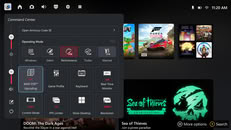
ASUS has started rolling out a preview GPU driver that brings AMD FSR 4.1 upscaling to the ROG Xbox Ally X and ROG Xbox Ally X20. Owners can grab it through Armoury Crate SE under Update Center, then Preview Updates. This follows AMD's announcement earlier this week that FSR 4.1 is expanding to Radeon RX 6000 series GPUs, APUs, and Xbox. According to ASUS, the handheld version runs on a lighter model that is less than half the size of the original INT8 model, built with the Ryzen AI Z2 Extreme in mind. FSR 4.1 works in over 400 games that support FSR 3.1 or newer. Handheld owners have waited a while for this, as AMD previously had no definitive decision on RDNA 3.5 APUs before confirming FSR 4 for APUs by the end of 2026.

Once FSR is enabled in a game's settings, users also have to add the FSR tile in Command Center and switch it on. ASUS warns that RSR, the system-level upscaler, should not be combined with it. Neither AMD nor ASUS has shared any performance numbers yet, and ASUS notes that preview updates may still have bugs. As for the regular ROG Xbox Ally, ASUS says it will also get support through a GPU driver update coming soon, though there's no date yet. The Xbox Series X|S consoles are next in line and will reportedly get FSR 4.1 in the coming weeks, while FSR Diamond has already been teased for Project Helix.

Microsoft Warns Windows Update Will Stop Working on Unpatched PCs Next Year

Microsoft is replacing the certificates that Windows PCs use to confirm they are talking to genuine Windows Update servers, and machines that miss the changeover will stop receiving updates. The company announced the rotation on October 8, and the current certificates expire on May 17 and June 19, 2027. Most users apparently won't have to do anything, since the replacements ship inside the regular monthly security updates. Windows 11 25H2 and later, including the recently launched 26H2, need no action. Windows 11 24H2 needs the September 2025 security update or newer, while other supported Windows 11 and Windows 10 versions need the July 2026 update or later before June 19. Windows 10 Enterprise 2019 LTSC, Windows Server 2019, and Windows Server 2016 face the earlier May 17 deadline.

Microsoft says devices on unsupported versions "will lose access to Windows Update services and won't receive any updates as a result," and its only advice is to upgrade. For home users, that mostly points at Windows 10 PCs that were never enrolled in Extended Security Updates (ESU) after the OS reached end of life in October 2025. Those machines probably never got the July 2026 patch. Microsoft extended ESU coverage to October 12, 2027, so it looks like enrolling and installing the offered updates before June should bring the new certificates along. The warning also comes months after Microsoft began refreshing Secure Boot certificates that were due to expire in late June 2026. Readers are advised to check their update history for a cumulative update from July 2026 or later.

The Witcher's Henry Cavill Will Build a Video Game on a Googlebook This November

Google has announced that actor Henry Cavill will build a video game on a Googlebook this November, as part of a marketing partnership for its new Android-based laptops. In its blog post, Google describes Cavill as an actor, producer, and tech enthusiast with his own production company and a passion for gaming and fantasy lore, and says he is already using the laptop for personal passion projects. Google hasn't shared the genre, the game engine, who else is involved, or what form the end result will take. Updates are apparently coming through a landing page and an Instagram account. Here's what Cavill had to say about the project.
"When Google reached out to me and explained what they are doing with Googlebook, and all of its new, integrated tools, it had me intrigued. So, I asked for the opportunity to have a play with it ahead of release. After being hands on and spending some time with their team, I believe this has the potential to be the start of something rather special. Time and technology are marching forward at a breakneck pace, this, and all that Google are trying to do with it, has the whispers of the next generation."

Embark Backed Off Arc Raiders Monthly Updates To Stop Burnout

Since its launch in late 2025, Arc Raiders has been a commanding presence in the extraction shooter genre, at one point peaking at over 480,000 concurrent players. Embark has earned its player count partially by listening to its community's needs and by issuing frequent updates to fix issues, introduce fresh gameplay mechanics, and update content—until a recent change to the development cycle that will see less frequent updates. In a recent interview with Game Developer, Arc Raiders executive producer, Aleksander Grøndal, expanded on the studio's justification for the change in update frequency and how the game's dev team now approaches updates.
The team is super tired. We're putting out content as fast as we can, but it's not enough, and perhaps it wasn't necessarily interesting enough as well. I'm proud of what we achieved during the first four months of this year, but at the same time, I think we have to be honest at looking at some of the impacts of that.

Imminent Control Resonant Updates To Add Unlimited "New Game++" and Photo Mode

Control Resonant launched on September 24 to a rather positive reception, and less than a week after launch, Remedy, the studio behind the game, is promising an October update that makes sizeable changes to gameplay, including adding what it calls "New Game++" mode, which is likely the most interesting part of the blog detailing the upcoming update.

At the time of writing, Control Resonant has a New Game+ mode, which allows players to play through the story once more before needing to start a new savegame. With New Game++, Remedy will allow players to "start NG+ run after NG+ run, without needing to erase all your progress," and thoroughly explore the world and lore. New Game++ is slated to land in Control Resonant sometime in October, although no specific launch date has been announced yet.

Discord Updates Age Verification Process With "Privacy-Preserving" Methods

Discord was met with substantial backlash when it first announced that it would be adding age verification requirements globally, with the platform almost immediately rolling back the ID requirements after the backlash. It has since announced that it will be introducing new age verification methods, including credit card verification, Apple Store and Google Play Store verification, Google Wallet, and AgeKey—a third-party reusable age credential that can be used for multiple platforms. It will use these services to place its users in an age group—13-17 years and 18+ years—which will allow them access only to content appropriate for their age. While these new methods will apply to international users, users in the UK, Brazil, Australia, and the US state of Texas will have to follow different guidelines.

However, these new systems will not be the first resort for age determination. Discord says that, following the controversy with the ID requirement for age verification, it will prefer other ways to verify the age of its users, including account signals—account age and which servers users are part of, specifically. It says that these signals match biometrics on accuracy. Only in cases where there aren't sufficient signals to confirm user age, will Discord require users to verify their age using one of the aforementioned age assurance options. Users in the teen group will not have access to sensitive media, while messages to teens from non-friends will be filtered through message requests, and other users will not be able to see teens' full profiles or activity. They will also not be able to join age-restricted servers without confirming their age.

Gnome 51 Launches With Smoother Desktop Performance and Myriad QoL Updates

It's been just over six months since Gnome 50 launched into beta, in the process, ditching X11 and issuing a number of updates to Mutter, its compositor, including VRR and fractional scaling. Now, the Gnome Foundation has officially announced the public release of Gnome 51, which features myriad updates, both to the user interface and to the underlying tech, all of which is aimed at making Gnome easier to adopt and use as an average computer user and make "the desktop feel smoother and more responsive than ever."

Most notably, Gnome 51 improves frame scheduling, which should make the system feel more responsive, especially under load; faster screen capture with the screenshot tool, and streamlined support for NVIDIA GPUs, which will now all be consolidated into a single, modern management UI. Some of the other major changes include new settings dialogues for smoother fingerprint enrollment, an Auto Rotate option in display settings, for portable devices with accelerometers, and more intuitive window snapping with a new center snap option. Gnome 51 will also let users automatically disable the touchpad when a mouse is connected.

Framework Updates Laptop 13 Pro Pre-Orders Yet Again: Cheaper RAM Comes With Pricier Core Ultra X9 CPUs

Framework, the maker of repairable laptops and mini PCs, previously stirred up some controversy when it increased pre-order pricing on its Laptop 13 Pro after promising that the announced pricing would hold throughout pre-orders. Following that July price increase, however, Framework has revealed that it has once again dropped the price of pre-orders on the Framework Laptop 13 Pro, after it was able to secure a batch of LPCAMM2 memory at a lower price.

According to the latest update to Framework's RAMpocalypse tracker and updater page, the new Laptop 13 Pro pricing will not be lower than the original pre-orders, but it will be lower than the adjusted pricing after the previous price increase—that is to say, buyers will still be paying a higher price than expected, but it will not be as much higher. Framework will not only be reducing prices for currently available pre-orders, but it will be retroactively applying a discount to existing pre-orders and issuing partial refunds for pre-orders that have already been shipped at the higher price.

Keychron Updates K4 HE and K10 HE Wireless Keyboards with Wider Magnetic Switch Compatibility

The Keychron K4 HE and K10 HE have been go-to keyboard recommendations for those who want a decent combination of full-size or near full-size layout, magnetic switches, sleek design, and reasonable pricing, with the only caveat being that the K4 HE and K10 HE have always only been compatible with S-pole magnetic switches, coming equipped with Gateron Double-Rail Magnetic Nebula switches. Meanwhile, Keychron's more recent HE and TMR keyboards have switched to N-pole magnetic switches—the difference being that keyboards with N-pole switch compatibility offer significantly more choice, because they have seen much greater adoption among both switch and keyboard makers.

Now, Keychron has officially seemingly begun the switch to N-pole switches on its older models, with both the K4 HE and the K10 HE now offered with Keychron's Ultra-Fast Lime Magnetic switches as a default. This means that buyers of the new, revised version of the K4 and K10 HE keyboards will not only have a newer switch by default, they will also be able to use aftermarket HE switches from the likes of Wooting, Gateron, TTC, OwLab, Wuque Studio, and MMD, to name but a few. The caveat here is that existing K10 HE and K4 HE owners will not benefit from the updated SKU, and buyers will now need to be careful to buy the correct switch type when buying the updated keyboards.

Steam Frame Unboxing Video Leaks, Hinting at Nearby Launch

Valve's Steam Frame is just around the corner, as we have previously reported. Today, we received further confirmation when Valve accidentally uploaded several Steam Frame videos while updating its Steam Client for Arm. These videos, spotted by the Steam Hardware Updates account on X, include a detailed unboxing and an instruction guide on how to use the Steam Frame and its features. Given the numerous buttons and functionalities of the Steam Frame VR headset, having a visual guide is very helpful for new users to set up the VR experience and utilize all the features it offers.

The company has already released two of its three planned hardware products, with only the Steam Frame remaining. After launching the Steam Machine and Steam Controller, the eagerly anticipated Steam Frame VR headset is the last to debut. Previously, a game developer mentioned that he and his publisher are waiting for Valve to release the headset before launching their action-based shooter. With the launch expected soon, it could happen within a few weeks to a month. For more information and videos, check out the thread on X by Steam Hardware Updates.

Steam Machine Updates: FSR 4.1 Lands Alongside CAD Files for Custom Faceplates

Since the long-awaited launch of the Steam Machine, Valve has provided periodic updates on the new hybrid game console. Despite Valve's recent confirmations that RAM remains in short supply and at a high cost, the company has said in its latest update that it should be able to offer everyone in the reservation queue the option to purchase a Steam Machine by the end of 2026. After that, Valve will move on to users in the waitlist who have not yet had the chance to place a reservation.

Valve has also confirmed that it has published the CAD files for the Steam Machine's exterior for those who want to create their own faceplates or other accessories. The CAD model is in STEP format, which is widely regarded as a fairly universally accessible and compatible CAD format, and it is published under the Creative Commons Attribution-NonCommercial-ShareAlike 4.0 (BY-NC-SA) license, which specifies that the files are free to use and modify, but that users must attribute the original creator—in this case Valve—and share any projects they make under the same license. The CAD models have external topology, including fan mounting points, feet, and even geometry for the power button and I/O.

Marvel Tokon: Fighting Souls Beta Crashes PSN Servers for Hours on End

Marvel Tōkon: Fighting Souls officially started an open beta test on the morning of July 24, but shortly after the beta went live, users started reporting that they could not access the game due to a PlayStation Account error. The beta, went live across PC, PS5, and Xbox platforms, has reportedly been inaccessible to many players for much of the day, with Downdetector showing between 1,500 and 7,000 error reports every 15 minutes by users since the early hours of the open beta. Errors don't seem to be limited to any specific system, which makes sense, since the PlayStation Account login is required for all platforms. Arc System Works and PlayStation have acknowledged the issue, commenting in a post on X that there will be server maintenance until 16:00 PST (01:00 UTC).
Marvel Tōkon: Fighting Souls on XThe MARVEL Tōkon: Fighting Souls Open Beta will be temporarily taken offline for maintenance. The maintenance end time is 4PM PST. Updates will be shared through the game's official channels.

We apologize for the inconveniences this may cause. Thank you for your patience.

Framework Adjusts Pre-Order Configurations After 100%+ LPCAMM2 Price Increase

Framework recently published a pricing update regarding some of its Laptop 13 Pro SKUs, confirming that it has been subject to an unexpected 100%+ price increase for LPCAMM2 modules, which has meant that Laptop 13 Pro prices have had to increase in order to cover increased costs. Framework says that the price increase "goes far beyond anything we had predicted and anything we're able to absorb without placing our ability to operate at real financial risk."

One issue that has repeatedly come up in the Framework community on Reddit, for instance, is that the company has effectively gone back on a promise it made when it announced the Laptop 13 Pro. At launch, Nirav Patel, Framework's CEO, stated that "we are going to honor any existing pricing for any pre-order that gets placed on our website...that's not to say that we're not going to end up changing prices in the future for new orders, but we're not going to go back and change prices for orders that anyone's ever actually placed already."

Cryorig Updates High-Performance Cooling Hardware and Launches PC Case with 13 HDD Bays at Computex 2026

While Cryorig debuted a very interesting semi-passively cooled PC case at Computex 2026, the company also featured its fresh line-up of active cooling hardware, including the new H6 CPU cooler, a sizeable E-ATX PC case designed for workstation and AI use, and its recently updated Cryo360 AIO liquid cooler. The H6 CPU cooler is the latest in Cryorig's line of budget CPU air coolers that would compete in the same market as the Cooler Master Hyper 212 series. The H6 has a pure copper base with six heat 6 mm pipes and a total footprint of 122 × 69 × 148 mm, meaning it should have wide case compatibility, thanks to the low total height.

The H6 is compatible with Intel sockets going back to LGA 115X (meaning LGA 115X, 1200, 1366, 1700, and 1851, while AMD is limited to AM4 and AM5. Cryorig clams that the new cooler operate as quietly as 31.5 dBA. Cryorig also showed off its dual-tower Gladius Astral CPU air cooler, which has a small display on the top for system metrics, and its Cryo360 CPU liquid cooler, which, as the name suggests, is a 360 mm AIO cooler with a ceramic shaft core water block and a round display on the top of it. The Cryo360 has a 27 mm thick radiator and ships with three PWM fans capable of delivering 61.24 CFM airflow at 900-2,000 RPM, with noise performance claims of as little as 32.2 dBA.

Sony Rolls Out Public PlayStation 5 Player Count Beta Widget

One of the things that makes Steam unique as a platform is the APIs that Valve makes available to players and developers that allow us to see public player count data via sites like Steam Charts and SteamDB. According to recent reports by Mystic on YouTube, Sony is testing a new Community Activity widget in the PlayStation Welcome Hub that will show the top 10 most popular games for the week in question and a "Trending Now" category to show trending games. Trending Now shows increased gameplay hours, while the Top 10 view shows weekly active players and the position in the Top 10 leaderboard. There doesn't appear to be much more customization than being able to select these two options, and you don't seem to be able to see historic player counts for specific games.

Notably, this feature is in beta, so it may well change significantly before it hits more players, and it appears to be limited to certain countries at the time of writing. Additionally, although the widget does provide player count information, it's more like a snapshot of the game's performance at a specific point in time rather than the ongoing statistics gathered by SteamDB using Valve's APIs. Information about the most-played games isn't just useful from a novelty analytics point of view, but it also helps players ascertain if it would be worth investing time and money into a multiplayer game whose entertainment value may be contingent on the presence of other players in-game. Sony's Top 10 chart is also somewhat flawed, since aside from a few weeks a year when heavyweight launches take place, the popular games on a platform like Steam remain fairly constant—for Steam, the top 10 by player count usually includes Counter-Strike 2, PUBG: Battlegrounds, Apex Legends, Rust, Dota 2, and Terraria, with Warframe and Overwatch making occasional appearances.

Microsoft Updates ROG Xbox Ally X with Auto Super Resolution and Docked Mode Enhancements

Microsoft has just announced a new set of features coming to the ASUS ROG Xbox Ally handheld gaming PCs, addressing game quality, docked mode quality-of-life, Game Bar improvements, and more. The most notable improvement coming to the ROG Xbox Ally is Auto Super Resolution, or Auto SR, which is now in Preview in the Xbox Game Bar. Auto SR, as the name suggests, is a similar to AMD and NVIDIA's FSR and DLSS, allowing game upscaling to increase frame rates without losing image quality. On the ASUS ROG Xbox Ally X, Auto SR is only available in docked mode for now, where it will automatically upscale the game's image to deliver a sharper image, fit for a bigger screen, when docked to something like a TV. This should effectively make for a smoother transition between gaming on the TV and in handheld mode, since you won't have to change resolution or upscaling settings when plugging the ROG Xbox Ally in. Microsoft has an in-depth blog explaining Auto SR in more detail.

[Editor's note: Our in-depth review of the ASUS ROG Xbox Ally X is now live]

Aside from Auto SR, the ROG Xbox Ally also gets the gamepad cursor we previously covered, streamlined controller pairing for docked play, a display widget in Game Bar, where you can quickly adjust display settings, and a handful of automatic enhancements for smart TVs. For starters, when players connect to an external display or TV, the ROG Xbox Ally will now turn off the built-in screen and default to the TV for output. If the connected TV happens to be a smart TV from Samsung, LG, or Vizio, the ROG Xbox Ally will automatically enable certain features on the TV, like Auto Low Latency Mode, Auto Game Mode, or Game/PC Mode. The library consolidation features we previously covered have also officially been added to the Xbox PC App, allowing you to use the ASUS ROG Xbox Ally in handheld mode exclusively if you would like to.

JEDEC Updates DDR5 MRDIMM Standards with New Interface Logic, Expands Roadmap

JEDEC Solid State Technology Association, the global leader in standards development for the microelectronics industry, today announced milestones from its JC-40 and JC-45 Committees for Logic and DRAM Modules: the publication of a new DDR5 multiplexed rank data buffer (MDB) standard; progress toward a multiplexed rank registering clock driver (MRCD) standard; and continued work on the DDR5 multiplexed rank DIMM (MRDIMM) Gen 2 roadmap to enable higher-bandwidth DDR5 MRDIMM designs.
  • Published: JESD82-552 (DDR5MDB02) Multiplexed Rank Data Buffer
  • Expected soon: JESD82-542 (DDR5MRCD02) Multiplexed Rank Registering Clock Driver
  • In progress: MRDIMM Gen 2 module standard nearing completion
  • In development: Gen 2 DDR5 MRDIMM raw card designs targeting 12,800 MT/s and MRDIMM Gen 3 module standard development, with the underlying memory interface logic nearing finalization

Windows 11 Updates Can Now Be Skipped and Even Paused Indefinitely

Microsoft is... giving users exactly what they want? In the latest Windows Insider preview for Windows 11, Microsoft is rolling out an updated Windows Update experience that gives users more control over their update process. This includes the option to skip updates entirely during the out-of-box experience (OOBE) menu, allowing you to set up a PC without applying updates first. Previously, new PC configurations and installations might have been several months behind on Windows 11 updates, and Microsoft would force users to apply these updates immediately. This led to prolonged OS setup times and user frustration. Now, for those who need to move to a new desktop quickly and apply updates at a later date, Microsoft is finally offering an option during OOBE to install the OS first and apply updates later.

Additionally, Microsoft is now allowing users to pause Windows 11 updates in the settings with a dedicated calendar that extends up to 35 days. This ensures you have ample time to schedule an update session without disrupting your workflow. However, the 35-day mark is not a hard stop, as users can re-pause updates for another 35 days even after the original period has expired, essentially allowing updates to be paused indefinitely. There are no limits on how many times you can reset this pause date, giving you full control over the entire update process. This could be especially useful when a new update series arrives, and you want to wait and see if there are any OS issues or known problems before applying the update. For example, in the latest Windows 11 April update, some PCs might experience a BitLocker trigger, but this will be resolved in a future fix. Users can wait a few days for a fix to arrive and then install updates all at once without being forced to do so immediately.

NVIDIA DLSS 4.5 Leaves Beta, Available Now In War Thunder, Enlisted & Dawn of Defiance

Each week, new games and apps integrating NVIDIA DLSS, NVIDIA Reflex, and advanced ray-traced effects are released or announced, delivering the definitive PC experience for GeForce RTX players. This week, Samson has launched with ray tracing, DLSS Ray Reconstruction, and DLSS Multi Frame Generation. Additionally, Gaijin Entertainment's Enlisted and War Thunder have both introduced support for DLSS Ray Reconstruction when using each game's ray-traced effects, and DLSS 4.5 Super Resolution for those playing with FPS-maximizing rasterized visuals. And Dawn of Defiance recently introduced DLSS support, which you can upgrade to DLSS 4.5 using the NVIDIA app.

And today, our new NVIDIA app update has exited beta, bringing the full suite of DLSS 4.5 updates to every user of our essential application.

Assassin's Creed Shadows Title Update 1.1.10 Adds PSSR 2 Support and Gameplay Updates for Other Platforms

A little over a year after the release of Assassin's Creed Shadows, Ubisoft has shipped the Title Update 1.1.10, which, aside from the usual bug fixes, adds PSSR 2 support to the game for PS5 Pro players and a number of quality-of-life updates and gameplay changes across all of the game's platforms. The full changelog is available via an Ubisoft news post.

Ubisoft has not detailed the exact visual upgrades wrought by the addition of PSSR 2, but we can likely expect smoother, higher frame rates with sharper upscaling, as has been seen in other games, like Resident Evil: Requiem and Cyberpunk 2077. As of the new update, all players will be able to access the Bo staff, which was previously locked behind the Claws of Awaji expansion. The Switch 2 version of Assassin's Creed Shadows also now features mouse and keyboard support, and the laundry list of bug fixes include UI fixes for damage indicators, a fix for an unintentional +100% stat cap in some cases, issues with fast travel points not being available, and progression getting stuck at 97.89% despite all content being completed.

Slimbook Updates Kymera Desktop Line with More Options

We continue to improve our Kymera desktop line, not only in hardware but also in the way you can explore and configure each system. We are presenting new product pages for our lines, along with the return of one of the most requested formats by the community.

Kymera Cristal: power you can see
The Slimbook Kymera Cristal features a design that doesn't hide its power, it showcases it. Thanks to its tempered glass front and side panels, every component of the system becomes part of the design, proudly displaying the hardware with precision. This is a solution aimed at those seeking a system that combines extreme performance with striking aesthetics. From RGB-lit configurations to more understated setups, Kymera Cristal allows you to create an environment that reflects your style.

Digital Extremes Updates Warframe's "Follie's Hunt" Game Mode After Backlash

Alongside the official Nintendo Switch 2 launch of Warframe, Digital Extremes recently shipped its "The Shadowgrapher" update with a new quest, Warframe, and game mode for all platforms. Almost immediately after the update went live, gamers were online griping about the difficulty of the new mission, Follie's Hunt, with most complaints centering around the unkillable foe, and some even going so far as to say that the mission was impossible for most to complete. Now, having seen the feedback, Digital Extremes has shipped a hotfix with changes to Follie's Hunt that aim to make it more approachable and less punishing. Digital Extremes explains that it interpreted much of the feedback as a design mismatch—Follie's Hunt is a "deviation from regular Warframe gameplay...so understandably there may be some players who don't align with its design," reads the post announcing the upcoming changes, which will be implemented and iterated on in the coming weeks.

With the first Follie's Hunt update, Digital Extremes has made the Follies hunting players less brutal by removing their invulnerability. Players seeking reprieve can now shoot Follie, and she will retreat momentarily if enough damage is dealt. Further, Follie's Aura doesn't do as much damage to players, and Inky Walls will no longer damage players or inflict knock-down, increasing survivability. Resources are also now easier to find and gather: Atramentum balloons are easier to see; there are fewer balloons to find, and the Atramentum reward per mission has been increased from 5 to 15. The patch notes also contain a slew of unrelated changes, and Digital Extremes has already said it will be monitoring player feedback to see what more needs to be done to make the gameplay fun.

Apple Delivers More Timely Security Updates for iOS, iPadOS, and macOS

Apple has designed a new framework to keep its operating systems secure and up to date with modern protection technology without relying on major OS updates for essential security improvements. Called Background Security Improvements, this framework spans all of the company's operating systems that power iPhones, iPads, and Mac computers, used by hundreds of millions of users globally. For example, whenever a security issue arises in the Safari browser, WebKit framework, or any other software with an internet-first connection, security becomes the top priority. Instead of waiting to bundle these security updates with a new version of an operating system, Apple provides ongoing patches between major updates to address any security issues.

The company is gradually enhancing the quality of life on its platforms, and this is another significant step forward. Background Security Improvements begin with iOS 26.1, iPadOS 26.1, and macOS 26.1, and will continue with future versions of these operating systems across supported devices. Interestingly, Apple also publishes Background Security Improvements by date, component patched, and CVE number, so you can understand what the update addresses, why it was necessary, and have peace of mind that your OS remains safe from the growing number of online exploits targeting unpatched systems.

Framework Increases RAM and Pre-Built Laptop and Desktop Pricing in Light of Ongoing DRAM Crisis

Framework has taken a remarkably transparent approach to recent RAM price increases that affect the pricing of both its laptops and its standalone RAM sales, sticking to monthly price updates throughout the ongoing RAM shortage and maintaining a blog post with monthly updates on the industry situation. Framework's March memory pricing update will see prices on DDR5 SODIMMs increase to as much as $13-18 per GB, with lower capacity sticks seemingly trending towards the higher end of that price bracket. The price increases in question have also affected the Framework Desktop and some pre-built SKUs of the Framework Laptop 16.

Framework also confirmed that it has "started to deplete" its stockpile of low-cost SSDs that were sitting in inventory, and the company predicts that prices for the Laptop 12, 13, and 16 will continue to trend upwards in the coming months as a result of both the storage and RAM price increases. For the time being, the OEM still has supply of 2, 4, and 8 TB SN850X SSDs that are priced below market averages. The impacts of the DRAM crisis on silicon fabrication have also begun to become apparent, since the Intel Core i5-1334U in the Framework 12 is in limited supply.

Apple macOS Tahoe 26.3.1 "Updates" M5 SoC With New "Super Cores"

We reported that Apple's M5 Pro/Max series of SoCs is now incorporating an additional core tier alongside the usual configuration we have been seeing in the company's processors for years. The performance core has been renamed "Super Core," and Apple has introduced a middle-tier design called Performance Core, which is actually a new "M-Core," while the Efficiency Core remains the same. As the regular big P-Core has been renamed to Super-Core, Apple is updating its nomenclature even for the regular M5 SoC with the macOS Tahoe 26.3.1 update. In this update, Apple has renamed the bigger Performance core to Super-Core, meaning that the M5 SoC now has four super cores and six efficiency cores, whereas this was previously called a four performance-core and six efficiency-core design before the update.

This M5 SoC has no new "M-Cores" variants that sit between the super core and efficiency core, while the M5 Pro and M5 Max have six Super-Cores and 12 M-Cores. The M-Core is a 7-wide out-of-order execution CPU that has roughly 70% of the P-core performance with slightly lower power usage. Interestingly, the efficiency core is completely absent from the new M5 Pro/Max SoCs, resulting in a combination of performance and middle-class cores. This leaves only the regular M5 with the efficiency cores in its CPU package. This macOS software update is only meant for the M5-powered MacBook Pro, which has been shipping with older macOS versions without the Tahoe's v26.3.1 update. For the latest MacBook Air and MacBook Pro equipped with M5, M5 Pro, and M5 Max SoCs, the operating system will likely already show the new naming out of the box, as Apple likely applied all OS updates before shipping. Below are screenshots courtesy of Andrew Cunningham from Ars Technica, showing the new nomenclature on the left, and old way on the right.
Return to Keyword Browsing
Nov 11th, 2026 07:07 CST change timezone

New Forum Posts

Popular Reviews

TPU on YouTube

Controversial News Posts