 23
ACEMAGIC Tank M1A Pro+ Review
Value & Conclusion »Power and Noise Levels
Power and efficiency can be just as important as raw performance in a more compact system, so I measured how much the ACEMAGIC M1A Pro+ draws under CPU stress, during GPU-heavy tests, while gaming, and during a 24-hour idle period. These measurements were captured using a Shelly smart power relay, taking advantage of its API-based logging to track real-time wattage and build accurate per-second consumption profiles. I also monitored the system's noise levels while idle and when under sustained load.24-Hour Power Draw
Over a full 24-hour idle period, the system shows very consistent and efficient power behavior, averaging 8.6 W, with a peak of 9.3 W and a low point of 2.8 W. For most of the day, power draw sits tightly between 8.5 and 9 W, indicating stable idle operation with no unexpected spikes or background activity.For a mini PC with a Ryzen AI Max+ 395, Radeon 8060S, and 128 GB of LPDDR5X memory, this is a very good idle result. Systems in this performance class often idle closer to 10 W or higher, so the fact that this one stays below that for most of the run suggests the platform is doing a solid job of reducing clocks and settling down when it is not under load.
At an average of 8.6 W, leaving the system idle around the clock would result in roughly 75.3 kWh of annual energy use, which works out to about $11 to $15 per year, depending on local electricity rates. Overall, idle efficiency here is strong, and especially impressive given how much power the system can draw under heavier CPU and GPU workloads.
CPU and GPU Power Draw
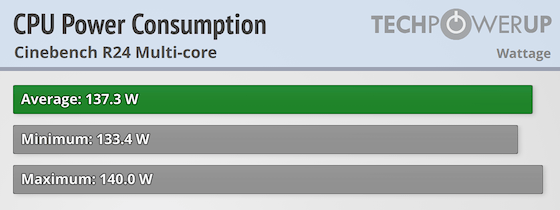
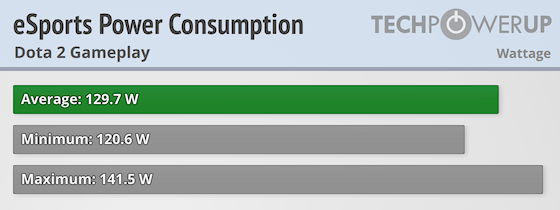
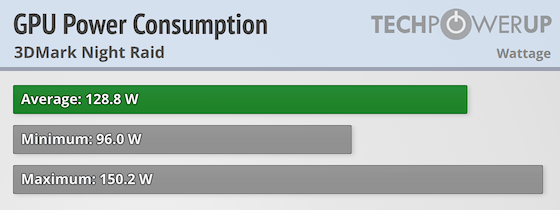
We evaluated three different power scenarios to see how the system behaves under varying types of load: an esports gaming run with Dota 2 to observe real-world gaming power and consistency, a GPU-focused pass using 3DMark Night Raid to show how the system ramps under heavy graphics demand, and a Cinebench multicore run that fully loads the CPU to measure sustained power delivery over time.
Cinebench Multicore
In the Cinebench multicore test, the system averages 137.3 W, with readings between 133.4 W and 140.0 W. This lines up almost perfectly with the system's 140 W Performance mode.
eSports gaming (Dota 2)
During the Dota 2 workload, the Tank M1A+ Pro averages 129.7 W, with readings ranging from 120.6 W to 141.5 W. That shows the system staying close to its 140 W Performance mode ceiling even in lighter gaming workloads, rather than backing off sharply once the load drops.
3DMark Night Raid
Running 3DMark Night Raid, the system averages 128.8 W, with readings between 96.0 W and 150.2 W. The peaks above 140 W suggest short boost behavior beyond the defined power modes, which is normal for bursty GPU workloads, while the lower dips reflect lighter segments between scenes.
Here's a full view of the M1A Pro+'s power draw across all three profiles:
Noise Levels
Noise was measured using a digital sound level meter placed about 30 cm from the front of the case. During light desktop use, web browsing, or general productivity work, the Tank was virtually silent, typically sitting in the low-30 dB(A) range no matter what the power dial was set to.When measuring noise under load, acoustics varied quite a bit depending on the front dial setting. Silent mode at 70 W kept the system in the mid-30 dB range at about 35 to 36 dB, which fits the profile name well, while Balanced mode at 100 W raised noise to roughly 45 dB and Performance mode at 140 W pushed it to around 52 to 54 dB. I also changed the dial in the middle of a Cinebench run, and the fans ramped up or down within about 10 seconds, which was nice to see and showed that the system reacts quickly to profile changes. Even at the higher settings, the noise was more of a steady rush of air than an annoying high-pitched tone.
Nov 20th, 2026 16:31 PST
change timezone
Latest GPU Drivers
New Forum Posts
- Without Jensen, PC gaming will be (51)
- WarpCoreBench scores! (86)
- Honestly, do you care about GTA VI? (213)
- What's your latest tech Freebie? (80)
- Nvidia GPU undervolting via MVolt+? (0)
- How to prevent OLED burn damage due to PC freezes or power outtages? (49)
- RX 9000 series GPU Owners Club (2249)
- Logitech Headsets Modded Driver — Unlock Dolby in G HUB (23)
- 1 - 5 person file storage server equivalent accasible from anywhere + general VM server. (1)
- When you could finally run Crysis maxed out? (63)
Popular Reviews
- Microsoft Surface Laptop Ultra Review - The Next-gen Arm Laptop
- Ugreen NASync DXP4800 GT Review
- Corsair RM1200e (Second Generation) Review
- Pulsar Office Tour & First Look at P1 Dual-Sensor Mouse
- Upcoming Hardware Launches 2027 (Updated Nov 2026)
- Acemagic Retro X3 Review
- Biwin Black Opal NV7400 2 TB Review
- AMD Ryzen 7 9800X3D Review - The Best Gaming Processor
- AMD Zen 6 Technical Deep Dive
- Chieftec Iceberg PRO 360 DARK Review
TPU on YouTube
Controversial News Posts
- NVIDIA Co-Founder and CEO Jensen Huang Officially Resigns (491)
- Report: Jensen Huang Eyes NVIDIA Comeback (256)
- Open Letter Asking NVIDIA to Reinstate Jensen Huang Passes 115,000 Signatures (184)
- OpenAI CEO Argues Home PCs Waste the World's Limited DRAM Supply (152)
- NVIDIA Launches Investigation Into Jensen Huang's Relationship With Suspected Chinese Spy (136)
- Intel "Raptor Lake Next" 16-Core and 20-Core CPUs Surface (130)
- Legendary Game Studio BioWare Shuts Down Following EA Layoffs (104)
- Dell CEO Says the Memory Shortage Will Get Worse in 2027 (95)