 12
Alliwava G15 Review - Good Budget Offer
Measured Temperatures & Clocks »Battery Life Test Methodology
How we test battery life:- The screen is set to 180 nits of brightness.
- If the device has an iGPU-only mode, this is activated.
- If not, the test will be executed with the standard NVIDIA Optimus/Advanced Optimus/Auto mode settings.
- All battery-saving features that don't decrease visual quality are applied.
- This includes:
- Best Power Efficiency mode and Energy Saver mode in the Windows Power & Battery Menu.
- Variable Refresh Rate (if present, that's a display/laptop dependent extra).
- Panel Self Refresh (if present, that's a display/laptop dependent extra).
- The most energy-efficient mode is selected by the manufacturer's own software that controls the notebook's power.
Settings Used

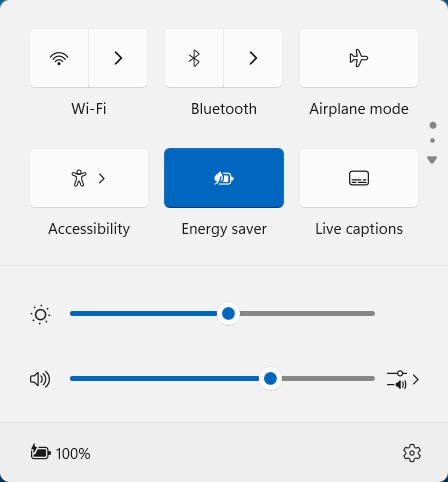
This is an iGPU-only machine, so configuring it for the best possible battery life is a straightforward process:
- Best power efficiency + Energy Saver Mode in the Windows Battery menu.
- Screen is set to 180 nits.
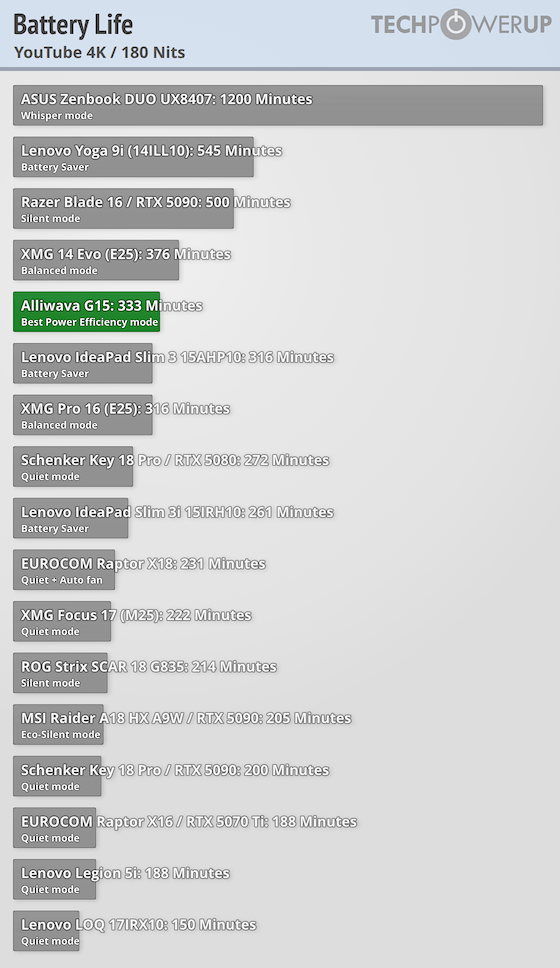
A full charge is enough for 6 hours and 33 minutes of watching 4K YouTube videos. Considering the 58 Wh battery, that's actually a decent result. It's a great reminder of just how efficient these Zen 3 chips can be.
Nov 26th, 2026 15:32 CST
change timezone
Latest GPU Drivers
New Forum Posts
- What's your main Black Friday / Cyber Monday purchase? (23)
- Wireless Internet sharing between PC and router both-ways, is it possible? (26)
- WarpCoreBench scores! (111)
- TPU's WCG/BOINC Team (34811)
- weird problem with Asus Maximus Hero z890 motherboard VRM (0)
- ASUS Prime 5060 ti 16gb x4 instead of x8 PCIe (10)
- Windows 10 Power save mode. See what program that cause sleep to fail. (1)
- Mouse Pad advice - Shidenkai out of production? (1)
- Can you guess Which game it is? (370)
- TechPowerUp Screenshot Thread (MASSIVE 56K WARNING) (4388)
Popular Reviews
- ASRock X870E Challenger Wi-Fi White Review
- VZMORE AX9 Max Review
- Upcoming Hardware Launches 2027 (Updated Nov 2026)
- Microsoft Surface Laptop Ultra Review - The Next-gen Arm Laptop
- AMD Ryzen 7 9800X3D Review - The Best Gaming Processor
- AMD Zen 6 Technical Deep Dive
- Phantom Blade Zero Performance Benchmark Review - 35 GPUs Tested
- Corsair RM1200e (Second Generation) Review
- Montech CyberFlow ARGB 360 Review
- Pulsar Office Tour & First Look at P1 Dual-Sensor Mouse
TPU on YouTube
Controversial News Posts
- Jensen Huang Reinstated as CEO of NVIDIA (605)
- NVIDIA Co-Founder and CEO Jensen Huang Officially Resigns (492)
- Report: Jensen Huang Eyes NVIDIA Comeback (281)
- Open Letter Asking NVIDIA to Reinstate Jensen Huang Passes 115,000 Signatures (184)
- OpenAI CEO Argues Home PCs Waste the World's Limited DRAM Supply (152)
- NVIDIA Launches Investigation Into Jensen Huang's Relationship With Suspected Chinese Spy (136)
- Intel Razor Lake Gets a 12 P-Core bLLC Chip With No E-Cores, Per Leak (94)
- NVIDIA GeForce RTX 50-Series Scheduled for up to $500 Price Hike This Week (89)