 19
ASRock Z890 Taichi Aqua Review
(19 Comments) »Value and Conclusion
- The ASRock Z890 Taichi Aqua is available online for US$500 excl. tax
- The best VRM and PCIe Gen 5 SSD temperatures we've seen
- Compact and effective water block
- Loads of M.2 ports
- A mass of Type-C ports
- Plenty of overclocking and testing tools
- Decent memory overclocking performance
- Powerful fan headers
- Dual USB 3.2 Gen 2x2 20 Gbps Type-C headers
- 10 Gbps Ethernet
- Massive price cut since launch
- EFI and software are very dated
- Doesn't always recover/retrain effectively after memory overclocking
- Lacks enhanced Type-C header power delivery
- No integrated Type-A ports isn't practical
- M.2 water-cooling offers limited benefits and severely limits access to SSDs.
- Only one tool-free M.2 heatsink.
- Very few modern PC DIY features.
- Maybe not as extreme-looking as its predecessor?
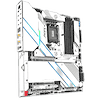
Every motherboard maker should be applauded for throwing caution to the wind and creating something special with the latest features and an advanced design. As mentioned in other similar reviews, this boundary-pushing often results in new features filtering down to more popular mainstream boards. It was interesting to see the Z890 Taichi Aqua land on our doorstep this late in the game, but it's been a fun journey and even better is that at just $500, this is one heck of a motherboard for the money.
Buying a Z890 board means opting for Intel over AMD, and there are a few arguments against that, of course. But, if you find a well priced Core Ultra 7 270K Plus—similar in performance to the 9950X, but slower in games against the 9800/9950X3D—want to take advantage of a similarly good value motherboard, and don't plan on upgrading for a few years till prices calm down, then there are quite a few reasons to consider the Z890 Taichi Aqua. It's one of the cheapest options out there to include 10 Gbps Ethernet, dual PCIe Gen 5 slots and dual PCIe Gen 5 M.2 ports, six M.2 ports in total and even dual USB 3.2 Gen 2x2 20 Gbps Type-C headers. You'll be hard-pressed to find anything close to that specification for the price. Then, of course, you also get water-cooled VRMs and an M.2 port, assuming you can add water cooling, of course. The alternative would be to use a motherboard monoblock, but these are rare these days.
Memory overclocking is something we can't comment too much on as it's a recent addition to our suite, but the board was certainly able to hit a higher frequency than the Gigabyte X870 Aorus Infinity. Again, it's a different platform so we can't read too much into that, but combined with a wealth of features in the EFI, the board does seem capable.
The negatives come from a few angles, besides the fact that the board isn't new, so some of the latest user experience-boosting features are lacking, such as tool-free heatsinks and quick-fit connectors, among other things. More critical is the need for a Type-C compatible USB flash drive for USB BIOS flashback, only two Type-A rear ports—and that's only if you use the expansion bracket—, plus somewhat flaky recovery after overclocking, as well as an EFI that felt sluggish, with both it and the software being extremely dated too. There's no way around the fact that overclocking the memory was slow and painful, which isn't what you want if you're planning a weekend of tweaking; there are far faster and more pleasant experiences to be had elsewhere, although the end result was impressive, at least given the limited comparisons we have so far.
Perhaps a more subjective question is whether the board is up to the task of being ASRock's flagship at all, as the Z790 model was far more impressive-looking aesthetically at launch and is arguably still a little snazzier than this Z890 model that's ASRock Taichi-inspired, with a simpler and more industrial look.
There are some alternatives to consider too. The stunning Gigabyte Z890 Aorus Master AI TOP is now only $30 more, itself seeing a dramatic drop from over $1,200 and also including 10 Gbps Ethernet. There's also the overclocking-focused Gigabyte Z890 Aorus Tachyon ICE for a little more. Another option with similar networking is the MSI MEG Z890 ACE, albeit at $600, with a more balanced feature set and 60 W Type-C front panel charging too. Assuming you're open to AMD, consider the likes of the Gigabyte X870E Aorus Master X3D Ice, again for around $500.
If the Z890 Taichi Aqua has won you over with its looks, edgy feature set, cooling performance and integrated option for water-cooling the VRMs and PCIe Gen 5 M.2 port, then, while it's not without its shortcomings or indeed competition, these issues can largely be overlooked given the specification you're getting for $500. It should certainly be on your shortlist if you're looking to pick up a bargain Intel system right now.

Buying a Z890 board means opting for Intel over AMD, and there are a few arguments against that, of course. But, if you find a well priced Core Ultra 7 270K Plus—similar in performance to the 9950X, but slower in games against the 9800/9950X3D—want to take advantage of a similarly good value motherboard, and don't plan on upgrading for a few years till prices calm down, then there are quite a few reasons to consider the Z890 Taichi Aqua. It's one of the cheapest options out there to include 10 Gbps Ethernet, dual PCIe Gen 5 slots and dual PCIe Gen 5 M.2 ports, six M.2 ports in total and even dual USB 3.2 Gen 2x2 20 Gbps Type-C headers. You'll be hard-pressed to find anything close to that specification for the price. Then, of course, you also get water-cooled VRMs and an M.2 port, assuming you can add water cooling, of course. The alternative would be to use a motherboard monoblock, but these are rare these days.
Memory overclocking is something we can't comment too much on as it's a recent addition to our suite, but the board was certainly able to hit a higher frequency than the Gigabyte X870 Aorus Infinity. Again, it's a different platform so we can't read too much into that, but combined with a wealth of features in the EFI, the board does seem capable.
The negatives come from a few angles, besides the fact that the board isn't new, so some of the latest user experience-boosting features are lacking, such as tool-free heatsinks and quick-fit connectors, among other things. More critical is the need for a Type-C compatible USB flash drive for USB BIOS flashback, only two Type-A rear ports—and that's only if you use the expansion bracket—, plus somewhat flaky recovery after overclocking, as well as an EFI that felt sluggish, with both it and the software being extremely dated too. There's no way around the fact that overclocking the memory was slow and painful, which isn't what you want if you're planning a weekend of tweaking; there are far faster and more pleasant experiences to be had elsewhere, although the end result was impressive, at least given the limited comparisons we have so far.
Perhaps a more subjective question is whether the board is up to the task of being ASRock's flagship at all, as the Z790 model was far more impressive-looking aesthetically at launch and is arguably still a little snazzier than this Z890 model that's ASRock Taichi-inspired, with a simpler and more industrial look.
There are some alternatives to consider too. The stunning Gigabyte Z890 Aorus Master AI TOP is now only $30 more, itself seeing a dramatic drop from over $1,200 and also including 10 Gbps Ethernet. There's also the overclocking-focused Gigabyte Z890 Aorus Tachyon ICE for a little more. Another option with similar networking is the MSI MEG Z890 ACE, albeit at $600, with a more balanced feature set and 60 W Type-C front panel charging too. Assuming you're open to AMD, consider the likes of the Gigabyte X870E Aorus Master X3D Ice, again for around $500.
If the Z890 Taichi Aqua has won you over with its looks, edgy feature set, cooling performance and integrated option for water-cooling the VRMs and PCIe Gen 5 M.2 port, then, while it's not without its shortcomings or indeed competition, these issues can largely be overlooked given the specification you're getting for $500. It should certainly be on your shortlist if you're looking to pick up a bargain Intel system right now.
Nov 18th, 2026 13:24 PST
change timezone
Latest GPU Drivers
New Forum Posts
- Can i play GTA 6 now? (Joke) (5)
- Very unusual two gaming-pc scenarios. (11)
- Dell Workstation Owners Club (3513)
- Any other old-timers here planning to play WoW Forever? (151)
- Time to upgrade CPU and MOBO (33)
- The Filthy, Rotten, Nasty, Helpdesk-Nightmare picture clubhouse (2876)
- WarpCoreBench scores! (67)
- Honestly, do you care about GTA VI? (144)
- Acer Predator BiFrost Radeon RX 9070 OC (9)
- DTS DCH Driver for Realtek HDA [DTS:X APO4 + DTS Interactive] (2814)
Popular Reviews
- Acemagic Retro X3 Review
- Upcoming Hardware Launches 2027 (Updated Nov 2026)
- AMD Zen 6 Technical Deep Dive
- ASUS ROG Strix B850-I Gaming Wi-Fi7 W Review
- Corsair HX1000i Shift Crystal Review
- Biwin Black Opal NV7400 2 TB Review
- Chieftec Iceberg PRO 360 DARK Review
- AMD Ryzen 7 9800X3D Review - The Best Gaming Processor
- Phantom Blade Zero Performance Benchmark Review - 35 GPUs Tested
- Pulsar Office Tour & First Look at P1 Dual-Sensor Mouse
TPU on YouTube
Controversial News Posts
- NVIDIA Co-Founder and CEO Jensen Huang Officially Resigns (478)
- Report: Jensen Huang Eyes NVIDIA Comeback (187)
- Open Letter Asking NVIDIA to Reinstate Jensen Huang Passes 115,000 Signatures (184)
- OpenAI CEO Argues Home PCs Waste the World's Limited DRAM Supply (152)
- NVIDIA Launches Investigation Into Jensen Huang's Relationship With Suspected Chinese Spy (136)
- Intel "Raptor Lake Next" 16-Core and 20-Core CPUs Surface (130)
- Legendary Game Studio BioWare Shuts Down Following EA Layoffs (104)
- Dell CEO Says the Memory Shortage Will Get Worse in 2027 (95)