 15
ASUS NUC 16 Pro Review
Web & Office Productivity »General Performance
AIDA64 Cache & Memory
The AIDA64 memory benchmark measures how quickly data moves between system memory and the CPU's cache hierarchy. It provides a closer look at memory bandwidth, latency, and cache behavior.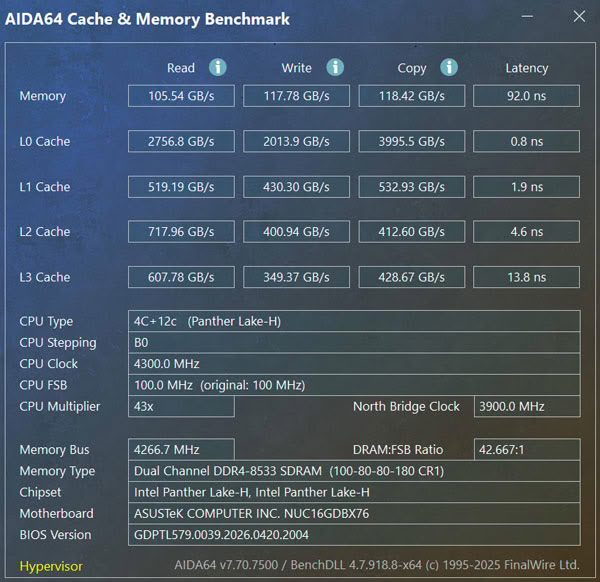
The 64 GB LPDDR5X-8533 memory reached 105.54 GB/s read, 117.78 GB/s write, and 118.42 GB/s copy bandwidth, with 92.0 ns latency. That bandwidth is useful for heavy multitasking and also benefits the Arc B390, which shares system memory with the processor.
Cinebench
Cinebench is a CPU rendering benchmark based on Maxon's Cinema 4D engine. It evaluates both single-threaded and multithreaded performance across lighter workloads and heavier rendering scenarios.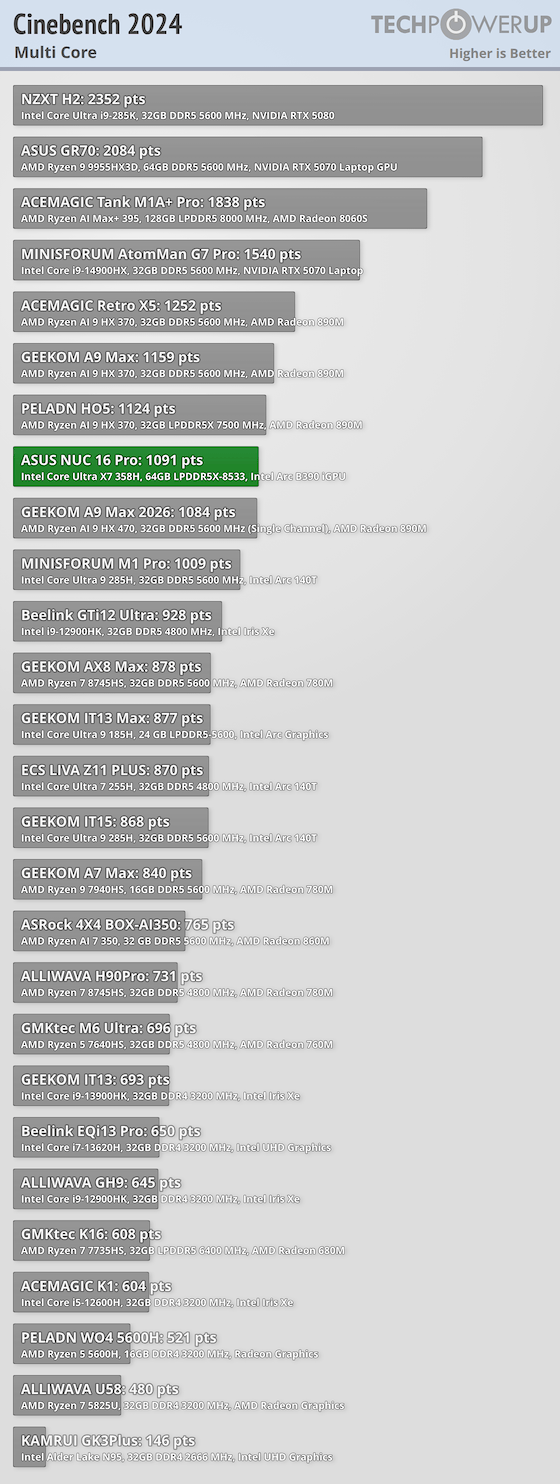
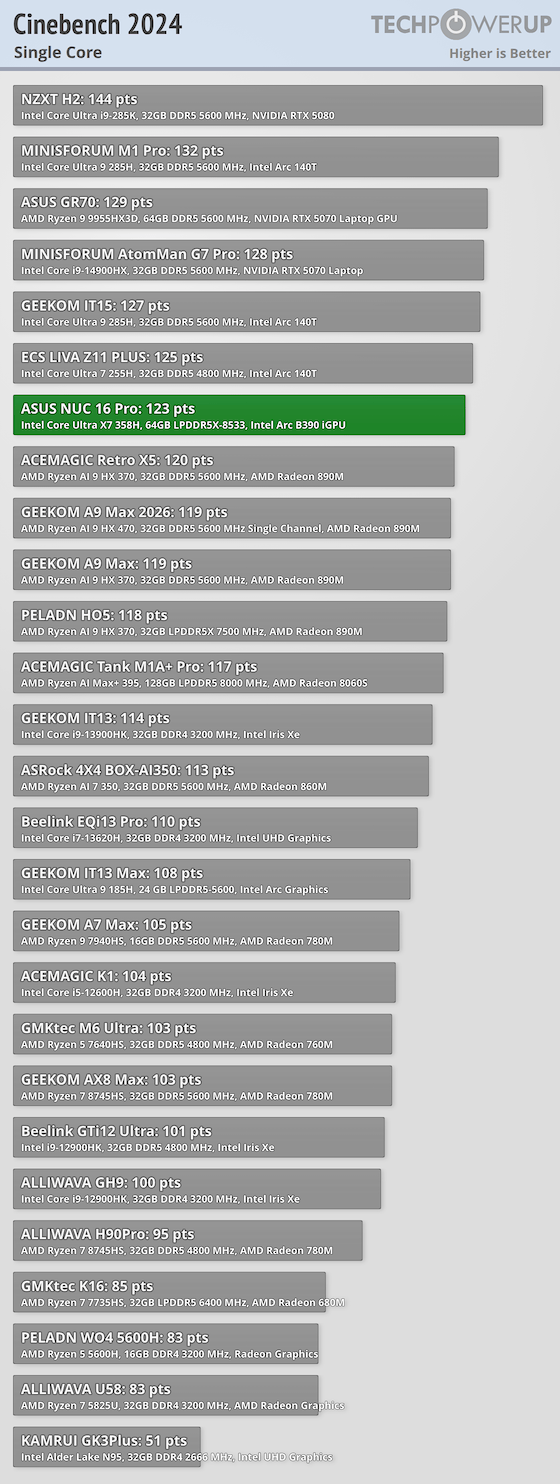
The Core Ultra X7 358H scored 1,091 points in the multicore test and 123 points in the single-core test, producing an 8.87x ratio. The multicore result is strong for a Mini-PC that drew about 97 W at the outlet during this workload, while the single-core score keeps lighter interactive tasks moving quickly.
7-Zip
7-Zip's built-in benchmark measures CPU performance when compressing and decompressing data. It's a useful indicator for file-heavy workloads such as packing archives, installing software, or building projects.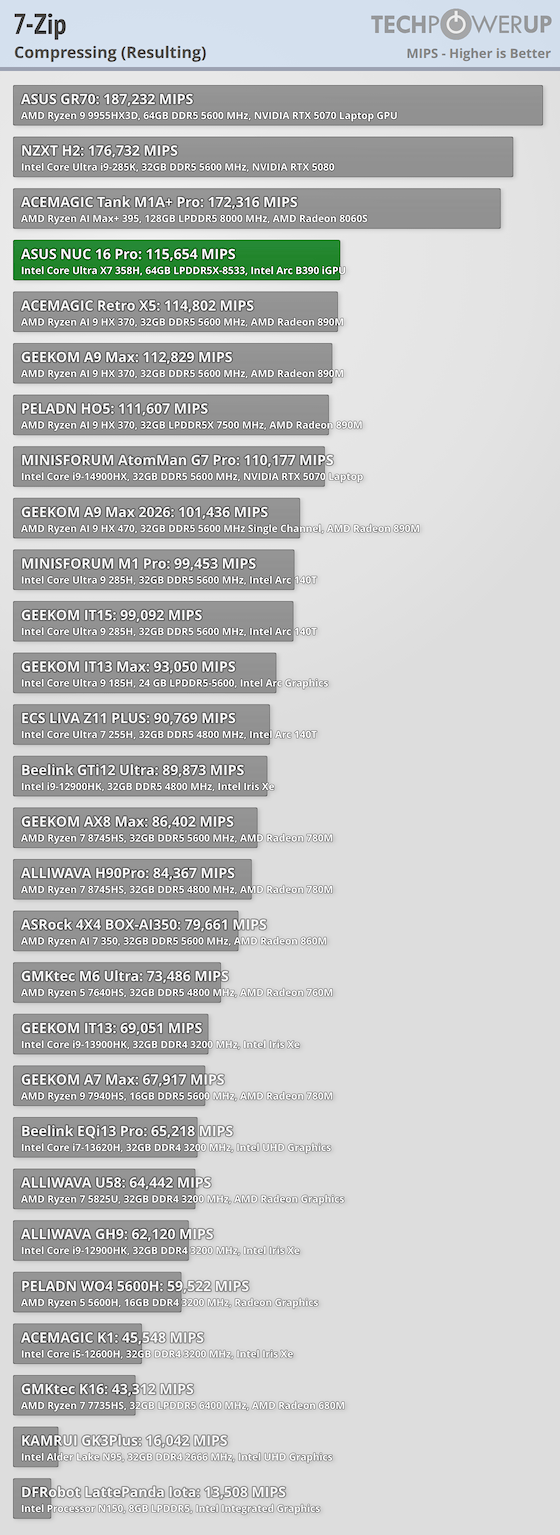
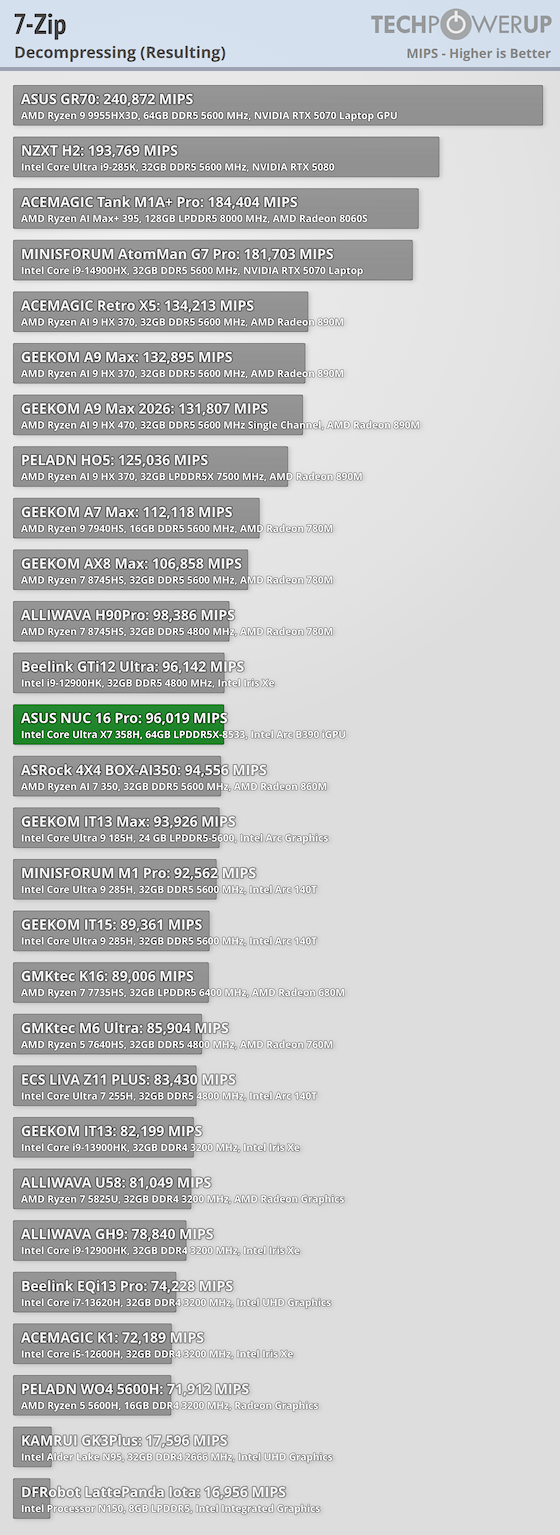
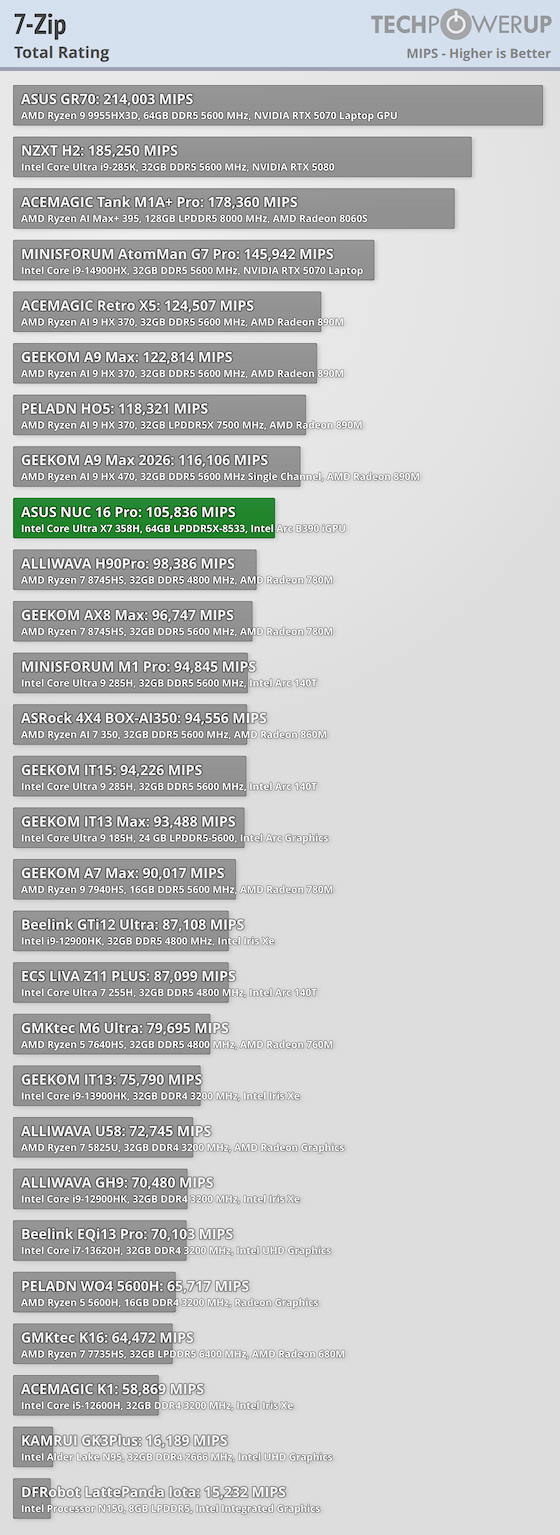
Compression reached 115,654 MIPS, decompression scored 96,019 MIPS, and the combined rating was 105,836 MIPS. These numbers fit the processor's 16-core layout and make the NUC 16 Pro well suited to large archives, software builds, and other file-heavy work that can use many threads.
PCMark
PCMark simulates common desktop activities across browsing, video conferencing, office apps, and media workflows. It gives a broad look at day-to-day desktop performance.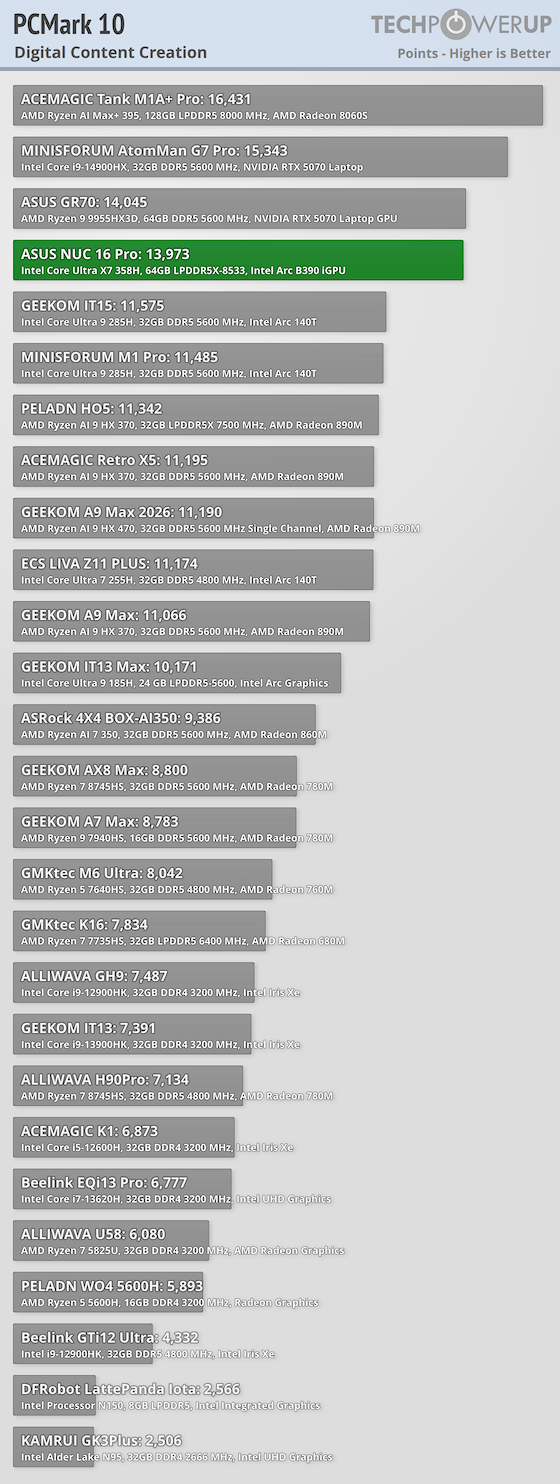
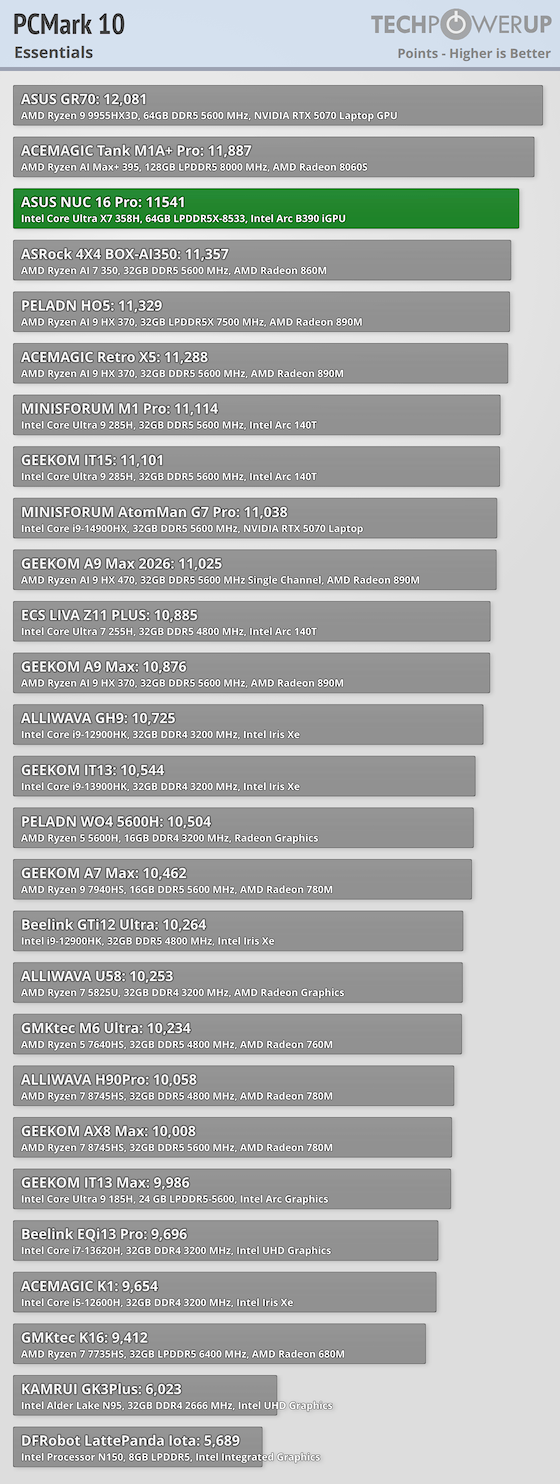
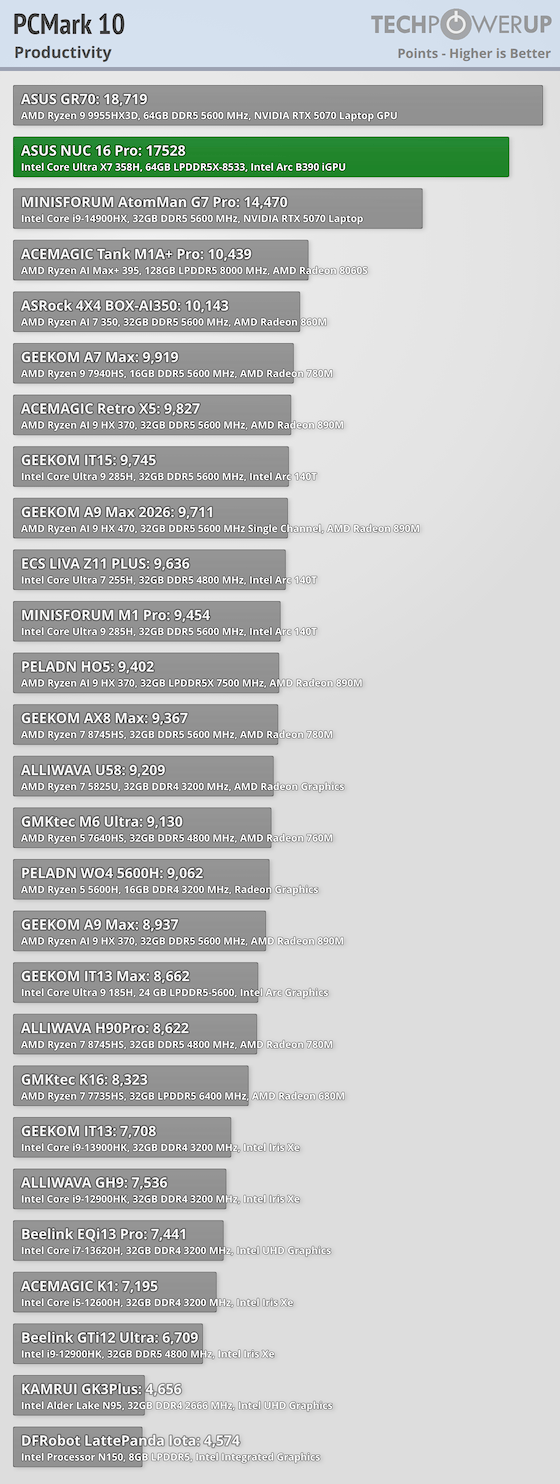
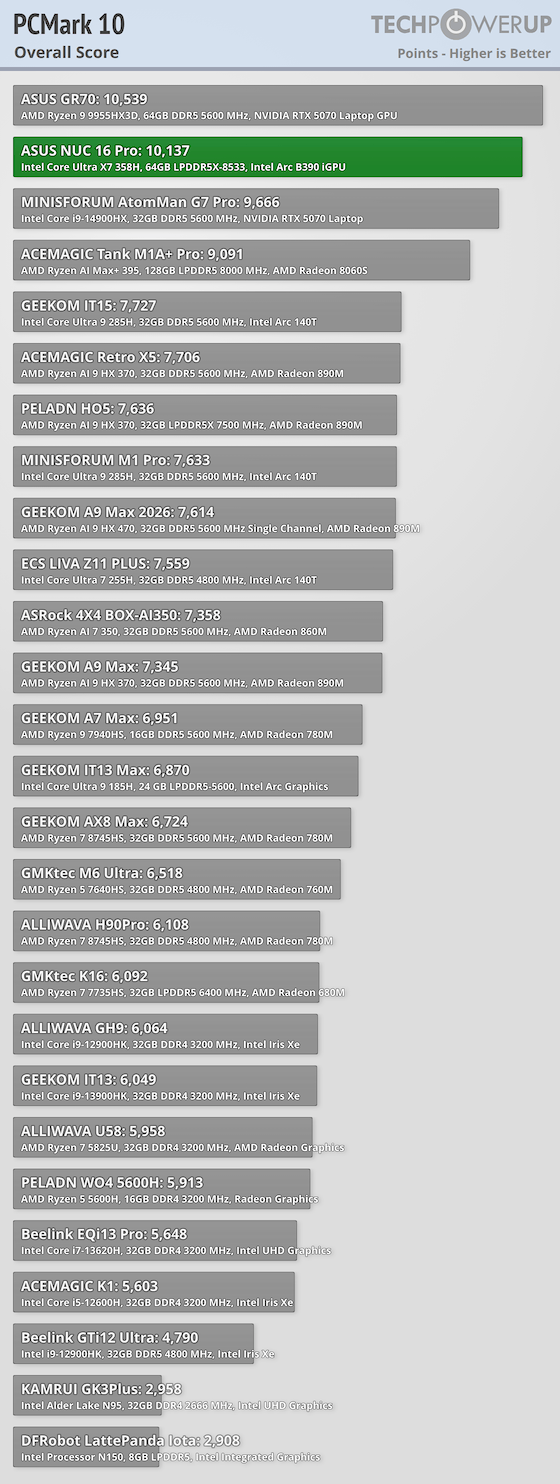
Spreadsheet work was especially quick at 19,644, and the overall result placed the NUC among the faster systems in my productivity comparison.
Y-Cruncher
Y-Cruncher calculates billions of digits of Pi while placing a sustained computational load on the processor and system memory. It measures computation time, total completion time, and processor utilization during a demanding mathematical workload.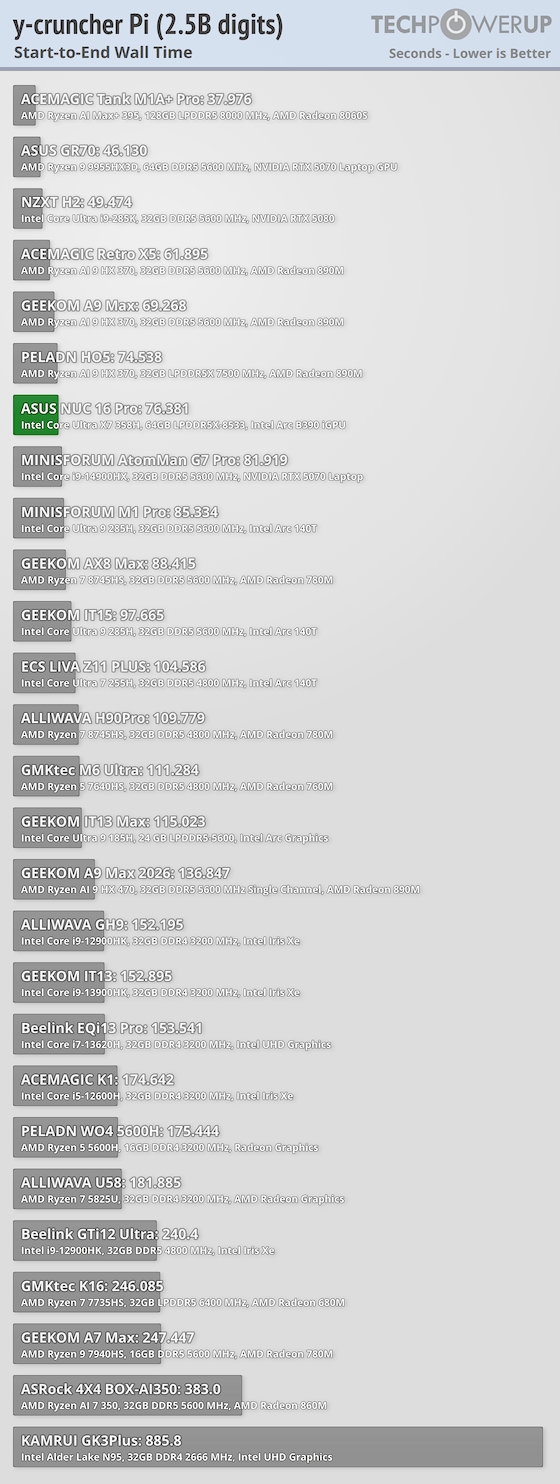
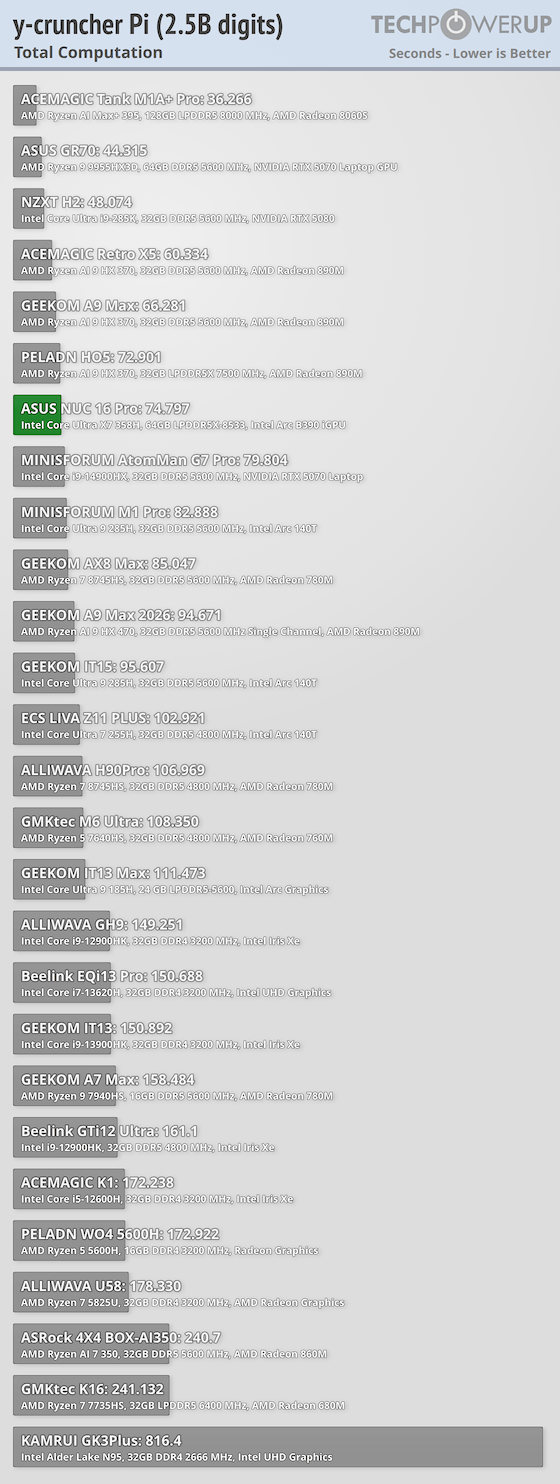
Calculating 2.5 billion digits of Pi required 74.797 seconds of computation and 76.381 seconds from start to finish.
Geekbench
Geekbench tests a wide variety of workloads, from encryption and machine learning to office productivity and photo editing. It also includes a GPU compute test, which provides a useful look at graphics performance outside of games.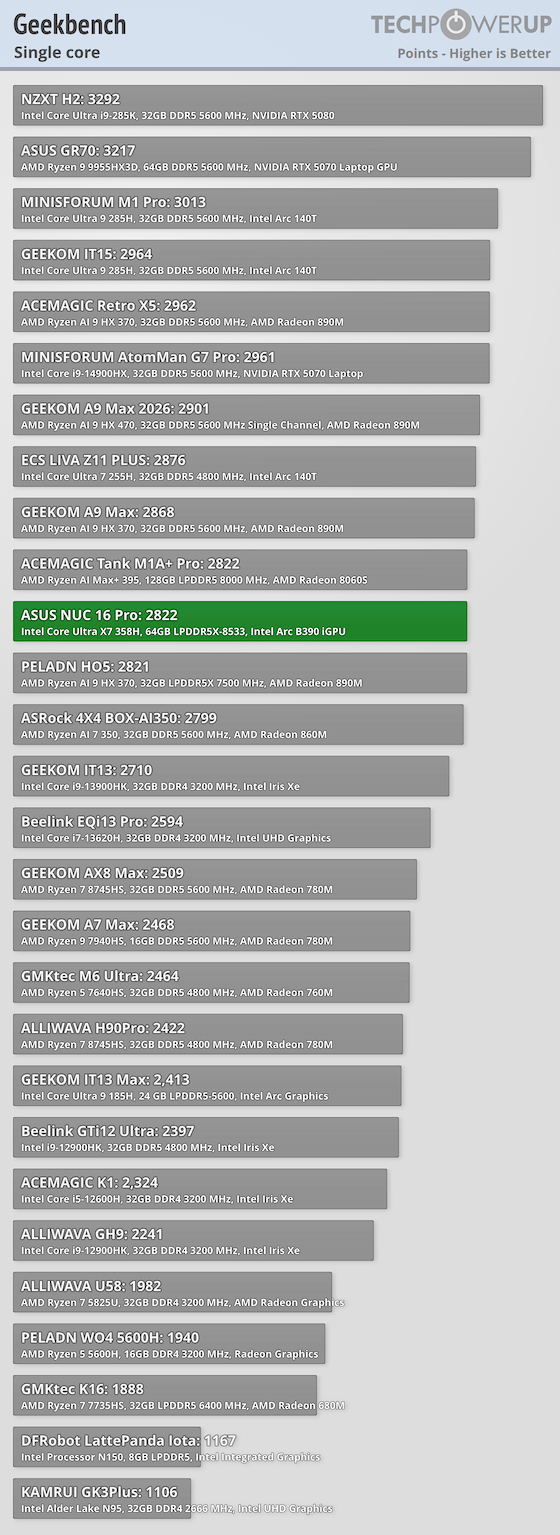
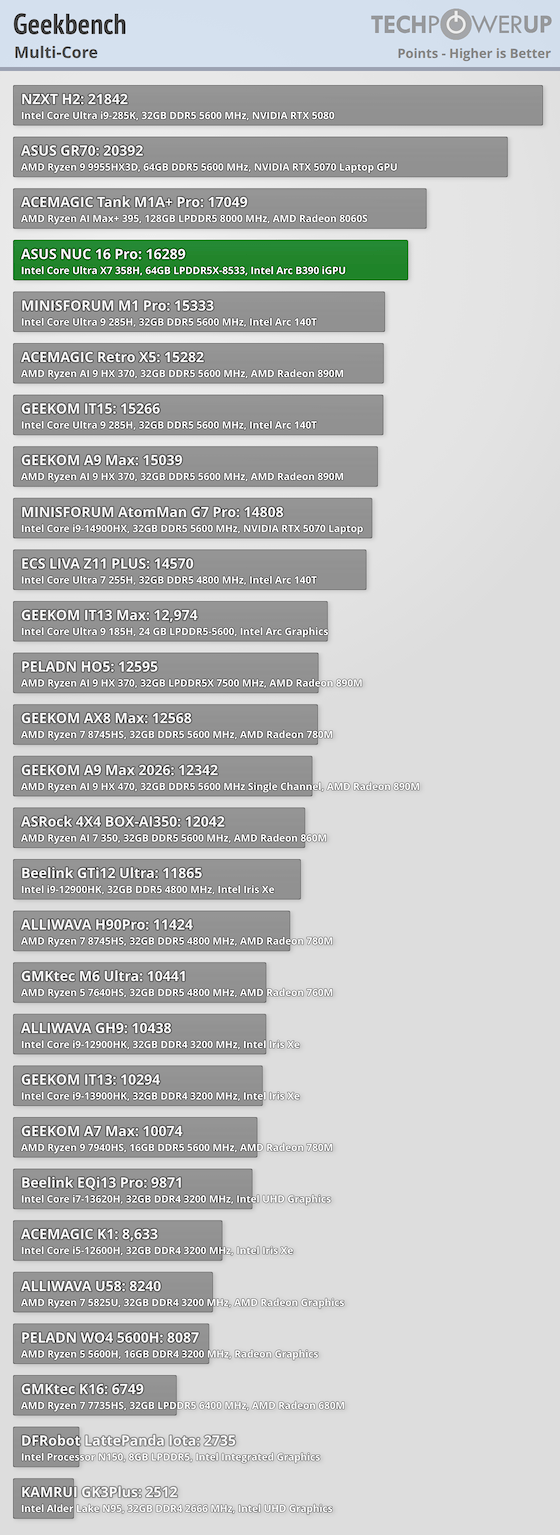
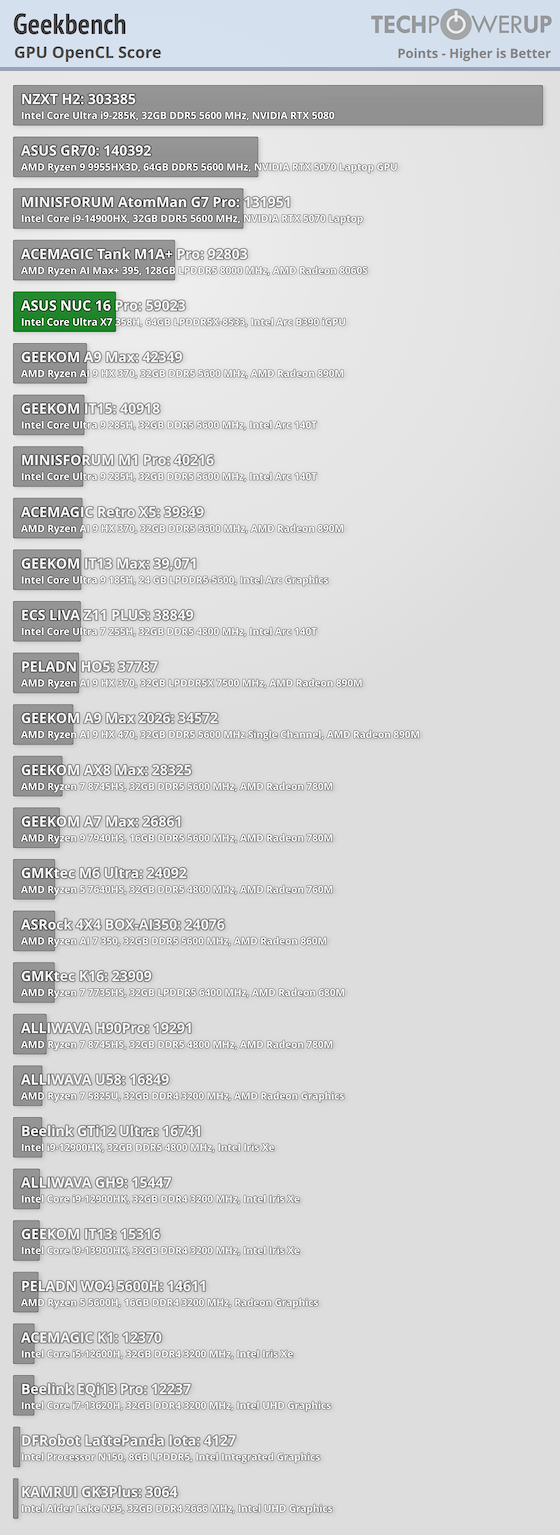
Geekbench produced 2,822 points in the single-core test and 16,289 points in the multicore test. The Arc B390 added an OpenCL score of 59,023, showing that the integrated GPU has useful compute throughput for supported filters and media tasks, although that result should not be treated as a substitute for discrete graphics testing.
Nov 14th, 2026 11:53 CST
change timezone
Latest GPU Drivers
New Forum Posts
- Slow SSD read speeds - help! (6)
- What can the FX 8320 do today? Here is the answer. (27)
- What card do I get for VR? (29)
- Tell me about your favourite graphics card (55)
- Ddr4 instead of ddr5 for 9060xt 8 gb over 5060 8 gb (7)
- Your PC ATM (36414)
- TPU's Nostalgic Hardware Club (22161)
- Microsoft Exchange/365 outages? (62)
- Opinion on Monitor Replacement (7)
- Show us your collections thread!! (366)
Popular Reviews
- AMD Zen 6 Technical Deep Dive
- Corsair HX1000i Shift Crystal Review
- ASUS ROG Strix B850-I Gaming Wi-Fi7 W Review
- NZXT C1200 Platinum Review
- Upcoming Hardware Launches 2027 (Updated Nov 2026)
- Montech King 95 3D PRO Review
- NZXT H7 RGB+ Review
- NZXT H5 Review
- Phantom Blade Zero Performance Benchmark Review - 35 GPUs Tested
- XPG NIMBUS PLUS Review - Mid-range Chair With Strong Competitors
TPU on YouTube
Controversial News Posts
- NVIDIA Co-Founder and CEO Jensen Huang Officially Resigns (399)
- OpenAI CEO Argues Home PCs Waste the World's Limited DRAM Supply (152)
- NVIDIA Launches Investigation Into Jensen Huang's Relationship With Suspected Chinese Spy (136)
- Intel "Raptor Lake Next" 16-Core and 20-Core CPUs Surface (130)
- Legendary Game Studio BioWare Shuts Down Following EA Layoffs (104)
- Dell CEO Says the Memory Shortage Will Get Worse in 2027 (95)
- NVIDIA GeForce RTX 50-Series Scheduled for up to $500 Price Hike This Week (89)
- Modder Fits RTX 5090 With Four 8-Pin Connectors, Halving Current per Wire (80)