 10
ASUS ProArt Z890-Creator Wi-Fi Review
(10 Comments) »Value and Conclusion
- The ASUS ProArt Z890-Creator Wi-Fi is available online for US$450
- Thunderbolt display support via DisplayPort input
- Dual Thunderbolt 5 Type-C ports
- 10 Gigabit Ethernet
- Decent SSD cooling
- Attractive design
- Front USB 3.2 Gen 2×2 20 Gbps Type-C header
- Overclockable
- Minimal bandwidth sharing
- Tool-free M.2 ports
- PCIe Gen 5 SSD and GPU support
- Thunderbolt 5 and 10 Gigabit Ethernet are only standout features
- Somewhat expensive
- Average VRM temperatures
- Only one PCIe Gen 5 M.2 port
- Only seven Type-A USB ports
- Only one dual-sided M.2 heatsink
- Limited fan header power
- No enhanced power delivery over Type-C front panel header
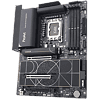
We do like what ASUS has done with the design of its ProArt motherboards and the ProArt Z890-Creator Wi-Fi definitely has a content creator-focussed edge, with specific features likely proving a hit with both casual and professional users. PC enthusiasts who want something that looks good and are just as happy customizing cooling, overclocking and handling high-end hardware as they are video editing, rendering, or connecting to Thunderbolt devices should be enthused about this board.
Those checking this board out for its looks, while having good taste, are sadly paying a lot more than they otherwise would be due to the inclusion of a Thunderbolt 5 controller and a pair of 80 Gbps Type-C ports, along with 10 Gbps Ethernet. You can get far better alternative feature sets for less cash, as we'll get to in a minute.
Let's start with the positives, though, and it's pretty clear that ASUS has created a successful new design in ProArt that's a refreshing change from the usual black or white gaming-focussed options, and it's good to see another board added to the ProArt range. There are no sticking points in terms of performance either. While the VRMs were middling in terms of temperatures, this was with a Core Ultra 285K under full load for half an hour and with minimal airflow over the heatsinks. The top heatsink proved capable in dealing with our toasty double-sided PCIe Gen 5 SSD while both upper and lower heatsinks were more than a match for our Samsung 990 Pro. Wherever you install your SSD you can rest assured that even under extreme conditions there won't be any throttling. ASUS also has an excellent EFI that's top of the class in many respects, although the competition does edge ahead in one or two specific areas. Its software is undeniably fiddly to install, but offers arguably the best fan and lighting control options.
While it's undoubtedly aimed at hardcore content creators, there's plenty to appeal to enthusiasts too. Cooling configuration is excellent in the EFI or software and while fan header power is down, there are eight headers and a thermistor probe header too, that can be used to control fan speed. Being a premium ASUS motherboard, the EFI is bulging with overclocking options too and there are virtually no bandwidth sharing restrictions. The huge lower tool-free heatsink is fabulous too, cooling up to four SSDs and installing in seconds, even if it didn't result in the best temperatures.
There are of course a few downsides too. The lone PCIe Gen 5 M.2 port means content creators looking for a hassle-free way of using two cutting-edge SSDs will need to buy additional hardware or simply opt for another motherboard, and this does seem a strange choice given the number of Z890 boards that have more options here. It would have been nice to see 60 W power delivery over its Type-C header too as well more power to its fan headers. It's clearly Thunderbolt-heavy, but the seven Type-A USB ports feels a little wanting on the rear I/O panel too.
Probably the biggest issue, though, is that while the 10 Gigabit Ethernet and Thunderbolt 5 are features unlikely to be offered by many other boards at this price, there are significantly better options out there in terms of better-rounded feature sets. The ASUS ROG Maximus Z890 Hero for example, can be had for less than $360 right now and can accommodate up to three PCIe Gen 5 M.2 SSDs, includes 60 W Type-C header power delivery, cooler VRMs and better SSD cooling, while still offering dual Thunderbolt 4 ports.
If it's mainly the design you're keen on, then ASUS has a new AMD B850 version that costs significantly less that we'll be taking a look at very soon. This offers those wanting to buy into the ProArt design a much more affordable option and one that's not forcing 10 Gigabit Ethernet and Thunderbolt 5 on you too. This is assuming switching to AMD is not a dealbreaker.
Ultimately, ASUS does have an attractive option here, even if the ProArt Z890-Creator Wi-Fi's appeal is niche and in value terms, definitely skewed towards those needing its unique Thunderbolt 5 and 10 Gigabit Ethernet combination. If you're planning on building a content creation system using a Core Ultra 9 285K or Core Ultra 7 270K Plus and plan on keeping it a while to get around LGA1851's non-existent upgrade path, then we can definitely see a place for it, and thankfully its performance and features are solid too, if a tiny bit uninspiring.

Those checking this board out for its looks, while having good taste, are sadly paying a lot more than they otherwise would be due to the inclusion of a Thunderbolt 5 controller and a pair of 80 Gbps Type-C ports, along with 10 Gbps Ethernet. You can get far better alternative feature sets for less cash, as we'll get to in a minute.
Let's start with the positives, though, and it's pretty clear that ASUS has created a successful new design in ProArt that's a refreshing change from the usual black or white gaming-focussed options, and it's good to see another board added to the ProArt range. There are no sticking points in terms of performance either. While the VRMs were middling in terms of temperatures, this was with a Core Ultra 285K under full load for half an hour and with minimal airflow over the heatsinks. The top heatsink proved capable in dealing with our toasty double-sided PCIe Gen 5 SSD while both upper and lower heatsinks were more than a match for our Samsung 990 Pro. Wherever you install your SSD you can rest assured that even under extreme conditions there won't be any throttling. ASUS also has an excellent EFI that's top of the class in many respects, although the competition does edge ahead in one or two specific areas. Its software is undeniably fiddly to install, but offers arguably the best fan and lighting control options.
While it's undoubtedly aimed at hardcore content creators, there's plenty to appeal to enthusiasts too. Cooling configuration is excellent in the EFI or software and while fan header power is down, there are eight headers and a thermistor probe header too, that can be used to control fan speed. Being a premium ASUS motherboard, the EFI is bulging with overclocking options too and there are virtually no bandwidth sharing restrictions. The huge lower tool-free heatsink is fabulous too, cooling up to four SSDs and installing in seconds, even if it didn't result in the best temperatures.
There are of course a few downsides too. The lone PCIe Gen 5 M.2 port means content creators looking for a hassle-free way of using two cutting-edge SSDs will need to buy additional hardware or simply opt for another motherboard, and this does seem a strange choice given the number of Z890 boards that have more options here. It would have been nice to see 60 W power delivery over its Type-C header too as well more power to its fan headers. It's clearly Thunderbolt-heavy, but the seven Type-A USB ports feels a little wanting on the rear I/O panel too.
Probably the biggest issue, though, is that while the 10 Gigabit Ethernet and Thunderbolt 5 are features unlikely to be offered by many other boards at this price, there are significantly better options out there in terms of better-rounded feature sets. The ASUS ROG Maximus Z890 Hero for example, can be had for less than $360 right now and can accommodate up to three PCIe Gen 5 M.2 SSDs, includes 60 W Type-C header power delivery, cooler VRMs and better SSD cooling, while still offering dual Thunderbolt 4 ports.
If it's mainly the design you're keen on, then ASUS has a new AMD B850 version that costs significantly less that we'll be taking a look at very soon. This offers those wanting to buy into the ProArt design a much more affordable option and one that's not forcing 10 Gigabit Ethernet and Thunderbolt 5 on you too. This is assuming switching to AMD is not a dealbreaker.
Ultimately, ASUS does have an attractive option here, even if the ProArt Z890-Creator Wi-Fi's appeal is niche and in value terms, definitely skewed towards those needing its unique Thunderbolt 5 and 10 Gigabit Ethernet combination. If you're planning on building a content creation system using a Core Ultra 9 285K or Core Ultra 7 270K Plus and plan on keeping it a while to get around LGA1851's non-existent upgrade path, then we can definitely see a place for it, and thankfully its performance and features are solid too, if a tiny bit uninspiring.
Nov 19th, 2026 17:18 CST
change timezone
Latest GPU Drivers
New Forum Posts
- TPU's Nostalgic Hardware Club (22170)
- How to prevent OLED burn damage due to PC freezes or power outtages? (29)
- Security Apps (3)
- Got the EOL 32GB TridentZ 6000 CL26 1.4V (13)
- Honestly, do you care about GTA VI? (167)
- Dell Workstation Owners Club (3517)
- Making a game in Godot engine (6)
- Introducing DST Bench : one of the most advanced disk benchmark and storage analyzer real-time software (6)
- Windows 11 General Discussion (7736)
- Current Sales, Bundles, Giveaways (10448)
Popular Reviews
- Acemagic Retro X3 Review
- Ugreen NASync DXP4800 GT Review
- Upcoming Hardware Launches 2027 (Updated Nov 2026)
- Pulsar Office Tour & First Look at P1 Dual-Sensor Mouse
- AMD Zen 6 Technical Deep Dive
- Biwin Black Opal NV7400 2 TB Review
- Sapphire Radeon RX 7700 XT Pure Review
- Sapphire Radeon RX 7700 XT Pulse Review
- Corsair RM1200e (Second Generation) Review
- AMD Ryzen 7 9800X3D Review - The Best Gaming Processor
TPU on YouTube
Controversial News Posts
- NVIDIA Co-Founder and CEO Jensen Huang Officially Resigns (489)
- Report: Jensen Huang Eyes NVIDIA Comeback (223)
- Open Letter Asking NVIDIA to Reinstate Jensen Huang Passes 115,000 Signatures (184)
- OpenAI CEO Argues Home PCs Waste the World's Limited DRAM Supply (152)
- NVIDIA Launches Investigation Into Jensen Huang's Relationship With Suspected Chinese Spy (136)
- Intel "Raptor Lake Next" 16-Core and 20-Core CPUs Surface (130)
- Legendary Game Studio BioWare Shuts Down Following EA Layoffs (104)
- Dell CEO Says the Memory Shortage Will Get Worse in 2027 (95)