 47
ASUS ROG Strix SCAR 18 G835 (2025) Review - Incredible Gaming Laptop
SSD Performance & Thermals »CPU Undervolting
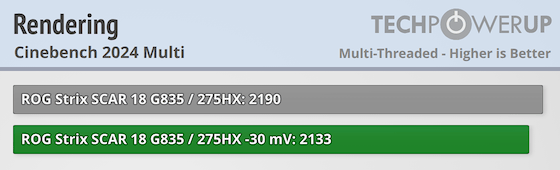
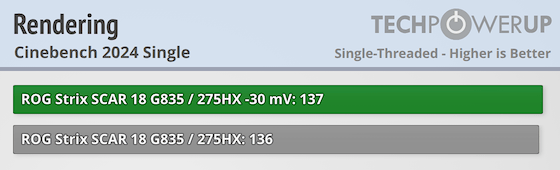
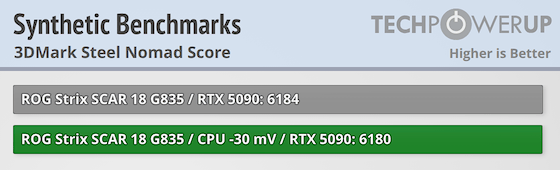
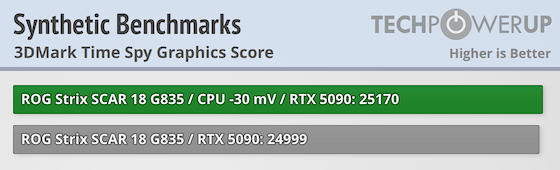
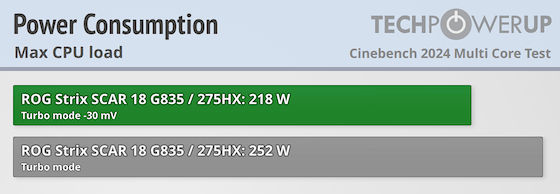
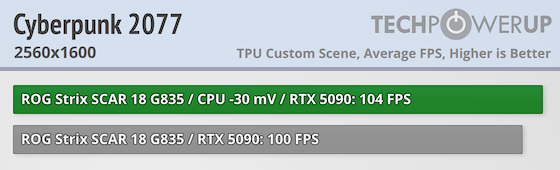
There is a CPU Undervolt option in the Advanced section of the BIOS. To use it, you have to disable Intel Trusted Execution Technology. You can set a core voltage offset up to -30 mV. Here's the fun part. When the CPU is undervolted, both P and E-core clocks are slightly lower than the default Turbo mode results. The clock differences between -5 mV and the maximum -30 mV offset are minimal, so -30 mV is the only setting that makes sense, as it significantly reduces power consumption. There is also a slight CPU performance hit, but I think it's worth it considering the reduced heat dissipation. The 4 FPS boost (I double-checked) in Cyberpunk 2077 at the native 1600p resolution is a welcome bonus.| Intel Core Ultra 9 275HX undervolt | ||||||
|---|---|---|---|---|---|---|
| Core Voltage Offset | P-Cores | E-Cores | CPU Power | CPU Temp. | Fan Speed | Noise |
| Stock Turbo mode | 3.80 GHz | 3.60 GHz | 133 W | 98°C | 5700/5700/6900 RPM | 50 dBA |
| -5 mV | 3.68 GHz | 3.54 GHz | 119 W | 98°C | 5600/5600/6700 RPM | 49 dBA |
| -15 mV | 3.67 GHz | 3.53 GHz | 116 W | 97°C | 5700/5700/6900 RPM | 49 dBA |
| -25 mV | 3.71 GHz | 3.54 GHz | 116 W | 98°C | 5700/5700/6900 RPM | 49 dBA |
| -30 mV | 3.71 GHz | 3.54 GHz | 115 W | 97°C | 5700/5700/6900 RPM | 49 dBA |
Nov 27th, 2026 12:09 CST
change timezone
Latest GPU Drivers
New Forum Posts
- The TPU UK Clubhouse (27298)
- What's your main Black Friday / Cyber Monday purchase? (34)
- Unigine Superposition on Linux (20)
- Making a game in Godot engine (23)
- TPU's WCG/BOINC Team (34814)
- Anthrophics IPO (41)
- Found Out Why My FygoOS Transfers Were Stuck at 11 MB/s (1)
- Dell Dimension E510 Retro Gaming PC Upgrade & Modification (4)
- WireView Pro II GPU Alignment: Wired | Variant: Black (11)
- Mouse Pad advice - Shidenkai out of production? (18)
Popular Reviews
- VZMORE AX9 Max Review
- Upcoming Hardware Launches 2027 (Updated Nov 2026)
- ASRock X870E Challenger Wi-Fi White Review
- AMD Ryzen 7 9800X3D Review - The Best Gaming Processor
- Microsoft Surface Laptop Ultra Review - The Next-gen Arm Laptop
- Montech CyberFlow ARGB 360 Review
- AMD Zen 6 Technical Deep Dive
- Phantom Blade Zero Performance Benchmark Review - 35 GPUs Tested
- Corsair RM1200e (Second Generation) Review
- ORICO Obook15 AI Review
TPU on YouTube
Controversial News Posts
- Jensen Huang Reinstated as CEO of NVIDIA (621)
- NVIDIA Co-Founder and CEO Jensen Huang Officially Resigns (492)
- Report: Jensen Huang Eyes NVIDIA Comeback (281)
- Open Letter Asking NVIDIA to Reinstate Jensen Huang Passes 115,000 Signatures (184)
- OpenAI CEO Argues Home PCs Waste the World's Limited DRAM Supply (152)
- NVIDIA Launches Investigation Into Jensen Huang's Relationship With Suspected Chinese Spy (136)
- Intel Razor Lake Gets a 12 P-Core bLLC Chip With No E-Cores, Per Leak (94)
- NVIDIA GeForce RTX 50-Series Scheduled for up to $500 Price Hike This Week (89)