 47
ASUS ROG Swift OLED PG27UCDM Review - 4K OLED Brilliance
Response Time, Input Lag & Motion Blur »Picture Quality
The ASUS ROG Swift OLED PG27UCDM is built around a 26.5-inch, 10-bit QD-OLED panel developed by Samsung Display. More specifically, it's based on the latest fourth generation of QD-OLED technology, which represents a significant refinement over earlier iterations. By adopting a more efficient blue emitter stack and a slimmer panel architecture, these panels achieve higher brightness levels while drawing less power, which in turn allows manufacturers to push them into demanding formats such as 4K at 240 Hz without thermal limitations. Peak luminance can now reach around 1,000 nits in small HDR highlights, with improved sustain across larger window sizes, and less aggressive ABL behavior, resulting in a more consistent HDR experience that better follows the PQ curve. Uniformity has also been improved, reducing the pink and green tinting sometimes seen on first-generation units, and refinements to the sub-pixel layout help minimize text fringing, making QD-OLEDs more suitable for desktop productivity. Color reproduction remains a strong point, with near-complete DCI-P3 coverage and expanded Rec.2020 volume, but the key advancement is in efficiency and longevity: the fourth-generation stack is designed to degrade more slowly, supported by enhanced compensation cycles and improved heat distribution to reduce the risk of burn-in over the long term.The panel runs at a native resolution of 3840 x 2160, which results in a pixel density of 166 PPI and a dot pitch of 0.1528 mm. Overall image sharpness is excellent. Even eagle-eyed users won't be able to spot any fringing while gaming, browsing, coding, working with text, or using their favorite editing software, such as Photoshop, Lightroom or Resolve. For best viewing experience, Windows recommends (and defaults to) using 150% display scaling, which effectively gives you the same amount of screen real estate you'd get from a 2560x1440 panel at 100% scaling. If your vision is fine, you can get away with 125% scaling for extra space. Using 100% scaling at 4K isn't a viable option, as UI elements become too tiny.
Like other OLED monitors, the ROG Swift OLED PG27UCDM doesn't rely on a traditional LED backlight. Instead, its self-emissive pixels offer all the expected benefits: infinite contrast, true blacks, zero haloing, and exceptional response times.
Like most other QD-OLED monitors, the ROG Swift OLED PG27UCDM is equipped with a glossy screen coating designed to boost contrast and perceived vibrancy, while also helping the panel appear brighter compared to matte alternatives. However, it's one of the least reflective such coatings that I ever had a chance of encountering, to a point where I don't see it as a potential issue even in environments where lighting conditions aren't fully controlled. The screen manages to absorb most of the light coming to it, and proves to be perfectly usable at 100% SDR brightness.
As for raised black levels in bright environments, which is a known limitation of QD-OLED technology, even the latest generation QD-OLED panels aren't immune to this phenomenon. Unlike LG Display's WOLED panels, Samsung's QD-OLED panels do not use a polarizer, a component that helps suppress reflections and preserve deep black levels under ambient lighting. Without it, reflected light can brighten black areas, making them appear gray instead of truly black. In other words, to get perfect blacks from the ROG Swift OLED PG27UCDM (or any other QD-OLED monitor for that matter), you must use it in a fairly dim environment. That said, it's not a dealbreaker. In most real-world use cases, you won't be comparing two OLED monitors side by side, nor will you be focused on subtle black-level differences across technologies. More importantly, if you're regularly working or gaming in bright rooms, an OLED monitor likely isn't the right tool in the first place. For such setups, an IPS panel with a Mini-LED backlight will serve you better—offering higher SDR brightness and better handling of ambient light. In short, QD-OLED's raised black levels can be an issue, but only in environments where OLED monitors are already a poor fit. A dim room is all you need to enjoy perfect blacks from this panel, a pitch-black one isn't necessary.
To test picture quality, I used an X-Rite i1Display Pro colorimeter with both DisplayCAL—a free, powerful display calibration and profiling tool—and Calman Ultimate, the industry-standard suite for display testing and calibration.
All measurements shown below were taken with "Uniform Brightness" (found in the Image menu) enabled. This disables the Automatic Brightness Limiter (ABL) and ensures stable brightness output regardless of on-screen content. For consistency, I also disabled all features in the OLED Care > Auto Logo Brightness submenu. Testing was done on firmware version MCM105, the latest available at the time of review.
Picture Quality at Factory Settings
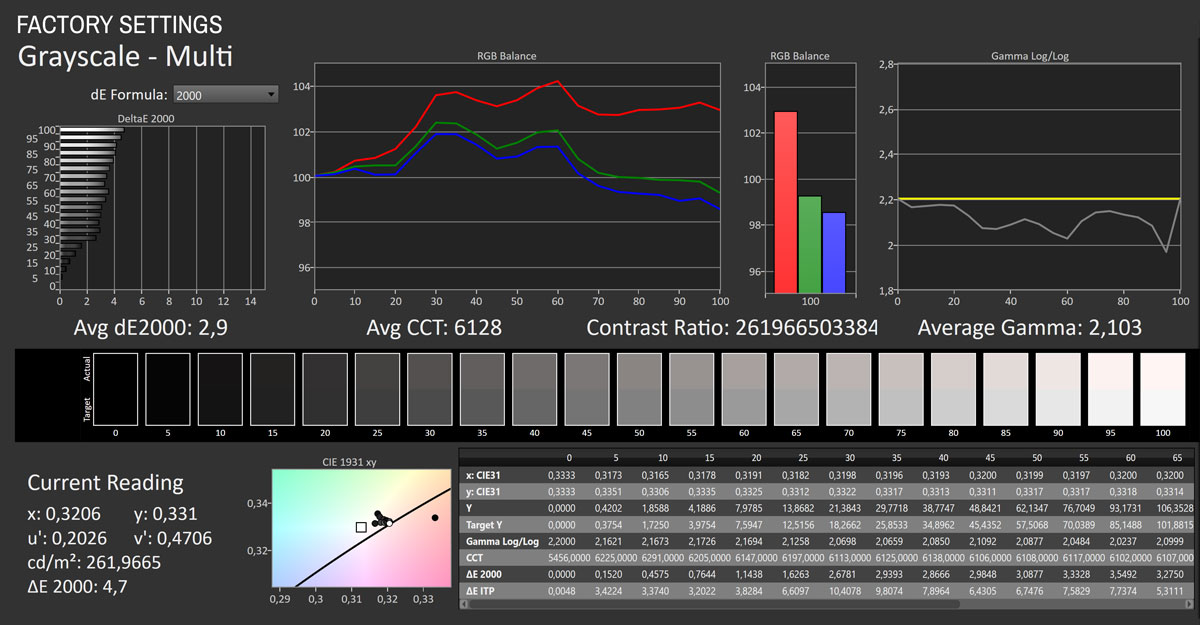

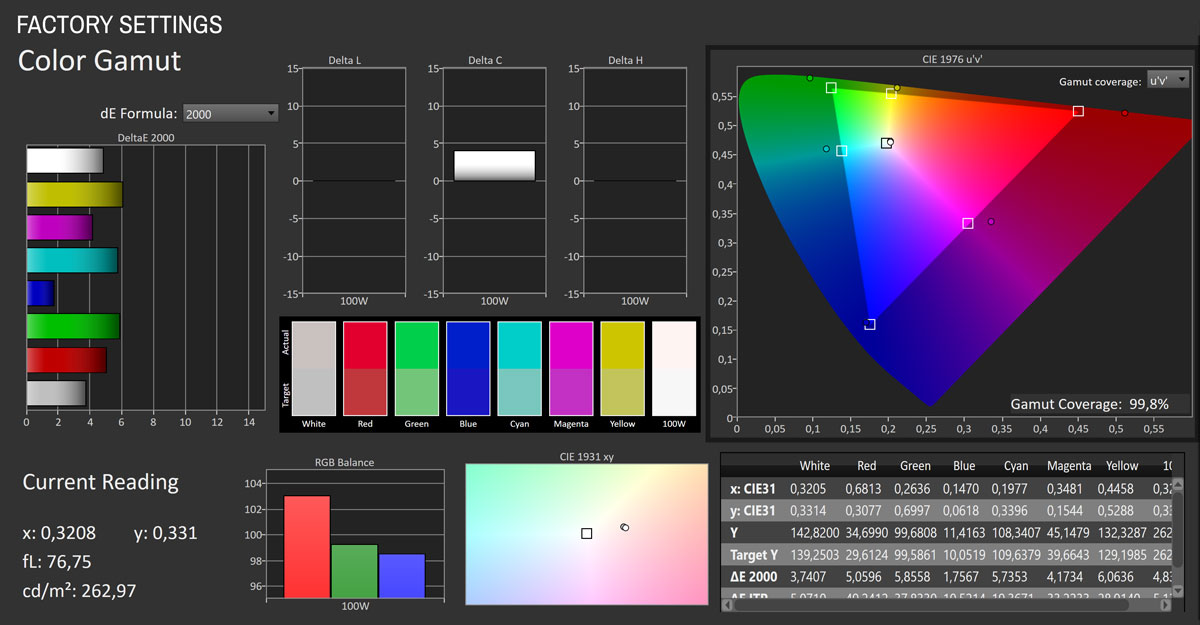
At its factory defaults, with Uniform Brightness enabled, the ASUS ROG Swift OLED PG27UCDM shows performance that is strong in some areas and compromised in others, largely depending on the reference space. The panel achieves an excellent 99.8% coverage of sRGB, which ensures a wide color palette, but because all measurements here are taken against the sRGB color space, the overly wide native gamut inevitably leads to mediocre color accuracy. This is reflected in the color accuracy measurements, which produced an average ΔE of 4.49 and a maximum error of 6.42, with certain hues—particularly saturated tones—pushed beyond their intended targets. Grayscale tracking is more convincing, with an average ΔE of 2.9, gamma following the 2.2 target closely at an average of 2.10, and a slightly warm white point of 6,128 K. The factory grayscale tracking shows a consistent red bias, with the red channel elevated across most of the brightness range, which gives whites and midtones a slightly warmer appearance than reference. Peak SDR luminance measured 263 cd/m², which is sufficient for typical indoor environments, while OLED's inherently perfect black levels yield effectively infinite contrast. In short, the PG27UCDM looks vibrant and punchy out of the box, which gamers will appreciate, but it's not tuned for strict sRGB accuracy.


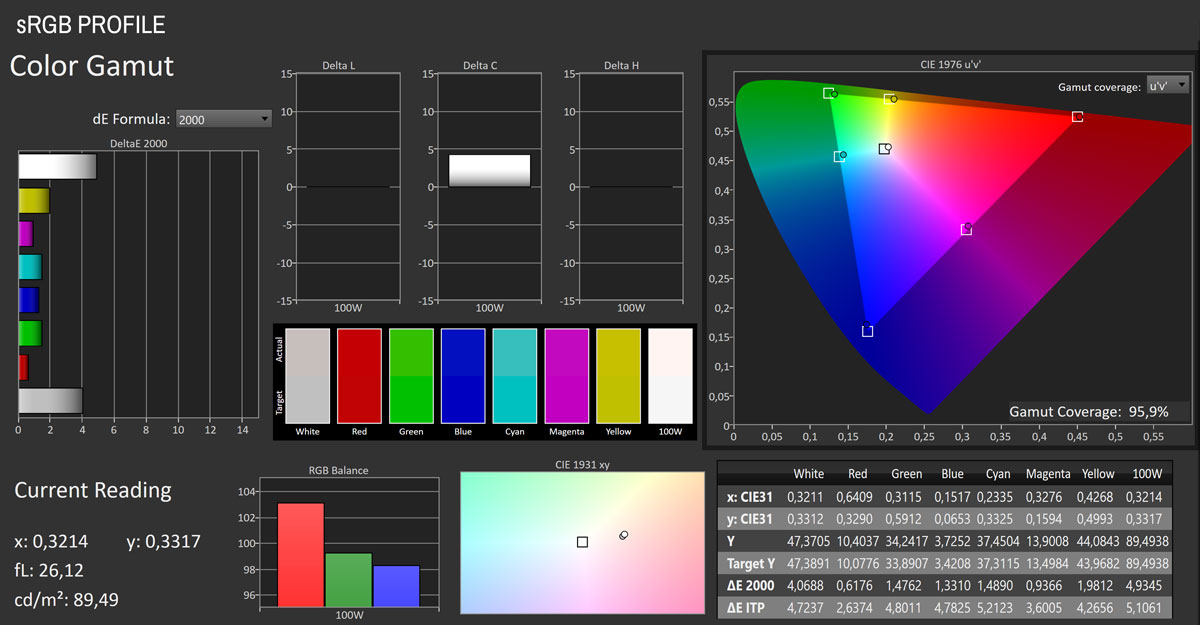
Switching the ASUS ROG Swift OLED PG27UCDM to its sRGB mode (Gaming > GameVisual > sRGB Cal Mode) results in a significant improvement in overall color accuracy compared to the default wide-gamut behavior. With the panel's gamut effectively clamped, coverage measures 95.9% of sRGB, and the color accuracy tests show a much better average ΔE of 1.71 with a maximum error of 4.96—well within the range where deviations are barely perceptible in practical use. Grayscale tracking remains solid but not spectacular, with an average ΔE of 3.1 and a correlated color temperature of 6,114 K, which still leans slightly warm due to a mild red dominance across the brightness range. Gamma sits very close to the 2.2 reference with an average of 2.12, ensuring that tonal transitions appear natural. Brightness output is set to 89 cd / m² in this mode by default, but you're free to increase it to your liking. Taken as a whole, this mode is a good option for anyone who requires faithful sRGB reproduction for content creation or browsing.
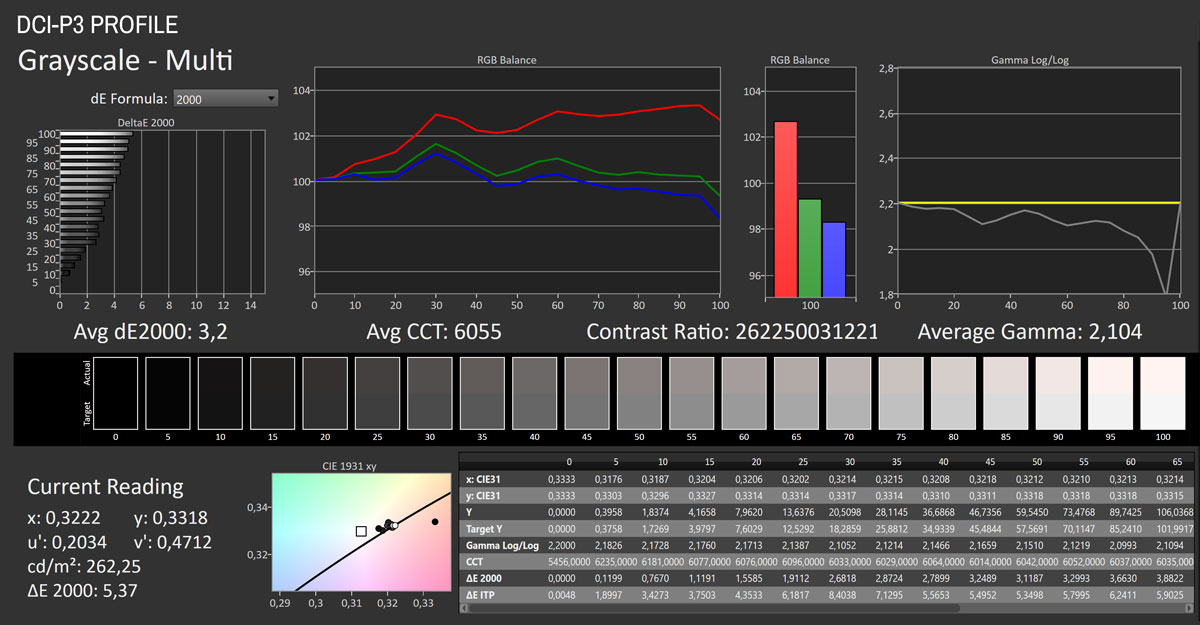
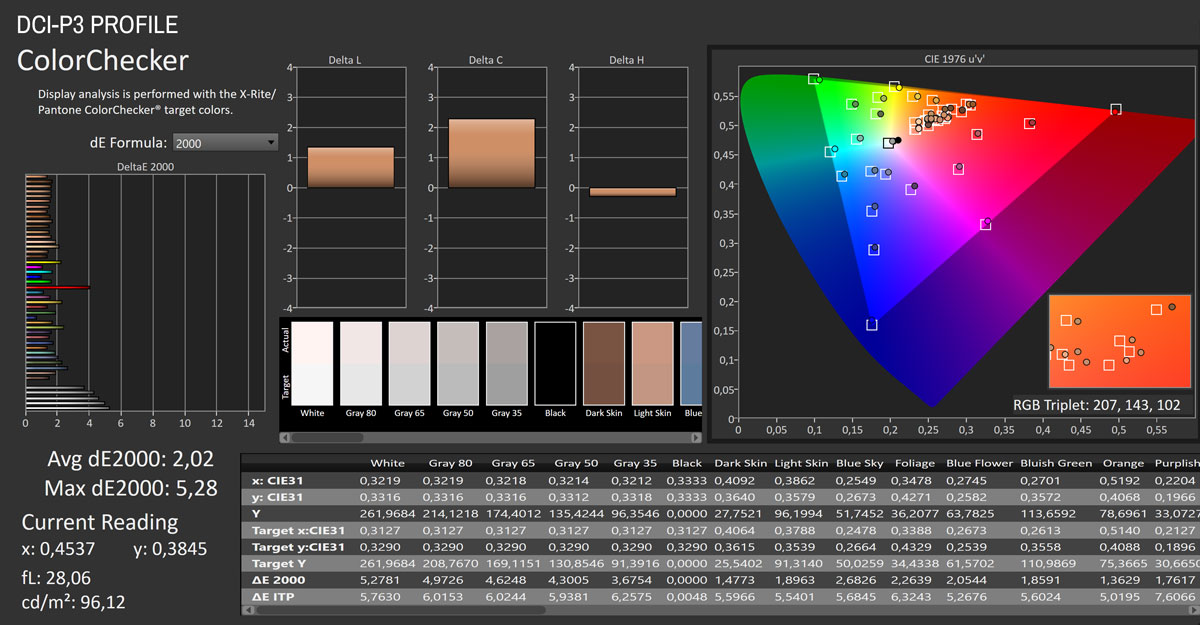
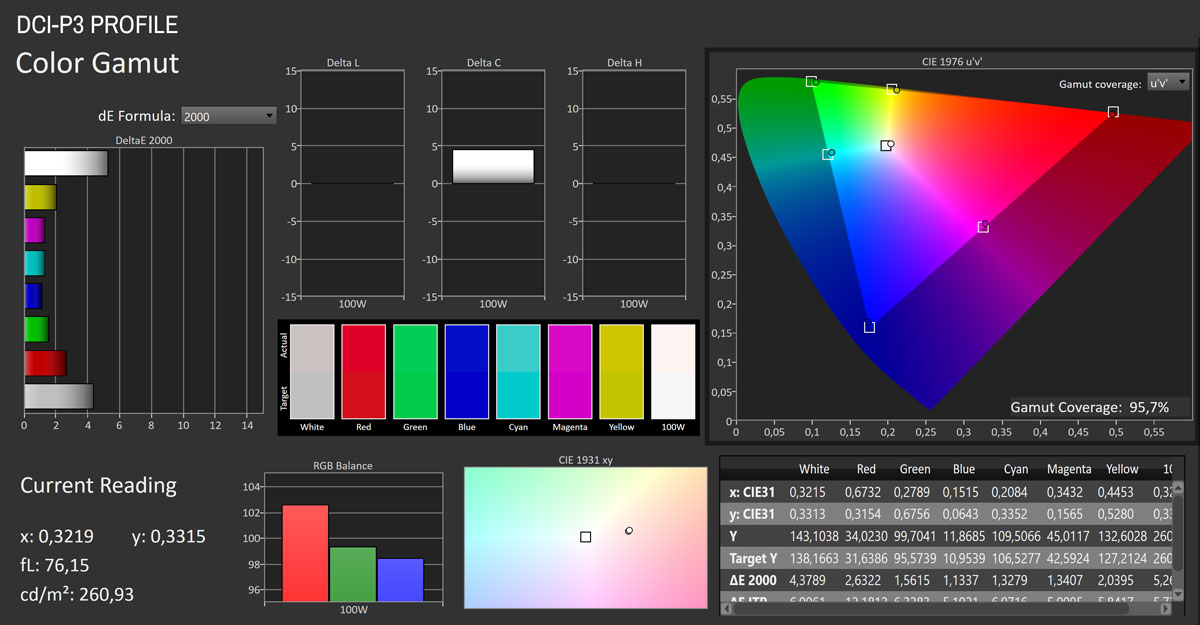
When switched into its DCI-P3 clamp mode (Color > Display Color Space > DCI-P3) and measured against the DCI-P3 color space, the ASUS ROG Swift OLED PG27UCDM shows a well-balanced performance profile. Gamut coverage reaches 95.7% of DCI-P3, which is very solid and ensures wide and vibrant color reproduction suited to HDR gaming and cinematic content. The color accuracy test yields an average ΔE of 2.02 with a maximum of 5.28, which is comfortably accurate for non-critical work and visually convincing across a wide variety of tones. Grayscale tracking lands at an average ΔE of 3.2 with a correlated color temperature of 6,055 K, once again showing a mild red dominance that makes the image appear slightly warm compared to reference, though gamma tracking is steady with an average of 2.10. The DCI-P3 clamp is a viable option for users who want a wide gamut experience that still keeps color reproduction fairly accurate.
Picture Quality with Modified Settings
After going over these test results, I obviously wanted to see what can be achieved in terms of manually reducing the aforementioned red bias. These are the changes I made within the OSD while cross-referencing them with the numbers shown by the calibrator in real time:Gaming > GameVisual > Racing Mode
Image > Brightness > 100
Image > Uniform Brightness > On
Color > Color Temp. > User > R 94 / G 98 / B 100
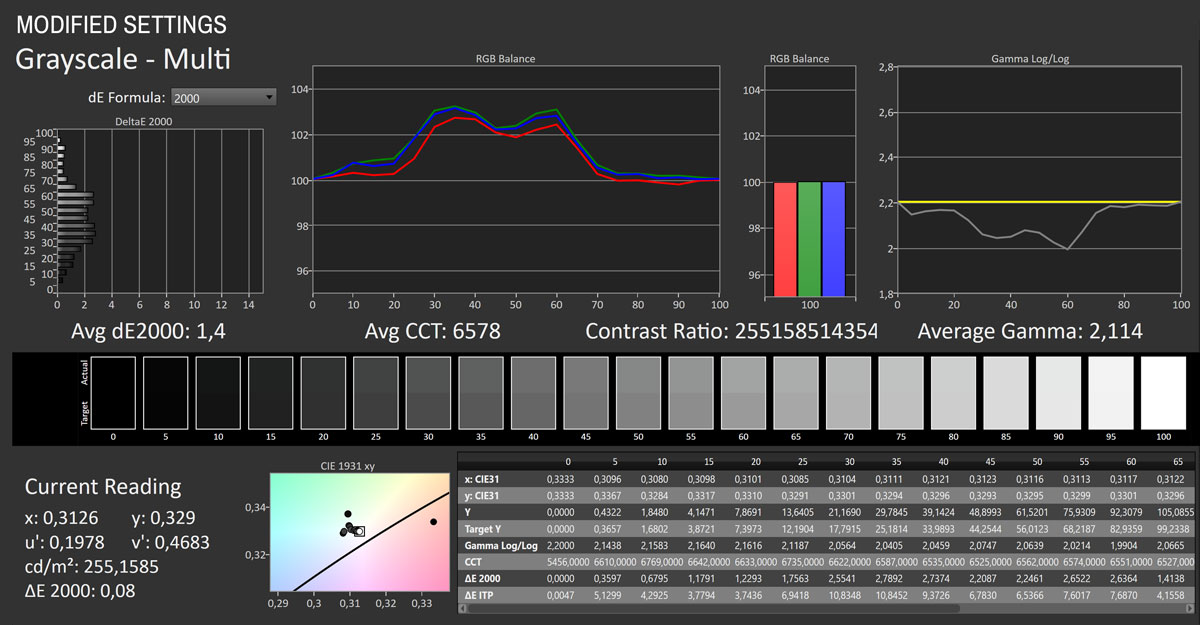
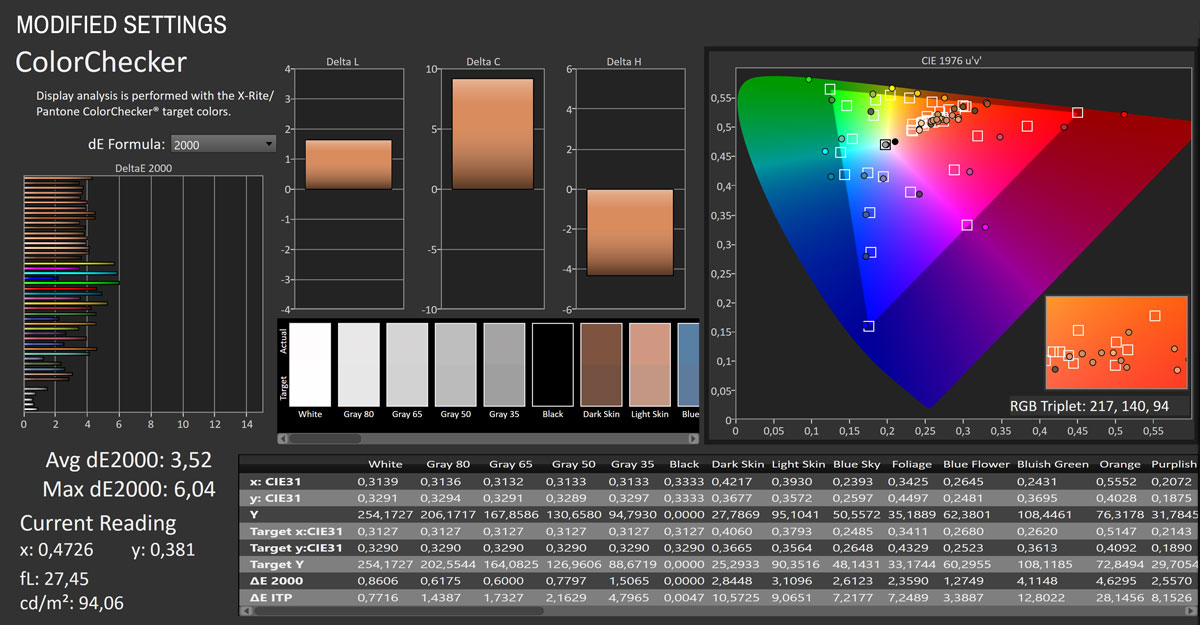
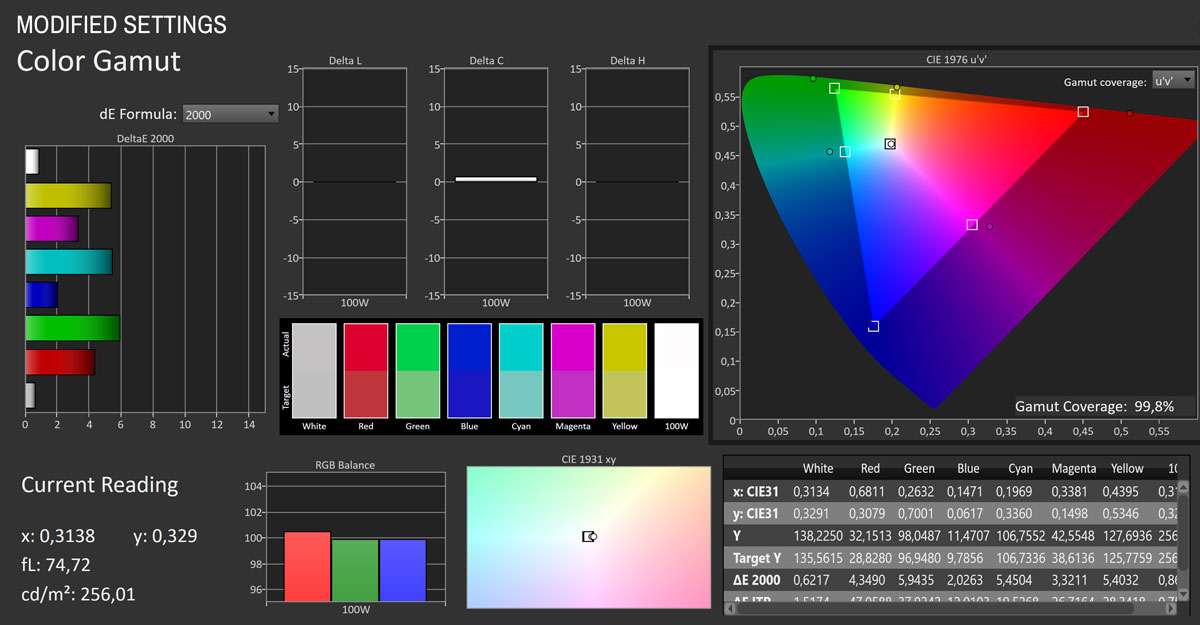
With the ROG Swift OLED PG27UCDM set to Racing Mode, Uniform Brightness enabled, brightness maxed out, and a manual RGB adjustment of Red 94 / Green 98 / Blue 100, the panel's accuracy improves substantially compared to factory defaults. Gamut coverage remains expansive at 138.3% of sRGB (sitting well beyond the sRGB target, as expected from a native wide-gamut OLED), but the grayscale now measures superbly, with an average ΔE of just 1.1, a near-perfect gamma tracking average of 2.21, and a corrected white point at 6,590 K, much closer to the 6500 K reference than before. Color accuracy also benefits, showing an average ΔE of 4.11 and a maximum of 6.76, which is an improvement over default but still reflects the challenges of mapping an unclamped wide-gamut panel against sRGB reference colors. In practice, these settings strike an excellent balance between brightness, grayscale neutrality, and gamma accuracy, making the ROG Swift OLED PG27UCDM much more versatile for mixed usage, though true color-critical work still benefits from enabling the dedicated sRGB or DCI-P3 clamp modes.
Picture Quality After Calibration
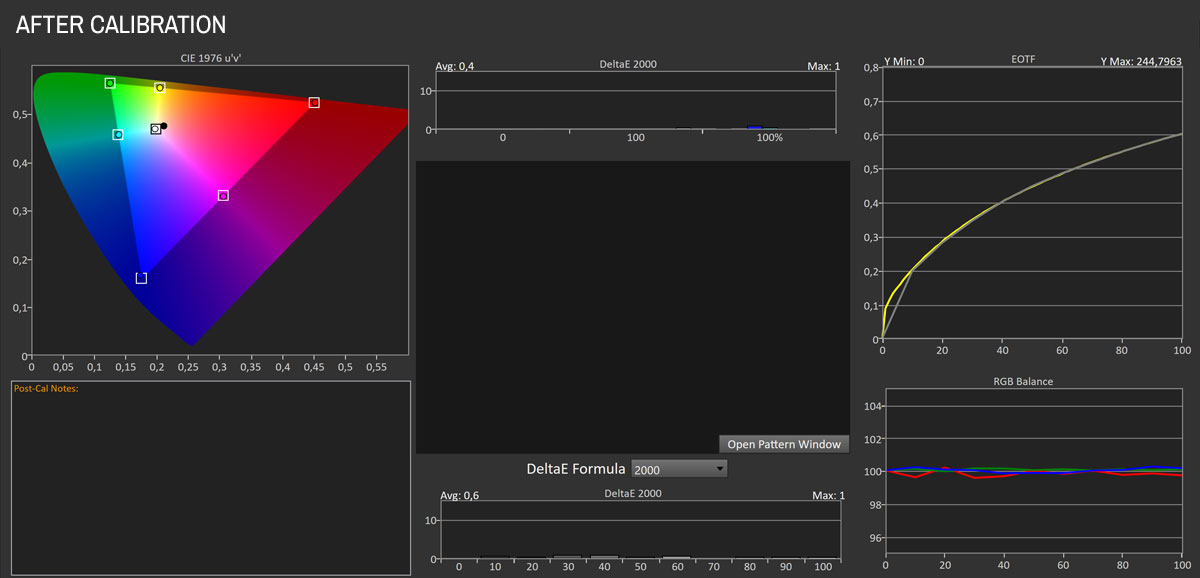
The post-calibration capture shows that the ASUS ROG Swift OLED PG27UCDM responds exceptionally well to tuning, with accuracy numbers firmly in professional-grade territory. The average ΔE drops to just 0.6, with a maximum of 1.0—well below the perceptibility threshold—ensuring that colors are effectively indistinguishable from reference. The EOTF tracking is smooth and follows the PQ curve almost perfectly, while the RGB balance is impressively tight across the entire luminance range, eliminating the slight red bias seen at factory defaults. Combined with stable peak brightness of around 245 nits in SDR, these results confirm that after calibration the PG27UCDM delivers excellent color reproduction and tonal accuracy, making it suitable for both demanding gaming and color-critical workflows.
Luminance, Contrast and Color Uniformity
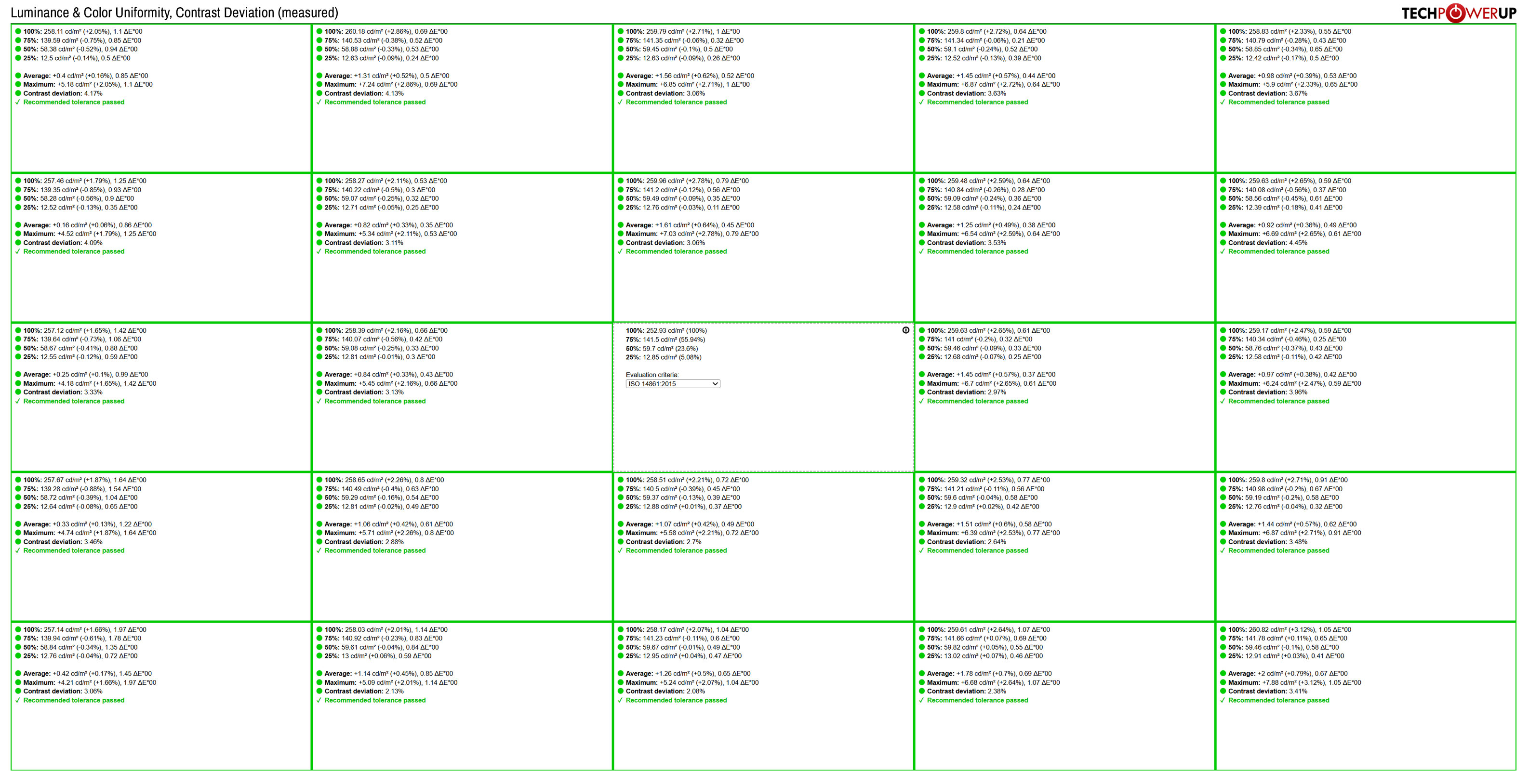
Uniformity performance of the ASUS ROG Swift OLED PG27UCDM is excellent, with both color and brightness staying comfortably within the recommended tolerance across the entire panel. Brightness uniformity shows only minor deviations, with the largest measured difference being around ±5% from the center, which is imperceptible in real-world use. Color uniformity is equally impressive: average ΔE values remain well below 2 across all measured zones, with no outliers exceeding the threshold of visual significance. Contrast deviation also stays tight, never straying far enough from the center measurement to create visible inconsistencies. In practice, this means there are no distracting hot spots, color shifts, or edge dimming, and the ROG Swift OLED PG27UCDM maintains a consistently accurate and even image across its 27-inch panel—an especially strong result considering OLED's inherent advantages in per-pixel light control.
HDR Performance
The ASUS ROG Swift OLED PG27UCDM supports HDR10 and Dolby Vision HDR formats. Depending on the content you're viewing, you have to manually switch it between the two via the Image > HDR Format menu.HDR is otherwise implemented flawlessly. As soon as you enable HDR in Windows, the monitor automatically switches to one of its HDR profiles (Gaming HDR, Cinema HDR, Console HDR, or DisplayHDR 400 True Black for HDR10, and DolbyVision Bright, DolbyVision Dark and DolbyVision Gaming for Dolby Vision), disables the Uniform Brightness setting, and adjusts everything else accordingly to optimize the HDR experience. Once HDR is turned off, the monitor seamlessly reverts to your previous SDR settings, eliminating the need to manually reconfigure anything.
Of the four available HDR10 profiles, I recommend trying Console HDR, as it's generally the most punchy and accurate of the group. For Dolby Vision, the DolbyVision Bright struck me as the best one.
Here's what the peak luminance measurements look like across various window sizes.
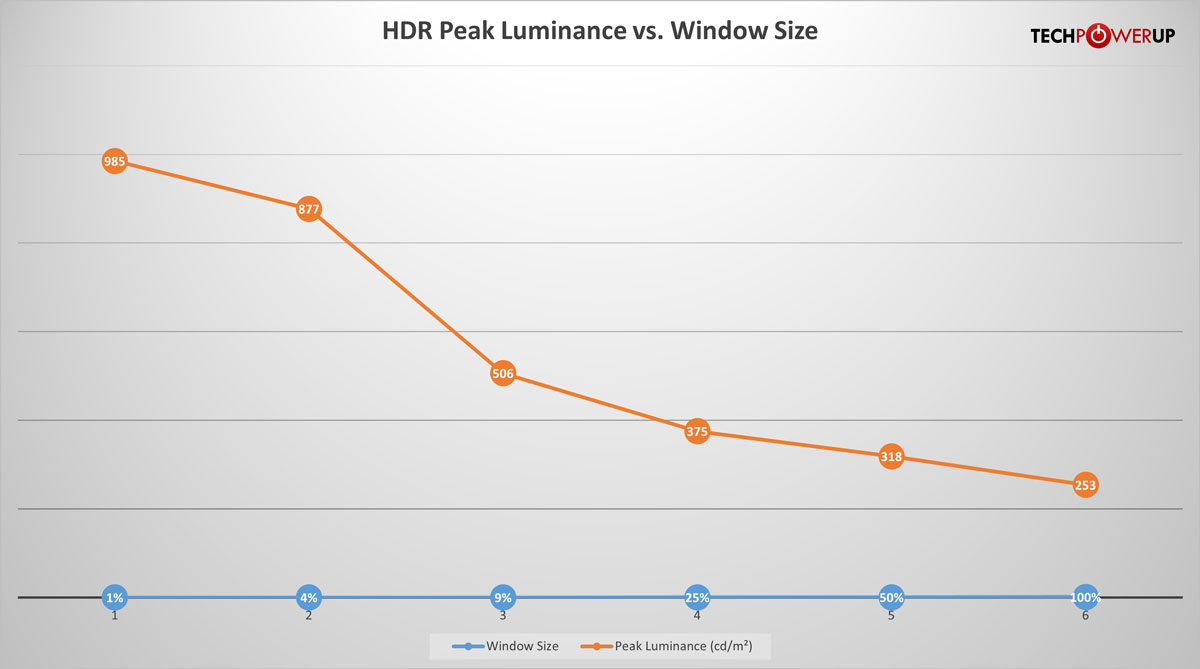
HDR peak luminance results of the ASUS ROG Swift OLED PG27UCDM are in line with what can be expected from a fourth-generation QD-OLED panel. The monitor reaches a maximum of 985 cd/m² on a 1% window. As window size increases, brightness naturally falls off due to the panel's Automatic Brightness Limiter (ABL): 877 cd/m² at 4%, 506 cd/m² at 9%, and 375 cd/m² at 25%. From there the decline is more gradual, settling at 318 cd/m² for 50% and 253 cd/m² for a full-screen white field. The ROG Swift OLED PG27UCDM delivers plenty of punch for specular highlights while still maintaining decent luminance in mid-sized scenes, though full-screen brightness is modest compared to high-end Mini-LED LCDs. The trade-off, of course, is that OLED continues to offer perfect blacks and infinite contrast, which preserves HDR impact even when peak luminance drops with larger window sizes.
Viewing Angles

The viewing angles of the QD-OLED panel built into the ASUS ROG Swift OLED PG27UCDM are excellent. There's no visible shift in colors from any sitting position or when changing positions.
OLED Burn-in Prevention Features
The ASUS ROG Swift OLED PG27UCDM offers several OLED burn-in prevention algorithms. All of them are grouped in the "OLED Care" menu within the OSD.Screen Saver – automatically dims the screen brightness after two minutes of inactivity. Mouse or keyboard inputs immediately bring it back to a normal level
Pixel Cleaning – starts a six-minute pixel refresh process
Screen Move – this feature allows you to select the screen movement level in order to prevent image sticking or burn-in on the display panel. The available settings are OFF, Light, Middle and Strong
Auto Logo Brightness - the monitor detects static, on-screen elements such as logos, taskbar, screen boundaries and reduces their luminance
Neo Proximity Sensor – a laser-based time-of-flight sensor that detects when you move away from the monitor and automatically dims or turns off the screen to reduce power usage and lower the risk of OLED burn-in. It's more accurate than earlier proximity systems and even lets you adjust detection distance; I had no issues with it misfiring and dimming the screen while I was still using it
ASUS also offers several additional OLED Care+ technologies through its DisplayWidget Center software, including Target Mode, which dims the entire screen except for a selected application window. While interesting in theory, it's not particularly practical for everyday use. In my case, I preferred to disable all features in the Auto Logo Brightness menu but left Screen Saver, Screen Move and Neo Proximity Sensor enabled. This combination should be more than sufficient to ensure years of use without visible burn-in.
Nov 17th, 2026 18:37 CST
change timezone
Latest GPU Drivers
New Forum Posts
- Honestly, do you care about GTA VI? (134)
- [testers wanted] Qsurfer My own QNAP Nas explorer/Search tool (7)
- Local LLM General Discussion (693)
- ProArt X870E-CREATOR WIFI - Bifurcation~Complication (14)
- Asus ProArt P14 (RTX Spark) linux so far (4)
- Without Jensen, PC gaming will be (34)
- 9070 GRE 3.9ghz validation reached. (18)
- Help with fixing Overclock (7)
- [Poll] 12V-2x6 Connector Protection: What Are You Using? (WireView / Ampinel / Equalizer / Other / Nothing) (27)
- What is the latest game you finished or 100% (204)
Popular Reviews
- Acemagic Retro X3 Review
- Upcoming Hardware Launches 2027 (Updated Nov 2026)
- AMD Zen 6 Technical Deep Dive
- ASUS ROG Strix B850-I Gaming Wi-Fi7 W Review
- Corsair HX1000i Shift Crystal Review
- Chieftec Iceberg PRO 360 DARK Review
- AMD Ryzen 7 9800X3D Review - The Best Gaming Processor
- Phantom Blade Zero Performance Benchmark Review - 35 GPUs Tested
- Montech King 95 3D PRO Review
- NZXT C1200 Platinum Review
TPU on YouTube
Controversial News Posts
- NVIDIA Co-Founder and CEO Jensen Huang Officially Resigns (458)
- Open Letter Asking NVIDIA to Reinstate Jensen Huang Passes 115,000 Signatures (184)
- OpenAI CEO Argues Home PCs Waste the World's Limited DRAM Supply (152)
- NVIDIA Launches Investigation Into Jensen Huang's Relationship With Suspected Chinese Spy (136)
- Report: Jensen Huang Eyes NVIDIA Comeback (135)
- Intel "Raptor Lake Next" 16-Core and 20-Core CPUs Surface (130)
- Legendary Game Studio BioWare Shuts Down Following EA Layoffs (104)
- Dell CEO Says the Memory Shortage Will Get Worse in 2027 (95)