 35
ASUS ROG Xbox Ally X Review
Software »Ports and Wireless Performance


The ROG Xbox Ally X comes with two USB-C ports, a microSD card slot, and a 3.5 mm audio jack. The primary USB-C port supports USB4 and all that entails, such as DP Alt mode with FreeSync support, 40 Gbit/s bandwidth, USB Power Delivery, and more. You can use the Xbox Ally X with an eGPU without issues. The second USB-C is a USB 3.2 Gen 2 port that supports DisplayPort Alt Mode, USB Power Delivery, and has a bandwidth of 10 Gbit/s.
While other handhelds offer dual USB4 ports (like the MSI Claw 8 and Claw A8), we don't find the lack of a second USB4 port a negative. The USB-C 3.2 Gen 2 port has enough bandwidth for any dock, and you can also use it to charge the device at full power if you've got a 100 W charger.
During our testing, we found that some chargers, like our UGREEN Uno 65 W charger, didn't play nice with the Xbox Ally X. While we'd get the slow charge warning, we could use the 35 W power profile because the ROG Xbox Ally X allows you to set power up to 35 W manually, even when not hooked to a charger.
The included Wi-Fi chip worked great. We were able to max out our 300 Mbit/s internet plan while downloading games, and the Xbox Ally X managed to stay connected to our 5 GHz network even in places where our phone (Samsung Galaxy S21 FE) would disconnect and switch to the 2.4 GHz band.

Local game streaming also worked great. After connecting the Wi-Fi chip to my 5 GHz network, I managed to up the bandwidth to 250 Mbit/s without any hitches, and the experience was great overall. Excellent image quality coupled with low input lag.
Battery Life
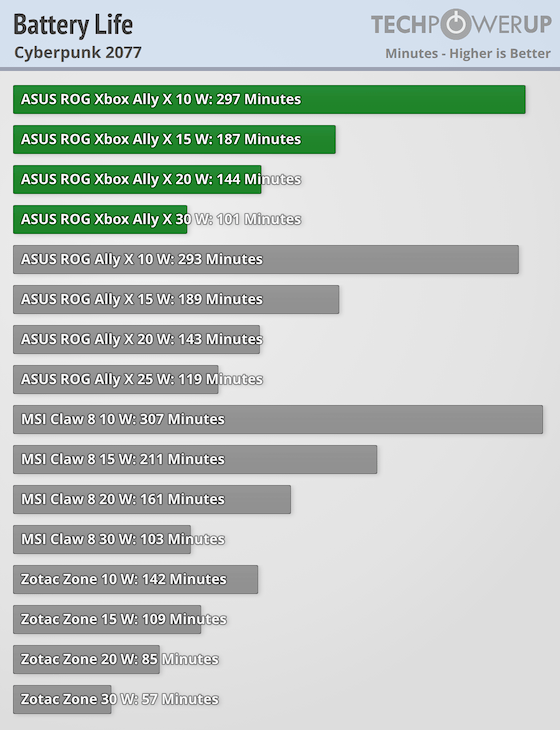
We tested the battery life with the screen brightness set to 50%. Note that the battery drain when sleeping is about 0.5% per hour.
The ROG Xbox Ally X can run at up to 35 W on battery when using the Manual power profile, allowing us to do an apples-to-apples battery life comparison with the MSI Claw 8. Despite having a larger screen, the Claw 8 trumps the Xbox Ally X at every power level.
That said, the ROG Xbox Ally X isn't a poor performer by any stretch. It lasts just a few minutes less than the Claw 8 at 30 W, and only 15 minutes less at 20 W. In other words, you should get almost three hours of battery life playing demanding games at 25 W, but even if you push it to its limits, you should get about one and a half hours of playtime before needing to plug in a charger.
At 15 W, where the Xbox Ally X is still quite capable, you're getting more than three hours of battery life. Since the Z2 Extreme offers plenty of performance between 15 W and 20 W, you should get around two and a half hours of playtime in all but the most demanding AAA games. You can squeeze two hours out of the battery even in those games, if you're ready to drop the settings and resolution to maximize battery life.
Lastly, at 10 W, the ROG Xbox Ally X is more than usable for 2D and less demanding and older 3D games. You should expect it to last almost five hours when gaming at 10 W, which is a mighty fine result.
While we aren't wowed by its showing—considering that the MSI Claw 8 remains the reigning champion of our battery life tests—we're very pleased with the level of longevity the Xbox Ally X achieves.
Nov 12th, 2026 20:51 PST
change timezone
Latest GPU Drivers
New Forum Posts
- Your PC ATM (36413)
- Microsoft Exchange/365 outages? (16)
- I won't download games that are larger than 30–40 GB. (99)
- Lenovo Legion R27fc-30 vs AOC c27g4h2 which one wins ? (0)
- AI generated images... (223)
- Classic Blizzard games (WarCraft 1-2, Diablo 1-2, StarCraft 1) (7)
- WarpCoreBench scores! (26)
- Ryzen 7 8700G OC (5)
- When you could finally run Crysis maxed out? (61)
- Warning for Windows 10 and 11 users running newer AMD GPU drivers (52)
Popular Reviews
- AMD Zen 6 Technical Deep Dive
- NZXT C1200 Platinum Review
- Upcoming Hardware Launches 2027 (Updated Nov 2026)
- Corsair HX1000i Shift Crystal Review
- NZXT H7 RGB+ Review
- Montech King 95 3D PRO Review
- NZXT H5 Review
- Phantom Blade Zero Performance Benchmark Review - 35 GPUs Tested
- XPG NIMBUS PLUS Review - Mid-range Chair With Strong Competitors
- Gigabyte Z890I Aorus Ultra Review
TPU on YouTube
Controversial News Posts
- NVIDIA Co-Founder and CEO Jensen Huang Officially Resigns (289)
- OpenAI CEO Argues Home PCs Waste the World's Limited DRAM Supply (152)
- NVIDIA Launches Investigation Into Jensen Huang's Relationship With Suspected Chinese Spy (136)
- Intel "Raptor Lake Next" 16-Core and 20-Core CPUs Surface (130)
- Legendary Game Studio BioWare Shuts Down Following EA Layoffs (104)
- Dell CEO Says the Memory Shortage Will Get Worse in 2027 (95)
- NVIDIA GeForce RTX 50-Series Scheduled for up to $500 Price Hike This Week (89)
- Modder Fits RTX 5090 With Four 8-Pin Connectors, Halving Current per Wire (80)