 73
Intel Panther Lake Review - The Efficiency King That Can Game
(73 Comments) »Introduction

Welcome to our launch review of Intel's new Panther Lake processor architecture. This marks a significant leap forward from its predecessor, Lunar Lake, with substantial improvements and innovations. To evaluate what Intel has achieved with Panther Lake, we're testing it in the impressive 2026 ASUS Zenbook DUO UX8407AA. This laptop, with its updated design, exemplifies ASUS's commitment to quality. While the changes from the previous generation may appear subtle, they enhance the overall premium feel of the device, making it a perfect showcase for the advancements brought by Panther Lake.

No doubt, the biggest highlight of the new Zenbook is the new CPU and iGPU combo, but the dual screen setup is also mighty impressive. This year's Zenbook DUO features the Intel Panther Lake-based Core Ultra X9 Series 3. More specifically, the Core Ultra X9 388H is at the heart of this machine. This new-gen chip features 4 P-cores, 8 E-cores, and 4 LPE-cores. That's plenty of power for almost any workflow or entertainment, barring the heavy-duty tasks usually reserved for mobile workstations.
Intel is claiming a notable performance jump alongside significantly lower power draw—especially during light tasks—compared to older Lunar and Arrow Lake chips. This gives us some real hope that the battery life might actually live up to the hype.
The new Intel Arc B390 Graphics isn't just another iGPU that is good enough for playing Tetris and browsing the web. What really stands out is the massive 16 MB of shared L2 cache—a huge amount for an integrated solution. It also packs 12 Xe Cores and 12 dedicated ray tracing units. When you add the fact that you can manually set a fixed VRAM size (ergo, allocated shared memory to the iGPU), the Arc B390 might just be the new king of its class.
We're officially in the AI era—or at least the dawn of it. That makes Intel's NPU 5 a key focus for everyone from power users to casual fans using AI tools daily. It efficiently delivers up to 50 TOPS, speeding up tasks like image generation, real-time translation, and AI-driven video editing.
The system performance is additionally boosted by the fast LPDDR5x-9600 RAM. As expected for a thin-and-light, the memory is soldered down. While this saves space and keeps the weight down, it does mean you're sacrificing upgradability. Still, 32 GB of RAM sounds like a reasonable amount of memory that should be enough for the next few years.
Since it's a dual-screen machine, you may think that the port selection may be super limited. It's not, but don't expect I/O like in a 3-kilo laptop. Still, two full-function Thunderbolt 4 and one Type-A, besides a full size HDMI 2.1 port sounds reasonable to me. The tradeoff is that you can lose one of the fast Type-C ports when the power adapter is plugged in.
To extract more performance out of the new CPU, ASUS has installed a thermal system with larger fans to push out the hot air as fast as possible. In my experience, bigger fans usually mean lower noise levels too.
Aside from the new-tech CPU, the dual displays are superb. They look just as good in person as they do on paper, thanks to vivid colors and a 2880×1800 resolution that delivers a sharp image. The OLED touchscreens offer a 144 Hz refresh rate for extra smoothness, an infinite contrast ratio, and DisplayHDR 1000 True Black certification. These two are a perfect choice for watching movies, playing games, working, content creation, you name it!
The device is literally loaded with goodies such as a pretty good detachable keyboard, Wi-Fi 7, an IR webcam, 6-speakers audio system enhanced by Dolby Atmos, and somehow, ASUS managed to cram a massive 99 Wh battery system into this crowded chassis.
It all sounds great on paper, but let's put this machine through some real-world torture to see if it's worth the premium.
Specifications
| Specifications | |
|---|---|
| Manufacturer: | ASUS |
| Model: | ASUS Zenbook DUO (UX8407) |
| Weight: | Starting at 1.35 kg without keyboard 1.65 kg with keyboard |
| Processor: | Intel Core Ultra 7 355/Panther Lake 4 P-Cores+4 LPE-cores/8 threads up to 4.7 GHz, 12 MB L3 cache 25 W Base Power Intel Core Ultra 9 Processor 386H/Panther Lake 4 P-Cores+8 E-cores+4 LPE-cores/16 threads up to 4.9 GHz, 18 MB L3 cache 25 W Base Power Intel Core Ultra X9 Processor 388H/Panther Lake 4 P-Cores+8 E-cores+4 LPE-cores/16 threads up to 5.1 GHz, 18 MB L3 cache 25 W Base Power |
| Chipset: | Intel Panther Lake PCH |
| Display: | Display: 2× 14"/2880×1800 (16:10)/OLED/144 Hz ~500 nits/100% sRGB/anti-reflective coating Display HDR True Black 1000 |
| Operating System: | Windows 11 |
| Integrated Graphics: | Intel Graphics 4 Xe3 Intel Arc B390 |
| Memory: | up to 32 GB of soldered LPDDR5x-9600 |
| Storage: | 1× M.2 2280 PCI Express 4.0 x4 |
| Optical Drive: | None |
| Connectivity: | 1× 10 Gbps USB Type-A/3.2 Gen. 2 2× 40 Gbps Thunderbolt 4 with DP Alt Mode/100 W PD HDMI 2.1 FRL Audio combo jack |
| Communications: | Wi-Fi 7+Bluetooth 5.4 1080p IR webcam |
| Audio: | 6-speakers audio system 2× high-frequency tweeters + 4× low-frequency woofers optimized with Dolby Atmos |
| Input device: | ASUS ErgoSense touchpad with a hydrophobic coating Detachable keyboard with backlight |
| Power: | 1× 100 W USB-C AC adapter 99 Wh battery system |
| Warranty: | Two Year (region dependent) |
| MSRP: | Starting at €2600/$3080 |
Inside Intel Panther Lake
Let's talk about the "elephant in the room" that is revealed: Panther Lake.While the last generation of Intel chips felt like a solid step forward, Panther Lake is the leap Intel has been promising for years. This isn't just another incremental spec bump; it's the moment Intel tries to take back the efficiency crown from Apple's silicon.
On this page we will summarize Panther Lake's most important aspects. For all the details with lots of additional explanation, check out our Panther Lake Technical Deep Dive.
The "Under-the-Hood" Magic (Intel 18A)
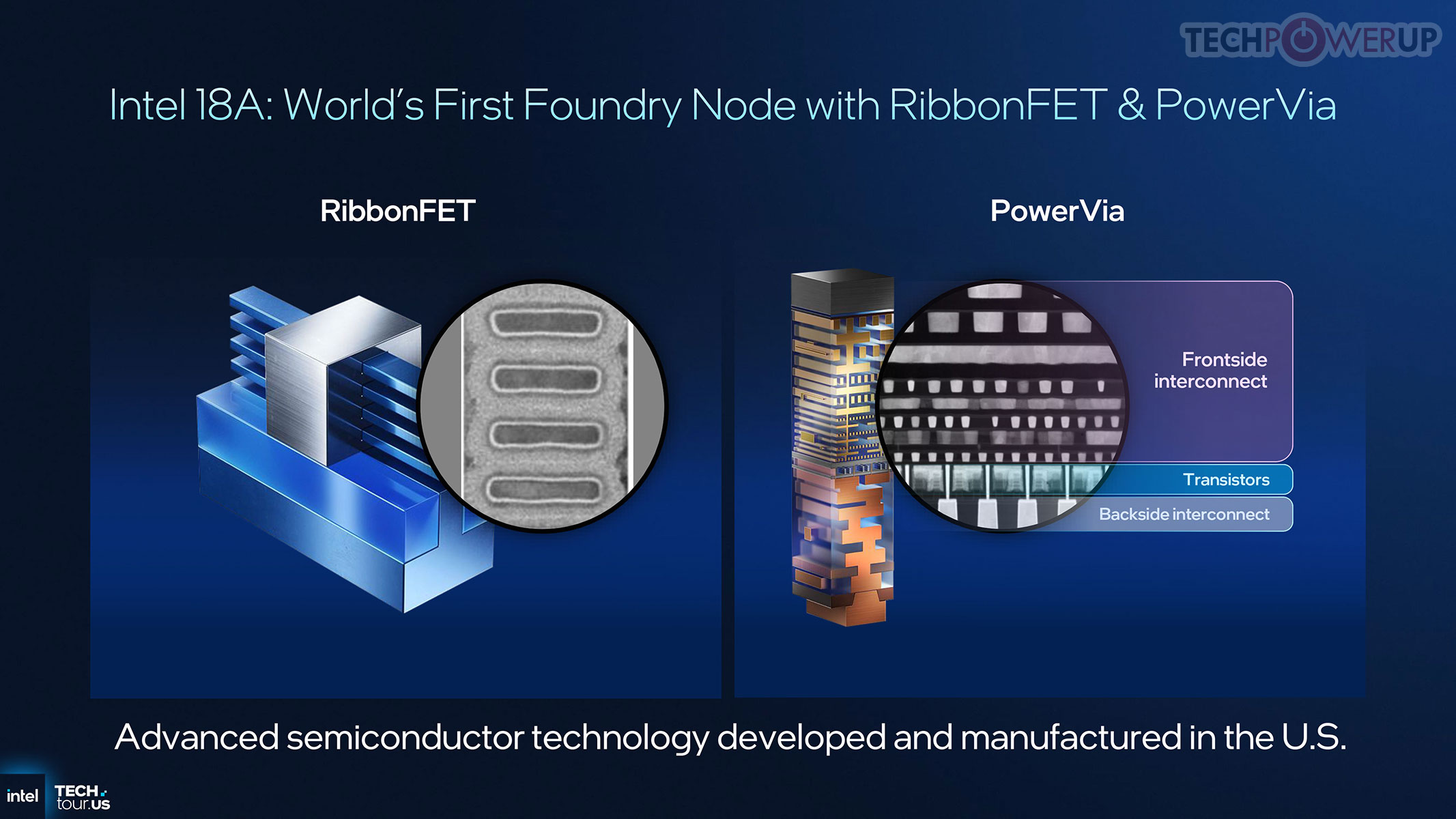
The biggest deal here is the 18A process node. For the first time in a decade, Intel is changing the transistor makeup, by using a brand-new architecture called RibbonFET plus something called PowerVia.
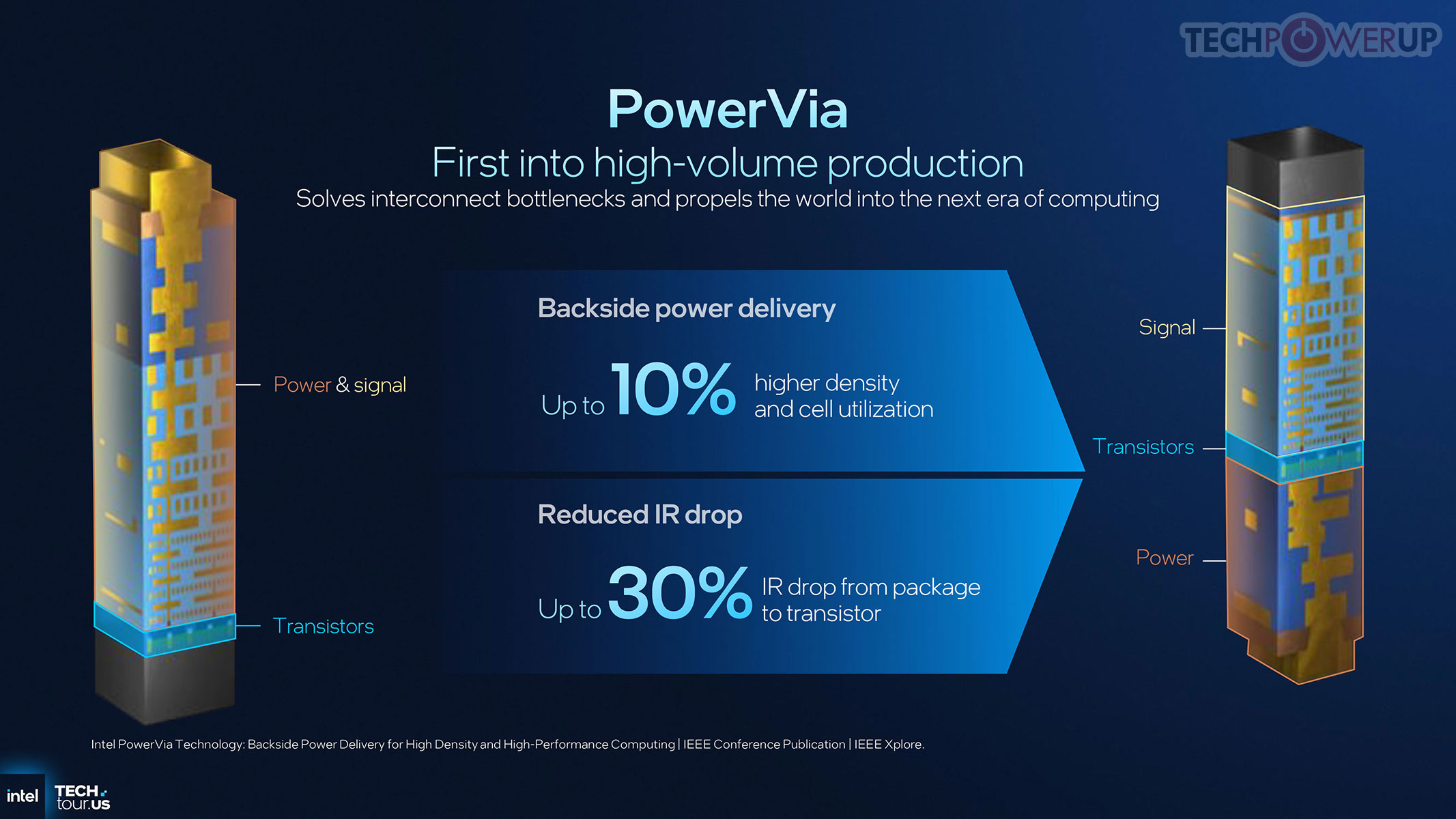
If PowerVia sounds unusual to you, think of it like good cable management. Instead of cramming the power delivery lines in with the data lines, Intel is moving the "power cords" to the back of the chip. This clears up congestion, reduces heat, and lets the chip run much more efficiently and cooler. That translates to a laptop that stays cooler on your lap, it won't burn your hips, and it doesn't need to spin its fans up right away when you open ten Chrome tabs.
Graphics That Might Finally Kill the Entry-Level GPU
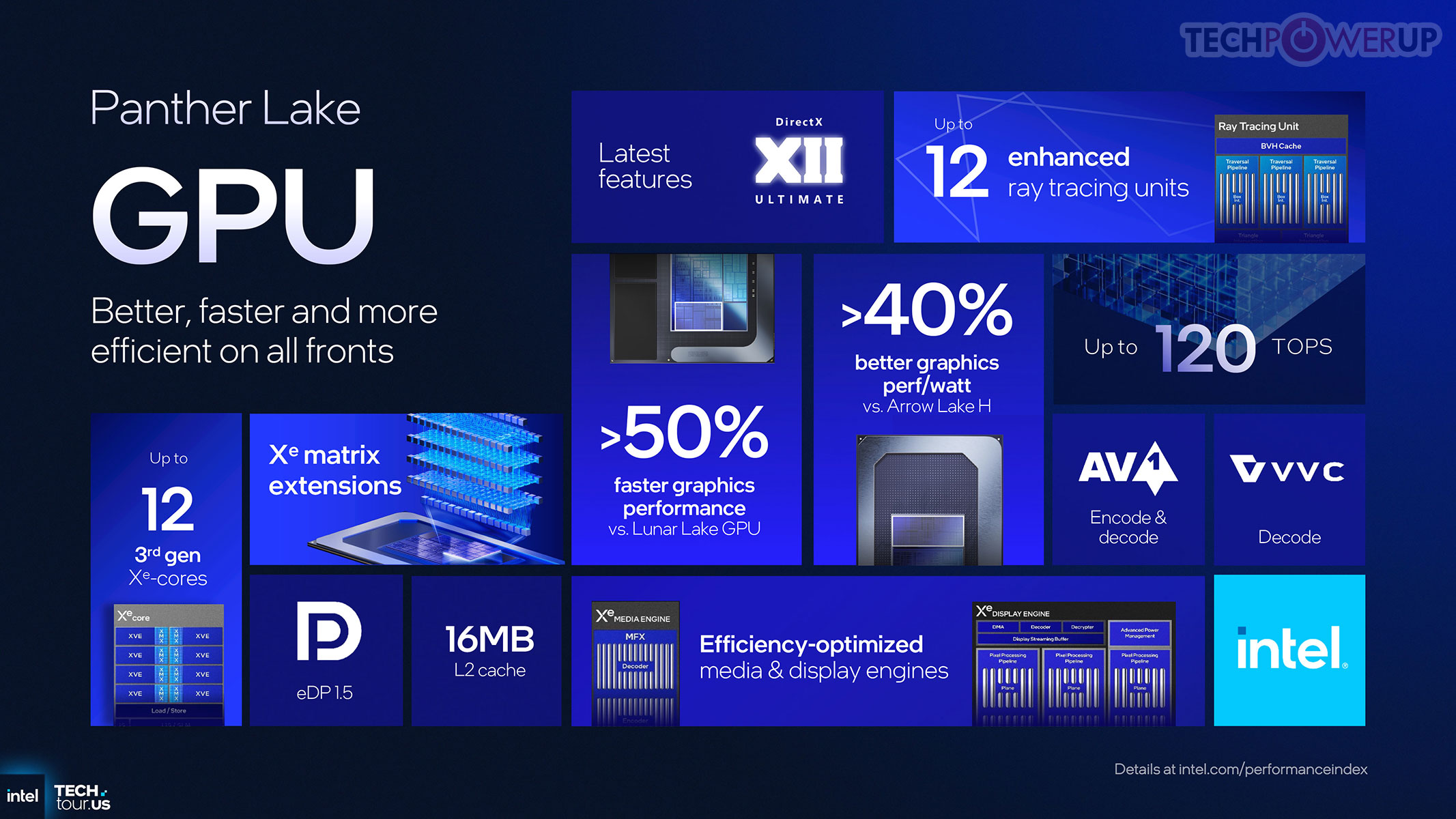
No matter if you are a casual gamer or a photo/video editor, the Xe3 graphics architecture is the part you may care about. While it's still based on an improved Battlemage, i.e. not Celestial, it definitely helps. We've seen huge gains recently with Arc graphics, and PTL comes with a massive jump in performance per watt. We're reaching a point where a thin-and-light laptop might actually handle AAA games at 1080p without needing a bulky, dedicated NVIDIA chip. Yes, Team Green, AMD is kind of in no man's land when it comes to mobile dGPUs.
The Core Hybrid: Efficiency First
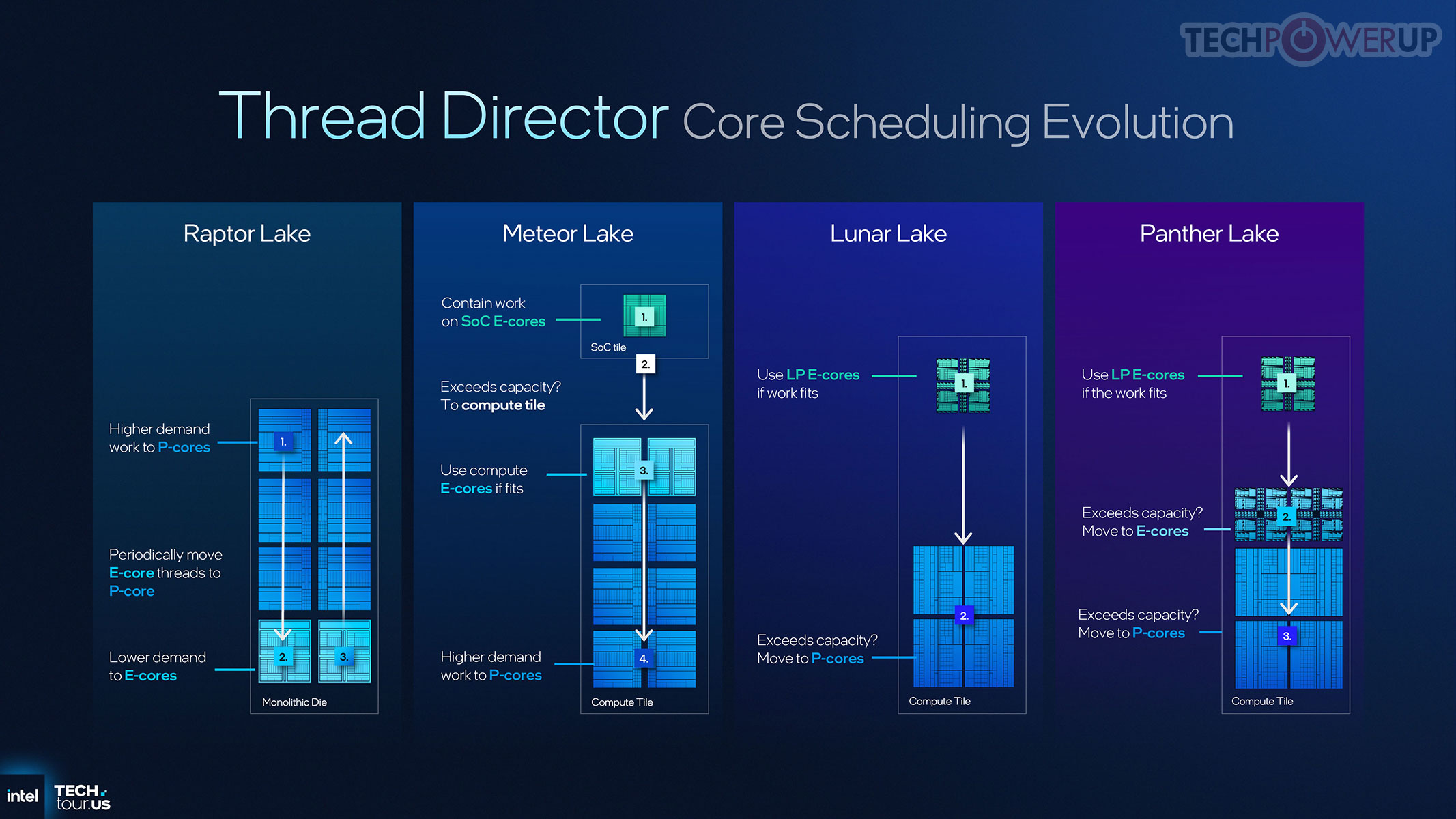
Panther Lake uses a mix of Cougar Cove (P-cores) and Skymont (E-cores). The P-cores are there for the "oomph"—when you're exporting a 4K video, gaming, or crunching a massive spreadsheet. The E-cores are the real heroes for daily use. They've become so efficient that they can handle almost everything you do on battery power, leaving the hungry P-cores "asleep" until they are absolutely necessary.
Our Patreon Silver Supporters can read articles in single-page format.
Nov 14th, 2026 13:12 CST
change timezone
Latest GPU Drivers
New Forum Posts
- Tell me about your favourite graphics card (66)
- Your PC ATM (36415)
- What can the FX 8320 do today? Here is the answer. (33)
- auto-closed by somethings by actions (1)
- What card do I get for VR? (30)
- no "PhysX" workable (10)
- TPU's Nostalgic Hardware Club (22162)
- Slow SSD read speeds - help! (7)
- Ddr4 instead of ddr5 for 9060xt 8 gb over 5060 8 gb (7)
- Microsoft Exchange/365 outages? (62)
Popular Reviews
- AMD Zen 6 Technical Deep Dive
- ASUS ROG Strix B850-I Gaming Wi-Fi7 W Review
- Corsair HX1000i Shift Crystal Review
- NZXT C1200 Platinum Review
- Upcoming Hardware Launches 2027 (Updated Nov 2026)
- Montech King 95 3D PRO Review
- NZXT H7 RGB+ Review
- NZXT H5 Review
- Phantom Blade Zero Performance Benchmark Review - 35 GPUs Tested
- XPG NIMBUS PLUS Review - Mid-range Chair With Strong Competitors
TPU on YouTube
Controversial News Posts
- NVIDIA Co-Founder and CEO Jensen Huang Officially Resigns (400)
- OpenAI CEO Argues Home PCs Waste the World's Limited DRAM Supply (152)
- NVIDIA Launches Investigation Into Jensen Huang's Relationship With Suspected Chinese Spy (136)
- Intel "Raptor Lake Next" 16-Core and 20-Core CPUs Surface (130)
- Legendary Game Studio BioWare Shuts Down Following EA Layoffs (104)
- Dell CEO Says the Memory Shortage Will Get Worse in 2027 (95)
- NVIDIA GeForce RTX 50-Series Scheduled for up to $500 Price Hike This Week (89)
- Modder Fits RTX 5090 With Four 8-Pin Connectors, Halving Current per Wire (80)