 23
Asustor Nimbustor 4 Gen2 AS5404T Review
Value & Conclusion »Power
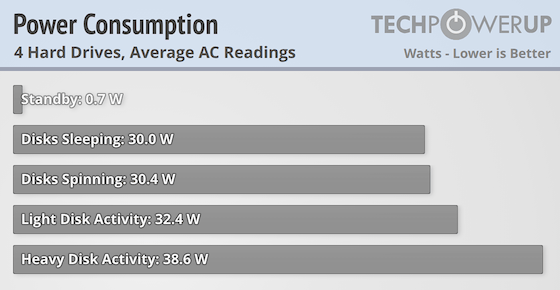
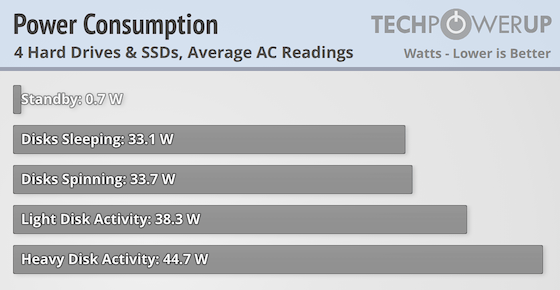
The Intel Celeron Processor N5105 which i powering the AS5404T is quite power frugal with a TDP of 10 W, in fact, it should be more power efficient than the popular Intel Processor N95 which has a 15 W TDP. However, in real world use, it seems like there's little to no difference between the two, at least if we compare the AS5404T with the F4-424 from TerraMaster. Yes, the hardware isn't identical and the Asustor doesn't seem to be as power frugal when the drives are supposed to be in sleep mode, since we couldn't measure a power usage lower than 30 W, whereas the F4-424 would go as low as 18 W. According to Asustor's own specs, it should idle at just below 18 W, but at no point in our testing were we able to get the system to drop below 30 W. This time we threw in some numbers for the system fully loaded with four NVMe SSDs, just to get an idea of how much more power a fully loaded NAS draws and this was also the first NAS we've tested that can house four NVMe drives alongside four mechanical drives. Unloaded the four NVMe drives added a mere 3 W, but when in use, this ended up being somewhere around 5-6 W, which is still a fairly small increase in power draw. Considering the added benefit of SSD caching—even if a single drive might be enough—in combination with SMB multichannel on the AS5404T, it might be worth the extra power usage if you can afford the extra SSDs.
Noise
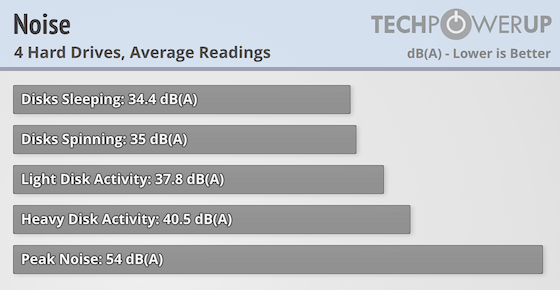
In terms of noise, Asustor could improve things, as the AS5404T comes out noisier than the TerraMaster F4-424 by a fair amount, although it was never so noisy that it was distracting. Note that the peak noise was measured with the fan speed set manually to full tilt, and we never noticed the fan going that loud under any point during our testing of the NAS. For a home NAS, you want a device that is as quite as possible and this isn't it.
Temperature
Unlike some of its competitors, Asustor offers full on system monitoring with multiple temperature sensors, and during our testing, the system never seemed to get particularly hot. The CPU was operating at around 50-60 degrees C, which isn't terrible, especially considering the location of the CPU and its fairly small heatsink. The system temperature was around 33–35 degrees C at the same time, with the hard drives normally at around 30 degrees and the SSDs at below 30 degrees when not loaded. Due to the limited PCIe bus speed and width, the SSDs never reached temperatures of over 60 degrees, but they did get a bit toasty during multiple runs of copying data using SSD caching. We'd still really like to see a re-design of the SSD carrier board and housing so some small heatsinks could be applied to the SSDs.
Nov 14th, 2026 22:03 CST
change timezone
Latest GPU Drivers
New Forum Posts
- WarpCoreBench scores! (40)
- What can the FX 8320 do today? Here is the answer. (47)
- Tell me about your favourite graphics card (82)
- Recommendations Wanted - Affordable Enterprise SSD for Boot (3)
- Planning for Prolonged High Prices and Maintaining What You Already Have (71)
- [INTEL]-How To Update Your Microcode for Intel HX 13/14th Gen. CPUs Laptops/Mobile Easily. (260)
- [Intel AX1xx/AX2xx/AX4xx/AX16xx/BE2xx/BE17xx] Intel Modded Wi-Fi Driver with Intel® Killer™ Features (632)
- Optical Disc Drive owners club (208)
- Game Soundtracks You Love (1287)
- 9070 GRE 3.9ghz validation reached. (11)
Popular Reviews
- AMD Zen 6 Technical Deep Dive
- ASUS ROG Strix B850-I Gaming Wi-Fi7 W Review
- Corsair HX1000i Shift Crystal Review
- Upcoming Hardware Launches 2027 (Updated Nov 2026)
- Montech King 95 3D PRO Review
- NZXT C1200 Platinum Review
- NZXT H7 RGB+ Review
- NZXT H5 Review
- Phantom Blade Zero Performance Benchmark Review - 35 GPUs Tested
- AMD Ryzen 7 9800X3D Review - The Best Gaming Processor
TPU on YouTube
Controversial News Posts
- NVIDIA Co-Founder and CEO Jensen Huang Officially Resigns (408)
- OpenAI CEO Argues Home PCs Waste the World's Limited DRAM Supply (152)
- NVIDIA Launches Investigation Into Jensen Huang's Relationship With Suspected Chinese Spy (136)
- Intel "Raptor Lake Next" 16-Core and 20-Core CPUs Surface (130)
- Legendary Game Studio BioWare Shuts Down Following EA Layoffs (104)
- Dell CEO Says the Memory Shortage Will Get Worse in 2027 (95)
- NVIDIA GeForce RTX 50-Series Scheduled for up to $500 Price Hike This Week (89)
- Modder Fits RTX 5090 With Four 8-Pin Connectors, Halving Current per Wire (80)