 4
Beelink EQi13 Pro Review
Workstation Performance »Content Creation and Media Encoding
Photoshop
PugetBench for Photoshop uses real actions like filter stacks, layer adjustments, and compositing. It measures both interactive responsiveness and how long complex edits take to apply.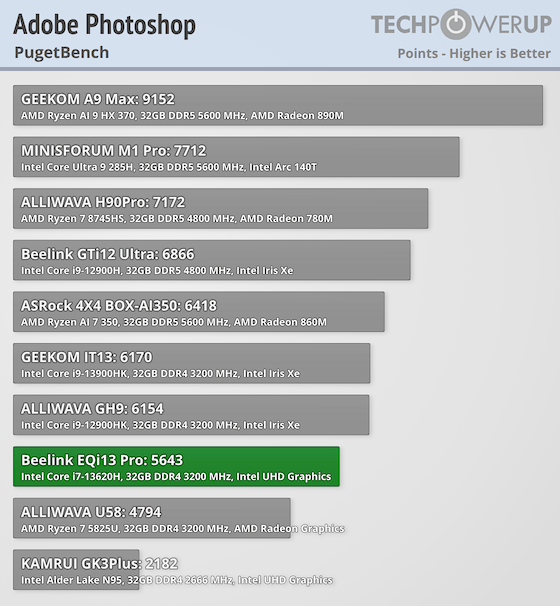
Here, the EQi13 Pro scored 5,643 points, placing it near the middle of recent Mini-PCs. Tasks like cropping, resizing, and basic retouching feel responsive, but GPU-heavy filters and AI-driven features run slower than on Iris Xe or Radeon systems. This lines up with what you would expect from a system using UHD Graphics.
Blender
Blender's benchmark measures 3D rendering across multiple test scenes. It's an effective way to see how a CPU and GPU perform in creative and technical workloads.
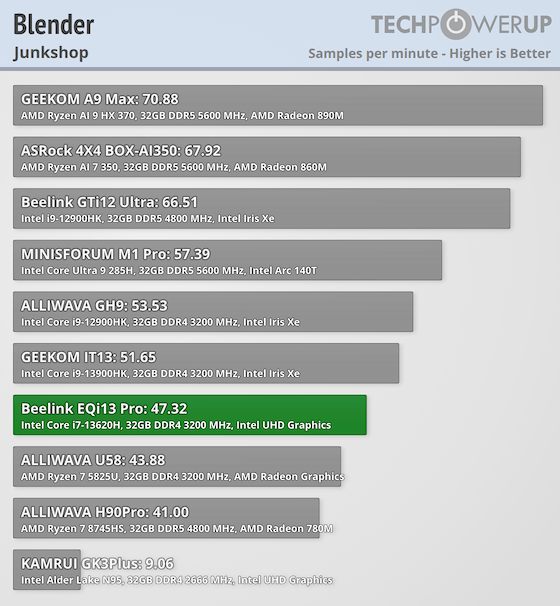
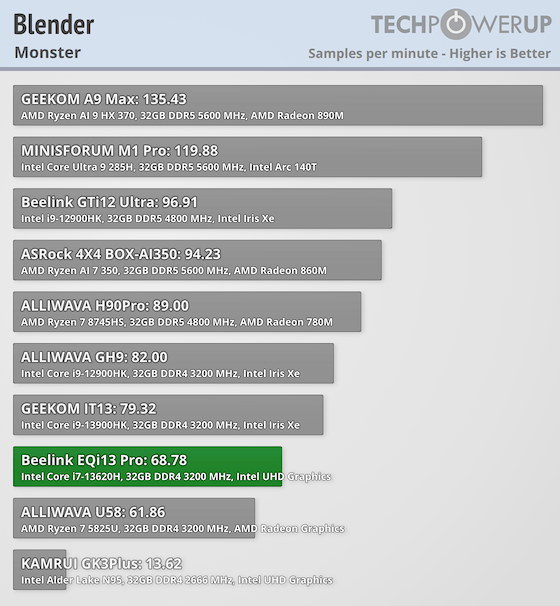
Blender's rendering tests show the EQi13 Pro handling 68.8 (Monster), 47.3 (Junkshop), and 34.5 (Classroom) samples per minute. That's modest but expected for CPU-only rendering, since there's no dedicated GPU acceleration. It's fine for testing or basic 3D work, though not for professional workloads.
Media Encoding
HandBrake is a popular open-source transcoder, and its benchmark tests how quickly a system can convert video using the x264 codec. It's a real-world scenario for streamers and media professionals.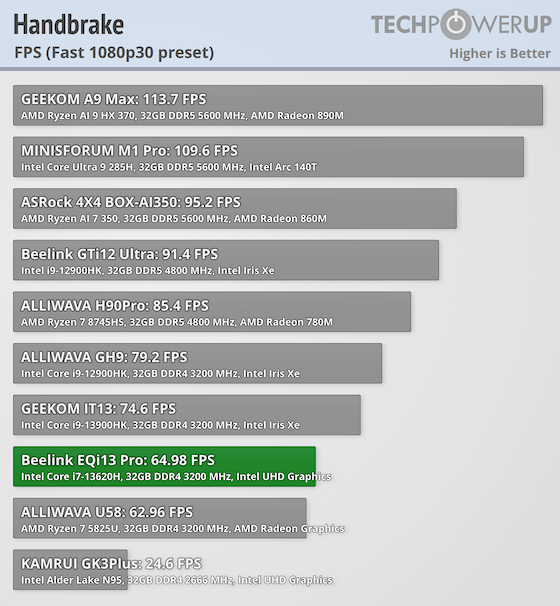
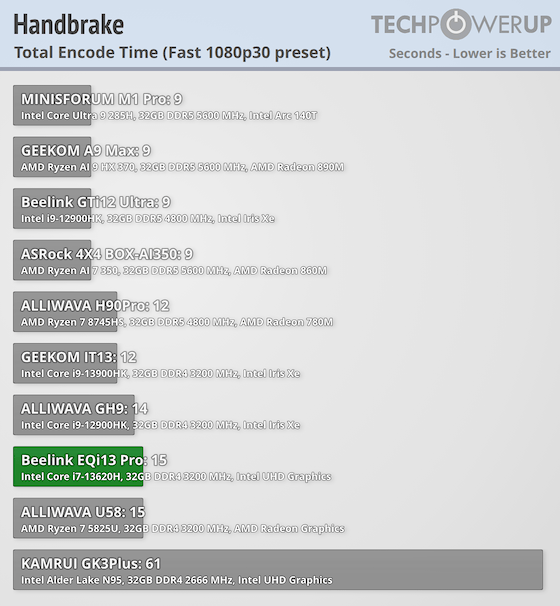
Using the "Fast 1080p30" preset, the EQi13 Pro averaged ~65 FPS and finished the encode in about 15 seconds. This is competitive with other Raptor Lake i7 Mini-PCs and only slightly behind i9-based models. Quick Sync Video helps speed up H.264 and H.265 encoding, making it efficient for media conversion.
For video streaming, the integrated GPU has no trouble with 4K streaming and can even handle 8K 60 FPS YouTube playback without stutter, as long as your connection keeps up.
Nov 20th, 2026 02:23 PST
change timezone
Latest GPU Drivers
New Forum Posts
- Making a game in Godot engine (8)
- Anime Nation (13188)
- Honestly, do you care about GTA VI? (179)
- Folding Pie and Milestones!! (10207)
- RX 7600 + Ryzen 5 5600GT getting the same FPS as my old RX 6500 XT – What am I missing? (12)
- GTA VI (13)
- Intel Core Ultra 5 processor 250K Plus (1)
- How to prevent OLED burn damage due to PC freezes or power outtages? (41)
- WarpCoreBench scores! (79)
- What are you playing? (26236)
Popular Reviews
- AMD Zen 6 Technical Deep Dive
- Ugreen NASync DXP4800 GT Review
- Acemagic Retro X3 Review
- Corsair RM1200e (Second Generation) Review
- Upcoming Hardware Launches 2027 (Updated Nov 2026)
- Pulsar Office Tour & First Look at P1 Dual-Sensor Mouse
- Biwin Black Opal NV7400 2 TB Review
- Chieftec Iceberg PRO 360 DARK Review
- AMD Ryzen 7 9800X3D Memory Performance Scaling
- AMD Ryzen 7 9800X3D Review - The Best Gaming Processor
TPU on YouTube
Controversial News Posts
- NVIDIA Co-Founder and CEO Jensen Huang Officially Resigns (490)
- Report: Jensen Huang Eyes NVIDIA Comeback (226)
- Open Letter Asking NVIDIA to Reinstate Jensen Huang Passes 115,000 Signatures (184)
- OpenAI CEO Argues Home PCs Waste the World's Limited DRAM Supply (152)
- NVIDIA Launches Investigation Into Jensen Huang's Relationship With Suspected Chinese Spy (136)
- Intel "Raptor Lake Next" 16-Core and 20-Core CPUs Surface (130)
- Legendary Game Studio BioWare Shuts Down Following EA Layoffs (104)
- Dell CEO Says the Memory Shortage Will Get Worse in 2027 (95)