 5
Cooler Master CM310 Review
(5 Comments) »Introduction

Cooler Master is a strong competitor in the gaming peripherals market, and their latest mice have proven to be fantastic. I previously reviewed the MasterMouse MM520 and MM530 models, which had a ridiculously good price-value ratio, and this time, Cooler Master went with an even lower price tag. The CM310 offers a lot of RGB lighting across the mouse with five pre-defined options, a PixArt PMW3325 optical sensor, matte UV coating, and rubberized side grips. The shape is not very common, but I have the feeling I've already seen it somewhere.

Specifications
| Cooler Master CM310 | |
|---|---|
| Size: | 127 mm x 71.5 mm x 39.5 mm |
| Size (inches): | 5" x 2.8" x 1.6" |
| Ambidextrous: | Yes, side buttons on left side only |
| Weight: | 100 g (3.53 oz) without cable |
| Number of Buttons: | 8 |
| Main Switches: | Fraly 30M |
| Wheel Encoder: | F-Switch brown core (10 mm height) |
| Sensor: | PixArt PMW3325 |
| Resolution: | 500–10,000 CPI |
| Polling Rate: | 1000 Hz |
| Cable: | 1.8 m long, non-braided |
| Software: | None |
| Price: | $29.99 |
| Warranty: | Two years |
Packaging

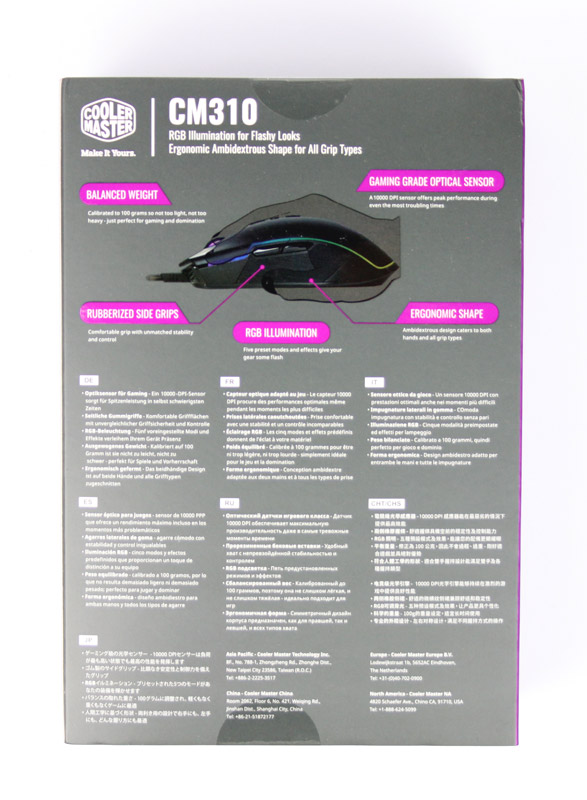


Most newer Cooler Master products arrive in a box that features this dark gray-purple color scheme, which I personally find very nice. There's an outer cardboard layer, which contains an inner box with the CM310 inside. There are no accessories—the only contents of the box are the mouse and a quick-start guide. Unfortunately, replacement mousefeet also haven't been included, but at this price point, that is forgivable.
Our Patreon Silver Supporters can read articles in single-page format.
Nov 14th, 2026 20:03 CST
change timezone
Latest GPU Drivers
New Forum Posts
- Optical Disc Drive owners club (208)
- Planning for Prolonged High Prices and Maintaining What You Already Have (67)
- Game Soundtracks You Love (1287)
- WarpCoreBench scores! (35)
- Tell me about your favourite graphics card (80)
- 9070 GRE 3.9ghz validation reached. (11)
- Honestly, do you care about GTA VI? (20)
- AI generated images... (226)
- What is in your fleet, size and contents? (28)
- X79 and/or rampage IV OC'ing thread for those of us still left.... (2452)
Popular Reviews
- AMD Zen 6 Technical Deep Dive
- ASUS ROG Strix B850-I Gaming Wi-Fi7 W Review
- Corsair HX1000i Shift Crystal Review
- Upcoming Hardware Launches 2027 (Updated Nov 2026)
- Montech King 95 3D PRO Review
- NZXT C1200 Platinum Review
- NZXT H7 RGB+ Review
- NZXT H5 Review
- Phantom Blade Zero Performance Benchmark Review - 35 GPUs Tested
- AMD Ryzen 7 9800X3D Review - The Best Gaming Processor
TPU on YouTube
Controversial News Posts
- NVIDIA Co-Founder and CEO Jensen Huang Officially Resigns (406)
- OpenAI CEO Argues Home PCs Waste the World's Limited DRAM Supply (152)
- NVIDIA Launches Investigation Into Jensen Huang's Relationship With Suspected Chinese Spy (136)
- Intel "Raptor Lake Next" 16-Core and 20-Core CPUs Surface (130)
- Legendary Game Studio BioWare Shuts Down Following EA Layoffs (104)
- Dell CEO Says the Memory Shortage Will Get Worse in 2027 (95)
- NVIDIA GeForce RTX 50-Series Scheduled for up to $500 Price Hike This Week (89)
- Modder Fits RTX 5090 With Four 8-Pin Connectors, Halving Current per Wire (80)