 17
Crimson Desert Handheld Performance Review
Out-of-Box Experience »Graphics Settings
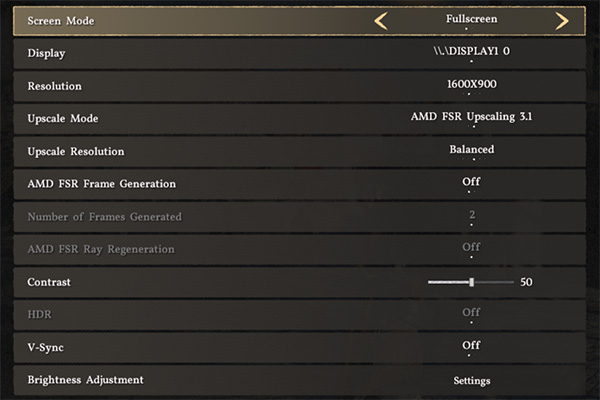
- There are two graphics settings screens, but a few visual options are also found in the "Accessibility" menu.
- The first menu deals with display-related settings.
- Display mode can be set to "Window," "Fullscreen," and "Borderless Window."
- Vertical synchronization can be toggled on or off.
- After enabling frame generation, you can also set the number of frames generated, but only with DLSS frame gen.
- We couldn't test whether the game has a frame cap, since we only tested it on handhelds.
- The game doesn't include TAA or any other form of antialiasing, you can use any of the upscalers set to "Native AA" as antialiasing instead.
- We don't recommend playing the game at native resolution without AA because it looks very noisy.
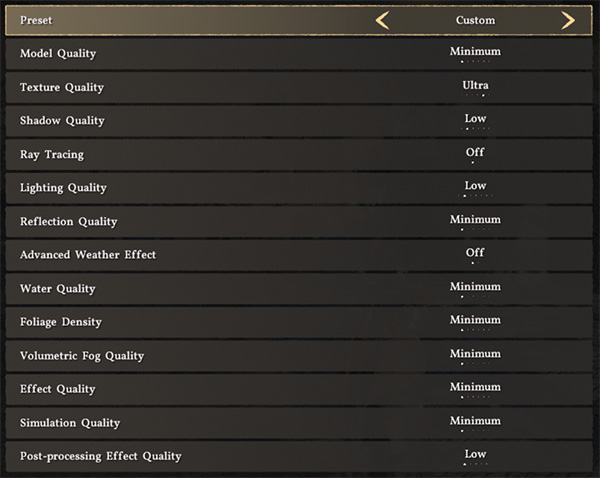
- Under the Graphics Settings screen you can find the usual assortment of graphics options, along with multiple graphical presets.
- There are five graphics presets in total: "Minimum," "Low," "Medium," "High," "Ultra" and "Cinematic."
- The game includes just a single Ray Tracing toggle, which is automatically enabled when you choose the "Medium" or higher preset.
- You cannot disable Chromatic Aberration, at least not to our knowledge.
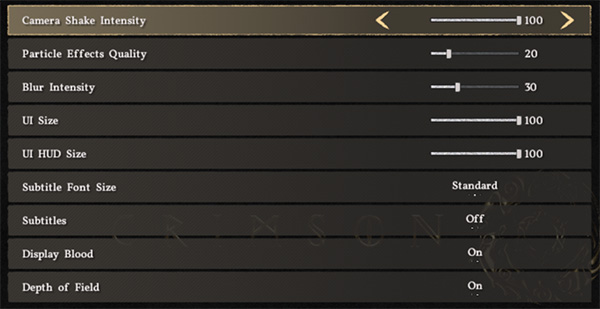
- The "Accessibility" menu, for some reason, hosts a few visual settings as well.
- Here you can adjust the quality of particle effects, motion blur intensity, and enable or disable depth of field.
Test Devices
We tested the public Steam release version of Crimson Desert.- The Steam Deck LCD was running SteamOS version 3.7.20, build 20260108.1
- Our ROG Xbox Ally X had Armoury Crate 2.1.21.0 installed along with BIOS 316.
- The MSI Claw 8 AI+ A2VM had MSI Center M 2.0.2601.2301 installed along with BIOS E1T52IMS.112
- The ROG Ally X had the latest Armoury Crate version installed at the time of testing (2.1.21.0), along with BIOS 312.
- The ROG Ally with SteamOS was running SteamOS version 3.7.20, build 20260108.1.
| Gaming Handhelds Used for Testing | |
|---|---|
| Steam Deck LCD | SteamOS version 3.7.20 build 20260108.1 |
| ASUS ROG Xbox Ally X | Armoury Crate 2.1.21.0 BIOS 316 GPU driver version: 32.0.21025.27003 Windows 11 Home 25H2 VBS disabled |
| Claw 8 AI+ A2VM | MSI Center M 2.0.2601.2301 BIOS E1T52IMS.112 GPU driver version: 32.0.101.8626 Windows 11 Home 25H2 VBS disabled |
| ASUS ROG Ally X | Armoury Crate 2.1.21.0 BIOS 312 GPU driver version: 32.0.22029.13001 Windows 11 Home 25H2 VBS disabled |
| ASUS ROG Ally Z1E with SteamOS | SteamOS version 3.7.20 build 20260108.1 |
Nov 22nd, 2026 05:31 PST
change timezone
Latest GPU Drivers
New Forum Posts
- UPS what one to get? (36)
- Honestly, do you care about GTA VI? (246)
- Gigabyte AORUS RTX 5080 MASTER – Up to 30°C GPU Hotspot Delta! Is This Normal, a Cooling Defect, or Should I RMA? (4)
- TPU's Nostalgic Hardware Club (22195)
- repair an NVIDIA Quadro M4000 (2)
- The TPU UK Clubhouse (27289)
- Your PC ATM (36449)
- Zen 3 IF/IMC degradation (244)
- Local LLM General Discussion (696)
- How to prevent OLED burn damage due to PC freezes or power outtages? (54)
Popular Reviews
- Microsoft Surface Laptop Ultra Review - The Next-gen Arm Laptop
- Corsair RM1200e (Second Generation) Review
- Pulsar Office Tour & First Look at P1 Dual-Sensor Mouse
- Upcoming Hardware Launches 2027 (Updated Nov 2026)
- Ugreen NASync DXP4800 GT Review
- AMD Ryzen 7 9800X3D Review - The Best Gaming Processor
- Biwin Black Opal NV7400 2 TB Review
- AMD Zen 6 Technical Deep Dive
- Phantom Blade Zero Performance Benchmark Review - 35 GPUs Tested
- AMD Ryzen 7 5800X3D 10th Anniversary Review
TPU on YouTube
Controversial News Posts
- NVIDIA Co-Founder and CEO Jensen Huang Officially Resigns (492)
- Report: Jensen Huang Eyes NVIDIA Comeback (262)
- Open Letter Asking NVIDIA to Reinstate Jensen Huang Passes 115,000 Signatures (184)
- OpenAI CEO Argues Home PCs Waste the World's Limited DRAM Supply (152)
- NVIDIA Launches Investigation Into Jensen Huang's Relationship With Suspected Chinese Spy (136)
- Intel "Raptor Lake Next" 16-Core and 20-Core CPUs Surface (130)
- NVIDIA GeForce RTX 50-Series Scheduled for up to $500 Price Hike This Week (89)
- Intel Razor Lake Gets a 12 P-Core bLLC Chip With No E-Cores, Per Leak (86)