 10
Death Stranding 2 Handheld Performance Review
Conclusion »ASUS ROG Xbox Ally X, ASUS ROG Ally X, and MSI Claw 8 Optimized Settings
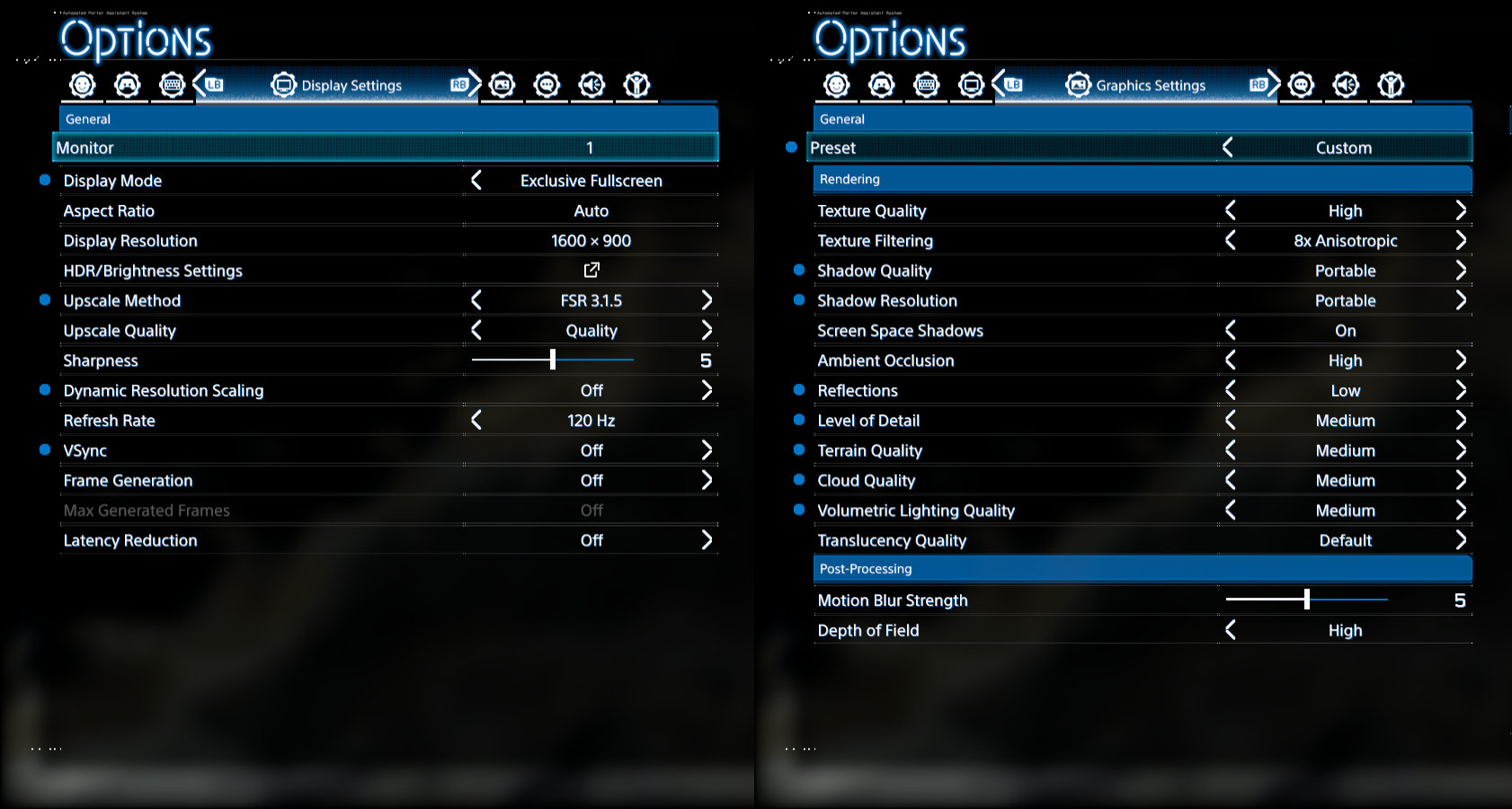
If you own an ROG Xbox Ally X or any other AMD Z2 Extreme handheld, set the power as high as possible (35 W on the Xbox Ally X) and apply the settings shown above. You should get a very playable, smooth experience with frame rates between the mid-30s and mid-40s. You can also enable frame generation, but the input lag is too high for our taste, at least on AMD handhelds.
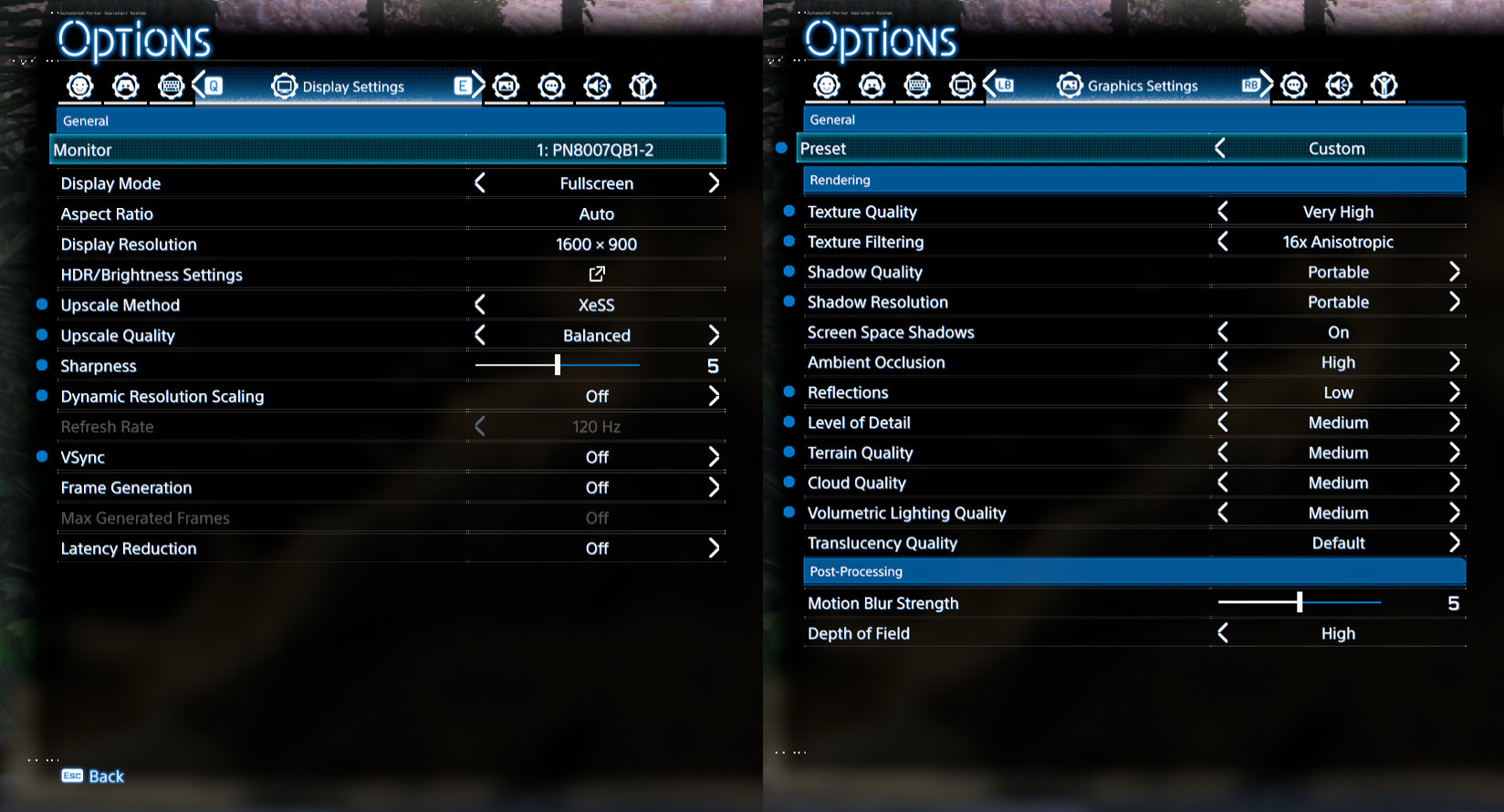
MSI Claw 8 owners can set the power to 30 W, apply the settings shown above (you can turn the XeSS quality preset up a notch), and achieve performance similar to that of Z2 Extreme handhelds. The caveat is that, surprisingly, XeSS looks worse than FSR in Death Stranding 2, with more jagged edges and shimmering artifacts. However, you can override XeSS frame generation to 3x in the Intel app, enable frame generation, and bump XeSS to "Ultra Quality," maintaining over 60 "fake frames."

Now, we know that using frame generation when the base frame rate isn't at least 50–60 FPS can be quite jarring, but this time we can recommend it because it looks like Intel has done a stellar job of minimizing latency and artifacts. We hadn't believed XeSS multi-frame generation was this good, but after experiencing it firsthand, we can't wait to test future games with XeSS 3x frame generation to see whether Intel really did knock it out of the park, or whether such a pleasant multi-frame gen experience is only a result of Death Stranding 2's low input latency.
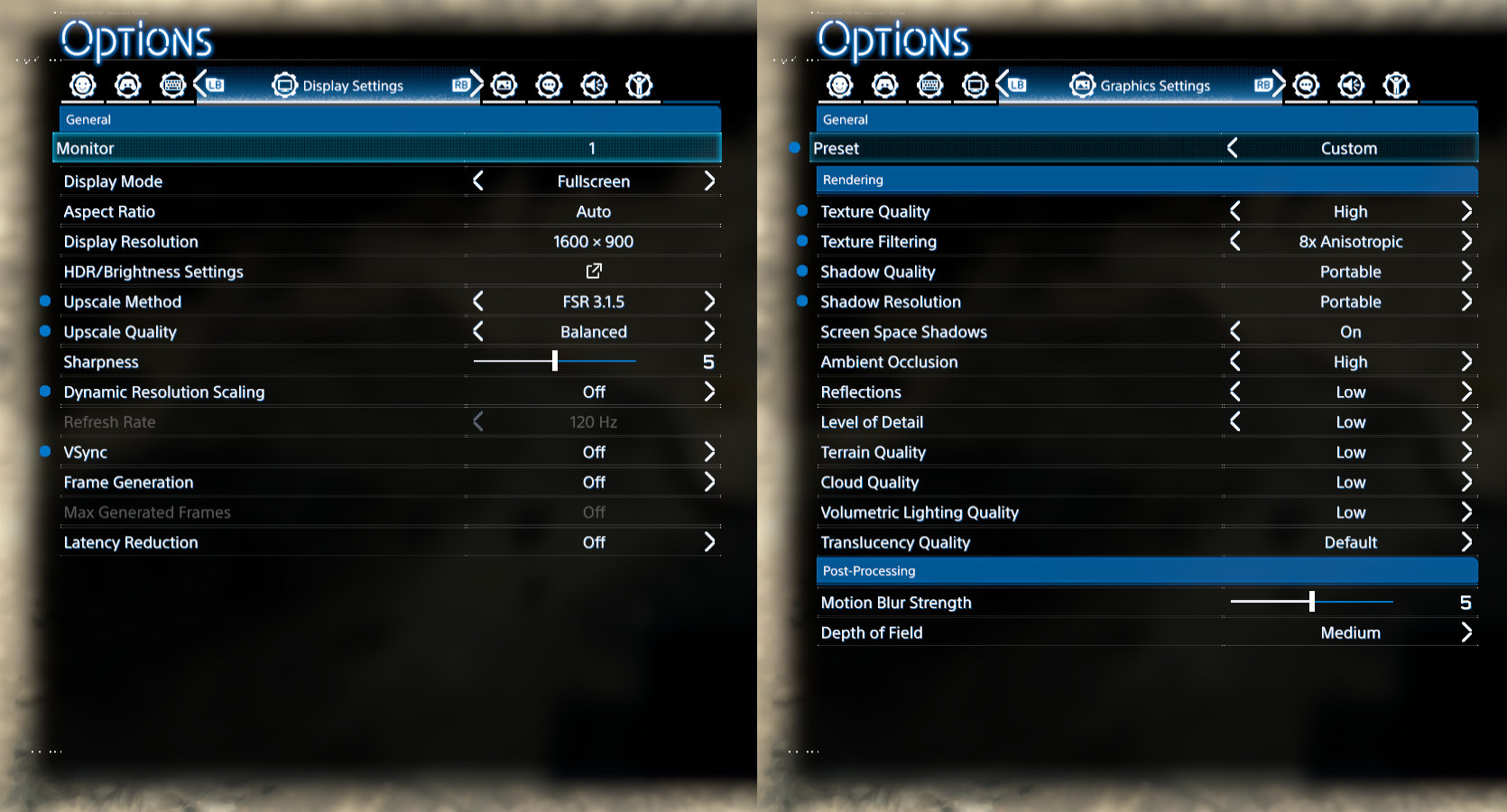
ROG Ally X and ROG Ally owners should set power to 25–30 W, apply the settings above, and expect performance similar to Z2 Extreme handhelds. You'll need to drop FSR from "Quality" to "Balanced" and most settings to Low, but the game still looks more than decent, especially with high textures. Just don't forget to increase VRAM allocation to 6 GB on the base ROG Ally.

Like its predecessor, Death Stranding 2 is a slow-paced game with exceptionally low input latency. Combined with the third-person camera, it's very playable even at 30 FPS. At 40 FPS, it feels closer to how many games feel at 60 FPS, which is great for handheld play.

Battery-wise, our optimized settings should allow for about an hour and a half of playtime on the ROG Xbox Ally X, MSI Claw 8, and ROG Ally X, and less than an hour on the original ROG Ally.
Nov 24th, 2026 09:07 CST
change timezone
Latest GPU Drivers
New Forum Posts
- Your PC ATM (36488)
- Increasing Power Limit? (31)
- HP ZBook 17 G3 i7 – black screen and fans running at max speed after switching SSD to GPT (1)
- GTA VI (33)
- I forced a 16 Year Old 64GB SSD to write 1 PETABYTE (And it didn't die) (194)
- Games at first startup always worse why? (0)
- Strange PC issues with Z690 setup (2)
- How to prevent OLED burn damage due to PC freezes or power outtages? (58)
- Which ryzen am5 cpu ? (201)
- AI generated images... (234)
Popular Reviews
- Microsoft Surface Laptop Ultra Review - The Next-gen Arm Laptop
- ASRock X870E Challenger Wi-Fi White Review
- Upcoming Hardware Launches 2027 (Updated Nov 2026)
- Corsair RM1200e (Second Generation) Review
- AMD Ryzen 7 9800X3D Review - The Best Gaming Processor
- AMD Zen 6 Technical Deep Dive
- AMD Ryzen 7 7700X3D Review
- Pulsar Office Tour & First Look at P1 Dual-Sensor Mouse
- Phantom Blade Zero Performance Benchmark Review - 35 GPUs Tested
- Ugreen NASync DXP4800 GT Review
TPU on YouTube
Controversial News Posts
- NVIDIA Co-Founder and CEO Jensen Huang Officially Resigns (492)
- Jensen Huang Reinstated as CEO of NVIDIA (452)
- Report: Jensen Huang Eyes NVIDIA Comeback (281)
- Open Letter Asking NVIDIA to Reinstate Jensen Huang Passes 115,000 Signatures (184)
- OpenAI CEO Argues Home PCs Waste the World's Limited DRAM Supply (152)
- NVIDIA Launches Investigation Into Jensen Huang's Relationship With Suspected Chinese Spy (136)
- Intel "Raptor Lake Next" 16-Core and 20-Core CPUs Surface (130)
- NVIDIA GeForce RTX 50-Series Scheduled for up to $500 Price Hike This Week (89)