 13
Diamond Stealth X550 Review
(13 Comments) »Introduction

I would like to thank Diamond Multimedia for supplying the review sample.
Diamond Multimedia has been making video cards, sound cards and modems for 20 yrs. It was a Diamond Monster 3D card that was my first 3D graphics card purchase, it was even capable of dual video card graphics using a 3dFX chipset and similar to today’s Crossfire using a single cable from one card to the other. That was sometime ago and video cards have come a long way and in some aspects full circle. Diamond Multimedia makes ATI graphic cards from the X1800 down to the newly added Stealth Express X550.
ATI introduced the X550 as an option for low budget PCI-Express systems falling between the X300 and X600 Pro. The Diamond Stealth Express X550 is using the same GPU core as the X300(RV370) but 75 MHz higher clock at 400 MHz with Infineon DDR2 memory at 500 MHz which is 100 MHz higher than the X300 using DDR1. The core and memory MHz along with memory type (DDR1 vs. DDR2) / amount (128 MB vs. 256 MB) being the difference between them with the same amount of Pixel Pipes at 4 and each with Vertex Shader at 2.
So with those specs this budget card would work best for Multimedia systems and or those just wanting to increase their video capability from their onboard graphics to an entry level one. With the Diamond Stealth Express X550 in hand let's take a look at what you can expect.
Featuring:
- Full Microsoft® DirectX® 9 support
- SmartShader™ 2.0
- SmoothVision™ 2.1
- With: DVI/TV-Out
- Hyper Z™ III
- VideoShader™
- Dual integrated display controllers
- Integrated TV Output support up to 1024x768 resolution
- ATI Radeon® X550(RV370)
- Memory: 256MB DDR 2
- GPU Core Clock: 400 MHz
- Memory Clock: 250 MHz
- Four extreme parallel 3D rendering pixel pipelines
- Two programmable vertex shader pipelines
- 128-bit memory interface
- PCI Express® x16 lane native support
From the Datasheet one can see that the DDR2 is spec'd to run at 700MHz 2.8ns
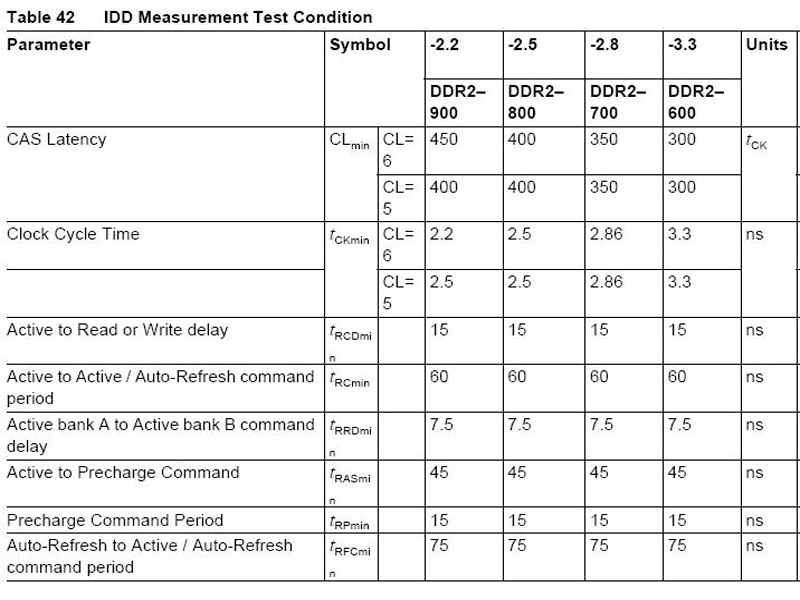
Source Infineon
Radeon RV370 GPU Thermal Specs
| Thermal Parameter Value | Temperature |
| Maximum recommended ASIC case (or center of die backside for flip chip) | 105°C |
| Absolute maximum rated junction temperature: TJmax | 125°C |
| Minimum ambient operating temperature | 0°C |
Packaging & Contents


Diamond packages the Stealth Express X550 in a generic box with the normal eye candy. There's nothing fancy like open slots to view the video card or at least a picture of the X550. The back of the box contains card hype and a benchmark graph that shows the X550 128MB vs. a Geforce 6200 256 MB. With the sides posting features and specifications. But I can do without the bling on the box and find more interesting what's inside.

If the packaging was any indication of what to expect then there's no excitement here. I have to remember it's an entry level card and you're just not going to get the usual accessories. The card comes with what is required to get up and running, included is the driver CD and the S-video out cable.


The Driver CD did come with documentation, added software and to my surprise Diamond added Windows updates in the form of SP2 for XP, along with the dreaded .NET Framework.
Included in the Windows updates was DirectX9. The CD also contained Bonus Software:
- Acrobat Reader
- 3DMark03
- Final Reality
- VulpineGL
- VulpineGL Patch
- Free DVD codec
- DS Player
- Maximus DVD
- WCPUID
Video Card


Here we have the front and back side of the Diamond Stealth Express X550. It was nice to see that Diamond opted for the DDR2 for its X550 rendition with the Infineon 2.8ns rated for 700MHz even though it's under clocked at 500MHz, should allow for a nice memory overclock. The card has output connections for DVI, VGA, TV-Out which supports its use as a Multimedia graphics card.


The heatsink fan is very quiet and isn't made of copper or aluminum but rather from a cast.
As display connectors you get an analog VGA output and a digital DVI output. The round connector in the middle is for TV-out to watch movies on your PC, for example.


There is a GPU pad to protect the chip and a thermal pad is used instead of thermal paste. I did install a Type-K Thermocouple sensor next to the GPU to get an idea of temps the RV370 would be running at, since a temperature chip is not installed on the card. This is in no way 100% accurate but should get us relatively close for my purposes.
Our Patreon Silver Supporters can read articles in single-page format.
Nov 12th, 2026 20:00 PST
change timezone
Latest GPU Drivers
New Forum Posts
- Lenovo Legion R27fc-30 vs AOC c27g4h2 which one wins ? (0)
- I won't download games that are larger than 30–40 GB. (98)
- Microsoft Exchange/365 outages? (14)
- AI generated images... (223)
- Classic Blizzard games (WarCraft 1-2, Diablo 1-2, StarCraft 1) (7)
- WarpCoreBench scores! (26)
- Ryzen 7 8700G OC (5)
- Your PC ATM (36412)
- When you could finally run Crysis maxed out? (61)
- Warning for Windows 10 and 11 users running newer AMD GPU drivers (52)
Popular Reviews
- AMD Zen 6 Technical Deep Dive
- NZXT C1200 Platinum Review
- Upcoming Hardware Launches 2027 (Updated Nov 2026)
- Corsair HX1000i Shift Crystal Review
- NZXT H7 RGB+ Review
- Montech King 95 3D PRO Review
- NZXT H5 Review
- Phantom Blade Zero Performance Benchmark Review - 35 GPUs Tested
- XPG NIMBUS PLUS Review - Mid-range Chair With Strong Competitors
- Gigabyte Z890I Aorus Ultra Review
TPU on YouTube
Controversial News Posts
- NVIDIA Co-Founder and CEO Jensen Huang Officially Resigns (287)
- OpenAI CEO Argues Home PCs Waste the World's Limited DRAM Supply (152)
- NVIDIA Launches Investigation Into Jensen Huang's Relationship With Suspected Chinese Spy (136)
- Intel "Raptor Lake Next" 16-Core and 20-Core CPUs Surface (130)
- Legendary Game Studio BioWare Shuts Down Following EA Layoffs (104)
- Dell CEO Says the Memory Shortage Will Get Worse in 2027 (95)
- NVIDIA GeForce RTX 50-Series Scheduled for up to $500 Price Hike This Week (89)
- Modder Fits RTX 5090 With Four 8-Pin Connectors, Halving Current per Wire (80)