 5
Dying Light: The Beast Handheld Performance Review
Out-of-Box Experience »Graphics Settings
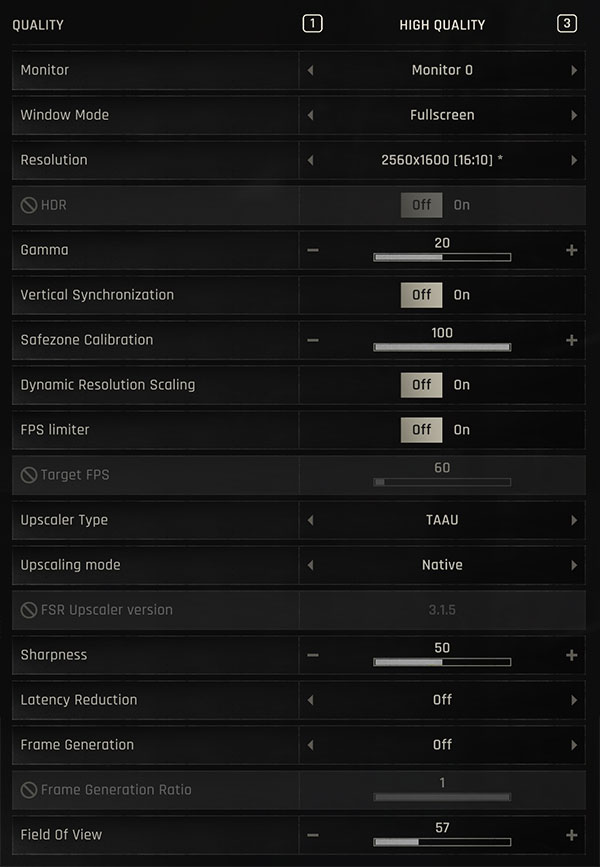
- The first settings screen has mostly monitor related options
- Window mode options are "windowed," "fullscreen" and "borderless"
- The FPS cap can be set anywhere between 30 and 360 FPS
- V-Sync can be disabled completely
- The field of view range goes from 47 to 77 degrees, with the default at 57. I set the FOV to 65 on my PC, but kept it at default on handhelds
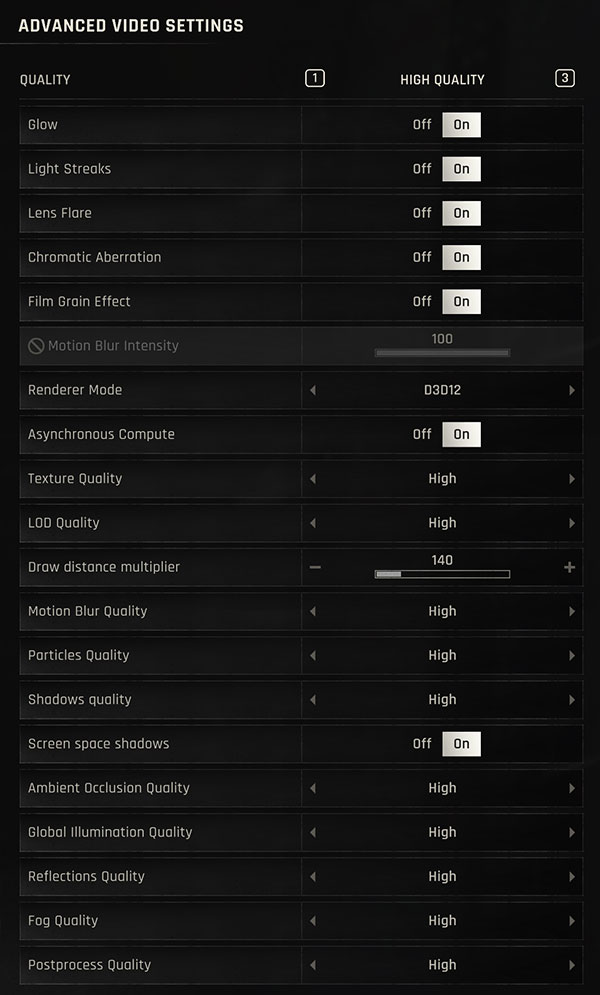
- The second screen called "Advanced" deal with more hardware related settings
- The graphics presets available are "Very Low," "Low," "Medium," and "High," on PC and the ROG Ally X, but on SteamOS you only have one preset called "Performance"
- On SteamOS, the "Performance" preset not only sets upscaling to "Performance," but also enables frame generation, which you can disable
- The game sets upscaler to "Performance" on every preset aside from "High," where it sets it to "Quality," but you can change the quality to "Native"
- Anti-Aliasing cannot be disabled; you can set one of the available upscalers to "Native" and use it as an antialiasing solution
- Upscaling methods available are: "DLSS," "FSR," "TAAU" and "XeSS," with the game supporting FSR 4 out of the box
- The game supports frame generation, and you can change the frame generation ratio if your GPU supports DLSS 4
- There's a decent amount of options to fine tune performance but, as you'll see, "Low" and "Medium" presets perform almost the same
- You can disable motion blur completely, as well as film grain and chromatic aberration
Test Devices

We tested the public Steam release of Dying Light: The Beast. The Steam Deck LCD was running SteamOS version 3.7.13, build 20250630.1. Our ROG Ally X had the latest Armoury Crate version installed at the time of testing (1.6.8.0), along with BIOS 312. The ROG Ally with SteamOS was running SteamOS version 3.7.15, build 20250903.1.
| Gaming Handhelds Used for Testing | |
|---|---|
| Steam Deck LCD | SteamOS version 3.7.13 build 20250630.1 |
| ASUS ROG Ally X | Armoury Crate 1.6.8.0 BIOS 312 GPU driver version: 32.0.21013.11001 Windows 11 Home 24H2 VBS disabled |
| ASUS ROG Ally Z1E with SteamOS | SteamOS version 3.7.15 build 20250903.1 |
Nov 22nd, 2026 18:19 CST
change timezone
Latest GPU Drivers
New Forum Posts
- Increasing Power Limit? (5)
- What are you playing? (26240)
- UPS what one to get? (48)
- Honestly, do you care about GTA VI? (265)
- Your PC ATM (36458)
- Gacha Games - Discussions, Pulls, Updates, etc. (1157)
- Last game you purchased? (1414)
- Making a game in Godot engine (19)
- Intel D270 (5)
- X870E AORUS ELITE WIFI7 thread with setting and OC (69)
Popular Reviews
- Microsoft Surface Laptop Ultra Review - The Next-gen Arm Laptop
- Corsair RM1200e (Second Generation) Review
- Upcoming Hardware Launches 2027 (Updated Nov 2026)
- Pulsar Office Tour & First Look at P1 Dual-Sensor Mouse
- Ugreen NASync DXP4800 GT Review
- AMD Ryzen 7 9800X3D Review - The Best Gaming Processor
- AMD Zen 6 Technical Deep Dive
- AMD Ryzen 7 5800X3D 10th Anniversary Review
- Phantom Blade Zero Performance Benchmark Review - 35 GPUs Tested
- Biwin Black Opal NV7400 2 TB Review
TPU on YouTube
Controversial News Posts
- NVIDIA Co-Founder and CEO Jensen Huang Officially Resigns (492)
- Report: Jensen Huang Eyes NVIDIA Comeback (266)
- Open Letter Asking NVIDIA to Reinstate Jensen Huang Passes 115,000 Signatures (184)
- OpenAI CEO Argues Home PCs Waste the World's Limited DRAM Supply (152)
- NVIDIA Launches Investigation Into Jensen Huang's Relationship With Suspected Chinese Spy (136)
- Intel "Raptor Lake Next" 16-Core and 20-Core CPUs Surface (130)
- NVIDIA GeForce RTX 50-Series Scheduled for up to $500 Price Hike This Week (89)
- Intel Razor Lake Gets a 12 P-Core bLLC Chip With No E-Cores, Per Leak (86)