 5
Endorfy Viro Infra Wireless Review - Win Some, Lose Some
Microphone Performance »Sound Quality
The Endorfy Viro Infra Wireless features a pair of 50 mm dynamic drivers. The specified frequency response spans from 20 Hz to 20 kHz, and the impedance is rated at 16 Ω. There's no companion software and no equalizer, so the only way to shape the sound is the sound profile button on the right ear cup, which switches between two built-in profiles, Gaming Mode and Vocal Mode. According to Endorfy, Gaming Mode emphasizes lower frequencies for more impact, while Vocal Mode brings out the mids and highs for better voice clarity. As mentioned, both profiles are only available in 2.4 GHz and USB mode.For gaming headset frequency response measurements I'm using the miniDSP EARS headphone test fixture, probably the least expensive such device on the market. It consists of two miniDSP UMIK-1 microphones placed inside a pair of silicone ears and affixed to a steel headphone stand. It's a USB-powered device, perfectly integrated with the fantastic Room EQ Wizard (REW) software, which is used for headphone and microphone calibration, as well as doing the measurements themselves. Every single miniDSP EARS unit comes with its own microphone calibration files, which are loaded into REW before doing the measurements. The miniDSP EARS certainly has its quirks. The artificial ear canals aren't particularly deep, so I wouldn't consider it a viable option for IEM testing. The integrated microphones are exceptionally sensitive to headphone positioning, partially because of the screws affixing the silicone ears to the stand, which aren't perfectly flush with the silicone surface. Some users also claim that the fixture is too narrow for very large Hi-fi headphones, so they have to use rubber bands to tighten the clamping force. The latter isn't something I ever had an issue with, though; all my headsets and headphones fit perfectly.
Because of all that, the miniDSP EARS is prone to user error. Whoever is using it has to know how to interpret the results and, even more importantly, how to spot those that are clearly flawed. After getting rid of the bad data, assuming the initial configuration and calibration were done properly, the resulting frequency response measurements are usable and in line with what one would hear from the headphones (or headset) in question. My testing methodology mostly follows the best practices of using the miniDSP EARS as covered in great detail in this article on Headphonesty. The most significant difference is that I'm using the updated HEQ compensation, where a subjectively neutral headphone would measure approximately flat. To compensate for minor seal variances, I'm measuring each ear until I get 10 usable results, and reseat the headphones, or headset, between runs. After I have my results for one ear, I apply a 1/12 octave smoothing and average the measured responses. I then repeat the process for the other ear for an idea of whether any channel imbalance exists. It's important to keep in mind that my results cannot be directly compared to anyone else's, as only an identical methodology conducted on my exact sample of the miniDSP EARS would yield directly comparable results.
For the Endorfy Viro Infra Wireless, I used the supplied 2.4 GHz wireless dongle as the source when doing my frequency response measurements, and measured both sound profiles.
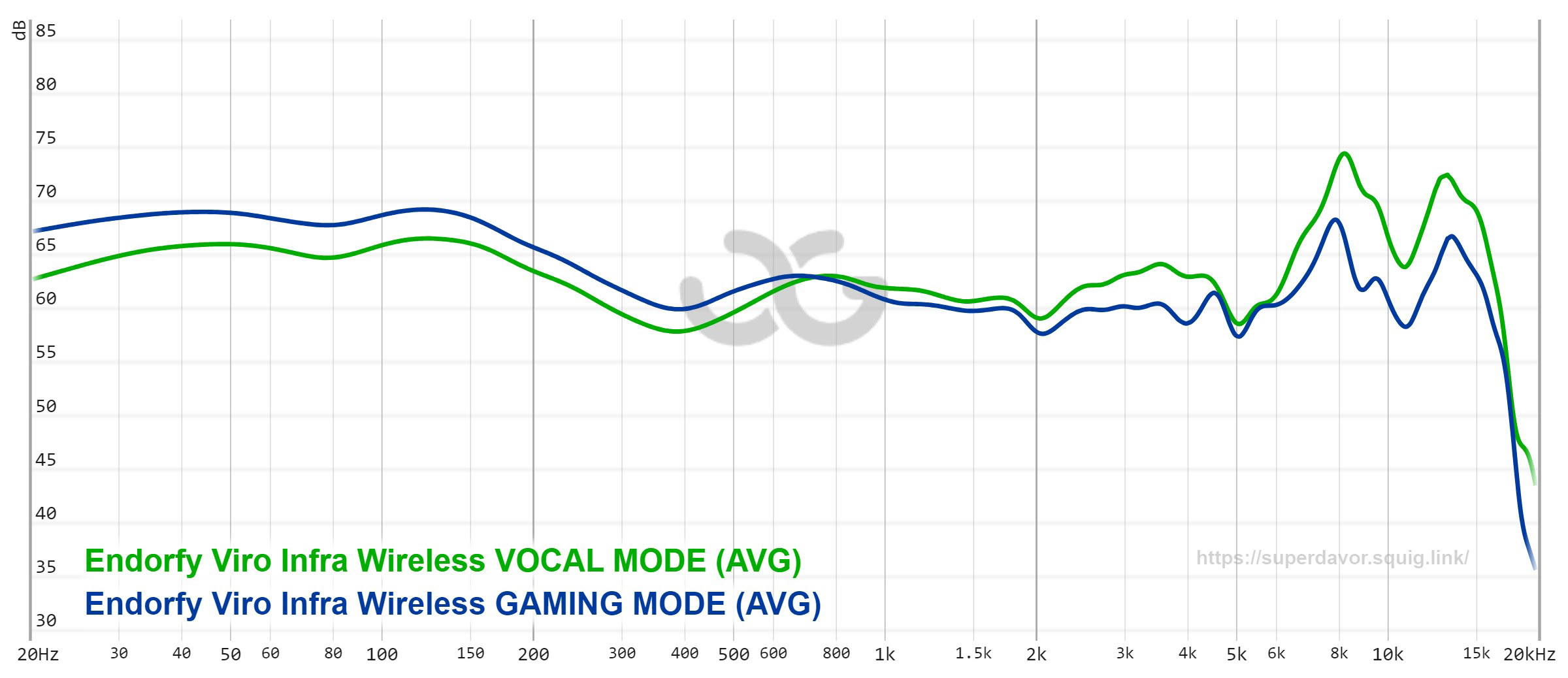
The graph above shows the averaged frequency response of both profiles, and it reveals that the difference between them is less dramatic than their names suggest. The midrange between roughly 600 Hz and 2 kHz is practically identical in both modes. What changes is the balance between the two ends of the spectrum. Compared to Gaming Mode, Vocal Mode lowers the bass by around 3 dB, lifts the upper midrange between 2.5 and 4.5 kHz by a couple of decibels, and adds a lot more energy to the treble, with a peak around 8 kHz that's a good 6 dB higher than in Gaming Mode.
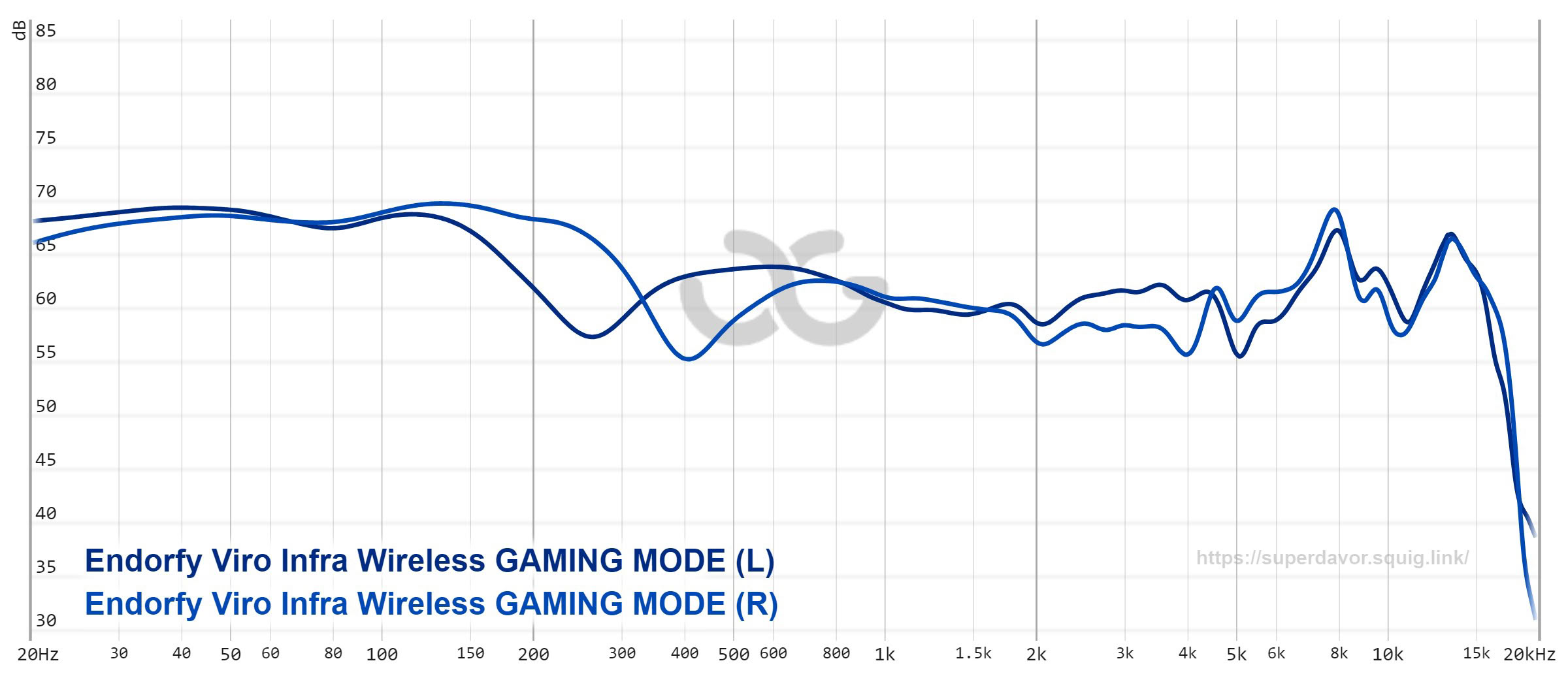
Gaming Mode is built around a thick, extended low end. Unlike the Viro Wireless, whose bass is concentrated in a hump around 100 Hz, the Infra's bass forms a broad shelf that stays roughly 8–9 dB above the midrange all the way from 20 Hz to 150 Hz, so the sub-bass doesn't roll off at all. The result is thick, punchy bass with plenty of rumble in explosions and engine sounds. The problem is everything above it. The response slopes down into the lower midrange, there's a small bump around 600–800 Hz, and the upper midrange stays flat and recessed relative to the bass, with a couple of dips between 4 and 5 kHz. As a result, Gaming Mode sounds congested and boxy in the mids and highs, even muddy at times, as if the sound were coming from behind a curtain. The treble peaks around 8 and 13 kHz add a bit of sparkle, but they can't make up for the missing presence and clarity.
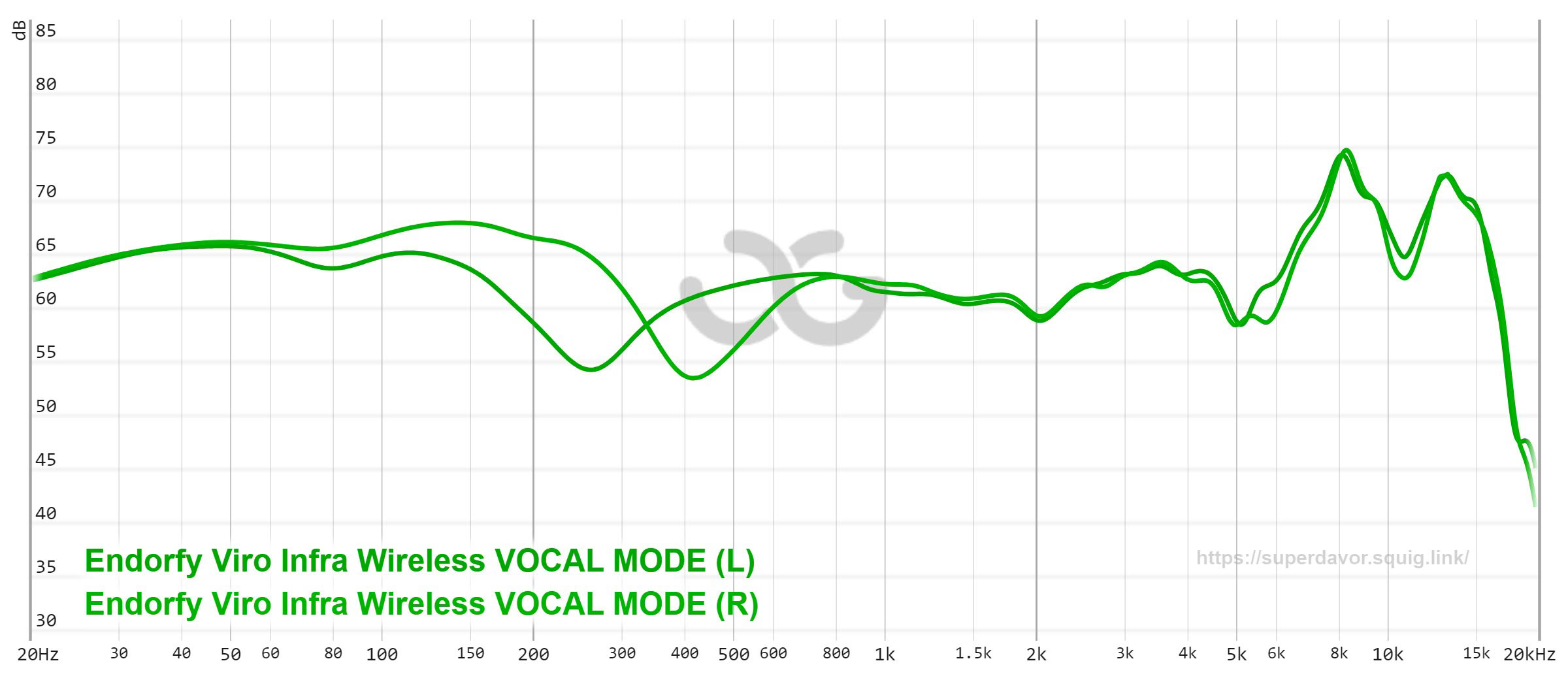
Vocal Mode sounds noticeably more open, which is what you'd expect, given the boost in the upper midrange and treble. Voices are clearer and more articulate, and details are easier to pick out. Unfortunately, Endorfy overdid it. The bass loses its impact, while the treble peak at around 8 kHz—which now sits roughly 12 dB above the midrange—adds too much sparkle. It's intriguing at first, but it quickly becomes fatiguing during longer listening sessions, with cymbals, sibilants and high-frequency sound effects coming across as overly sharp.
Both sets of measurements also show a sizable channel imbalance between roughly 200 and 500 Hz, with the left and right ear cups dipping at different frequencies. I reseated the headset on the test rig numerous times and got virtually identical results each time, so this isn't a matter of a single bad seal. Still, as with the Viro Wireless, it isn't something I was able to pick up with my ears. Since both headsets show an imbalance in the same region, I'm inclined to attribute it to the way these ear cup and earpad shapes interact with the miniDSP EARS fixture, rather than to an actual issue with the headset itself.
In short, neither profile is quite right. Gaming Mode has the bass but severely lacks clarity, while Vocal Mode has the clarity but lacks bass and is too bright for its own good. A third profile somewhere between the two would likely sound much better, but since there's no software and no equalizer, there's no way to fine-tune the sound the way you can with the Viro Wireless. Your only option is to pick the lesser of two evils, or to use an equalizer on your source device, such as Equalizer APO on Windows, or your phone's built-in equalizer.
Nov 14th, 2026 08:35 CST
change timezone
Latest GPU Drivers
New Forum Posts
- No screen and keyboard with mouse not being powered on (6)
- What can the FX 8320 do today? Here is the answer. (4)
- Tell me about your favourite graphics card (48)
- What are you playing? (26219)
- 3D Printer Club (851)
- Folding Pie and Milestones!! (10202)
- a note from zachary85's son (9)
- Have you got pie today? (17083)
- Requesting original VBIOS for Gigabyte RX 5700 XT GAMING OC 8G Rev 2.0 (Micron) (3)
- Unallocated space in ssd , is it normal? (19)
Popular Reviews
- AMD Zen 6 Technical Deep Dive
- Corsair HX1000i Shift Crystal Review
- ASUS ROG Strix B850-I Gaming Wi-Fi7 W Review
- NZXT C1200 Platinum Review
- Upcoming Hardware Launches 2027 (Updated Nov 2026)
- Montech King 95 3D PRO Review
- NZXT H7 RGB+ Review
- NZXT H5 Review
- Phantom Blade Zero Performance Benchmark Review - 35 GPUs Tested
- XPG NIMBUS PLUS Review - Mid-range Chair With Strong Competitors
TPU on YouTube
Controversial News Posts
- NVIDIA Co-Founder and CEO Jensen Huang Officially Resigns (386)
- OpenAI CEO Argues Home PCs Waste the World's Limited DRAM Supply (152)
- NVIDIA Launches Investigation Into Jensen Huang's Relationship With Suspected Chinese Spy (136)
- Intel "Raptor Lake Next" 16-Core and 20-Core CPUs Surface (130)
- Legendary Game Studio BioWare Shuts Down Following EA Layoffs (104)
- Dell CEO Says the Memory Shortage Will Get Worse in 2027 (95)
- NVIDIA GeForce RTX 50-Series Scheduled for up to $500 Price Hike This Week (89)
- Modder Fits RTX 5090 With Four 8-Pin Connectors, Halving Current per Wire (80)