 4
Endorfy Viro Wireless Review - Forget the Charger
Sound Quality »Viro Studio
Viro Studio is Endorfy's companion application for the Viro Wireless, and there are two important caveats right off the bat: it's available for Windows only, and it works only while the headset is connected via the 2.4 GHz dongle. In Bluetooth and analog mode, you're on your own. The application is built around C-Media's Xear audio suite, which will look familiar to anyone who's used a budget-to-midrange USB headset in the past decade.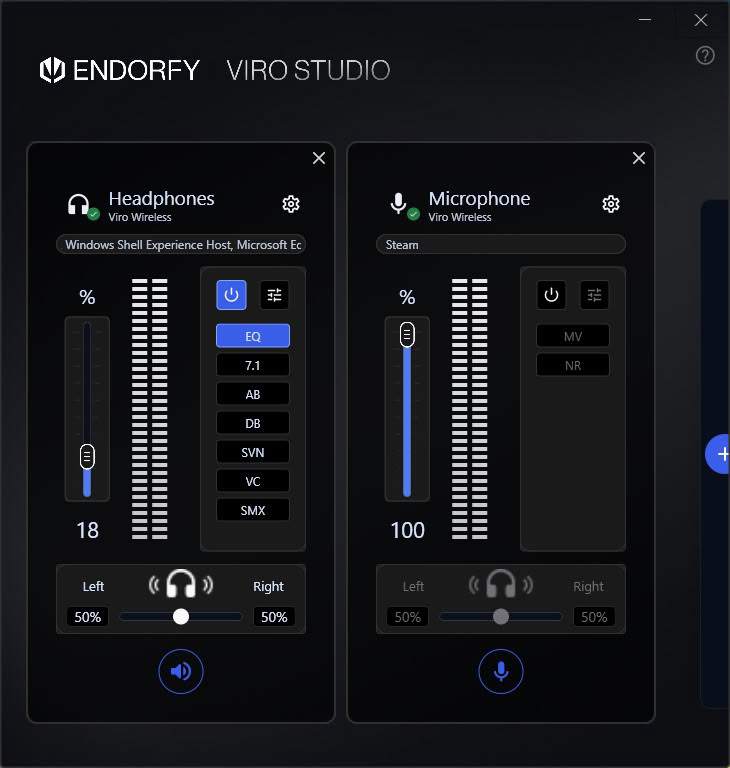
At first glance, Viro Studio looks rather minimalist. The main window is split into two panels, one for the headphones and one for the microphone. Each has its own volume slider with a level meter, a left/right balance slider and a column of buttons for enabling individual audio effects. The effect names are abbreviated into cryptic two- or three-letter labels (EQ, 7.1, AB, DB, SVN, VC, SMX for the headphones; MV and NR for the microphone), so expect a bit of trial and error before you figure out what's what.
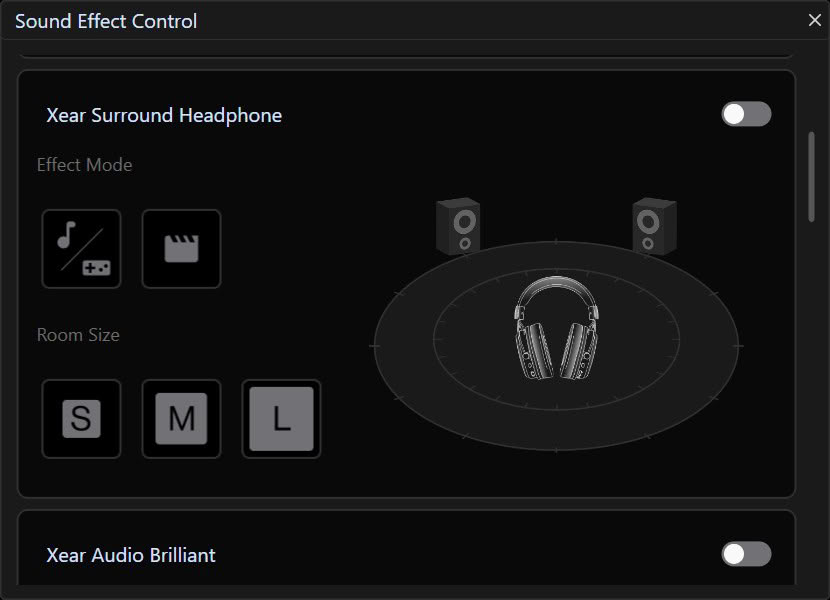
The Xear Surround Headphone effect adds virtual 7.1 surround sound, with two effect modes (music/gaming and movie) and three virtual room sizes (S, M and L). Regardless of the combination, I don't recommend using it. The effect sounds cheap and artificial, pushing sound sources further away and robbing the Viro Wireless of the directness and clarity it has in stereo mode.
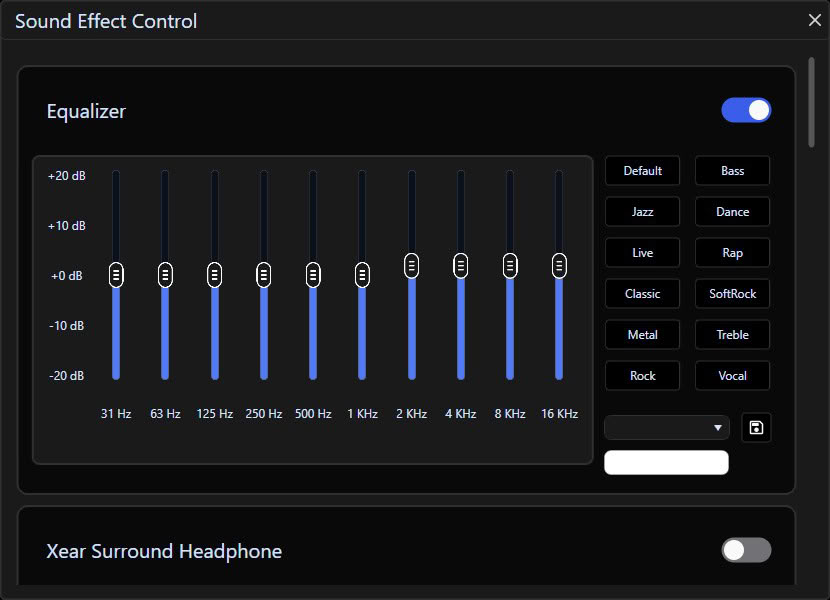
The equalizer offers ten bands, from 31 Hz to 16 kHz, with a range of ±20 dB, along with a dozen presets such as Bass, Treble, Rock, Jazz, Dance and Vocal. The presets are useless. They're tuned so aggressively that Bass turns everything into a muddy rumble with no treble to speak of, while Treble strips away almost all the low end. In short, each of them does terrible things to the Viro Wireless' output in its own way. The equalizer itself, however, is genuinely useful—you just have to make your own adjustments, and keep them smaller than you otherwise would. I'd consider anything beyond ±3 dB in any part of the frequency range overkill. Custom settings can be saved as your own profile, and I'll go into more detail on the one I used to get the most out of the Viro Wireless in the sound quality section of this review.
The remaining effects are mostly best left alone. Audio Brilliant (AB) improves clarity in the treble and upper midrange, and it's the only one I'd consider keeping enabled, albeit at the risk of listening fatigue. If you start to notice any, switch it off. Dynamic Bass (DB) turns the bass into a hot mess, Smart Volume (SVN) normalizes loudness by automatically raising quiet passages and taming loud ones (which I'd advise against), and Voice Clarity (VC) brings dialogue forward, but introduces artifacts in the process. Surround Max (SMX) is an upmixer that copies the front stereo channels to all virtual channels, which slightly reduces detail and directionality, so I can't recommend it either.
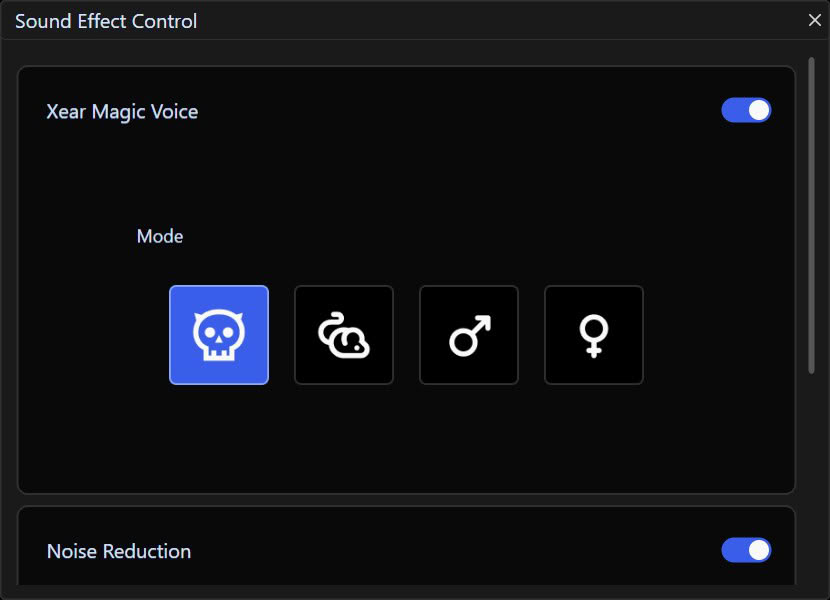
The microphone panel contains two effects. NR is the noise reduction, which can also be toggled directly on the headset with a double press of the microphone button, but the application additionally lets you adjust its strength. MV is a voice changer with presets that make you sound like a monster, a mouse, or a more masculine or feminine version of yourself. It's good for a laugh or two, but the quality of the effects is mediocre at best.
What Viro Studio doesn't have is just as telling. There's no battery level indicator, no sidetone control, and no option to remap the headset's controls. The battery indicator in particular is a glaring omission, given that there's no other way to check the battery level while connected via 2.4 GHz.
Nov 20th, 2026 16:37 PST
change timezone
Latest GPU Drivers
New Forum Posts
- Without Jensen, PC gaming will be (51)
- WarpCoreBench scores! (86)
- Honestly, do you care about GTA VI? (213)
- What's your latest tech Freebie? (80)
- Nvidia GPU undervolting via MVolt+? (0)
- How to prevent OLED burn damage due to PC freezes or power outtages? (49)
- RX 9000 series GPU Owners Club (2249)
- Logitech Headsets Modded Driver — Unlock Dolby in G HUB (23)
- 1 - 5 person file storage server equivalent accasible from anywhere + general VM server. (1)
- When you could finally run Crysis maxed out? (63)
Popular Reviews
- Microsoft Surface Laptop Ultra Review - The Next-gen Arm Laptop
- Ugreen NASync DXP4800 GT Review
- Corsair RM1200e (Second Generation) Review
- Pulsar Office Tour & First Look at P1 Dual-Sensor Mouse
- Upcoming Hardware Launches 2027 (Updated Nov 2026)
- Acemagic Retro X3 Review
- Biwin Black Opal NV7400 2 TB Review
- AMD Ryzen 7 9800X3D Review - The Best Gaming Processor
- AMD Zen 6 Technical Deep Dive
- Chieftec Iceberg PRO 360 DARK Review
TPU on YouTube
Controversial News Posts
- NVIDIA Co-Founder and CEO Jensen Huang Officially Resigns (491)
- Report: Jensen Huang Eyes NVIDIA Comeback (256)
- Open Letter Asking NVIDIA to Reinstate Jensen Huang Passes 115,000 Signatures (184)
- OpenAI CEO Argues Home PCs Waste the World's Limited DRAM Supply (152)
- NVIDIA Launches Investigation Into Jensen Huang's Relationship With Suspected Chinese Spy (136)
- Intel "Raptor Lake Next" 16-Core and 20-Core CPUs Surface (130)
- Legendary Game Studio BioWare Shuts Down Following EA Layoffs (104)
- NVIDIA GeForce RTX 50-Series Scheduled for up to $500 Price Hike This Week (89)