 3
FiiO BTR5 Portable High-Fidelity Bluetooth Amplifier Review
Value & Conclusion »Wired Experience

After that rather long page we just went through, I am happy to report that this one will be quite long, too. Yes, I know it is weird to be happy about, but the way I am looking at it is that FiiO has not forgotten about USB wired mode, either. It is of course as simple as plugging the device into the source using the provided USB Type-C to Type-A cable for a PC/laptop, or even using a Type-C to Type-C/Lighting OTG cable for a mobile device. You might as well update the firmware of the BTR5 at this point if there is an update available by navigating to this page that goes over it in detail. But of interest to audiophiles will be the ASIO (audio stream input/output) drivers, with the installer available here. The latest version of these Windows USB drivers at the time of testing was 4.47.0, and these allow you to make the most of the device in wired mode since the Windows audio drivers are often more miss than hit. Even the universal ones can only do so much for a standalone DAC SoC system as employed here. The installer is just 2.3 MB, and as seen above, installation is straightforward. It is best to have the BTR5 connected to the PC already, which has the installer prompt you to disconnect and re-connect the BTR5 to finish the process. Taking up all of 4.5 MB on the system, it is also extremely lightweight on all system resources.

An online guide goes over the installation and setup of the generic FiiO USB DAC drivers for Windows, but as you can see above, it is nowhere as involved as the mobile app. Just be sure to set the format to 32-bit and choose the ASIO buffer size that suits your latency requirements, and that's about it.
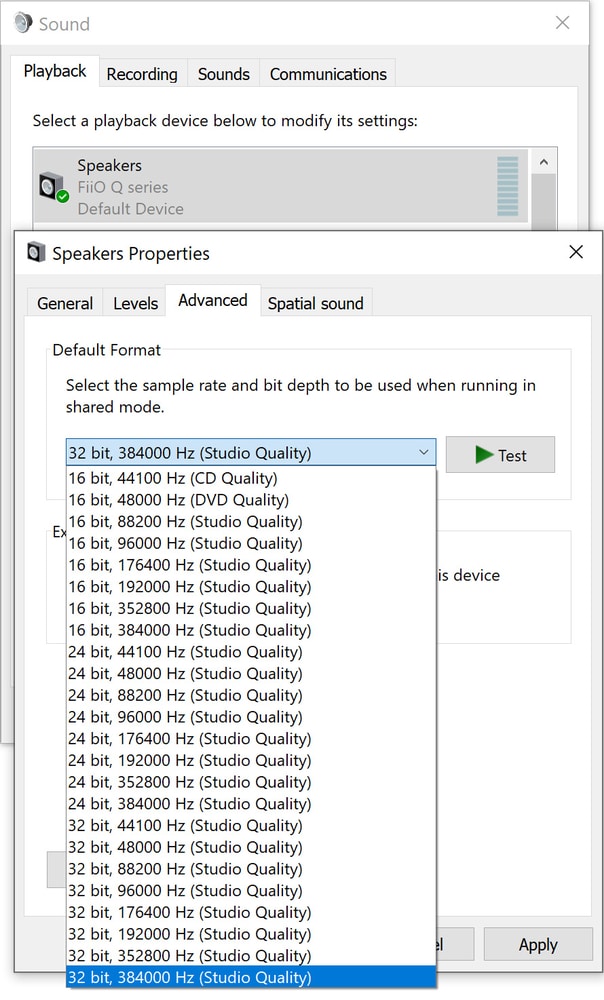

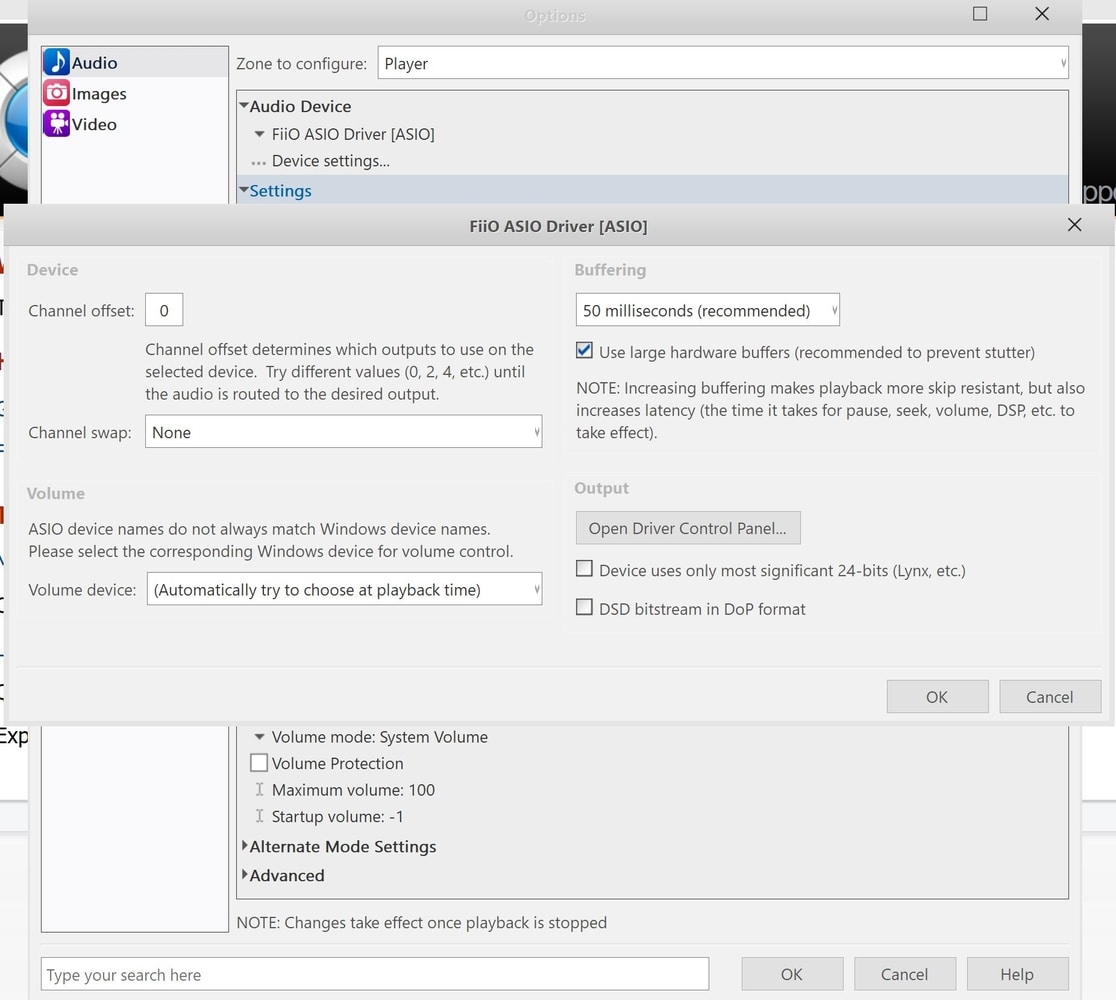
What it then does is create a new output device in Windows called FiiO Q series you want to set as the default before configuring the playback rate to the 32-bit, 384 kHz rate the ESS Sabre DACs onboard can handle, supported by an XMOS XUF208 USB microcontroller/decoder with asynchronous USB Audio Class 2.0 decoding. With that done, go to your media player of choice, and I demonstrated above with JRiver and set the audio player to the same output. At this point, you can implement further tweaks, but this is player dependent, so I will not talk about it too much and just allow the photos above to speak for themselves. I also deliberately choose the ASIO driver as the output to show its options, but of course go back to the FiiO Q series output to have the BTR5 running properly in USB DAC mode.
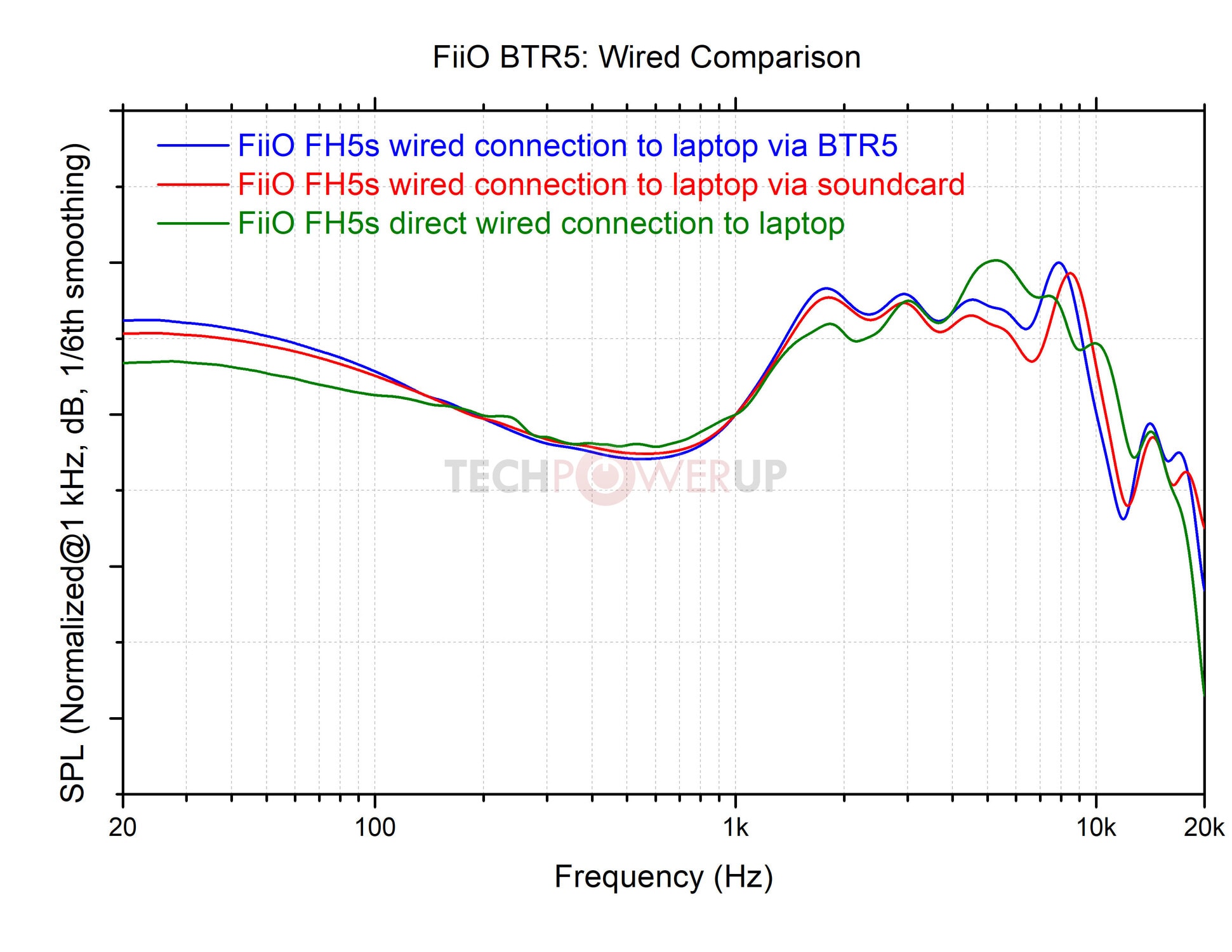
The V-shaped signature boost is even more pronounced here, and I will say it is probably also what LDAC mode felt like. I did notice the elevated sub-bass first, which on the FH5s was probably needed even with the switches for more customization. This is a solid-state amp that adds slight warmth to your audio, but more importantly makes for an incredibly good listening experience. FLAC files are best used to take advantage of the high sampling rate, with some details retrieved that I was not anticipating from this tiny thing. This absolutely is better at even the stereo output of the FiiO E17 Alpen, which the frequency response curve does not reflect, and best paired with balanced IEMs and headphones that have the range across the mids and highs to account for the slight shift, with more V-shaped IEMs, such as the Tripowin TC-01, ending up a slight nightmare for me personally.
The ThieAudio Monarch was another excellent pairing, as was the Audeze LCD-2 Classic with an EQ profile. I am never going to use the Audeze cans wirelessly because it weighs almost thirteen times as much as the FiiO BTR5, but it is certainly driven quite well by it. Vocal separation is the strong point here, and I will once again bring back wireless mode by saying LDAC came real close, as are instrument separation and imaging. Notice that the treble range gets a slight lift, with the airy response increasing the soundstage somewhat, too. So expect increased detail and tonal separation across the board, with better resolution and imaging in a few regions to suit music genres that have a good mixture of vocals and instruments alike.
Nov 17th, 2026 17:16 CST
change timezone
Latest GPU Drivers
New Forum Posts
- 9070 GRE 3.9ghz validation reached. (18)
- [testers wanted] Qsurfer My own QNAP Nas explorer/Search tool (6)
- Honestly, do you care about GTA VI? (129)
- Help with fixing Overclock (7)
- Local LLM General Discussion (692)
- ProArt X870E-CREATOR WIFI - Bifurcation~Complication (13)
- Last game you purchased? (1403)
- Without Jensen, PC gaming will be (33)
- [Poll] 12V-2x6 Connector Protection: What Are You Using? (WireView / Ampinel / Equalizer / Other / Nothing) (27)
- What is the latest game you finished or 100% (204)
Popular Reviews
- Acemagic Retro X3 Review
- Corsair HX1000i Shift Crystal Review
- Upcoming Hardware Launches 2027 (Updated Nov 2026)
- AMD Zen 6 Technical Deep Dive
- ASUS ROG Strix B850-I Gaming Wi-Fi7 W Review
- AMD Ryzen 7 9800X3D Review - The Best Gaming Processor
- Phantom Blade Zero Performance Benchmark Review - 35 GPUs Tested
- Chieftec Iceberg PRO 360 DARK Review
- Montech King 95 3D PRO Review
- NZXT C1200 Platinum Review
TPU on YouTube
Controversial News Posts
- NVIDIA Co-Founder and CEO Jensen Huang Officially Resigns (457)
- Open Letter Asking NVIDIA to Reinstate Jensen Huang Passes 115,000 Signatures (184)
- OpenAI CEO Argues Home PCs Waste the World's Limited DRAM Supply (152)
- NVIDIA Launches Investigation Into Jensen Huang's Relationship With Suspected Chinese Spy (136)
- Report: Jensen Huang Eyes NVIDIA Comeback (135)
- Intel "Raptor Lake Next" 16-Core and 20-Core CPUs Surface (130)
- Legendary Game Studio BioWare Shuts Down Following EA Layoffs (104)
- Dell CEO Says the Memory Shortage Will Get Worse in 2027 (95)