 3
G-Wolves HTM Plus Review
(3 Comments) »Value and Conclusion
- The G-Wolves HTM Plus is available for $149.00.
- True 8000 Hz polling
- Ultra-low click latency
- Excellent sensor performance
- Very high button quality
- Good scroll wheel
- Good choice of components
- Lightweight
- Nicely gliding mouse feet
- Full software customizability
- Sets of replacement feet included
- Set of grip tape included
- Pricey
- Included cables are either too short or too stiff
- Web driver not available as standalone app
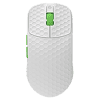
Nominally, the HTM Plus belongs to the Hati-S series of shapes, and while it end up being larger than any Hati-S, the HTM Plus deviates in several key aspects. Being much longer, the HTM Plus also isn't as tall as the classic Hati-S, bringing it closer to an entirely different shape from a different manufacturer, namely the ASUS ROG Harpe Ace Aim Lab Edition. Where these two mice differ fundamentally, however, is the weight. At 36 g, the HTM Plus weighs 18 g less, yet still retains a solid top shell. As with previous G-Wolves mice, this is made possible by the PCB having been extended such that it supports the shell, which is why there is no creaking or flexing of the shell when applying lateral pressure despite the lack of a proper bottom shell, and the side buttons cannot be actuated by pressing below them, either. As there is no rattle when shaking the mouse, either, the build of the HTM Plus is remarkably solid overall. The only build-related flaw I could find was that upon pressing the scroll wheel switch while the mouse is stationary, the cursor will go down and right due to the pressure exerted upon the PCBA.
The HTM Plus comes with a new feature, although this one is already familiar from a different manufacturer. Much like the OP1 8K and other mice from Endgame Gear, the HTM Plus implements a different switch type, which have a top contact in addition to the usual bottom contact. Such switches are called SPDT (single-pole, double throw), and since these aren't too common, G-Wolves had a custom SPDT switch requested from Huano. With SPDT mode enabled, a click will already be registered upon the top contact being opened instead of having to wait for the bottom contact to close, reducing physical latency in the process. In my testing, enabling SPDT mode reduces physical latency by 1.36 ms, which is highly substantial. At 8000 Hz, the HTM Plus already has among the lowest click latency at 0.3 ms in wireless operation and at 0.1 ms in wired operation when using the lowest debounce time setting, and by enabling SPDT mode, one can cut down on physical latency even further.
In terms of button response, these switches also do well. On the left main button, pre-travel is low and post-travel low to moderate, whereas on the right one, pre-travel is moderate to high and post-travel moderate. Button response is rather firm and snappy nevertheless, and lateral movement can only be provoked to a very low degree. The side buttons have been outfitted with Omron D2LS-21 switches, which are surface-mounted and familiar from the G-Wolves HTX Mini 8K. Pre- and post-travel are low on the forward button, but the back button has moderate post-travel accompanied by uneven actuation and lackluster feedback. For the scroll wheel, G-Wolves once again opted for a TTC "Gold" encoder (blue/yellow core) in the 9 mm size. I've found that this encoder has quite a bit of unit-to-unit variance, and the one on my sample seems to be no exception to this rule. In this case, scrolling up in particular is noisy, and tactility is merely above average, with the individual steps being reasonably well-separated. Much like on previous G-Wolves releases, the bottom (what little there is) lacks indents for feet, allowing one to apply feet of non-default sizes and shapes. Aside from the feet installed by default, no less than three sets of fitted feet are included with the mouse, along with one set of dots. They're all made of pure PTFE, and glide very well. On first-batch units, the feet are also thicker than average, whereas later batches will revert to standard thickness. Of note is that due to the lack of a bottom, the HTM Plus lacks a sensor ring entirely, which isn't necessarily an issue, but having one would probably be better for users of soft mats in particular.
The HTM Plus combines PixArt's latest PAW3950 sensor with the latest Nordic nRF54L15 MCU. The biggest benefit brought by the 54 series MCUs from Nordic is lower power draw, resulting in far improved battery life. To enable polling rates of above 1000 Hz not just in wireless, but in wired operation as well, the HTM Plus furthermore comes with a USB high-speed MCU on the mouse PCBA, too. In terms of performance, the HTM Plus does admirably. There is no CPI deviation whatsoever. Unlike on the recent G-Wolves mice using the older nRF52840 chipset, polling stability is flawless on the HTM Plus, with no polls being missed at any polling rate, be it wired or wireless, and the target interval is averaged on the dot throughout. An interesting and somewhat peculiar difference exists when compared to previous nRF52840 mice from G-Wolves, however. On those, motion delay was the same regardless of polling rate, provided that sensor run mode had been set to corded. On the HTM Plus, on the other hand, the lowest motion delay indeed is only achieved at 8000 Hz, with lower polling rates scaling accordingly. In wired operation at 8000 Hz, the HTM Plus attains a lead of 1.2 ms over the G403 (control subject) without MotionSync, and a lead of 1.0 ms without MotionSync in wireless operation at 8000 Hz, placing the HTM Plus in the upper echelon in terms of latency. The "competitive mode" toggle works identically to previous G-Wolves releases. When enabled, it sets sensor run mode to corded and the sensor framerate to its maximum value, prioritizing performance over battery life. At polling rates of 2000 Hz and higher, corded mode is already enabled by default, which is why only sensor framerate is set to its maximum value.
G-Wolves does not cite any battery life numbers. The software features a percentage-based battery life indicator using single-digit increments, which isn't particularly reliable or accurate, but at least sufficiently so to allow giving a rough estimate. For every two and a half hours of usage at 8000 Hz with competitive mode enabled, the indicator went down by 10%, suggesting an expected battery life of around 25 hours at 8000 Hz, and presumably in the range of 100 hours at 1000 Hz. Accordingly, compared to previous nRF52840-equipped G-Wolves releases, the Nordic 54 series MCU used on the G-Wolves indeed improves battery life greatly, all while using a slightly smaller-capacity battery at 220 mAh. Charging isn't all that speedy on the HTM Plus, but decent enough, though playing while charging won't be an option with the included cables anyway. The first one isn't all that flexible to begin with, but more importantly seriously short at 1.25 m, whereas the second one is a bit longer at 1.45 m yet even stiffer. As such, it is best to keep the HTM Plus charged at all times to minimize forced downtime.
As with other recent G-Wolves releases, configuration on the HTM Plus is done through a web driver. Due to using WebHID, this will only work in Chromium-based browsers such as Chromium or Edge. Hence, for those not already using these browsers, being directed towards a web driver requires installing an additional browser, which of course comes with its own resource footprint, much like standalone peripheral software would. In addition, if G-Wolves were to go defunct, or decide to no longer host the web driver, configuration would become impossible, as a local copy unfortunately won't work. This is doubly problematic in that the HTM Plus doesn't even have a CPI button, so even something basic as changing CPI requires using software. As such, I consider the exclusive web driver a step back compared to the previous standalone application featured with earlier G-Wolves mice, and would welcome if G-Wolves would also release a desktop version of their web driver in the future. As for the driver itself, I couldn't find any bugs, and all the relevant options are present. The issue where setting changes could still be made after the mouse has entered sleep mode has been addressed, and the only remaining oddity is that any adjustment to the debounce settings will only take effect after the mouse has been lifted and reset once.
At $149.00, the HTM Plus is not a bargain. At the same time, it is easily one of the more feature-complete mice currently available: sub-40 g weight at a large size, SPDT mode for the main buttons for nearly unparalleled click latency, latest Nordic 54 series MCU for higher battery life, and excellent performance across the board. Direct competitors include the ASUS ROG Harpe II Ace, which cannot compete in terms of weight, lacks SPDT mode, and is even pricier at $169.99, and the Endgame Gear XM2w 4K V2, which weighs far more and comes with an older Nordic 52 series MCU, albeit at a lower price of $119.99. Accordingly, while expensive on its own, the HTM Plus is priced quite reasonably relative to its competition, and earns our Recommended award.

The HTM Plus comes with a new feature, although this one is already familiar from a different manufacturer. Much like the OP1 8K and other mice from Endgame Gear, the HTM Plus implements a different switch type, which have a top contact in addition to the usual bottom contact. Such switches are called SPDT (single-pole, double throw), and since these aren't too common, G-Wolves had a custom SPDT switch requested from Huano. With SPDT mode enabled, a click will already be registered upon the top contact being opened instead of having to wait for the bottom contact to close, reducing physical latency in the process. In my testing, enabling SPDT mode reduces physical latency by 1.36 ms, which is highly substantial. At 8000 Hz, the HTM Plus already has among the lowest click latency at 0.3 ms in wireless operation and at 0.1 ms in wired operation when using the lowest debounce time setting, and by enabling SPDT mode, one can cut down on physical latency even further.
In terms of button response, these switches also do well. On the left main button, pre-travel is low and post-travel low to moderate, whereas on the right one, pre-travel is moderate to high and post-travel moderate. Button response is rather firm and snappy nevertheless, and lateral movement can only be provoked to a very low degree. The side buttons have been outfitted with Omron D2LS-21 switches, which are surface-mounted and familiar from the G-Wolves HTX Mini 8K. Pre- and post-travel are low on the forward button, but the back button has moderate post-travel accompanied by uneven actuation and lackluster feedback. For the scroll wheel, G-Wolves once again opted for a TTC "Gold" encoder (blue/yellow core) in the 9 mm size. I've found that this encoder has quite a bit of unit-to-unit variance, and the one on my sample seems to be no exception to this rule. In this case, scrolling up in particular is noisy, and tactility is merely above average, with the individual steps being reasonably well-separated. Much like on previous G-Wolves releases, the bottom (what little there is) lacks indents for feet, allowing one to apply feet of non-default sizes and shapes. Aside from the feet installed by default, no less than three sets of fitted feet are included with the mouse, along with one set of dots. They're all made of pure PTFE, and glide very well. On first-batch units, the feet are also thicker than average, whereas later batches will revert to standard thickness. Of note is that due to the lack of a bottom, the HTM Plus lacks a sensor ring entirely, which isn't necessarily an issue, but having one would probably be better for users of soft mats in particular.
The HTM Plus combines PixArt's latest PAW3950 sensor with the latest Nordic nRF54L15 MCU. The biggest benefit brought by the 54 series MCUs from Nordic is lower power draw, resulting in far improved battery life. To enable polling rates of above 1000 Hz not just in wireless, but in wired operation as well, the HTM Plus furthermore comes with a USB high-speed MCU on the mouse PCBA, too. In terms of performance, the HTM Plus does admirably. There is no CPI deviation whatsoever. Unlike on the recent G-Wolves mice using the older nRF52840 chipset, polling stability is flawless on the HTM Plus, with no polls being missed at any polling rate, be it wired or wireless, and the target interval is averaged on the dot throughout. An interesting and somewhat peculiar difference exists when compared to previous nRF52840 mice from G-Wolves, however. On those, motion delay was the same regardless of polling rate, provided that sensor run mode had been set to corded. On the HTM Plus, on the other hand, the lowest motion delay indeed is only achieved at 8000 Hz, with lower polling rates scaling accordingly. In wired operation at 8000 Hz, the HTM Plus attains a lead of 1.2 ms over the G403 (control subject) without MotionSync, and a lead of 1.0 ms without MotionSync in wireless operation at 8000 Hz, placing the HTM Plus in the upper echelon in terms of latency. The "competitive mode" toggle works identically to previous G-Wolves releases. When enabled, it sets sensor run mode to corded and the sensor framerate to its maximum value, prioritizing performance over battery life. At polling rates of 2000 Hz and higher, corded mode is already enabled by default, which is why only sensor framerate is set to its maximum value.
G-Wolves does not cite any battery life numbers. The software features a percentage-based battery life indicator using single-digit increments, which isn't particularly reliable or accurate, but at least sufficiently so to allow giving a rough estimate. For every two and a half hours of usage at 8000 Hz with competitive mode enabled, the indicator went down by 10%, suggesting an expected battery life of around 25 hours at 8000 Hz, and presumably in the range of 100 hours at 1000 Hz. Accordingly, compared to previous nRF52840-equipped G-Wolves releases, the Nordic 54 series MCU used on the G-Wolves indeed improves battery life greatly, all while using a slightly smaller-capacity battery at 220 mAh. Charging isn't all that speedy on the HTM Plus, but decent enough, though playing while charging won't be an option with the included cables anyway. The first one isn't all that flexible to begin with, but more importantly seriously short at 1.25 m, whereas the second one is a bit longer at 1.45 m yet even stiffer. As such, it is best to keep the HTM Plus charged at all times to minimize forced downtime.
As with other recent G-Wolves releases, configuration on the HTM Plus is done through a web driver. Due to using WebHID, this will only work in Chromium-based browsers such as Chromium or Edge. Hence, for those not already using these browsers, being directed towards a web driver requires installing an additional browser, which of course comes with its own resource footprint, much like standalone peripheral software would. In addition, if G-Wolves were to go defunct, or decide to no longer host the web driver, configuration would become impossible, as a local copy unfortunately won't work. This is doubly problematic in that the HTM Plus doesn't even have a CPI button, so even something basic as changing CPI requires using software. As such, I consider the exclusive web driver a step back compared to the previous standalone application featured with earlier G-Wolves mice, and would welcome if G-Wolves would also release a desktop version of their web driver in the future. As for the driver itself, I couldn't find any bugs, and all the relevant options are present. The issue where setting changes could still be made after the mouse has entered sleep mode has been addressed, and the only remaining oddity is that any adjustment to the debounce settings will only take effect after the mouse has been lifted and reset once.
At $149.00, the HTM Plus is not a bargain. At the same time, it is easily one of the more feature-complete mice currently available: sub-40 g weight at a large size, SPDT mode for the main buttons for nearly unparalleled click latency, latest Nordic 54 series MCU for higher battery life, and excellent performance across the board. Direct competitors include the ASUS ROG Harpe II Ace, which cannot compete in terms of weight, lacks SPDT mode, and is even pricier at $169.99, and the Endgame Gear XM2w 4K V2, which weighs far more and comes with an older Nordic 52 series MCU, albeit at a lower price of $119.99. Accordingly, while expensive on its own, the HTM Plus is priced quite reasonably relative to its competition, and earns our Recommended award.
Nov 20th, 2026 15:15 PST
change timezone
Latest GPU Drivers
New Forum Posts
- WarpCoreBench scores! (82)
- RX 9000 series GPU Owners Club (2248)
- Honestly, do you care about GTA VI? (209)
- Logitech Headsets Modded Driver — Unlock Dolby in G HUB (23)
- 1 - 5 person file storage server equivalent accasible from anywhere + general VM server. (1)
- How to prevent OLED burn damage due to PC freezes or power outtages? (48)
- When you could finally run Crysis maxed out? (63)
- GTA VI (20)
- Anthrophics IPO (25)
- GeekMagic Ultra Smart WiFi Weather Station (8)
Popular Reviews
- AMD Zen 6 Technical Deep Dive
- Microsoft Surface Laptop Ultra Review - The Next-gen Arm Laptop
- Ugreen NASync DXP4800 GT Review
- Corsair RM1200e (Second Generation) Review
- Acemagic Retro X3 Review
- Upcoming Hardware Launches 2027 (Updated Nov 2026)
- Pulsar Office Tour & First Look at P1 Dual-Sensor Mouse
- Biwin Black Opal NV7400 2 TB Review
- AMD Ryzen 7 9800X3D Memory Performance Scaling
- AMD Ryzen 7 9800X3D Review - The Best Gaming Processor
TPU on YouTube
Controversial News Posts
- NVIDIA Co-Founder and CEO Jensen Huang Officially Resigns (490)
- Report: Jensen Huang Eyes NVIDIA Comeback (256)
- Open Letter Asking NVIDIA to Reinstate Jensen Huang Passes 115,000 Signatures (184)
- OpenAI CEO Argues Home PCs Waste the World's Limited DRAM Supply (152)
- NVIDIA Launches Investigation Into Jensen Huang's Relationship With Suspected Chinese Spy (136)
- Intel "Raptor Lake Next" 16-Core and 20-Core CPUs Surface (130)
- Legendary Game Studio BioWare Shuts Down Following EA Layoffs (104)
- Dell CEO Says the Memory Shortage Will Get Worse in 2027 (95)