 5
G-Wolves Lycan Review
Value & Conclusion »Software
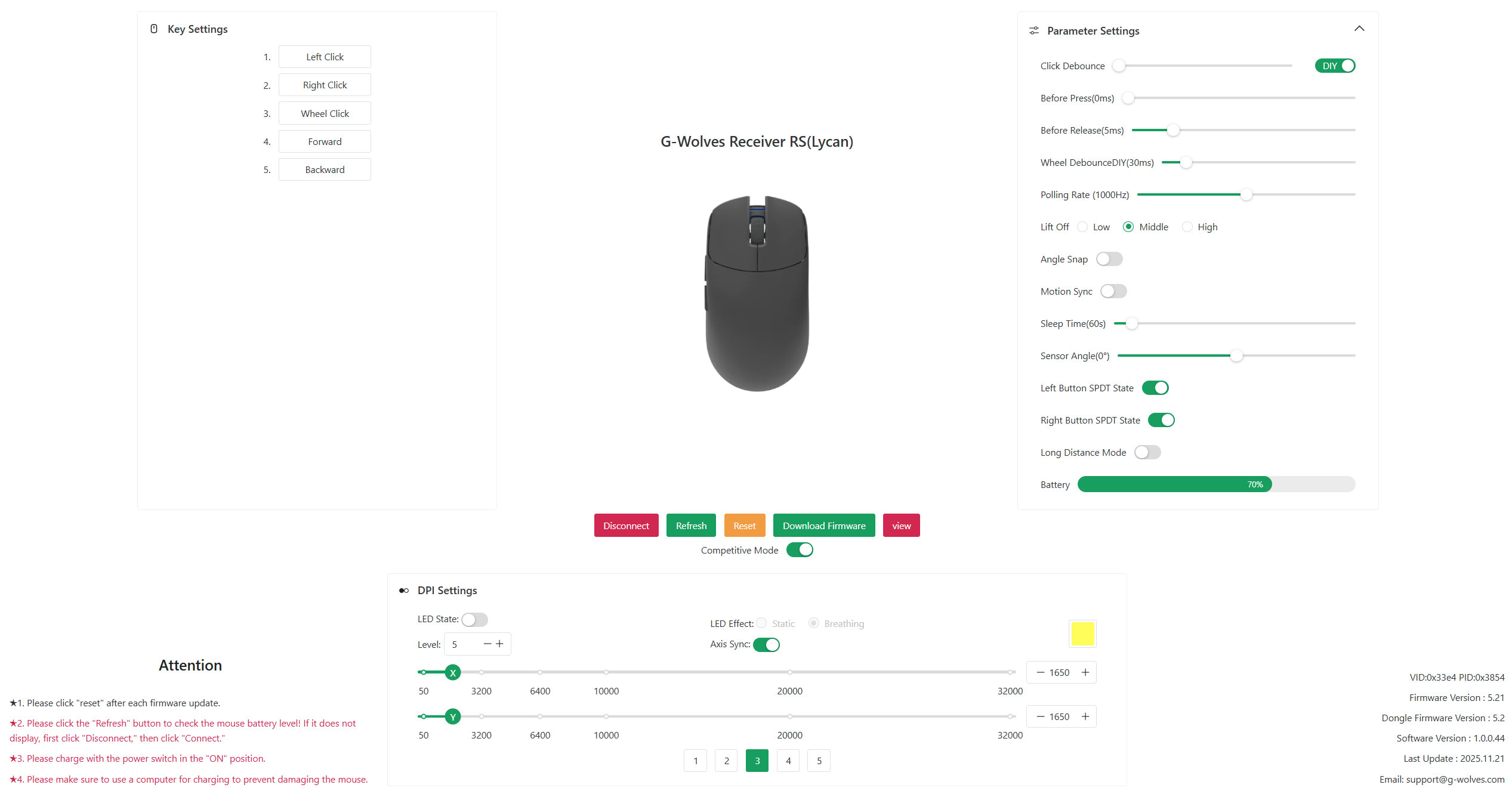
On the Lycan, configuration is possible only through a web driver, which connects through WebHID and therefore will—at least as of now—only work on Chromium-based browsers such as Chrome or Edge.
All options are distributed across a single page. The settings include button remapping to mouse, keyboard, media, and macro functions. CPI adjustment is possible for up to seven color-coded levels, at a range of 50 to 32,000 in increments of 50, and x- and y-axis values may be set independently. Polling rate can be set to 125, 250, 500, or 1000, 2000, 4000, or 8000 Hz. Competitive mode may be enabled, which sets sensor run mode to corded and the sensor framerate to its maximum possible value for polling rates of 1000 Hz and under, and sets the sensor framerate to its maximum possible value for polling rates of 2000 Hz and above. Further settings include lift-off distance (low/middle/high) and angle snapping (on/off). MotionSync synchronizes SPI reads with USB polls, albeit at the cost of up to an entire interval of added motion delay. Sleep time defines after how much idle time the mouse enters sleep mode, and can be adjusted between 30 and 600 seconds. The sensor angle may be adjusted from -30° to 30°, in increments of 1°. Debounce time may be adjusted for both clicks and the scroll wheel, and by enabling "DIY" mode, even more fine-grained adjustment is possible, such as defining debounce time separately for before press or release. In addition, SPDT may be enabled, which is short for "single-pole, double-throw," and will lower physical click latency by virtue of a click already being registered upon the top contact being opened instead of having to wait for the bottom contact to close. "Long Distance Mode" supposedly boosts antenna power to increase wireless coverage range.
All setting changes are saved live to the on-board memory, and the web driver is able to connect to both dongle and mouse.
Battery Life
G-Wolves does not cite any battery life numbers. The web driver includes a battery charge indicator utilizing increments of 10%, though it isn't particularly reliable or accurate. After two hours of continuous use at 8000 Hz with competitive mode enabled, the indicator stood at 90%, and after another two hours at 1000 Hz with competitive mode enabled, it stood at 80%. Yet, when turning the mouse on the next day, it now stood at 70% without any further usage. Based on this, I consider around 15 hours at 8000 Hz with competitive mode plausible.Sleep mode is entered after 60 seconds of inactivity by default, but can be adjusted within the software.
Using the included USB Type-A to Type-C charging cable, I measured the charging speed during the constant current stage, which sits at 0.220 A when lifted and 0.208 A when not lifted. The battery has a capacity of 200 mAh (3.7 V) and utilizes a 3-pin JST connector.
Nov 25th, 2026 16:54 CST
change timezone
Latest GPU Drivers
New Forum Posts
- {NA} 2026 Black November prices / deal (7)
- TPU's Nostalgic Hardware Club (22208)
- Which ryzen am5 cpu ? (217)
- UPS what one to get? (74)
- More Nova Lake specs (5)
- Share your CPUZ Benchmarks! (2680)
- X79 and/or rampage IV OC'ing thread for those of us still left.... (2457)
- Asus Rog Maximus Z890 Extreme. (Various questions). (38)
- Can you guess Which game it is? (362)
- Claude credits purchased on or after Dec. 7 now have an expiry date (13)
Popular Reviews
- ASRock X870E Challenger Wi-Fi White Review
- Microsoft Surface Laptop Ultra Review - The Next-gen Arm Laptop
- VZMORE AX9 Max Review
- Upcoming Hardware Launches 2027 (Updated Nov 2026)
- AMD Ryzen 7 9800X3D Review - The Best Gaming Processor
- AMD Zen 6 Technical Deep Dive
- Corsair RM1200e (Second Generation) Review
- Phantom Blade Zero Performance Benchmark Review - 35 GPUs Tested
- Pulsar Office Tour & First Look at P1 Dual-Sensor Mouse
- Ocypus lota P1000 Review
TPU on YouTube
Controversial News Posts
- Jensen Huang Reinstated as CEO of NVIDIA (570)
- NVIDIA Co-Founder and CEO Jensen Huang Officially Resigns (492)
- Report: Jensen Huang Eyes NVIDIA Comeback (281)
- Open Letter Asking NVIDIA to Reinstate Jensen Huang Passes 115,000 Signatures (184)
- OpenAI CEO Argues Home PCs Waste the World's Limited DRAM Supply (152)
- NVIDIA Launches Investigation Into Jensen Huang's Relationship With Suspected Chinese Spy (136)
- Intel "Raptor Lake Next" 16-Core and 20-Core CPUs Surface (130)
- Intel Razor Lake Gets a 12 P-Core bLLC Chip With No E-Cores, Per Leak (94)