 15
GEEKOM A9 Max Review
Web & Office Productivity »General Performance
AIDA64 Cache & Memory
This benchmark measures how quickly data moves through system memory and CPU caches, showing bandwidth (read/write/copy speeds) and latency.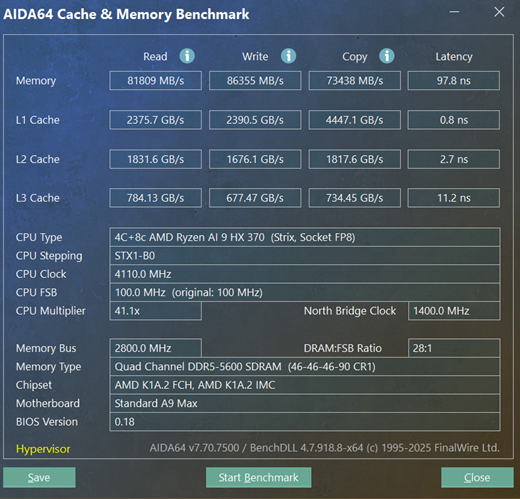
In AIDA64's memory benchmark, the GEEKOM A9 Max reaches 81.8 GB/s read, 86.3 GB/s write, and 73.4 GB/s copy speeds, with latency measured at 97.8 ns. These figures are on target for dual-channel DDR5-5600, providing plenty of bandwidth for handling large media files and data-heavy tasks. Cache results are equally strong, with L1 latency under a nanosecond and L2 around 2.7 ns, showing the Ryzen AI 9 HX 370 can sustain smooth performance across both everyday workloads and heavier compute sessions.
Cinebench
This is a synthetic benchmark that measures CPU performance using real-world rendering workloads from Maxon's Cinema 4D engine. It stresses both single-core and multicore performance, giving a clear sense of how a processor handles light everyday tasks versus heavy, fully threaded workloads.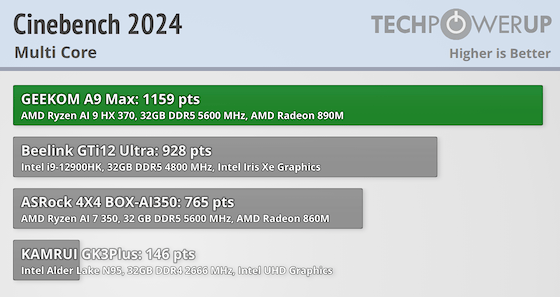
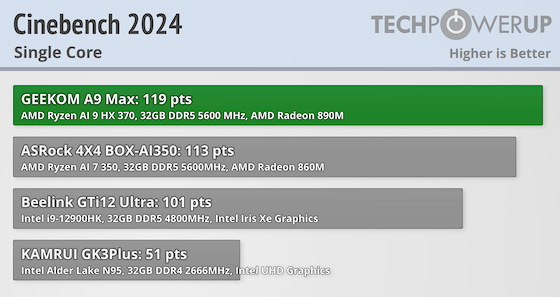
The GEEKOM A9 Max scores 1159 in Cinebench multicore and 119 in single-core, putting it ahead of both the Beelink GTi12 Ultra (928 / 101) and ASRock 4X4 BOX-AI350 (765 / 113). Those results mean the A9 Max can definitely handle demanding multitasking, rendering, or code compiling in ways you don't normally expect from a small form factor PC. By comparison, the KAMRUI GK3 Plus trails far behind with its Intel N95 CPU, which just shows the huge gap between entry-level and premium mini PCs.
7-Zip
This benchmark measures how efficiently the processor handles compression and decompression, reporting results in millions of instructions per second (MIPS).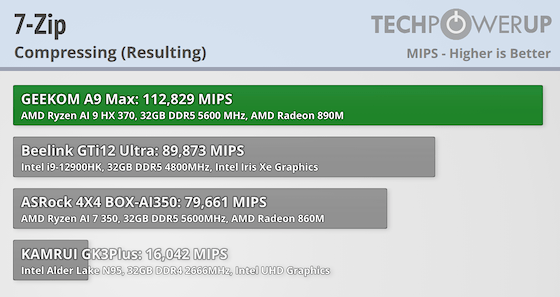
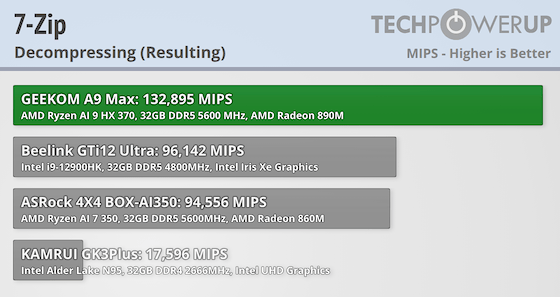
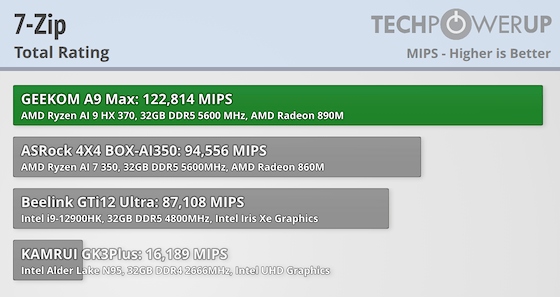
In 7-Zip compression and decompression, the GEEKOM A9 Max is clearly the leader here, posting 112,829 MIPS compressing and 132,895 decompressing for a total of 122,814. The ASRock 4X4 BOX-AI350 comes in at 94,556 and the Beelink GTi12 Ultra at 87,108, meaning the A9 Max saves noticeable time in file-heavy workflows like archiving or software builds. The KAMRUI GK3Plus once again sits far below at around 16,000 MIPS, showing how ill-suited budget CPUs are for this type of workload.
PCMark 10
PCMark 10 is one of the better tests for showing how a system will actually feel day to day, as it breaks things down into real-world scenarios.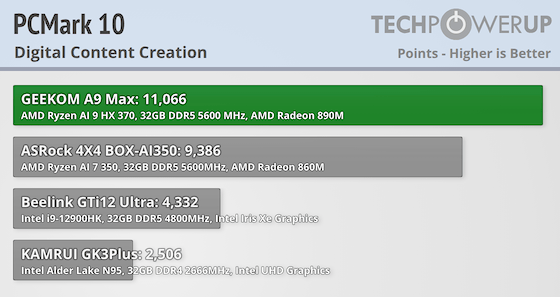
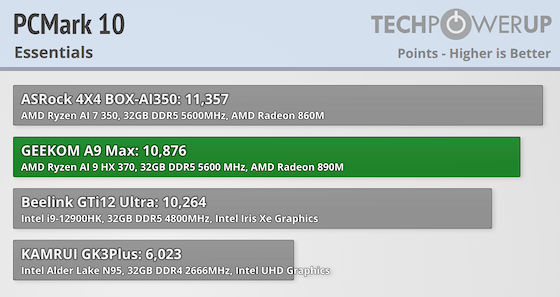
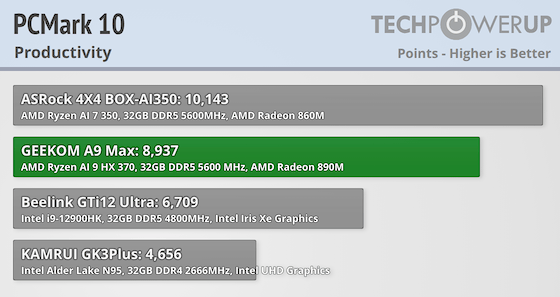
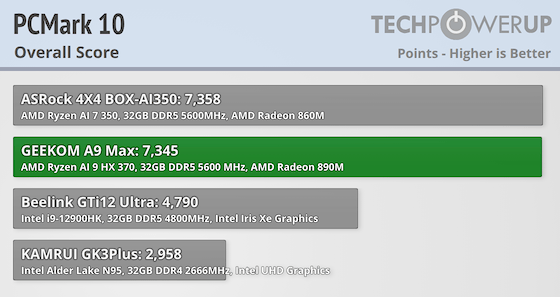
PCMark 10 confirms that the GEEKOM A9 Max feels like a desktop replacement when it comes to in everyday use. It posts 10,876 in Essentials and 8,937 in Productivity, just shy of the ASRock 4X4 BOX-AI350 (11,357 / 10,143) but ahead of the Beelink GTi12 Ultra (10,264 / 6,709). Where it pulls ahead is in Digital Content Creation with 11,066, a clear lead over the ASRock at 9,386. The overall score of 7,345 essentially ties the ASRock's 7,358, putting both at the top of the stack and well ahead of the Beelink and entry-level KAMRUI GK3Plus.
Y-Cruncher
Y-Cruncher is a benchmark that pushes both the CPU and memory hard by calculating digits of Pi to ridiculous precision, which makes it a great way to spot the real differences in raw compute power between systems.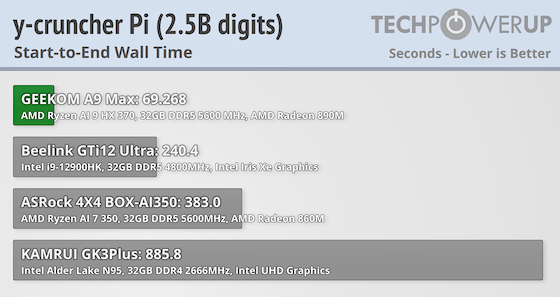
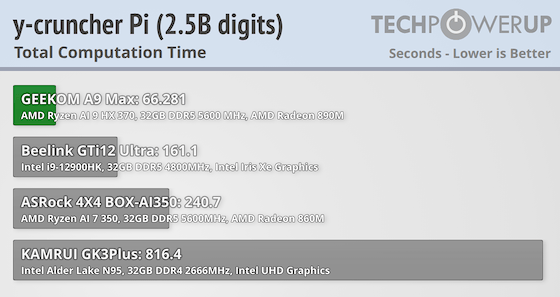
The GEEKOM A9 Max finished very strong in the 2.5B digit Pi run, clocking in at just 66 seconds of compute time and 69 seconds wall time. By comparison, the Beelink GTi12 Ultra needed 161 seconds and the ASRock 4X4 BOX-AI350 took 240 seconds. These results show that the A9 Max is not only fast but also efficient, making it capable of sustained heavy compute loads in scientific or technical applications.
Geekbench
A widely used synthetic benchmark that measures how well a system's CPU and GPU handle a variety of consumer workloads, from web browsing and office tasks to photo editing and rendering.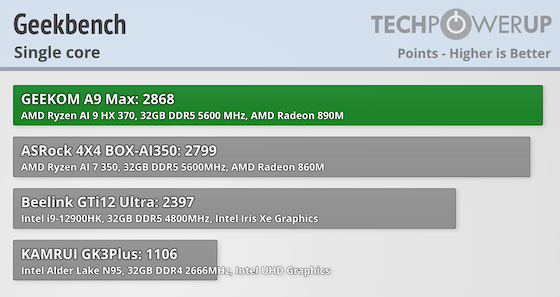
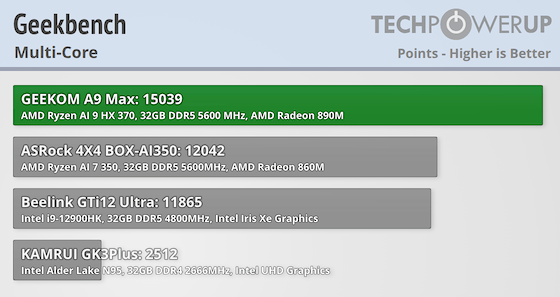
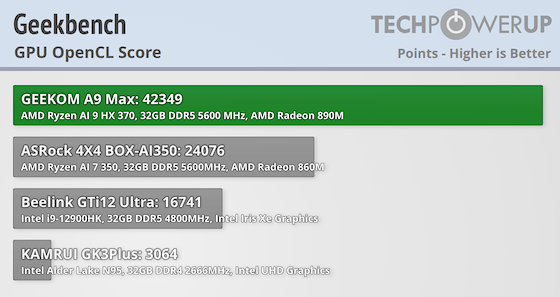
The A9 Max delivers 2868 single-core and 15,039 multicore in Geekbench, comfortably ahead of the ASRock 4X4 BOX-AI350 (2799 / 12,042) and Beelink GTi12 Ultra (2397 / 11,865). That means both light day-to-day tasks and heavier workloads feel faster on the GEEKOM system. Its Radeon 890M also posts 42,349 points in OpenCL, nearly double the Iris Xe in the Beelink GTi12 Ultra (16,741) and well beyond the Radeon 860M in the ASRock 4X4 BOX-AI350 (24,076), which makes a difference in GPU-accelerated apps and 3D workloads.
Nov 25th, 2026 23:43 CST
change timezone
Latest GPU Drivers
New Forum Posts
- Claude credits purchased on or after Dec. 7 now have an expiry date (16)
- Strange PC issues with Z690 setup (5)
- RTX 5080 problems, random troubleshooting "log" (8)
- Slow boot, can't launch monitoring software, general lag (38)
- Linpack Xtreme Released (512)
- AI generated images... (235)
- Exploring Local LLMs: Models, Hardware and Setup Experiences (1)
- What's your main Black Friday / Cyber Monday purchase? (10)
- Smokin Hot Lappy (10)
- Gacha Games - Discussions, Pulls, Updates, etc. (1165)
Popular Reviews
- ASRock X870E Challenger Wi-Fi White Review
- VZMORE AX9 Max Review
- Upcoming Hardware Launches 2027 (Updated Nov 2026)
- Microsoft Surface Laptop Ultra Review - The Next-gen Arm Laptop
- AMD Ryzen 7 9800X3D Review - The Best Gaming Processor
- AMD Zen 6 Technical Deep Dive
- Corsair RM1200e (Second Generation) Review
- Phantom Blade Zero Performance Benchmark Review - 35 GPUs Tested
- Pulsar Office Tour & First Look at P1 Dual-Sensor Mouse
- Ocypus lota P1000 Review
TPU on YouTube
Controversial News Posts
- Jensen Huang Reinstated as CEO of NVIDIA (573)
- NVIDIA Co-Founder and CEO Jensen Huang Officially Resigns (492)
- Report: Jensen Huang Eyes NVIDIA Comeback (281)
- Open Letter Asking NVIDIA to Reinstate Jensen Huang Passes 115,000 Signatures (184)
- OpenAI CEO Argues Home PCs Waste the World's Limited DRAM Supply (152)
- NVIDIA Launches Investigation Into Jensen Huang's Relationship With Suspected Chinese Spy (136)
- Intel "Raptor Lake Next" 16-Core and 20-Core CPUs Surface (130)
- Intel Razor Lake Gets a 12 P-Core bLLC Chip With No E-Cores, Per Leak (94)